The software is moving too slowly and often in a wrong direction. Especially since they released the keyboard folio most updates were around typing (which is supar on any eink device)... and they generally made my experience as a pen user worse.
I don't care if the new hardware is awesome, whenever mine breaks I will switch to a competitor.
EDIT: the reviewer I mention is excited about the device https://www.youtube.com/watch?v=ZkEg8WLeW4Q
For anyone still into them though, a Lamy EMR pen coupled with the Wacom felt pen nibs (pn ACK22213) is an incredible upgrade which makes it feel like a real fineliner. Similarly, I found the various titanium nibs that you can get off amazon made it feel like a real ballpoint [0].
[0]: https://reddit.com/r/RemarkableTablet/comments/1545mn9/excel...
I have absolutely no idea why they went all in on keyboard input, when the whole freaking point of the tablet was that you could write on it like paper.
I literally can't believe in 2024 it's still not straight forward to "send a blog post from my phone to my remarkable" without some mangling happening along the way. It was genuinely jawdropping for me, I ended up contacting an employee on LinkedIn to confirm that this wasn't a well supported workflow
I 100% agree with this - hardware is great but the software is terrible and it isn't being improved. They think of themselves as Apple in terms of the design but they forget that Apple also has decent software.
A couple of other things: - The Connect subscription: you don't need to use it if you use a USB connector to your computer and run the reMarkable app (but it's annoying). Because they use a custom OS they can't have a Dropbox, Google Drive, or One drive app. If they used Android than they could have this. - They have a document type called Notebook. You can create a Notebook and it comes with different templates for page designs (lined, graph, etc..). The galling thing is that they don't allow you to load your own template. You can do so if you ssh in and modify the OS but then any update destroys everything. I contacted them about this and the answer was basically "we don't give a crap".
I will NEVER buy anything from this company. They like to naval gaze at their hardware and they don't care about the software nor their users.
I watched the linked video and got kind of excited about buying one, and I was wondering about whether they'd pull the move of making me pay them a subscription to even use the thing I already paid them to own. That would basically make the whole device a non-starter for me.
Somewhere in the midst of this, I realized the actual reason I won't buy it is that I have no real use case for it, even though I think the technology is cool. Your mileage may vary.
[1] https://support.remarkable.com/s/article/Using-reMarkable-wi...
I just can't recommend an e-book reader that's smaller than a piece of A1 paper if its purpose is to replace A1 sized paper (either books or notebooks)
I got a supernote instead. He couldn't be happier with it.
However, I also believe there is a market out there for a device like this that is 1) extremely limited and 2) very focused on a few specific tasks (handwriting and document review workflow)
Sometimes the other stuff is a distraction. My wife owns the remarkable 2 and it is really good for what she wants ("just" a replacement for paper).
Asking for a perpetual cloud synchronization at no cost is bold.
Nobody is asking for a free sync server.
after digging (which is something i shouldn’t have wasted my time on), it seems that it lost the correct time because i didn’t power it for a while and there was no way to set the time manually. because of that, the signature for validating the firmware update was failing (it uses the time).
there was nothing i could do. it fixed itself few days later, after i gave up.
this is still unpolished so many years after the first release. i’m not sure i would recommend it to anyone. i’m sure i will trust it to work next time i will give it another chance.
You can break the custom integrations that they created or even brick the whole device.
But nothing is stopping you from logging into the system and modifying anything you want. There's actually a whole ecosystem of 3rd party mods and software for the ReMarkable!
So any suggestions here?
It still says this year!! :fingers-crossed:
I miss an API to their cloud storage. It is simply a dealbreaker that it aims to help avoiding distractions but leaves no room for building an automated workflow around it.
Remarkable lacks a backlight, and e-ink displays don't have deep blacks, so depending on your reading environment, it may be a bit low-contrast. I got a kobo elipsa myself for this reason. Kobu is notably cheaper and has a backlight which helps the contrast a bit, but the pen support is waaay worse.
But writing is where you notice how small the screen really is.
It’s down to the size difference between printed text and handwriting.
I'm really looking forward to installing Zed on this thing!
So I sort of feel like I should love it more, but this bit makes it annoying for me.
(1) e-ink for both paper-like visual texture (the pixels are not square) and eye comfort (impossible with traditional screens)
(2) single-purpose note-taking without distractions (although some hate that)
(3) paperlike haptic feel (the only thing that can be addressed by screen cover on an ipad)
You can get very close to that by locking your iPad down and setting it in kiosk mode.
If you use Apple Configurator, you can even have it boot into a single app. See https://support.apple.com/en-gb/guide/apple-configurator-mac...
(3) is mostly matter of choice, and it's a feel of matte plastic, very far from actual paper.
(2) is the only reason I'm using it. It's thin (although not as thin as a piece of paper) and single-purpose, a physical product.
I have an e-ink tablet, the Boox Note Air 3 C, when I use it as an ereader or notetaker the battery lasts for weeks. A little less when I use it for web browsing or apps that change the content on the screen a lot.
It has nothing to do with E-ink, but about how it feels to write on the Remarkable display with the pen.
The paper-feel comes in large part from the physical part of the screen the pen touches not from the display itself.
Also paperlike film for iPad significantly degrades the screen, making it darker and grainy. It's still a better all-around device, but its really not as good as these eInk tablets for writing.
I have a Remarkable 2 and the device is great, software is improving as well and taking notes is a joy BUT finding those notes later on is next to impossible.
OCR is very bad and basically makes indexing and full-text searching impossible (and off device)
And no, "labels" do not address this problem.
Is that something that exists? Is that what the tablet tries to do and fails? Or is it only trying to OCR after-the-fact, in which case I'm not surprised it's terrible.
You can use the OCR feature only in the companion desktop app, explicitly selecting pages you want to run the process on. The result is better than it used to be but still not great and, importantly, it does NOT seem they make any difference if you later on do a search on the device
reMarkable does Online Handwriting Recognition with MyScript running in the cloud, not on the tablet https://remarkable.com/store/remarkable-2
I feel like it falls short on the reading side (not searching, dictionary, note management...), and short on the notes side (simple drawing tools, no dashed lines, no shapes, and I think you can't even position text on the wherever you like on the page).
I really liked the initial hackability, as you have SSH access to the Linux inside the device, and people was building software to run on it, but seems like due to some changes since v3.4 of the firmware, it's either very difficult (or not possible) to do it, and the ideas I had for using it aren't feasible right now.
The price for the color model is (at least in Europe) already higher than a Boox Note Air3C, that's a full fledged Android tablet. Of course, the battery won't last as long even with all the optimizations, but is a bit lighter, has more resolution, and you can put whatever software you like that runs in Android. I haven't tested the software, though...
TLDR: not sure about this :(
It’s like an anti-discovery device.
In ambient light the contrast is worse on the Daylight than the RM2 - the screen background is quite significantly darker.
However, the Daylight has a backlight which increases the contrast enormously. And it’s usable in the dark which the RM2 is not. The much faster refresh rate also gives it a more fluid feel.
What I didn’t anticipate is the difference the screen makes in how I use and perceive them:
As the RM2 is so simple and static it feels more like a notebook or book reader that happens to be battery powered, whereas the Daylight is definitely a gadget.
I’m more likely to use the RM2 to take notes or do some thinking and the Daylight as something to tinker with.
Remarkable screen and pen latency is much better.
I hope they both succeed. Both awesome. I'll probably get this new Remarkable as well.
(That being said, I use my pen and paper bullet journal ($30) more than both of these combined).
The reMarkable has better contrast, viewing angle, and resolution, the Daylight has a far better refresh rate. There are other tradeoffs between them of course, but display-wise, those are the main ones
https://www.sony.com/en/SonyInfo/design/stories/DPT-RP1/
https://goodereader.com/blog/electronic-readers/sony-digital...
100K JPY too, which is in the range of an iPad Air. I hope some of these software issues get ironed out and maybe I'll consider it again...
We had hoped to buy these for all our paperless office employees, and gave it up almost solely because it was far too easy to transfer files.
If they deliver a device with on-device encryption (as this claims) and sync or manual transfer tied (and locked) to company-owned storage, we'd buy them for all our Pro(fessionals).
To your point, instead we give our professionals iPad Air with Paperlike™ for pencil-feel and a keyboard for on-the-go use. We'd rather (for reasons) give them Remarkable Pros if it was capable of meeting Professional data-loss-prevention (DLP) needs.
It's a cool product but I don't get it. I don't get who needs this.
Writing notes with a pencil. I think they make this pretty clear. Anything outside of that is either a bonus or out of scope for the device.
> It doesn't have end-to-end encryption so I wouldn't use it for anything important
Don't use the cloud sync and instead manually sync things between your own hardware, encrypt at rest if you feel like it.
> e-ink is great in bright environments [...] And who is going to use their ReMarkable at the beach?
Living in a country with lots of sunlight and as a person who sometimes visits the beach, this is exactly what I want.
One of the main variables I look at when I buy laptops is "How well can I read from the display when I'm in sunlight?", I'm sure I cannot be the only one who likes to sit outside with my computer, or have windows that let in sunlight.
Despite reMarkable's marketing around high-quality hand-drawn professional notes, I suspect crappy "transient" notes to aid memory and mental organization are the most common use case. For me it's really a thinking device rather than a writing device.
If I actually need to reference or organize my notes I will type something out in emacs.
So, to generalize, I'd suggest it for people that do bespoke construction of some sort often.
I have the RM2, and my answer to that question is: nothing. Even when handwriting - which is their core feature - the screen is very imprecise at times - up to 1 mm. You can't search in notes, not even after converting them to text.
- how fast the nibs wear out
- how inaccurate the screen is
- the screen update rate
- infinite pages
It sounds like they might have fixed the nibs. The rest of it is up in the air. I think infinite pages might be workable if the update rate is better, but it's also got bad ergonomics. It's far too easy to accidentally trigger a scroll. It was bad enough when all you could do was accidentally zoom, but the infinite pages update really messed with it.
I love the increased storage (8GB goes fast with a bunch of scanned PDFs) and the addition of color (so long as it's as readable in sunlight).
However I'm stuck on the old 2.x fw versions because I don't like the infinite page thing they added, so I won't be upgrading. Also it'd be cool if they offered proper support for self-hosting rather than forcing us to use tools like rmfakecloud (which is great btw).
It’ll be neat to see if this device is more or less locked down. I hope less.
Is there a way to revert to the older versions of the software?
Although, I do kind of want one.
For instance, with Kindle and nook, the best use I got out of it was reading on the train and bus where having a paperback-book sized device was really convenient. Outside of that, I have rarely reached for my Kindle.
As for eink writing devices, Even without the high price, I am very skeptical that they would be more useful than a stack of printer paper and a decent pen. Especially with modern phone camera features that can transcribe your handwritten text and save the image as a PDF. I suspect the target market for Remarkable is quite small, and I also suspect that many people who buy them rarely use them, just like I rarely use my kindle.
Here's an experiment: navigate your browser to the Remarkable page, look at it, and pay attention to how you feel when thinking about using the device. Next, navigate to the PineNote page[1], a device that has technological capabilities that are quite similar to the remarkable 2, and do the same thing. I suspect that the Remarkable marketing is doing a lot of work here. (One caveat here is that the Remarkable Pro is color, so the comparison is more different than if they still had a marketing page for Remarkable 2)
The other big advantage is battery life. I have an old Kobo Aura I got second hand on eBay. I keep the WiFi turned off, have installed KOReader and load books over USB (with the held of Calibre). With semi-regular usage the battery lasts weeks if not months. Way longer than any phone or tablet I ever had. Granted of course those devices do a lot more, but it's nice to at least very rarely have to worry about whether you have enough charge to read a book.
Like you I'm not sure of the advantages of eink for more general computing. I wonder what the (actual) battery life is like on the ReMarkable.
I have an ipad pro (2018). It's functions are 1) watching youtube 2) drawing/painting on procreate and 3) using some music apps like AUM and various synths 4) acting a kitchen display for recipes and 5) general note taking if I need to take notes that involve drawing or diagrams.
I have a phone. I read on my phone because its the device I have with me most.
I look at this Remarkable and
1) It's much more money than either my kindle or even my phone cost.
2) I can't install the kindle app on it, for it to replace my kindle
3) It's not small or convenient enough to replace the kindle or phone
4) It's not good enough for drawing to replace the ipad
5) I don't understand why it doesn't interoperate with a lot of existing stuff. If I want to use my wifi to backup the remarkable to my onedrive, it doesn't sound like that's possible, which is possible on my phone and ipad, and isn't necessary on kindle since everything is already dealt with by amazon whispersync.
Not for me either.
I always thought writing on paper is something we have to deal with because paper is.. well, the physical medium we always used because it is cheap to manufacture.
Similarly, we're so used to feeling at least a tiny bit of resistance when writing that when it isn't there, things feels "greasy" or unnatural.
I personally agree with that it feels nicer with a bit of contrast compared to sliding around. Drawing on a Wacom tablet gives me a lot better results than drawing on an iPad, even when I get to see the lines where I draw it with an iPad and with the Wacom that drawing appears on the monitor instead at on the tablet.
How slippery/grippy you want things to be depends on the type of pen you use (gel, ink, pencil, brush,etc.) and to some extent also preference, but people generally agree that there are cases which work just badly: very slippery (e.g. glass) and much too rough (e.g. sand paper).
With the replacement I get wrist strain. With the originals I don't.
I use a 3rd party pen with the RM2, much better ergonomics, but not clear what now will work.
- Samsung Galaxy Note 10+
- Kindle Scribe
- Samsung Galaxy Book 3 Pro 360
- Wacom One (attached to my MacBook)
and I couldn't count the number of styluses I have floating around my home/office.
It’s not ideal, but not super tedious either.
I’ve been planning to start charging via a raspberry pi so that the pi can automatically tend to the device whenever it’s connected, but haven’t gotten there yet.
I could be misinformed though, haven't researched it a lot.
I also agree with other comments here regarding the software being too slow to develop and some dark patterns (such as subscription stuff for the new users). Feels more and more like the makes are not sure what to do and trying to shoot in every direction sometimes. You have a very good product, just make it great and that's it.
Pro tip (no pun intended): get a Lamy al-star emr pen for a better writing experience, if you are not comfortable with the default pen being too thin.
Even for this intended purpose, I am disappointed. The screen is imprecise up to 1 mm, no search in notes, etc. I went back to paper, which is certainly not what I expected.
With this one being $579 including the basic marker. The iPad Air with an 11" screen with the cheaper pencil is $678. iPad with an 11" screen and the cheaper pencil is $428.
If it is the screen feel, how does that compare to the paperlike screen protectors for iPad?
Some say a lack of distractions, but you can turn on do not disturb?
I am just really curious what this solves vs other tablets that I am missing here, especially at this price point. Or is there something I am really missing here?
I mainly use it for my journal/planner, using like a 1200 page PDF. Could I have that PDF on my iPad? Yep. Do I? No, the experience of the ultra high quality iPad color, pixels, brightness, interface, UI, all that just puts your (my) brain in a different space.
Anyway, it’s not for everyone, but I think most people who give it a try for note writing prefer it to the iPad.
Read about the advantages of e-ink.
At least it's an improvement from Gallery 2 which took 10 seconds to refresh in color mode, no wonder hardly anything ever used that generation...
And if you can't write software for it, any recommendations for a hackable e-ink tablet?
But from what I have read software support for the device is very unfinished and not moving that quickly. So while you can hack on it, you will also likely need to.
(EDIT: Some other comments here appear to be suggesting that this is unlikely to come back in stock.)
This may be the first legitimate color e-ink tablet with good (EMR; see: S-Pen, Wacom, old style Thinkpad) pen input.
That said, due to the fact that it does have an eraser, I would still guess that it is EMR but probably with a softer tip (e.g., the galaxy folds had special pens; other emr pens are "compatible", but might damage the crease, so they are not officially compatible).
Perhaps something from the Universal Stylus Initiative?
I have got it working via Wine, but it keeps breaking after updates. I do not use it often though, as I mostly just upload new files via the website.
If I had to guess it's probably because they want to keep it closed-source and that is a nightmare with linux distro packaging. I have also used the tables via the webapp like you for many years.
It's clear the company is now run mostly by marketing and business people. At some point they didn't do any software development at all, and soon after they actually removed features. None of the original hacker spirit has remained.
Most of your money is going to marketing. The device and software are insanely overpriced, and I see their ads everywhere.
Never buying any of their devices again.
The screen is imprecise, sometimes the line appears 1mm away from the tip of the pen.
Their synchronisation service costs monthly, I think 3€?
I'm simply underwhelmed, especially for this price. The Supernote would have been a much better choice for me - now I'm looking at the Samsung Tab S9 series for real note taking.
But it feels like they've been increasingly moving away from that, especially where the openness now competes with their cloud subscription.
Given the amount of love the open source community has shown Remarkable, I think they could let the community build some amazing software for them. This would be doubly beneficial because the software is the weak point currently for the Remarkable. If they were to open source the existing software, even with a CLA copyright assignment, I bet there'd be a huge influx of people contributing.
I hope with this new Paper Pro that they are moving in the direction of openness/hackability and not more closed like they did with the Remarkable 2. Would love to hear from people who have tried the Paper Pro about how that is.
Side note: If you haven't gotten the RCU utility application, you definitely should! It's a great tool[1]
I reason to this because software in hardware produces revenue only during hardware sales which typically fall off after the initial wave. Without continual revenue your business model goes upside down when you have developers for whom you don't have any work. So we get bullshit work and eventually we get 'RMR' or recurring monthly revenue because well we need to pay these folks.
Of course building an enterprise like that would require retooling your process with massive emphasis on sustainable build tools that are 'done' and similarly libraries. We massive documentation on taking the product firmware out of the archive and re-createing the entire build / test workflow with new developers.
A company like that might have 500 developers during initial product development and first shipments, that then reduces down to 10 or fewer for maintenance needs.
The surprising thing is that a lot of open source is actually kind of like this, a new 'thing' is out there and the number of people making contributions grows, and then it is 'shipped' or 'done' and the number of contributors reduces down to a handful, sometime zero, developers. Growing again when a zero day or CVE needs to be fixed and then back to zero. Because its OSS nobody is paying them, or maybe they are being paid by another company that uses the package and needs a fix, but the whole software development model is going to be completely changed over the next 10 - 20 years.
Oh, and page turning swipes were hit or miss. that was annoying.
I bought it for the same reasons you allude to - open, not locked down, cannot enshittify something you don't have to update. I didn't really buy it for the pen.
I tried a 6" kobo klara 2E for a while. You can mount it as a USB device, but you have to hack it somewhat to get "sideloading" of books to work. Nice device, but 6" was a little smaller than I wanted.
But then I found the Pocketbook Inkpad Lite.
It is my primary reader now. 9.7" screen with backlight.
No account, no subscription, no hacking to get it to work.
Out of the box, just hook to usb, transfer yoru files, start reading.
Also, it will read most file formats directly - so if you want to use .mobi instead of .epub, that works. It also says .azw, but I haven't tried it.
note it doesn't do handwriting. But it is $185.
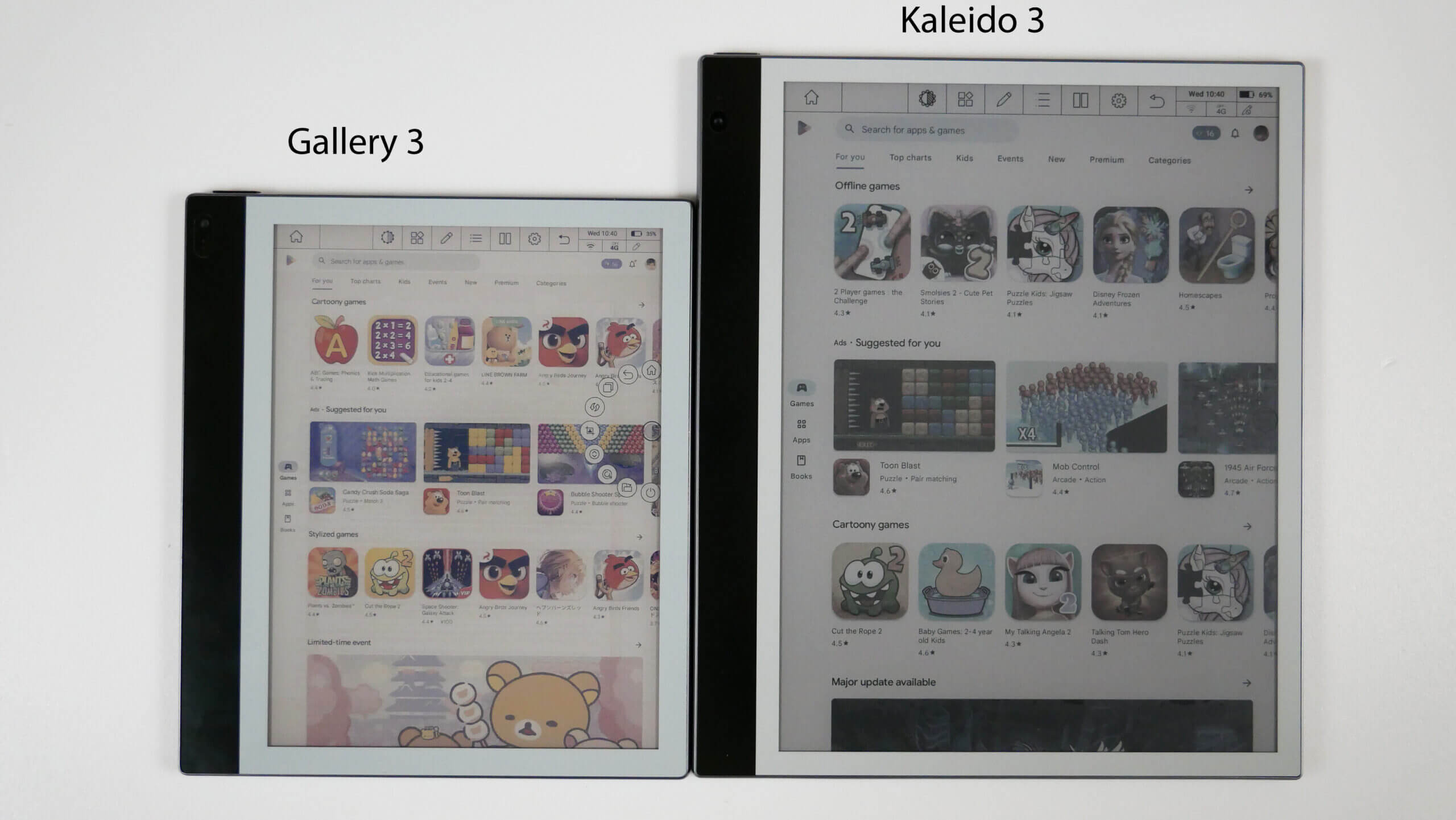
Instead it uses subtractive color mixing inside each pixel: It layers transparent cyan, magenta and yellow, and opaque white pigments, over each other. Which creates cyan, magenta, yellow and white as primary colors, and red, green, blue and black as secondary colors. Other shades are then created via dithering those eight base colors. So it works very similar to an inkjet printer.
Since it doesn't use subpixels, the screen seems to have a similar brightness to greyscale E Ink displays, which is reasonably close to printed paper. However, the color saturation is clearly still not quite on the level of actual printed paper.
Here is a comparison shot between Gallery 3 and Kaleido 3 (the latter uses conventional subpixels to create colors): https://assets.goodereader.com/blog/uploads/images/2023/03/2...
And of course the reaction times are not as fast as LCD/OLED. As is well known, E Ink uses electrophoresis e-paper screens, where solid electrically charged pigments are moved around in a liquid, which is a slow process. It also still requires a "deghosting" refresh once the screen changes, but interestingly those refreshs are now only applied to the parts of the screen which actually have changed pixel values, which looks significantly less distracting in my opinion.
Looks like they still exist but they haven't done much in the last 15 years. They used to make these high-quality leather-bound notebooks but now it seems they only have cheap spiral-bound ones. Worse, the pen still costs about $200 so it's not in anyway competitive with remarkable.
I'm contemplating going to grad school and I might try to dig up my old livescribe pen if I can find it (I think I saw it a year or two ago in some box of assorted odds and ends) but the lack of high-quality journals is a disappointment and if I can't find my old livescribe pen I'd rather try out remarkable than spend 10x as much on a nearly-dead product that had far more potential but seems to be on life-support.
Wish livescribe would at least open-source their software if they no longer care about it.
I never used it extensively but I remember it also had a nice integration with EverNote. That was truly a bygone era of productivity tools that are now zombie companies…
I also assume that if you were to ever need to use the warranty for any purpose that requires returning the product it's going to be the same thing and also awful.
Buyer beware.
My device broke in warranty (< 1 year). Customer support refused replacements, finally offering a 2nd-hand / refurbished replacement (illegal according to EU law).
Despite my attempts at polite out-reach to individuals at the company, including C-level, everything was ignored until a lawyer friend sent a formal letter - and suddenly everything was magically resolved the next day.
It's such an expensive device, and each press-release makes it more and more cultish - I couldn't recommend buying this - I'll wait for a competitor to do a better job.
I read lots of discussions on comparable devices on this post, can anyone recommend something suitable for music?
On android I use MobileSheets which does everything I need.
I was using mine a little while ago for a PDF-based RPG-type thing which involves a lot of writing on the PDF and it worked quite well (the main downside was the PDF took a while to render as it's very image-heavy but that might work better in your case.)
It's not an LCD on top, it's just a static stained-glass checkerboard pattern.
* Onyx Boox Mira and Mira Pro: https://shop.boox.com/products/mira
* Dasung Paperlike Monitors: https://shop.dasung.com/
Between them you can pick between multiple sizes and specs. I haven't tried either, but I have a number of Onyx Boox devices (a Palma phone sized one, and Nova Air small tablet sized one) and I'm very happy with their quality.
I love this marketing soundbite too:
> “reMarkable gives me the deep focus required to work on complex problems.”
Mmmm. Yeah. I usually have to find a quiet place and eliminate distractions to get deep focus, but nice to know I can just carry this new device around with me and never lose deep focus!
P.S. I was seriously considering it, but I went back to paper after trying to use my iPad for digital notetaking (too much distraction and the main apps, goodnotes and notability, have become awful). I have a clipboard and a ram of paper as a thinking tool. Then I copy the final result in a text file.
You're right, but only mostly :)
The paper and pen that it replaced for me certainly wasn't cheap. I bought the rM2, keyboard folio, and the pen, so I'm all-in for around $1k USD. My EDC pens are all around the $150-$400 mark.
There are use cases that it does much better, though. I regularly use mine in Zoom meetings, and the desktop app allows me to screencast my rM2 to the call. It's super nice to be able to draw a diagram "on paper" and have everyone on the call see what I'm doing.
> I can just carry this new device around with me and never lose deep focus!
This is a net zero, at least for me. Before, I had two notebooks (one for work, one for personal stuff) and a pen. Now I have a single device that's the same height and width, but is about 1/3 as thick. The weight is a bit less. It's not distracting because all I can do with it is take notes and read PDFs/ebooks.
Actually, I take it back. It's a net win. I no longer have a separate Kindle that I carry with me.
My needs are mostly note taking and reading technical PDFs, and for that the reMarkable is fantastic. I used it extensively while taking Calculus, which, it was great to use as many pages as I needed and to write as big as I wanted without worrying about "wasting" paper.
I miss background light from time to time, which I think is a great addition.
I'm not super familiar with alternatives so I can't say that is better than X or Y, but I personally have been moving as much as I can to single purpose electronic devices. That allows me to be more focus and not fight my device wanting to distract me. That takes out every eInk table that has android for me, I don't want a yet another multipurpose device that I need to develop discipline to use it!
On that line, I love my kindle, but that spends about 90% of the time in airplane mode, because, again, the kindle is for readin, the reMarkable for taking notes and reading Datasheets and such...
But, that's just me :-)
I do both of those and I dislike the RM2. There's little space for notes above and below the PDF page, no infinite canvas. I have more space on the back of a printed PDF (to the left of the current text page) than in the RM2. So, all note taking in a PDF for me is just keywords, while I would much prefer to put text and drawing,s graphs, etc. all around the PDF page.
So, for the last few months I have barely used the RM2 and have gone back to pen and paper.
How well does the machine work w/o it?
When will someone else make a device with this display? (I'm looking at you Amazon)
Could we get this display in a larger size on a general-purpose tablet w/ stylus? (I still haven't found a replacement for my Fujitsu Stylistic ST-4110 and its daylight viewable transflective display)
A smaller size for a cell phone? (with a stylus please)
How about a dual-screen device like to the Lenovo Yogabook which had an e-ink display for the lower half which would toggle between keyboard and other uses?
A feature I was using some is the 'desktop connect' thing - drawing on it is synced to the desktop app pretty much live (<1s delay, ime). Doing a screen share and letting people watch me draw using it has been useful, but not something I need a lot. But... considering some of the discussions I've been having lately, perhaps I do need it more. Trying to get data relationship concepts across to people seems to do better with pictures for some folks.
EDIT: Works fine without it and paid account. I think you even get a small amount of 'sync' data for free if you create an account (5meg or something?). I seem to remember I still had some stuff synced between desktop and device even before paying. I used it for months just as a standalone device with no issues.
The OCR stuff does send the data out to the cloud, and my experience is it's not that great, but my penmanship stinks, so it's more me than it.
So, I settled on getting a Samsung Tablet with a S-Pen and using the "Flexcil Notes & PDF Reader" app. The tablet was not cheaper than ReMarkable but I had access to all the apps in the Android ecosystem. The note taking app was not free and its premium features make it cost between £4.59 - £10.49 if billed through Google Play store. The app was well worth it and you can search for reviews of it on Youtube.
If you are planning on getting a ReMarkable for studying, I'd suggest to instead consider using an iPad or Android tablet with pen support instead.
- https://www.flexcil.com/ - https://play.google.com/store/apps/details?id=com.flexcil.fl... - https://apps.apple.com/us/app/flexcil-note-good-pdf-reader/i... - https://www.youtube.com/@flexcil5010/videos
I'm particularly interested in refresh latency and color gamut. You can get a feel for these here.
Afaik, e-ink screens don't use any energy to display, but only to refresh.
Unfortunately they took a classic commercial path, maybe fueled by many "users desires" described by users who have not much an idea about how they can use such devices and the result is well... Not exiting especially for the price. I have no issue paying something I own, I do not pay for something I can only use.
I use it everyday at work (handwritten notes and reviewing short PDFs like resumes and white papers). It’s one of the biggest professional ROI investments that I’ve ever made.
The people who hate the Remarkable seem to be either zealots for openness or people who want to read ebooks on it or people who hate subscriptions. Those 3 things don’t matter to me at all so I’ve been extremely happy.
Will I be able to use it if the company fails?
Will I be able to install third party firmware and software?
> Will I be able to use it without creating an account with the company?
I _think_ so. I created one, and am not willing to wipe my device to see if it's required. I _have_ used mine for months without connecting it to the network, so it's certainly not required on a regular basis.
> Will I be able to use it if the company fails?
Yes.
The "Connect" service is nice and all, but really the big that that it provides is an easy way to sync files to and from the device. That's not required; you can just use USB to transfer if you want.
> Will I be able to install third party firmware and software?
Yes.
There are active F/OSS projects out there for the rM2, including custom bootloaders, OS forks, and applications.
It makes me wonder if an alternative route to this type of tech is to integrate OCR more into a device.
I wont be giving them any more of my money.
Also, if you were in the company's position, what would you do?
That's an "exchange rate" of 1 USD = 1.6045 CAD. That is a far cry from the actual exchange rate (which is 1 USD = ~1.35 CAD).
And ReMarkable isn't the only company selling products at rip-off pricing to Canadians.
This absolutely sucks.
The only thing I will say is that for the iPad I'm still surprised I can't really share my screen and start drawing on a whiteboard in a Slack meeting which was my primary desire for having one. Literally be in a meeting and start sketching boxes and circles to my coworkers to explain things
Are slack meetings really that far behind? I was doing that with my iPad in zoom 5 years ago, and regularly do it in Google meet now…
Been itching to upgrade my beloved Libra H20.
Thanks in advance.
Anyone have experience with their 100 days risk free program?
Use an e-ink tablet if you want:
- long battery life
- paper-like writing experience
- high resolution (for b/w)
- an alternative to paper for books and notes
That said, there are devices which are essentially Android tablets w/ e-ink screens, which aside from refresh rates work much as one would expect.
(Also, a lot of manga gets distributed through proprietary apps now so an iPad is probably your best bet anyways, at least if you read the serialized version and not the tankoubon releases...)
The rM2 also "just runs linux" under the hood. I bet you could write a utility to screenshare over USB if you really wanted to.
But I am interested in replacing it with something newer...and while years ago I was pining for color e-ink - I am not so sure it's something I need/want any more.
After seeing how fast the Daylight Computer^1 display is (60fps), and the fact that it supports a massive variety of apps because it runs Android, I think that's the route I want to go to replace my Remarkable...
Then they started releasing software updates that made the UI slower, moved around the buttons in said UI, made it easy to accidentally select the wrong widgets (e.g. because two widgets are in the same part of the screen and so a double-tap combined with the high refresh latency causes a misinput), made notebook/page loading much slower (which, to their credit, they have fixed), and started adding lots of typing-related features that I don't use or need.
The device is still good, but I still find myself getting annoyed at it in a way that I didn't when it was new - although for me that's my experience with virtually all technology.
I wish there was a tablet with similar ergonomics that allowed me to tinker with the guts. I want to be able to write Python or C against a simple API and immediately run my code - I don't want to have to write an Android application, which I think is necessary for the BOOXen? I just want to easily write code that processes my pen strokes in real time.
I got my first remarkable a few years ago and I was super excited, I thought it could be the bridge between my need to write and the digital world.
I gave up, I also tried an iPad too but again I gave up.
I ended up using a cheap fountain pen and the paper that I like its texture.
I think the problem with all these devices is that from a product perspective they focus on the wrong things.
I don’t care about colors and syncing with the cloud or whatever else.
I care about emulating an as close as possible experience to natural writing and that means latency of the device and the tactile feeling I get when I touch the screen with the pen are the most important aspects.
I haven’t seen much there happening and maybe these are just too hard problems to solve.
Or maybe I’m just a member of a too niche group of people.
But until I find a digital writing instrument that gives me the sensory feedback of a pen an a paper I don’t see me going back to these devices.
The latter got better after persistent zoom - you zoom the PDF once for the margins and it remembers it for ongoing pages.
I got grandfathered into the connect service, it's also $36/yr, so not a huge deal? I transfer using the app. The app also lets you screenshare your drawing live, so I use it to draw during video conferences. That's been useful a few times.
It didn't promise to be a full-on tablet, and its value prop is in not being one. I prefer that it doesn't run a full mobile OS with other apps. That's against the damned point. I just want something to replace the paper stack I usually have near my laptop.
The out-of-the-box software may be a bit barebones for some power users, but you can certainly add-on the functionality that you desire.
I wrote this as a "is this possible" type program. It ssh's into the tablet and then emulates a stylus through the windows api. Worked with things like blender and krita. Can't say I'm likely to update it again, but it at least worked last I tested it. Also note it doesn't install anything on the device it only reads out the device file for the pen.
I bought it before they added a subscription, so I was spared the pain.
For me personally, it was too expensive to be able to just use the device and not worry about damaging it, I even stopped wearing a watch, because I worried that it might scratch the display.
I don't have that worry with a notebook, but then again, notebook is physically limited especially when compared to digital tablets.
I do enjoy writing, so after I sold my unit, I went back to pen and paper, but I do still love the tech so I keep an eye on it!
Usually colour E-ink is slower than monochrome, I wonder what the product will actually look like and function, when it launches.
I did a bit of research and decided to go ahead and jump on the Paper Pro. I hope it's worth it, because it's quite a bit more expensive than the rM2 was.
Writing documents is likely impractical (ocr seems bad, and I doubt it'd like my handwriting in particular). Reviewing them maybe, but it doesn't plug to the online tools we use at work, and then comments are only for yourself. Maybe when reading a paper and underlining a few things? Which is the odd case
I switch to paper for strides of time, which I don't see a point in replacing by a device that needs a charge and costs 1000cad
No they didn't - you just have to activate "Developer mode" (forcing a factory reset, so don't set up too much, you'll have to repeat it all..)
I did look at getting a RM2, but for the same price I could get a iPad with a pencil. Granted the pencil wasn't that great, but the software on the iPad is.
I have good notes on the iPad which is great for "journaling" and it almost works like the microsoft courier concept
Interesting approach/angle they are taking about being distraction-free. Intentionally no email, etc.
Ultimately this thing is not going to magically make you super creative and productive. Frankly it's easier for me to be more productive by using my laptop. I prefer typing notes because I can keep up with what my brain is thinking. I prefer reading books on my computer with the Books app. If I'm trying to work something out visually I'll use my sketchbook which I have at my desk.
But this is just how I like to do things. You might be different. I really liked the Remarkable but it just didn't work into my workflow.
I am now wondering if we could have a reMarkable Paper Pro Mini, a pocket version I can carry around and take notes.
Given it now has Colour e-ink as I said before [0], I will buy one right now.
Think you can plug this into your PC to drag and drop files like external storage? Nope.
That pricing is just insane
Off-topic: If the future is less paper, then should we dig more holes in the earth's surface to make digital papers. I mean the alternative is just replanting.
Please, Remarkable, find a way.