PS-> Who came up with calling it 'ortholinear'?
Many otholinear keyboard are in a grid, yes. I guess mostly because it is easy, aesthetics and it fits everyone as good/bad. Many keyboards have their rows at different height to adapt to the different length of each finger. But how much? Depends on hand size and preference it is hard to imagine one being mass produced.
The thing that splitting the keyboard (while keeping it flat) helps with is reducing “ulnar deviation” of the wrist (outward rotation in the plane of the hands). It is also possible to avoid ulnar deviation on a standard keyboard by changing typing style a bit, which is why some people have less problem than others with a single-piece keyboard.
What helps most is not splitting the keyboard per se, but tilting the two sides upward toward the center (the ideal is probably something like a 45° tilt, but even a bit of “tenting” helps significantly).
Having the hands palms-down and close together (as forced by a standard keyboard) ends up causing an unpleasant trade-off between (a) forearms rotated uncomfortably inward about their axis (“wrist pronation”), or (b) elbows swung forward or out to the side to reduce the amount of wrist pronation, in the process causing shoulder and back strain, or causing people to rest their elbows, forearms, wrists, or palms on some surface to compensate for the shoulder strain, and often in the process flexing or extending their wrists.
Wrist flexion or extension is really the worst for any kind of repetitive motion. It dramatically reduces strength and responsiveness of the joints, and can cause severe repetitive strain injuries. You will notice that typical human tools are designed very carefully so they can be used with a mostly straight wrist (or tool-user technique has developed to work around tools which don’t make this obvious).
Tilting the keyboard the right amount front-to-back to match the height of the keyboard relative to the torso can help quite a bit; most keyboards I observe in the wild are tilted incorrectly. You want the plane of the keyboard to be roughly parallel to the plane of the forearm. So on a tall desk, the keyboard should be tilted up at the back. On a low keyboard tray they keyboard should be flat or even tilted slightly down at the back.
Traditional keyboards are simply not great for a lot of reasons. I experimented with tons of different keyboards and keyboard layouts mostly out of curiosity. You don't need to go far to feel the difference: microsoft curved keyboards are already much better than most regular keyboards.
Once you realize you can reduce finger travel by orienting the keyboard to the natural direction of the finger flexion you won't go back easily, and you'd likely want to go further with something you can orient in any way you like.
And yes, 'ortholinear' plays a big part in how you position the keys. I've used a lot earlier models of fully split keyboards such as the "comfort keyboard", but it never felt as natural as a simple linear grid, as I tended to put the keyboard at weird angles just to achieve what a simple vertical array of keys does. Heck, I'll go as far as saying that if you want to experiment without going crazy, the first step would be to try an ortholinear keyboard. It makes more difference.
I've personally settled on a Kinesis Advantage Pro. It does many things right out of the box. I can only complain about the function keys, but I barely use them anyway. It's not fully split, but the position is good enough, and it avoids the issue of fixing the keyboard pads to the table in order to avoid movement which is an issue I had with all split keyboards (and no, a rubberized mat is not enough).
I think the price is right for the build quality, and I didn't want to go the DIY route mostly because I have other projects going on (a DIY keyboard is a lot of work - I have plenty of respect for those who make even a flat one).
Edit: typo.
The DataHand was a new interesting “keyboard” design in the 1990’s, about 25 years ago.
https://en.m.wikipedia.org/wiki/DataHand
Btw, Xahlee has a great article on keyboard switches:
For example, Matius was stopping one-handed keyboards for a while.
http://blog.monstuff.com/archives/000021.html
There were things like the Frogpad or the HandyKey Twiddler
https://old.reddit.com/r/MechanicalKeyboards/comments/9g0e24...
The problem with curved boards is manufacturing (for diy) and the pcb. But 3D printing solved the first problem and they are mostly soldered with wires rather than experimenting with pcbs. So there are a few curved boards out there as well. Such as https://github.com/abstracthat/dactyl-manuform/blob/master/R...
As for touchpads they kind of suck as an input device (imo), but it would be easy to incorporate an apple device in the above. But people seem to be experimenting more with large ball mouses such as the kensington trackball or something like the point-stick that thinkpads use, where you don't even have to lift your hands of home-row.
It doesn't really. Modern diy culture is ultimately about publishing. That is what puts you on somewhat equal footing with a large entity. What we mostly have with 3d printing is a do-it-for-yourself culture. That is why every institution will have an exclusive maker space, where you will get reprimanded if you use too much machine time. Why people dump things on github without documentation for their resume. And why the hacker news thread on the raspberry pi is about what people are using rather than what they have created.
A keyboard is a very basic object. It is almost like the hello world of hardware. Despite this it is very challenging to produce and publish one [0][1], or something like one [2]. But these stories mostly fall of deaf ears as this important part of diy culture has become marginalized.
[0] https://blog.keyboard.io/post/181333242149/december-2018-a-s... [1] https://ultimatehackingkeyboard.com/blog/ [2] http://www.tlalexander.com/business/
https://www.flickr.com/photos/amatecha/41021237041/in/album-...
https://www.flickr.com/photos/amatecha/31638862398/in/album-...
As soon as the trackpoint modules are complete this will be the dream for me.
In fact, in my admittedly small sample of others I know who do have problems with their wrists, they were all ones who tried very hard to rigidly conform to the "standard" posture and move only the fingers of the hands instead of the whole arm. They were also people who hit the keys much harder than necessary.
I use a standard flat QWERTY keyboard and I can type for hours at 150+ WPM with no problem, but I've had comments from some of those people above that I'm not doing it right... when they're the ones who are getting pains in their wrists, not me...
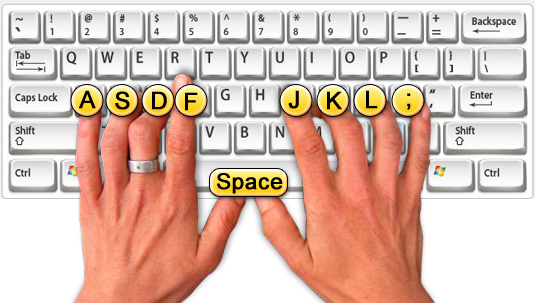
If you try to keep your hands parallel to the keyboard no matter what, you are going to stress your wrists. Let them approach at whatever angle feels comfortable, and relax. That also happens to be the "trick" to typing faster too --- if you expend effort on trying to be "strict" about posture rather than just hitting the keys in whatever you feel to be the most comfortable way, you'll tire quickly, type slower, and stress your joints more.
This is good:
https://us.123rf.com/450wm/pxhidalgo/pxhidalgo1604/pxhidalgo...
This is not:
http://help.nchsoftware.com/help/en/keyblaze/win/keybd_hand_...
(My resting position is more like awef and jio;)
https://raymii.org/s/articles/Split_keyboards_a_five_year_re...
You should aim to go as low as possible but still avoiding accidental activation when resting your fingers on the keyboard. For most people, that means between 30 and 35g.
Realforce makes a bunch of them but they’re not held in high regard by the mechanical keyboard community because they don’t feel tactile enough. Let alone the fact that they dare using rubber in the keyboards.
Fortunately they seem to be busier building them from scratch and posting the results on Reddit than actually typing.
They seem pretty accepting of anything, and are often more concerned with finding the right keyboard for what you want. There are jokes and memes that go around, but not many people have issues with any kinds of switches.
Some people really prefer the tactile feel, and others really want the super high activation forces. It's a tradeoff, and there are more options now than ever.
I have a split ortholinear keyboard with Kailh blue 50cN activation force "clicky" switches, a BDN9 macro pad with Cherry MX White (80cN "clicky" switches), a planck with cherry MX brown 55cN quiet "tactile" switches, and an aging das-keyboard 4 ultimate that I replaced the stock greetech switches with MOD L Linear switches with a 45cN activation weight.
I have to say that I thought the lighter activation would be nice, but it was actually MORE stressful for my hands because even though I wouldn't normally accidentally activate the switch by resting my hands, if I moved too quickly or kind of let my fingers relax it would press down enough sometimes to type accidentally, leading to me kind of "hovering" my fingers above the keys all the time. I also missed the tactile feel that I was getting used to on other boards to avoid having to "bottom out" the keys for the most part.
I'm not going to say it's worse for everyone, but for me I greatly prefer 50-70cN activation force for typing, and I really like the "heavy" feel of the cherry MX White switches for my macro pad. You may like the lighter force switches. In that case you may want to go for linear switches as they tend to have smaller activation weights. Take a look at the Kalih silver or copper switches, or the cherry MX speed silver if you can find them. They are about as light as mechanical switches come.
Maybe because I play Bass and my fingers are used to a certain kind of haptic feedback?
In the end it doesn’t matter, as long at is not one of these ultraflat new macbook keyboards, I hate typing on them.
I have been using a keyboard with relatively heavy switches for years now and never had fewer problems typing.
As for the community, most seem to dislike high resistance switches, which is why my preference for MX Clears leaves me with few brands to purchase from, and my dream ideal of a higher resistance Topre will probably never happen.
The biggest value in QWERTY keyboards is that everyone can use them. It's a standard, and most of the information about it being intentionally designed to "slow you down" is false.
I care about the quality of my keyboard and how it feels in the same way I care about how my piano keys feel. Switching even from my thinkpad to friends butterfly MacBooks makes typing significantly harder for me.
As far as RSI is concerned, there was a time when I used to play WoW and I thought I might have a problem with this, but between small hand stretches and maybe just luck, I don't have these problems anymore. Maybe they'll come back as I continue to get older.
Here's a random reddit thread where random people seem to think posture and technique avoids RSI. I'm tempted to agree.
https://www.reddit.com/r/osugame/comments/34y4x4/do_pianists...
And some good advice http://www.pianocareer.com/piano-practice/how-to-deal-with-p...
A piano is very wide, and you often have you hands spaced very far from each other. This reduces a lot of stress. Also, you don't have your fingers basically tied to the same positions, but during the play, the wrists change position a lot, so there is no static pressure into a single unnatural position. The active movement should be beneficial to your wrists too. Finally, the keys are pretty large, giving more possible hand positions to hit them.
My next build will be more ambitious. I want to include a USB hub, a raspberry pi zero, a small screen, and a track{pad,point,ball}.
I'm not fully sure what you are asking -- I would guess you're referring to the fact that it's harder than usual to type with one hand and mouse with the other, because you have to reach across to the other side of the keyboard?
If that's what you're asking, I agree -- but I consider it a good thing :). I found that the kinesis helped me focus on touch-typing more and relying more on keyboard shortcuts to navigate; it's a bit of a learning curve but ultimately worth it for ergonomics and speed.
This keyboard-reliance has led me to another observation, that web devs don't test keyboard scroll on their sites.
Parent did say "and slapping touchpads in the middle".
that sounds like an amazing product TBH-- does anything like that exist?
Once you type one handed or use a mouse your ergonomic keyboard is less comfortable than the traditional geometry.
A family member had a mechanical keyboard with a cherry mx switch and I tried it out with an online typing test I'd tried before.
I could type about 20% faster than usual, which is already way up there. I easily hit 135+ in several segments[1], which is insane.
I easily felt when I was making a mistake, I had confidence in what I was typing. (because of each little click.)
But it was also really loud.
Is that necessary? Is it part of what made me fast and accurate?
The obvious way to test this which would not change the feel of the keyboard at all, would be to put in foam earbuds and then see if my typing rate or accuracy drops when I can't hear the keyboard. Unfortunately I didn't have any with me so I didn't try it.
Can someone who uses a mechanical keyboard comment on whether the audible noise from it is part of the typing loop? if someone here has the inclination and a mechanical keyboard and happens to have hearing protection with them could you try it and tell me whether your typing rate or accuracy drops if you can't hear the keyboard? (if you do an online typing test with strong hearing protection in.)
If it does not, then why aren't there any absolutely silent keyboards that just have the feel (tactile feedback) but without any loud click?
I plain can't decide if this clickety-clack noise is part of the feedback loop the typist uses or not. My family member's keyboard was incredibly loud.
--
[1] I'm being very literal so just to show you, on my own keyboard now I took a screenshot 15 seconds into a test, before I made any mistakes: https://imgur.com/a/eOejvsu - this was really hard for me to do now. On my own keyboard I can average 100 wpm for 60 seconds but it's really hard: https://imgur.com/a/tClgZR4
The cool thing about these linear switches (Black, Red, Silver, Grey) is that you can type extremely silent if you like to, by just hovering the keys or you can type loudly by bottoming them out (if somebody was wrong on the internet or so).
When I type silently it is less loud than my lenovo notebook keyboard.
For me the click was never really necessary — the resistance of the spring is already enough. Maybe it is because I play guitar, bass and piano.
I had a red keyboard and I never felt that it was necessary. But then I got a blue and I would never go back. Just because the sound isn't necessary or helpful doesn't mean it's pleasing to have it.
Like a big moon roof in a car, if you've never had one you may not really see the point, but once you get one the feeling of having light coming in from overhead is something that you quickly begin to enjoy.
You may want to try this program - even though I have blues I keep it enabled when I use headphones or when I am using the laptop keyboard: https://github.com/zevv/bucklespring
Also it just feels nicer to me.
Then again, I haven't spent an insane amount of money on a keyboard. My work keyboard is a Red Dragon 10 keyless with Cherry MX blues (what you think of with clicky keyboards), one of the cheapest you can get on Amazon at around $25. Definitely worth the money, and in all honesty not a whole lot louder than the OEM keyboards some of my co-workers use (probably because I don't bottom out the keys).
I am consistently 30wpm slower on my mech than I am on my laptop keyboard. I heavily regret buying this keyboard, even.
I mean, like audiophiles buying gold cables for 10x the price and no reason, and using 20's tech (vacuum tubes) in their amps, selecting individual tubes and all that...
So here the keyboard enthusiasts select their switches, key curvatures, materials, etc. and the result might just be some placebo feel good improvement and more noise for everyone else.
Obviously, there are many similarities, for examples,
* Community-driven
* DIY
* Emphasis on personal paste and preferences
This is why, drop.com is actually a well-known group-buy website that offers BOTH audiophiles AND mechanical keyboards.
> I mean, like audiophiles buying gold cables for 10x the price and no reason, and using 20's tech (vacuum tubes) in their amps, selecting individual tubes and all that...
But there are some important differences as well. Computer enthusiasm is either the delivery of objective performance or personal tastes and preferences. However, a large subset of the audiophile market is pseudoscientific, useless snake-oil that pretends to be an objective improvement.
Using vacuum tubes and selecting them individually is a personal preference, but buying "cryo-treated" vacuum tubes, some questionable power conditioners, and gold cables and actually believing them can have a significant effect (compared to, let's say, spending the money on upgrading the sound source or the acrostics of your room) is pure snake-oil.
On the other hand, computer enthusiasts know exactly what they are buying for, the transparency and competition is radical in the industry, unlike parts of the audiophile market.
> some placebo feel good improvement
There is no placebo effect, as mechanical keyboards users simply say that it's comfortable to type, and I don't see claims about how they can make you type faster (on the other hand, whether advocacy of alternative keyboard layouts are completely placebo effects would be something worth an actual discussion, e.g. I'm currently typing this on Dvorak).
You'll know without question that two mechanical keyboards have different characteristics, and you would have a personal preference. On the other hand, the same cannot often be said for some audio "equipment" such as a gold cable.
I have used a mass-manufactured red (linear quiet) keyboard, a custom split blue (tactile loud/clicky) mechanical keyboards, the keyboard on my current XPS 15, and many years ago a MSI gaming laptop with a SteelSeries-made rubber dome keyboard. I realize these are audiophile terms, but there is a huge difference in how each keyboard feels and how satisfying it is to type on them. It's not just like having slightly 'cripser' etc. audio - the differences are extremely obvious.
The red keyboard sucks for typing; I didn't realize how much until I switched to the blue. They offer no feedback and my WPM and error rate is much higher/lower on the reds. The blues have very solid feedback and feel nice to type on, the sound is also beautiful. The keyboard on the XPS 15 sucks, it's like typing on a piece of styrofoam - but better still than the new MacBook keybaords, which feel like like typing on a piece of wood. The MSI laptop had a very deep keyboard (almost as much key travel as a mechanical one) and the keys were heavy. The pressure required to push them down felt nice, and they bottomed out in a very satisfying way. I only use the MSI laptop a few times a year but I always look forward to typing on it.
If you only drove 4 door sedans (normal rubber domes) you would think that people are crazy for wanting to get their own customized cars in different form factors, but if you drove a sedan and a SUV and a pickup truck and a motorcycle you would know that it's very much not just a 'placebo feel good' difference.
On the other hand if you go to /r/mechanicalkeyboards you'll find weirdos spending $200 on keycaps and cases and $50 on USB cables, or people that collect dozens of keyboards, or people that use 10x3 keyboards (letters + space, no numbers ctrl alt etc.). Those people are the audiophile-type ones. I just have a nice $120 keyboard which I love to use and which will last a decade or more.
You can find audiophile-type stuff for really every category of purchaseable products. I have a beautiful metal $15 fountain pen (Pilot Metropolitan); on /r/fountainpens you'll find weirdos spending $100 on an ugly octagonal pen made with transparent plastic. Here's a video on laundry machine collectors who bring dirty clothes to meets and listen/watch to the laundry machines go: https://www.youtube.com/watch?v=jmmmxI-Y_6U
Also, to some people the sound is really pleasing. You may want to try out Bucklespring, which plays the sounds of an old IBM buckling-spring keyboard through your computer speakers, and you might realize why so many people like clicky keyboards. When I'm not using headphones I can hear the blues, when I am wearing headphones the blue switches are muffled and their sound mixes with the sound of Bucklespring. When I take the laptop outside and I'm alone I turn up the speakers a bit; the buckling spring keyboard on its own sounds amazingly good, and helps reduce the type-on-wood feeling of laptop keyboards.
At least what I've seen feels to me more like casemodders with PCs, people putting decals or body-kits on their cars, or collectors ... It's more about making something their own and making it look cool, not pretending it works that much better.
I think I might have some problem other people don’t, but even for normal people, I find it hard to believe that a kinesis wouldn’t be better for them as well.
I’ve seen some split diy keyboards, but none of them have the great concave wells kinesis does. Also the kinesis has macros, key remapping, and easy switching between Dvorak and QWERTY. Being able to type your password with one button is super cool!
Do you really have a button on your keyboard mapped to type your password? If that's the case, I'm horrified.
But I secretely wish I had a button like that too...
Why are so many mechanical keyboards tiny? They don't want to spend the money for more switches?
I thought I found something "close enough" in this split mechanical keyboard (https://www.amazon.com/gp/product/B07FK74QY5/ref=ppx_yo_dt_b...). But it is "tiny" and doesn't have normal function keys, etc. After a while its lack of keys drove me crazy and I went back to my old mushy MS Natural.
Yes, to some extent at least. But maybe more the pcb, plate, case etc. I have a pcb for a ms natural style keyboard (without the numpad) and the effective size is 40x15 cm (16x6 inches). Not that expensive to get in China, but I guess it is has also become fashion with smaller boards now. I think the whole thing sort of started with modifying pok3r, ducky, ninja type keyboards
It's more about travel distance from your home row. Adding more modifiers or having vim like modes baked in your keyboard help filling the gap.
As someone with a mechanical Keyboard obsession I have this advice: "Walk away now!". This is a expensive hobby the more you get the more you want. The first fix is something cheap a couple hundred dollars. The next will be a little more bespoke on and on it will go. Until spending $500 on a keyboard seems like an everyday thing.