Hopefully it's helpful for a quick overview of the options that exist. Many of these keyboards are DIY (available as a kit, or sometimes just a PCB and case plan), but some are available assembled.
https://aposymbiont.github.io/split-keyboards/
(There's also https://jhelvy.shinyapps.io/splitkbcompare/ for direct comparison of ergonomic (with thumb keys) keyboards.)
I've added it (though as it's unavailable, it doesn't show up by default). I've also added the Lalboard (http://lalboard.com/), which is an open-source project to recreate it.
Particularly annoying when there's such a wide range of non-split keyboards with nice keyswitches. You've got all the bizarre layouts you can eat, but you still get the option of a more standard one too.
I wish people would just copy the MS Natural Ergonomic 4000, but with better keyswitches.
Having said that, I did make myself a split ergonomic keyboard with a full set of keys (107, if I recall correctly). Here's a picture:
https://photos.app.goo.gl/XPvTVdwaP2tog8zj6
I ended up not liking the arrows where they were (was used to the Ergodox layout where they are not an inverted T but wrap the big right thumb keys) and stopped using it. Having the number pad was great for Blender, but hard to reach.
With cheap keyswitches, cheap microcontrollers, and cheap 3D printers around... there is no reason not to build a keyboard that meets your exact requirements. I use an Ergodox EZ, though, but may experiment more in the future.
This is why I made the gallery -- it's an easy way to compare a lot of options, even if not all options have filters.
I have just added the C989 Ergo, which was mentioned elsewhere in the discussion. That seems to be the closest mass-produced, mechanical keyboard to the MS Natural: https://c9ergo.com/
I replaced my MS keyboard with a Kinesis Gaming Edge - it's a pretty good replacement, and I've found being able to separate the two halves of the keyboard and put them about shoulder width apart makes for a very nice typing experience. No numpad, and I'm not a huge fan of the home/end/pgup/pgdown placement, but you can add a numpad in a second later if you want to.
I like having all my often used keys in the home row. I don’t have to move my hands to use arrow keys because I use vim bindings on a layer. Hyphen,underscore, grave and tilde are on the home row, too. I can program a key to be a combination of key presses, too. My workflow is much improved using my own custom keymap and keyboard.
The main focus of most of these keyboards is ergonomics. Even if it comes at the cost of learnability.
This is also why there's a lot of variation. People are dropping and moving keys to deal with things like hand size and existing RSI.
>I wish people would just copy the MS Natural Ergonomic 4000, but with better keyswitches.
You can probably get someone to 3d print and solder you a one-off keyboard that fits the bill. It's doubtful anyone other than MS will mass produce such a thing though.
I am a very satisfied user.
I have used ergonomic keyboards for long time. Some have been passable, such as one or two models of Adesso and Microsoft keyboard. Nothing has offered the combination of qualities that the Goldtouch offers. Comfort, robustness, adjustability, cost.
I have added a link at the very end to one such site, http://xahlee.info/kbd/ergonomic_keyboards_index.html , where the Goldtouch is listed and reviewed.
I've fixed the filter. I'd tried to do it entirely with CSS classes, but I think that was unrealistic.
(I also removed ErgoDox EZ, leaving only ErgoDox. It's the same design, and other keyboards where there are one or more manufacturers making the device to whatever quality aren't split out like this.)
[1]https://needgap.com/problems/96-one-hand-keyboard-keyboard-a...
Anandtech reviewed it seven years ago:
https://www.anandtech.com/show/6682/first-impressions-the-te...
(Maybe you did a case-sensitive search, or set some filters? I have it as "ErgoDox EZ".)
no wrist rest, or a hard plastic or wood one is leaving a lot of ergonomics, uh, off the table.
Have never been a perfect, trained touch-typist - so there has been a learning curve, but it is worth it.
My wrists feel so much better, and I am almost back to full speed. (Previously, I would just use laptop KB's).
The only complaints... Not from me, but when I am on web meetings, I have to be on mute, because everyone finds the KB noise too loud when I am typing... Lastly, very expensive, but much like my Ergotron monitor arms, this will likely outlast generations of equipment it is currently used with.
Microsoft lost me in the 2000s with terrible key feel. I remember bouncing over to the company store for an Ergo 4000 and being incredibly disappointed; I could barely type on the thing. They continue to screw up (e.g., decent keyboards, with good feel and layout . . . but only bluetooth).
I have a couple of UHKs. They do not have an ESC key, something I hadn't internalized when I ordered them. I do not recommend them.
The customization of both the RGB and the keys themselves as well as the ergonomics have been well worth it. I use a USB switch and use the keyboard for both Windows gaming and development on Mac.
One quirk of my typing style is that I use my right index finger for the space bar, so my left space bar effectively went unused when typing. I rebound the left space bar to the Command Key on my Mac profile so I can use my thumb for it like I would on a Mac keyboard.
I use it for gaming too. Sometimes I move the right side completely out of the way so I'm just using the left and my mouse.
I'm not saying these are all features exclusive to this particular keyboard. But a split keyboard was a great investment that I'd recommend.
My left space bar is backspace. I sometimes get confused when I switch to a different keyboard, though.
What do you use for a microphone? I have a Shure SM57, bought to record guitar, that I have repurposed into my PC mic, and the reduction of background noise vs laptop/webcam mic is _enormous_. You can't hear my mechanical keyboard at all, and it's sitting about a foot from the mic. The SM57 isn't really a vocal mic, but it works great. I'm sure a more purpose built vocal mic would be even better.
If you are currently using a built-in mic then I think something like that in conjunction with a BG noise reducer would basically get you the rest of the way. You just need to figure out a configuration that works for you and keeps it (at least relatively) out of sight.
It also has the added benefit of hugely improving your audio quality.
What's particularly great about them is that you can set them up vertically so that your wrists are completely neutral. Same concept as a vertical mouse, and similarly restrictive in its functioning.
Most people probably don't need this level of relief. Idk.
Have you looked into swapping out the switches? It looks like they aren't hot-swappable, but de-soldering switches isn't too difficult and there are a ton of amazing silent switches out right now. Check out Zealios for a great silent tactile switch.
I use Zilents on my daily driver. They're pretty quiet as far as mech switches go, but still a lot noisier than a standard laptop keyboard. No complaints so far.
But they are quit.
Also the arrow keys are mushed up with other keys and it’s hard to differentiate
* using it in full vertical is hard because there's two columns of buttons on the left & extra buttons on the right side. i diy but there is a "Ascent" package for some keyboards for full verticle. less arm twisting as you type; it's amazing, keyboard not stellar for it though.
* the stock "split" cable at 18" is pretty skimpy. the used to be an XL cable but even it was not super long and i don't see it on their store right now. RSI is about changing your posture, & when i literally use two keyboards & can put them wherever, i find myself sometimes going into a "butterfly stroke" (from swimming, arms out) position for some variety. and even basic adjustment is pretty limited at 18".
I was in a similar situation with my pok3r keyboard. I started to lower the microphone volume and people stopped complaining ymmv
It's just that some folks care enough to mute for the sake of others' ears, and some folks, not so much.
In my example, I type around 80 wpm on a regular keyboard, but I've never learned and used the proper key->finger assignment - I just type how I adapted over the years. So for me there was no trouble switching to proper technique on an ortholinear. I'm not yet nearly as fast, but it feels like it's 3-4 times easier to type (ie. less finger movement).
The only thing I had to relearn were the keys on the bottom alpha row on the left side, because on a regular keyboard I would tend to offset them by one column (i.e. type C with the index, X with the middle finger etc...) but with an ortho I didn't need to anymore. And the only reason I needed to offset them in the first place is because standard keyboards have such a bad layout for the left hand.
I was at full typing speed within a few days. Main problem was getting used to the custom locations of modifiers (e.g. thumb clusters).
They say you can tilt the thumb clusters up, but then you lose the ability to tent the keyboard.
If you tent it, the thumb cluster is doing the work and has to be tilted down making it harder for smaller thumbs.
They should have provided another leg to do the tenting so you could adjust the thumb cluster as needed.
I don't regret my purchase but if I were you I'd wait for something a bit more consequential, maybe a Moonlander Mk2. Or a more drastically different keyboard, like a manuform or a kyria for instance.
One of the reasons is overlap. Your hands do occasionally hit keys on the other side. You want a pair of 2/3 keyboards, rather than 1/2 keyboards. You /especially/ want a lot of the "special" keys on both sides.
Another is key action. You want proper mechanical keys.
A third is mounting. That's a problem which hasn't really been figured out. The middle hinge or fixed setup is definitely sub-ideal. Two pieces are a bit clunky. Armchair mounts are $$$.
For me, I also like having a trackpoint. I'm not saying that's common, but a lot of people want /some/ oddball feature like that. For one person, it might be lighted keys. For another, swapped capslock. Etc.
And then there's the mass of people who don't care about keyboard and buy the cheapest possible model. Split keyboards are $$$.
On the whole, the concept is good in abstract, but all models I've used have had one fatal flaw or another.
2. Yes :)
3. You do have great choice between splitting and tenting and wrist rests.
4. The keyboard in question has trackpoint, trackball, and trackpad accessories.
Bottom line is that once you enter the realm of unconventional keyboards, you will want a very custom one. You are right in that. This one is quite customizable, but there is always something you want different (a.k.a. endgame is a lie).
Previously I was used to typing some of the letters on the edges with the "wrong" hand (e.g. typing Y with my left hand) so I mapped an Y onto both halves, but eventually I got rid of that mapping.
I also had to gradually make many other small adjustments to the layout (which is thankfully really easy), because while you can adapt to typing of the letters fairly quickly, keyboard shortcuts and function keys are another matter (especially if you were used to using the function key row with Ctrl/Alt/Shift modifiers).
Having your arms naturally apart is pretty comfortable though, and I also like how cool it looks with the blank keycaps and the metal legs.
If anything, I had bigger issues with a MacBook keyboard, due to the missing Home/End keys, which I use all the time for selecting code (e.g End followed by a Shift+Home or vice versa to select a row, or using Shift+PageUp/PageDown plus arrows to select a block, are very ingrained in my muscle memory).
However, put that into perspective and it feels like this keyboard will outlive me. I'll probably get another one for home use when I can go back to the office...
That has been my biggest re-learning curve - but with only the 6/7 numeric keys (which, apparently I use often) - the one thing that I would have loved with the Kinesis RGB Edge, would have been a dedicated number pad on the right-side.
>Another is key action. You want proper mechanical keys.
Kinesis RGB Edge allows you to choose which "cherry mx" mechanical keys you get when ordering.
(I sound like a shill - but, I am very satisfied after a month of ownership - pricey, yes - but well worth it)
Why stop at 2/3? Apple Magic Keyboards are compact enough that for many people with reasonably wide shoulders they could just use two of those at once.
A setup with an Apple Magic Trackpad in the middle, two Magic Keyboards on the sides, and a mouse farther to the side might be quite reasonable.
Most of all keyboards on market are horrible.
I discovered I was using the wrong hand for the & key and that took some time getting used to - I do wish some keys on the middle rows were available on both sides
When I switched to a split keyboard I did have this problem at first (with the B and 6 keys in particular on a QWERTY layout) but it took me a week to relearn that. In particular if you use an ortholinear layout on each side there's really no reason to go fishing for keys with the wrong hand.
This in turn means that you can add new keys in the middle that are easy to reach, addressing your 2nd point since it lets you have more "special keys" in the middle.
>Another is key action. You want proper mechanical keys.
That's orthogonal. I like mechanical switches because there's a lot of variety to chose from and they're easy to replace if one goes wrong (a strong advantage on an expensive ergo keyboard that you don't want to replace because of a broken switch) but there are very decent membrane keyboard out there. It's really a matter of taste in the end. After all some people even like those low profile keyboards like the Apple ones that I personally find horrible to type on...
>For me, I also like having a trackpoint. I'm not saying that's common, but a lot of people want /some/ oddball feature like that. For one person, it might be lighted keys. For another, swapped capslock. Etc.
But you're moving the goalpost completely here. It's fine if you like trackpoints but you can't call keyboards "horrible" if they don't support your niche dream build. I don't care for trackpoints personally and it'd probably annoy me to have one on the middle of my keyboard.
>For one person, it might be lighted keys. For another, swapped capslock. Etc.
RGB lighting is fairly standard these days, and swapped capslock is normally easy to achieve either by reconfiguring the keyboard or, if not possible, the OS.
>And then there's the mass of people who don't care about keyboard and buy the cheapest possible model. Split keyboards are $$$.
That is true, ergo keyboards can be very expensive. That being said for the average HNer it's probably still worth it, after all we spend most of our days typing on keyboards, having to shell ~$300 to get a keyboard that will last us for years and improve our comfort is a no-brainer, at least for me.
I've been using an ergodox for years and while it does cost a lot it checks all of your points besides the overlap (which I think is a bad idea) and the trackpoint. It uses QMK under the hood so you can reconfigure it any way you want.
And that's not the only one either, you have the dactyl, the manuform, the moonlander and many others. It's not 2009 anymore, custom keyboards are more accessible than ever (if you have the money for them...)
e.g.:
https://splitkb.com/products/kyria-pcb-kit
With that said, I cannot go back to a non-split keyboard. When I use them I feel so cramped. Split design for life!
Separately, if you care about ergonomics enough to be interested in your keyboard, don't neglect your mouse - usually a much worse culprit for wrist issues. I recently switched from a vertical-style ergonomic mouse to a trackball and it's enough of a difference to make me a zealot! I bought the Kensington vertical model with a thumb trackball. My small remaining wrist issues are no more.
(I am an artist and my Wacom drawing tablet has almost completely replaced a mouse for me, the only time I plug one in is when I want to play a game that requires me to move its view by pushing the mouse cursor against the screen's edge.)
I'm not sure I follow your reasoning. As a mechanical keyboard user, "the tactical novelty" doesn't even register in the "pros" column. As a professional software developer I use mechanical keyboards because they are far easier to clean and maintain, and are actually repairable and don't become trash just because a key happens to crap out.
Mechanical keyboard users I've known all became obsessed with them and never stayed with the same model for long, rendering their longevity irrelevant.
It really helps with wrist issues. I also prefer a split keyboard.
Just like different guitars play differently, just like different shoes feel differently, different keyboards feel differently too.
If you are fine with a non-mechanical one, no need to defend yourself. Some people like clicky mechanical keyboards, some like linear ones, some want a heavy touch, some a light touch, some don't feel any difference at all, etc.
A good keyboard will last you at least a decade, multiply these hours by that and even 200$ would be nearly next to nothing given the time you use it. Do you really need it? Probably not (unless you use it for ergonomics). But if you can afford it, why not.
I will say the Kinesis Advantage2 people seem to be more or less permanently satisfied, though. So I am tempted.
Apple keyboards seem to have a different layout where the command key is lined up with the gap between X|C. Being a half key off took me a little getting used to.
I also gave the Kensinton Expert a try but I really disliked it. For one I think I just prefer thumb trackballs, but beyond that I found the build quality really shoddy for that price. In particular the scroll ring is wobbly and rattles quite a lot on my model, it feels very cheap and is unpleasant to use.
There's way too much emphasis on the mechanical switches among the community.
I got infatuated with mechanical keyboards with Cherry MX switches about 10-12 years ago and gave myself RSI from using them.
I kept trying different ones assuming it was the design of the keyboard.. there was so much non-scientific belief that mechanical switches are better for RSI that I had a huge blind spot. I went through Das Keyboard, Kinesis, Truly Ergonomic, and a bunch of others and it never would go away.
When I finally ditched the mechanical switches it went away... the MS keyboards seem to be the cheapest/easiest to get that have nice non-mechanical switches and work for me.
No problems for years now using the MS ones.
The boutique manufacturers selling mechanical switch keyboards market them as better for RSI without much proof meanwhile for some of us the longer travel on those switches might actually be the cause.
Favorite keyboard ever for me. (<-- that sentence, and this one, typed on a Sculpt. Thank you, unknown engineers.)
I used to suffer terribly with RSI from years of typing on crappy keyboards, with bad posture and not enough breaks.
The Microsoft Natural keyboard has been good to me - I haven't had RSI twinges for 10 years or so now!
I'm typing this on a Microsoft Natural Keyboard Pro which Wikipedia says was introduced in June 1999 - round about the time I got it. I wish it wasn't white as it really shows the dirt, but the media buttons are the best!
I've got two and I switched to the backup recently as my main one got really dirty and I haven't had time to clean it.
The MS Natural 4000 is very good too - I had one of those at work for over 10 years. I did wear the legends off but hey - who needs to see what key you are pressing anyway! Just don't press F-lock by accident as you'll be wondering for ages why your function keys aren't working.
I like the front stand of the 4000 to put the keyboard up a bit at the front. It is very good for encouraging good posture.
(The other thing I did to help with RSI is switch hands with the mouse. It took quite a long time to get used to using the mouse with the left hand but it really made a difference as my right wrist was worse than my left wrist. I'm now ambidextrous with the mouse - the only thing I can't do is draw with the mouse with my left hand!)
horrid.
Used the sculpt for a while which I adore but I had to go back to MS's wired keyboard because the dang thing just doesn't want to stay connected to my Mac.
Finally I read somewhere that the USB dongle needs to be close to the top right side of the keyboard.
So I got a USB extender and stuck it close to the right side of my keyboard. No dead keyboard anymore !
Great shape, terrible switches.
If someone would make one with light Topre switches I would pay pretty much any price up to $1000 for it.
I'm currently using a Varmillo 110% mechanical keyboard that has all the fancy keys (music/mail/calculator/My Computer keys, numpad, and multimedia keys on Fn-pressing the F keys). But it's not ergonomic; there's no curve, wrist rest, or option for a negative tilt.
A lot of mechanical keyboard options are more for show than practicality, which is a bit sad considering mechanical keys are nicer to type on.
But these mechanical keyboards are all so incredibly loud that your coworkers will hate your guts after just a half hour of sitting within 30 feet of you.
At home, sure, knock yourself out. But in a workplace environment? Be nice and choose a more silent keyboard, there are plenty of them with soft touches that feel great.
Some mechanical keyboards are loud, but not all of them. My newest keyboard is a Kinesis Freestyle Pro with "Silent Red" switches. It is "mechanical" but quieter than my MBP. I am sharing a home office with my wife right now, and I was worried when I ordered the keyboard because she complains that my chair creaks and makes too much noise, but she was fine with the keyboard.
I have a CODE keyboard with brown switches at work, and putting dampers on all of the keys helped that quite a bit. My coworkers expressed some interest in that one, but no one complained.
It's the equivalent of people who spend time and effort to really work on their car and make it what they want it to be. It's the equivalent of people who really appreciate a high quality tool instead of just picking up something cheap from the local store.
It's also art. Some keyboards are just beautiful creations with both utilitarian as well as artistic merit.
Yea and it's the click too for some, but "click" is just one option for people building mechanical keyboards. There are far more options than just "it clicks" and "it doesn't click" for switches.
There are plenty of silent mechanical switches, the choice to use a clicky-clacky switch is down to the individual.
I can type more silent on that keyboard than on my notebook keyboard. If you don't hammer the key you only hear a faint noise of friction..
I'm strange in that I prefer using a cheap rubber dome keyboard for gaming (RTS / FPS) and my Model M for everything else.
I'm already planning on order a second one for the office, assuming we ever return to it.
That said, it's pretty normal to put it under directly under the thumb, on the side you normally use for space.
I use an ErgoDash, essentially a flat version of the Dactyl Manuform, and have this layout [1]. Enter is under my right thumb, but if I hold down that key it becomes Ctrl. I could already touch-type, but it took a week or two of average use to get used to all the changes. Basic typing was quicker, but touch-typing `, [], = and the function keys took longer.
[1] http://www.keyboard-layout-editor.com/#/gists/501437fce9123e...
That being said, it took me about 3-4 weeks to get used to the keyboard to the point where I wasn't frustrated all the time and about 2 months to get back to my regular typing speed. One big benefit - I was developing carpal tunnel and about 6 weeks after switching to the dactyl, all pain was gone.
I've just started a new job and hope to use the initial downtime to adapt to an ergonomic keyboard. Since I understand it'll be a major adjustment, I've been considering alternative layouts as well. I've never learnt touch typing, so why not start from scratch on a better system?
I'm leaning Colmak mod DH for the Moonlander, but I'd appreciate any insights on this. I plan to learn Vim keybindings as well, so a layout that works well with vim would be the cherry on the top.
The switches are about the same for both. The keycaps on the uhk are ok but not great; you can feel the letters and now after 2+ years the prints are fading a bit. It's easy to order new keycaps for the ergodox, although I guess if I wanted to there's probably replacement sets for the uhk too? The uhk wrist pads (wood) are now getting quite stained from hand grease, I don't quite know how to clean them without damaging the wood finish. I would have preferred high quality plastic wrist supports.
The uhk modules still aren't available, what - 3 or 4 years after they were promised? It seems the first one is almost done now... Their project management is horrible, and what's worse, they don't seem to learn either. There is no newsletter that doesn't have another reason for a delay. I mean, I get it, hatdware is hard - but then don't make predictions, especially when you were wrong the first 10 times. The thumb clusters are great in the ergodox, so I hope the uhk modules will be too.
The mouse layer on the uhk ik worthless. I mean I guess there are people out there who use it, but don't get your hopes up until you know for sure it works for you.
The ergodox just looks nicer, especially when you get some custom sleeved cables that go with your custom keycaps. It looks less - frolicky, shall I say? Eg the segment display on the uhk is both tacky and useless.
But despite all of that I still use the uhk because of the key labeling. So make of that as you will.
They will cost a lot more than you expect (low volume manufacturing).
This is one example, plus others others in the same subreddit: https://www.reddit.com/r/MechGroupBuys/comments/iks5r5/gb_ka...
Personally, I bought a set with a few daft symbols, as I can easily remember that the biohazard symbol is Ctrl, and it gave a bit more flexibility.
The adjustment is not that bad. Just know that you are forced to learn touch typing (opting for blank key caps helped me a lot with that). When you are forced you usually learn this pretty quick. Just getting fast takes more effort.
If you want to learn vim keybindings, I would stay with the usual QWERTY layout as vim keybindings are optimized around the QWERTY homerow. In my opinion, other layouts like Dvorak or Colemac mess up at least a part of what makes vim keybindings great.
Of cause you could remap some keys like HJKL (left down up right) but you would have to do so in every application you would like to use vim keybindings. And what would you do if you are editing a file with vim on a remote server?
IMO alternative layouts are a bit overrated. An ergonomic keyboard takes you most of the way. If you stick with QWERTY you also won't forget how to use your co-workers keyboard.
Huh? I ordered one on 19 Sept. and had it on my desk in California on 24 Sept.
UHK/Kenesis non-advantage series - The user is not serious about ergonomics and lacks any drive to use better tools. Status quo is the driving factor in choice.
The trackpad has a lot of nice features missing in a mouse. I use a lot of keyboard shortcuts but I still need to reach for the pad.
Does any body have a workaround for this?
I had half-baked plans to integrate the trackpad from a Steam controller into a custom build, but I got lost in the planning stages a while back.
It has five programmable buttons with hundreds of options, a second scroll wheel, is wireless, and is very, very comfortable.
I have my extra buttons set to: (thumb controllable) Expose, Forward, Back (behind the main scroll wheel) click-and-hold-to-pan (scroll wheel click) screen shot
Then the secondary scroll wheel is set to scroll between tabs.
It's all the functionality I'm used to in a trackpad, but with even less motion. I HIGHLY recommend this mouse.
While it doesn't replace a mouse completely (I wouldn't use it for games), it does work for all my day-to-day work (development, writing, workflows) with shortcuts and the built in mouse layer.
One issue with normal keyboards is that it forces your shoulders to round forwards.
I currently use two normal keyboards side by side, which allows me to type with my chest open.
You can easily switch between Kinesis key placement and regular keyboards. It's like training your brain to be multilingual.
Try Emacs keybindings on a keyboard that has modifier keys easily accessible for your right and left thumbs. Emacs keybindings didn't make any sense to me till I tried them on a split keyboard.
I tried the Ergodox some others have mentioned in this thread but didn't like the modifier key placements. I've also found that I can type normally (which is reasonably quickly but not at the demonic speeds a few seem capable of) on normal or laptop keyboards, too.
Usually I find myself restricted by the speed of thought rather than speed of keyboard.
https://x-bows.com/products/x-bows-knight-ergonomic-mechanic...
I almost need a separate little keypad that I can program before I give up the 4000.
Search "Macropad", versions exist from 2×3 keys right up to about half a normal keyboard.
There are a few shown here: http://xahlee.info/kbd/programable_keypads.html
1: https://github.com/qmk/qmk_firmware/tree/master/keyboards/xb...
My concern is vim bindings, which is another thing on my to-list. The vim bindings designed with Qwerty in mind, and I'm unsure how Colemak messes with that.
What doesn't work is the default hjkl navigation. On Colemak these keys are on a rotated L shape around the right index finger, where j (down) is above k (up)...
I remapped them based on their position. h: up, k: down, j: left, l: right. Still not as convenient as hjkl on qwerty, but at least it make sense.
When I'm on Ergodox, I map arrow keys to the bottom row like those on Kinesis Advantage. Since they are close enough I use them instead of hjkl.
I don't think grinding is a good approach, you need to learn it and make it part of your life, just like going through a dictionary won't teach you a language.
Just keep in mind it will always be hard at first, and you won't see the benefits until you have more or less the same fluency as you had with qwerty.
People sometimes think that it will make you faster, and it _can_ make you faster, but the real reward is being just as fast, but enjoying much more using the keyboard.
1) I have no desire to own multiple of these for each of my working environments (home, work, and occasional remote from elsewhere). And no desire to always carry one around.
2) I fear making myself too attached to something which may go out of production. In case it breaks, I'd be sad.
To those who use these keyboards: are these legitimate concerns?
1) I enjoy it enough to carry it when I need to. I found a softshell case at a music shop that fits the UHK and my laptop surprisingly well. Not addressing preference, simply noting that it is more portable than other split boards I've used.
2) The UHK is built well and very sturdy. I've never questioned its durability as it's constructed better than most of my other keyboards (except for maybe my Leopold).
I use it enough that I've proposed getting a second one. Not because I'm worried about production or failure, but because it is a good keyboard and I use multiple computers. Though with the portability and a few cons (addressed in my other lengthy comment), I've held off from buying another for now.
The second fear for kinesis at least is largely unwarranted as the company has been around for nearly 30 years [1]. For something like the ultimate hacking keyboard, its future is less certain. Sticking to an open source keyboard where you can order your own PCBs is probably the most reliable in terms of longevity.
2) That was the reason why I've picked UHK - it is open source. Parts can be easily replaced. Though it does not seem it is going to break soon.
I wouldn't worry too much about that. These good quality keyboards will last for a long time. By the time it breaks, the state of the art would have advanced , you wouldn't want the same thing again.
Go for it.
These things are made in such small numbers that they’ll never get economies of scale. They’re typically 2x the cost of even the already high price of regular mechanical keyboards.
https://keyhive.xyz/shop Corne PCB with through-hole soldering at $13. 2 Pro micros for $12. Diodes at $3. Plates at $16. Standoffs at $2.
Switches from AliExpress for $14. Keycaps for $15-30.
But, yeah, I think a more realistic budget would be $150.
I feel I have to force myself to keep trying to use it because of the cost! I'm not sure if it's worth it at all, none of the parts are that expensive but I guess novelty cost money.
I bought it because of the reviews, I now realize no reviewer is ever 100% honest because candid honesty doesn't get you free samples from manufacturers to review! I will be getting rid of it soon. I definitely DO NOT recommend!
I played around with Keyboardio 001 and it's better, but my play time was too short to judge more accurately, didn't like the switches at all. I want to consider Kinesis Freestyle Edge but again the key switches are not my favorite, I like heavier tactile switches, Cherry MX Clear or similar.
My full CODE keyboard with Clear switches from 6-7 years ago is still the KING!
EDIT: LOL, people are down voting because this comment "hurt" their feelings. There's a small niche group that love ergodox, but it's not for general population. I code a lot and absolutely HATE it when missed key hits, looking for keys and typos distract my train of thought. I'm still in the hunt for a proper split keyboard but ergodox and family are not it!
I had a keyboard tray at work, so decided to get one of those from M3. It seems like a no brainer now.
Removed the side rests from my chair, and lowered the keyboard height so that the lower wrist rests easily on my keyboard tray's wrist rest.
I use the 'timed' shift functionality of the ergodox EZ. Check the video here: https://www.youtube.com/watch?v=F1rj9ZSBggg
I use vim extensively, and changed from hjkl to jkl; to keep touch typing in vim consistent with typing outside of it.
I use the layer 1 extensively, and have mapped my thumb keys to enable those on a long press.
My layout configuration is here: https://configure.ergodox-ez.com/ergodox-ez/layouts/BN33O/la...
I still struggle a bit due to small fingers. I am currently in the process of ditching my pinky for typing, but 95% of my complaints are now resolved. I also don't have the default keycaps, the ones I have are a random assortment of SA/DSA keys I got for cheap from a grab bag, I want to switch to cherry profile which aren't as deep and would hopefully work well for my small fingers.
It took about a month to get used to the linear (non-staggered) layout, but since I did it's been great.
I attribute the major improvement in RSI mostly to the split-ness, which keeps my shoulders properly spaced.
I'm guessing that the discrepancy may be people with different sized hands. I find it such an awkward reach from the home position to hit anything on the middle columns or outside the two large bars in the thumb cluster. Also the 'wing' wrist rests are worthless to me, they're too low for a keyboard so thick.
I keep trying it every week or two because I have such immense buyer's remorse but really I hate it.
I resisted the idea of split keyboards for quite a while because my right hand, with its greater dexterity, was responsible for more than half of my typing efforts. However, I got one last year (Kinesis gaming, tented, wrist rests, MX Blues). It actually helped me retrain my typing to be more evenly distributed between my two hands.
Later, when I was transcribing interviews for my book, I was typing for hours at 40-50 words per minute. I started out doing this on my laptop, but I got substantial hand pain from doing so. I started only transcribing in my dorm room, where I had access to the split keyboard, and it fixed everything. One day I typed more than 9,000 words without pain.
In summary, the benefits of ergonomic/split keyboards are real.
Custom, maybe one day. My grandfather was an author, he wrote his novels with a typewriter. He had a fantasy of building a typewriter the size of a room where you wrote with boxing gloves, punching the keys. I'd like to have something like that one day.
I should note that after using the Ergodox keyboards for a while, I definitely believe in letting the thumbs do more work!
That is why I try to build my own as close as possible to a MS Natural (with straight lines instead of curved. I think is near equal comfort):
One big thing for comfort: The body is made of wood. It feel very good!
This push to do heavy customizations but that create the issue of work only for X machine and X OS. In my case, a do work inside VMs and customers machines by remote software and also need to work in other laptop, so I prefer to not do keymaps customizations at all...
You should be typing "Z" with your ring finger, not pinky. 'WSZ' column, not 'WSX'.
Even the linked "Ultimate Hacking Keyboard" will require a VERY aggressive slanted placement of the left hand segment to give yourself comfortable inward left hand columns. Compare to Microsoft-style split/ergonomic keyboards, which angle `QAZ` inward or vertical.
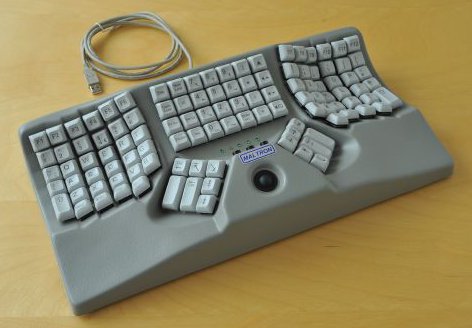
* https://www.maltron.com/uploads/6/1/2/5/61250099/s9751652005...
Couldn't get used to the layout of the ergodox even though it was very nice.
The kinesis hits all the marks an is incredibly programmable.
Different tastes I suppose. Coming from having previously been using a TypeMatrix 2030 USB for many years, the ortholinear key placement of the ErgoDox EZ, which on top of that is also similar in having two big buttons in the middle that I could use as backspace and enter like I had on the TypeMatrix 2030 USB, is the exact reason that I chose the ErgoDox EZ when in 2017 I decided to switch to a mechanical keyboard.
The programmability of the ErgoDox EZ meant that I was even able to create a layout that closely resembled the Dvorak layout of the aforementioned keyboard that I had previously been using. Over time I have made additional tweaks, moving a few keys around to be more comfortable and removing keys that I weren’t using.
My custom Dvorak layout for the ErgoDox EZ is available at https://github.com/ctsrc/ergodox-ez-shine-dvorak
One thing I am still looking to improve is how I do with numeric input. Also my brace keys still have potential for a better solution.
Even if I don’t figure out an improvement for those two things it’s pretty damn good though.
Last time I commented about this someone talked about chording, and I think they might be correct that going that way would be a good way to further improve things. Just haven’t taken myself the time to work out how I want chording to be like and when to set of time for looking into that.
Being able to split the keyboard wirelessly would give you freedom to put your hands wherever the heck you want. It would be interesting to play with different hand placements.
But i'm not willing to pay that kind of money for a keyboard with cheaper Kailh brown switches and without an option for cherry mx brown.
I do assume they can't make it that much cheaper but for me personally thats just a no go.
Summary: Cherry MX supply issues and Kailh matching Cherry quality (in their opinion).
Ergonomic setups are specifically meant to immobilise both your thumb and wrist joints.
I'm very interested in learning about solid science behind these things. I was considering buying one of the UHKs specifically because of the thumb modules, but now I realize that I don't know much about the ergonomics of that. I was assuming that being able to keep my hands in a single position would be an improvement.
2. Is coding noticeably easier or smoother on the 40%? What editors to you use? I'm tempted by the split ergo / ortho form factor, but I'm hard-pressed to give up the dedicated F-row.
Pros: very similar to ergo 4000. No immediate drop in typing speed like with an ergo dox ez.
Cons: easy to workaround: left alt is too left due the spacebar and the strange dial button in the middle. I ignore the dial and mapped the cmd key to ctrl and ctrl to capslock.
I can really recommend this keyboard if you find the Ergodox layout comfortable, they're very well built.
The biggest benefit to me wasn't the split, it was the programmability which both the UHK and the Freestyle Pro offer. I use the right half of the spacebar to change layers and have mapped the arrow keys to IJKL on the function layer. This plus remapping Caps to backspace has let me keep my hands on the home row MUCH more than typical and has made me more comfortable and a little more efficient.
My only complaint about programming the Kinesis Pro keyboard was the the order of key presses matters when using my remapped arrows in combination with command or option to move by a word, or to the beginning of the line: I must press the Fn shift key (the right half of my spacebar) before any of the modifier keys. This was very annoying at first, but my muscle memory caught up with it fairly quickly. I really like the fact that the UHK has fully customizable firmware and that would add some value to me, but maybe wouldn't matter too much to most people.
Has done wonders. Being able to remap keys with the heardware is awesome.
Mine recently broke due to a move, so I reached out. They offered to replace it, or swap out the cord they suspected was the culprit. I opted for the latter, opened my keyboard up, gave it a good cleaning, swapped out the cord, and I was back online. Very easy to open up and clean/repair.
A few criticizms:
Every once in a blue moon, I will create an extremely long macro of my everyday computer usage, and when I hit a button the keyboard will absolutely freak out and do all kinds of bad stuff: retype passwords I have typed, etc.
HONESTLY would prefer macro support to be a "app only" feature, because it has caused me nothing but pain.
Second, it is a bit boring. I kinda wish I had gone for a more interesting layout like the ErgodoxEZ.
Overall really solid mechanical keyboard.
It's a staggered, 60% split keyboard, with the spacebar replaced with an 8-key thumb cluster. The familiar layout minimized my learning curve and their custom layout software is decent.
The wrist cramps went away almost immediately (which I would assume would have worked for any split keyboard with a better wrist resting angle). The learning curve took a little as the UHK has a Mod key on one side where the space bar is supposed to be and I would also sometimes try to hit keys with one hand that are on the other side of the keyboard. The UHK agent app makes it super easy to map any key from any layer (fn or mod) to something else or even a combination of keys. I pair this with Better Touch Tool app which helps me map keyboard combinations to other things like switching to apps. The last part is using the mouse with the "mouse button" in place of capslock key, which I feel has cut the need to take my hands off the keyboard by ~70%.
It was a little pricey purchase, but the quality is phenomenal and 100% worth the money. If mine broke for whatever reason today, I would buy another in a heartbeat.
One thing I noticed with split keyboards which is kinda funny... sometimes I suddenly start typing gibberish and the reason is, I seem to naturally get used to a certain distance between the split parts, but If I move one of the splits for some reason then one of the keyboard splits appear shifted. It seems for me I used the left split as reference, and so I need to adjust the right split from time to time. In theory I should use "F" and "J" for reference.. I guess I never learned to do that.
Edit: I do use a sticker over my caps lock on the left split [2] to make it easier to find it without looking. I wonder if that's the reason the left hand is always more "calibrated" than the right one? :-)
1: https://gaming.kinesis-ergo.com/edge/
2: https://www.amazon.com/Loc-Dots-Keyboard-Location-Dots-Clear...
The only thing I don't like is the long wait for the modules. It's been about 3.5 years since I ordered and the ETA keep shifting. (They were supposed to ship in July, and then September. We haven't gotten the monthly update yet, but I'm doubtful they'll ship them all out this week.) With that said, they're doing something new, so I try to be mindful of the delay, and others won't have to wait for the keyboard, at least.
I recently got fed-up, after failing to find a good mechanical keyboard with trackpad, I settled for a cheap 60% membrane keyboard and Wacom Intuos touch tablet as trackpad with the intention of joining them together in a custom contraption. So far it seems to be working well for me, but I wonder whether I'll be able to go back to anything else after getting accustomed to 9.5" trackpad.
It's also fun to see people's reactions when take a look at it on my desk :p
I initially purchased the keyboard to address wrist pains. Likely from my years of development and gaming. Looked at many available split keyboard options. Tested a coworker's Keyboardio which was very comfortable, but pretty bulky and had a high learning curve for its non-standard layout. This was only a problem when I needed to switch back to typing on a laptop. That doesn't happen often but it did slow me down. Felt the same way about the Ergodox. Very comfortable, but took a while to get used (and then a while more to switch back to standard laptop) and it wasn't easy to cart around. Although, a benefit I found from the Ergodox was the fully programmability. This includes mouse programming. While it doesn't compare to having a pointer device, having mouse keys programmed allowed me to use the mouse without moving my hands away from the keyboard. I try to use keyboard shortcuts as much as possible, but today's design is very mouse/pointer heavy. With some site operations being mouse-only. Having that functionality (while not perfect) is great for me.
The main features I ended up looking for came out of testing those two boards: - Split keyboard - Close to standard layout - Portability - Mouse functionality
The two boards I found that fit these were the UHK and the Kinesis RGB Edge that other commenters have mentioned. While I couldn't test the UHK, I did get to try the Edge out at PAX last year. I really like it. It's not the same comfort as the Keyboardio and the Ergodox. But your fingers already know where to go without trying or having to learn anything knew. Keymapping worked really well. The macro keys were nice, though I didn't have time to play with them. It's somewhere in the line of 80% of a full standard keyboard. Which is enough for most. It did however lack in the portability department and didn't have a mouse layer. Not deal breakers, but lacked everything I was looking for. I'd like to try the Redox(w) at some point. At the time though, I ended up taking the leap and purchasing the UHK. It took over a month to arrive. Here's a list of what I like about it:
  - Can be used split or combined into a single board. I've found few split boards can do this. Helps with portability.
  - Tilting works well and is very stable. Though it requires tools to change the tilting.
  - Build quality is great. There is a nice (steel?) frame that the switches are mounted to. This quality extends to the wrist rests which have a nice metal plate to attach them to the base of the board.
  - Each key I need to press is within reach of my fingers. The Ergodox and Edge had some keys which were out of reach for me.
  - The mapping software is superb! I really appreciate the design and some additional features from that. The very first thing I changed was setting `/~ to Esc. In my mind, this should be the default for any keyboard with the word 'hacking' in the title.
  - While they seemed gimmicky at first, the 'mouse' buttons on the bottom frame of the board are easy to reach and use. Since they are a unique features to this board, I use them to active that mouse layer which works very well.
  - The small profiles allows it to fit really well in a small audio equipment case which I found at a music shop. Again, something difficult to do with the larger, awkwardly shaped boards.
  - Most importantly to me, my wrist pain has reduced dramatically.
  - The switches (MX Clears in my case) feel extremely dry and gritty. This isn't the case with my other keyboards with Clears. I've tried lubricating them but they still have a bit of grit.
  - The standard keycaps are not great. While it's clear the board has a lot of work put into it, the keycaps seem to be an area ignored or sacrificed for cost resulting in thinner (ABS?) plastic. This would be okay but some keys are not standard size so it is difficult to find higher quality replacements. I bought mine with blank caps and a spare set for when these get worn and glossy. If I had one request it would be a replacement set of keycaps from UHK in a higher quality plastic.
  - Every once in a while (maybe once a month) a layer gets stuck. I'll activate the FN layer by holding down a key and releasing that key doesn't deactivate it like it should. By that time I've already tried to type something else only for it to respond with weird behavior I didn't expect because FN is still active. I then have to press the FN key again to deactivate.
  - The LED read-out only works for the built in mod-layers (i.e. QWR for QWERTY, DVK for Dovorak). I use multiple profiles and it would have been nice to be able to program that LED for each profile. Or at the very least, use it for something fun.
  - The seal on the wooden rest has started to wear a bit. I'll likely sand it down and refinish it if gets worse.