It offers exceptional value. Pair that with a GeForce GTX 1650 SUPER which is at the top of Performance/$ chart for GPUs: https://www.videocardbenchmark.net/gpu_value.html
And you have a champion of a workstation right there.
This is such a welcome change from the crypto days with GPUs in short supplies and at very high prices, and stagnant Intel CPU performance!
Also the RTX 2070 Super might be the cheapest performance card at the moment.
Charts like these can save you a lot of money. But it will depend on the usage of course.
You have to be careful though. For example, the Radeon RX 570 is right next to the GeForce GTX 1650 SUPER at the top of the chart, but the GeForce costs almost 40% more. If the GPU isn't your bottleneck you may be better off with the less expensive one and save money to buy a faster CPU or more memory. Whereas if it is, you may be better off spending more for a faster GPU than either of those.
What these charts are great for is to look at the top fifteen or so as the set of candidates, which will all have good performance/$, and then if you prioritize better performance look at the fastest ones and if not then look at the least expensive ones.
But even then you have to be careful. For example, on the CPU chart the Core i3-9100F is one of the best values. The Ryzen 3 3200G is only slightly faster for $17 more (i.e. almost 25% more). But the 3200G has an iGPU, which is worth a lot more than $17 if it means you don't have to buy a discrete GPU.
https://store.steampowered.com/hwsurvey/Steam-Hardware-Softw...
For context, their page on the 1080 (https://www.videocardbenchmark.net/gpu.php?gpu=GeForce+GTX+1...) gives it a score / $ ratio of 20, while the lowest item on that page has a score of 30.
You could argue they should have some minimum threshold for performance before including them on the chart, certainly no one should be considering a r7 260 or gtx 770 for their new system, however cheap they've gotten, but they don't.
* https://www.tomshardware.com/reviews/evga-nvidia-geforce-gtx...
vs.
* https://www.tomshardware.com/reviews/nvidia-gtx_1650-super-t...
Note: this is NOT for gaming. Just everyday workflow and dev environments in 4k, 60hz.
7680x4320@120Hz [1]
[1] https://www.nvidia.com/en-us/geforce/graphics-cards/gtx-1650...
You can probably run as many 4K monitors as the 1650 has video ports.
..which might easily land you in 2060/2070 territory.
Sorta here: https://www.cpubenchmark.net/power_performance.html
Unfortunately it's hard to tell which are embedded versus traditional sockets.
https://www.tomshardware.com/reviews/amd-ryzen-5-3600-review...
Now EVERY single Zen 2 chip is at least smidge faster than my 6700k in single threaded benchmarks AND close to 100% faster in multi-core benchmarks. So for $180 I can buy something that takes a huge meaningful shit on my (fairly nice at the time) 6700k (~$350 when I purchased it).
That's just crazy to me how much performance I can get for so little. I'm going to buy something beastly with at least 16 cores, but! I also plan on building a little cluster using mini-itx B550 boards and the 3300x. In fact, I'll probably build the little cluster first, because each 3300X is still faster than my 6700k and the total cost per system will be like $450!!one! It hasn't been since the orig Core-2-Duo days I've gotten such a meaningful upgrade for so little. Plus, when Zen 3 comes out it's a drop in upgrade.
AMD is delivering insane value to their consumers, and I love it. I just wish I could buy a Zen 2 chip in a laptop that doesn't look like it was made for a fourteen year old (no offense to any fourteen year olds). I heard someone say the lack of 4k and more professional style laptops could be Intel back-channel fuckery, but... there's also a chance no-one expected AMD, in a single fucking generation of CPUs, to sweep every single market.
I just wish I could buy a decent motherboard that doesn't look like a 14yo's first attempt at drawing an f-35. My current rig does this weird glowing thing at night when it is supposed to be off. For my next machine I would honestly pay more to NOT have RGB support.
I had to use an ASUS motherboard and it took a good 10-15 minutes of poking through menus (with terrible keyboard navigation) to find the "magic rgb off" incantation.
If you happen to have an ASUS Prime Z370-A motherboard, here is the what you have to do:
boot and quickly press F2 or DEL to get into the BIOS (I had to do this more than once to poise my finger over the right key)
Press F7 to enter Advanced mode
Choose the Advanced menu (4th menu across top)
-> Onboard Devices Configuration (8th sub-menu in list)
-> RGB LED Lighting configuration (2/3 way down the page)
You have to disable both:
- when system is in working state - when system is in sleep, hibernate or soft off states
I basically tried all obvious places, then all the menus before this one before I stumbled upon it. it was nuts.
Well, it hasn't improved tremendously, but it hasn't remained flat. You can get around 20% more in single core performance, if it's so important to you.
https://www.cpubenchmark.net/singleThread.html
https://browser.geekbench.com/processor-benchmarks
https://www.cpu-monkey.com/en/cpu_benchmark-cinebench_r15_si...
1. Intel/nVidia Contracts have OEMs their hands tied (which explains capped GPU in most Zen 2 laptops).
2. Lack of widespread Thunderbolt 3 support on AMD.
While I'm fully bought on reason 1., reason 2. is still hard to digest as one can still ship laptop with USB-C port supporting PD and DisplayPort (w/ alternate mode) and call it a day, and most users won't mind. I hope Zen 3 causes the power shift on laptops.
The idea that in 2-3 years i could just buy a used 3970 or even a 3990 to more than double the core count is amazing to me, and knowing that prohibits me from having my mind blown by the insane value of the smaller Ryzens.
Lenovo just released a couple ThinkPads peered by AMD Ryzen 7 Pro CPUs: T495, T495s and X395. They don’t have 4K screens though.
https://arstechnica.com/gadgets/2019/05/lenovo-adds-amd-ryze...
https://www.anandtech.com/show/15772/new-lenovo-thinkpad-ran...
Turns out it was the CPU and how crappy AMD handle C-states that save energy, i had to turn them completely off and that resolved the issue (In AMD defense, freezing the entire OS do save a lot of energy)
This was exactly 2 years ago, and i had the issue for almost a year before figuring out the fix. I wonder if the new generation have this problem too?
From my experience, Intel is no better.
I have a 4 year old laptop with an Intel CPU that has the same problem, it was never fixed by Intel. [see EDIT]
For the first 3 years of use I just accepted the fact that my laptop would randomly freeze and I would have to reboot it.
One day, I got sick of it and started digging into forums until I found a way to avoid the specific c-state (by modifying kernel boot parameters) that caused the issue.
EDIT: Apparently, it's getting fixed now. Just 5 years late, issue was reported in 2015 https://bugzilla.kernel.org/show_bug.cgi?id=109051
In the end I switched to a 3700X; so far the problem hasn’t reoccurred. No doubt it will now that I’ve posted about it (fool me twice, shame on me).
It turns out many PSUs don't handle low CPU power states well, and disabling C6 just prevents the CPU from being able to idle (and consequently, boost) properly. I've had perfect uptime with my 1600AF in a storage node since discovering this.
I've never had a problem running Intel based systems with Linux. So, even though everybody's talking about how good AMD is right now, and why you should buy one for your next rig, and how good are AMD graphic cards with open drivers instead of the nVidia binary blobs... I sincerely don't see any reason to ditch what has been working OK and make the switch when preparing a new build. Should I?
It wasn't until Ryzen 2000 / 3000 in particular that board vendors took the AMD stack seriously again.
I remember at release getting ram working on Zen 1 was a nightmare. Nowadays you can throw almost any stick to 3733mhz on Zen 2 no problem.
At home I've had a 3950x now for about six months and no such issues with the CPU at all. It just works and runs nicely. No freezes, no problems.
It has also some really fantastic thermals, it does not produce that much heat. I use it in a fully fanless / passive cooling setup and it works great.
My thermals were pretty great with the stock CPU cooler, but I ended up going with a Noctua NH-U14S which might be a little overkill, but when playing Half-Life: Alyx, I stay between 45-60c which seems pretty good to me. The game runs at a perfect framerate on High settings with the AMD 5700XT, 32GB of DDR4 RAM on the Vive Pro.
I may end up upgrading to a Ryzen 7 4XXX series when they come out, but for now, this CPU is performing great. Def best bang for your buck.
Yes. I have the same cooler* on a Threadripper 3970X with 280W TDP. The only thing that it can't handle is a sustained all-core load for >10-15 minutes. Even at all-core load it still turbos above base clock (but less than max turbo).
Technically a different SKU with a larger base plate, but otherwise the same design.
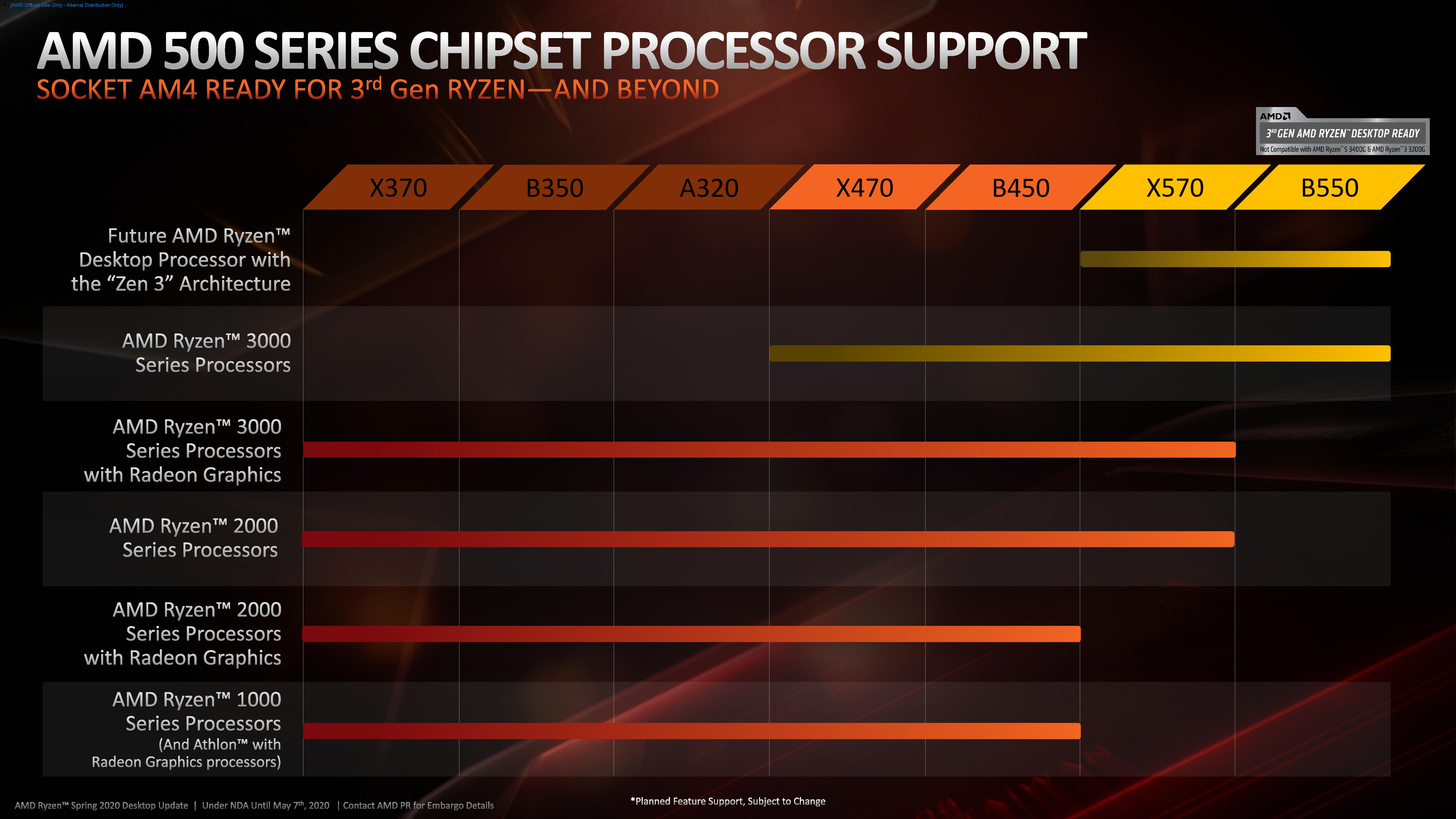
One thing I didn't realize at the time is that the 3000 series is "end of the line" for B450 motherboards, which should be a real consideration for anybody eyeing a new system with this CPU now. As this article suggests it leaves you in an awkward spot. I opted to upgrade there to a X570, but only barely; a lucky decision, as it turns out!
Granted my case doesn't have the best airflow (NZXT h210i), I was getting pretty high CPU temps with the stock cooler. Averaging mid to uppers 80s during gaming, High 50s idle.
I went ahead and ordered a Noctua cooler which should be coming today actually. Hoping it helps.
That said, $30 aftermarket cooler will keep you at 50 degrees even during max load. Great chip for the money and I'm super happy with it
It took forever to get bundled, but you can get Lenovo and I think HP prebuilt machines for this as well - for work I don't like handbuilding a machine.
As GPU I had the Gigabyte GTX 1650 mini and the Gigabyte GTX 1660 TI mini. The 1650 is definitely easier to put in a passively cooled system, but the 1660 TI is much more powerful.
The 3900x has been selling for $400 which is also amazing value.
Intel CPU market is behind after many years. Long live AMD design + Taiwan manufacturing.
Except Intel still delivers better and more consistent gaming performance largely based on better overall architecture (L3, IMC and what connects these).
Both Intel and AMD are billion-dollar publicly traded companies. I don't get why people would fanboy either of them. I don't want AMD to win, because then they are going to abuse their position, just like Intel did. Conversely, I don't want Intel to win. Two players in a market is already problematic; trying for one player is just suicidal.
Intel has 5x the market cap and 10x the revenue compared to AMD, and AMD is the underdog in its dGPU competition with nVidia too! If you want innovation, you'd want to equalize investment in R&D for both these two competing pairs, it makes sense to be pro-AMD.
I tried a light touch of overclocking and got absolutely nowhere. (Stock cooler)
Running that close to the edge is an achievement in itself though I guess
This always gets brought up as a use case, but how many people are building non-trivial codebases where compile times matter? If build times are under 5s, near perfect parallelization only nets you a 1.25s gain between 3700x and 3600.
You want to see a preview as quickly as possible. Best if you can keep a live view on a second monitor.
The standard on the software side is CUDA..which is nvidia only.
However you have to pay the Nvidia tax to do anything.
So a nice AMD ultrabook (which reigns on current price/performance charts) has the firepower, but no access to ML libraries.
I was under the impression that AMD gpus had achieved some modest level of compatibility with the major frameworks?
(Performance as compared to CUDA on cards that are supported is not great however)
I'm looking to gift a laptop that's good for ML stuff. What features should I be looking at?
Any specific recommendations?
Recommendations...depends on $$$...high end laptops are expensive as hell. Maybe something like a 1660 Ti?
Broadly I'd avoid ML work on a laptop though due to thermals
Having a remote GPU which is 10x more powerful than you can afford to buy yourself, and you can scale up to 50 GPU's at the click of a button is a far better workflow than spinning fans on your laptop overnight, only to wake up in the morning and realise a code tweak is needed and then you have to wait another 12 hours...
Are you certain you don't mean "stops boosting" when you say that?
I'm running exactly the same: a 3900X with the default included cooler. Yeah, it hits 95C and at that point it's running at 3.8 GHz instead of 4.4 (I never see 4.6 unless I boot Linux in single user mode).
But 3.8 is the base clock speed, so I don't think "throttle" is the right word for "running at base clock."
It's only Ryzen where the CPUs support ECC, but AMD doesn't require AM4 socket motherboards to implement it. (And you have to verify that a board advertising ECC actually implements ECC and doesn't just accept ECC modules.)
I'm in the same situation, looking to get a new workstation and want ECC. Performance-wise, I would be good with a 3900x or 3950x. But PCIe lanes and good IOMMU separation are also requirements for me, so it looks like I have to go Threadripper. I'm disappointed that there's no 16 core Threadripper that has the other benefits of a HEDT platform for people who don't need zillions of cores. The current generation motherboards are also disappointing in that they max out at 4 PCIe slots. Apparently this is because PCIe 4.0 is still rather expensive at the moment.
I did not know this. Do you have a source for this that I can share with others for reference in the future? My understanding was that Ryzen and Threadripper were the same on this front.
I do wish memtest86 had a rowhammer style test, as that should tell if ECC is working
Send a PR...
They make great stuff, but the value proposition disappears pretty quickly if you aren't building a gaming rig/workstation that already requires a dedicated GPU.
https://www.amd.com/en/processors/athlon-and-a-series
An 8-core zen 2 APU is expected
https://www.tomshardware.com/news/amd-ryzen-7-4700g-desktop-...
[1] https://videocardz.com/newz/amd-ryzen-7-4700g-8-core-apu-pic...
https://www.pcworld.com/article/3402056/amds-new-ryzen-3000-...
Why is that? Enthusiast has been overly excited they ignored the actual reality? Or what other factor at play? Inertia ?
[1] https://store.steampowered.com/hwsurvey/Steam-Hardware-Softw...
[2] https://www.anandtech.com/show/15754/amd-reports-q1-2020-ear...
With the typical 5-year upgrade cycle on CPUs for most non-hardware-enthusiast gamers and general-purpose users, I would expect the AMD share in Steam stats to drastically increase by about 2022.
Also, mind you, Steam numbers are not really representative of the overall market. Most online hardware retailers reported 50%+ of their high-end CPU sales to be AMD in Q1 2020.[0]
With that said, once the 3300x is out, I would likely go that route with a cheaper a320 motherboard. This would bring the cost of the cpu/motherboard to about $175 which is terrific value, and leaves you with more money for other components.
https://images.anandtech.com/doci/15774/Ryzen%203_B550_Press...
Motherboards don't need to have the xx. There is only B550. There is no other B5xx.
It looked to me like a modern AMD combo is the way to go - is that the general thinking these days? Are there issues you need to watch out for if you’re going to use them with Linux?
It’s important to note most CPU benchmarks are utter trash and many are on the payrolls of intel including CPU benchmark.net (thanks google for granting them incredible SEO).
My current build is still an 8700k but my next will most likely be AMD for a mostly gaming workload.
Here the build: https://pcpartpicker.com/b/p9D2FT
I only wish the AMD desktop and workstation machines could support more RAM. I have 256GB on the Intel machine, whereas 128GB was the max for the 3900x. I think the threadripper line only goes up to 256GB, which seems a little low for machines which such a large core count.
Just anecdotal but I'm still on the fence between Ryzen vs I series.