- Weather info. Before heading out for the day I can see instantly if I might need a jacket or umbrella later.
- Tube status. I can see at a glance if there are any problems on any underground lines. If there are, I can click on the problem line to get more detailed information with a single touch.
- Calendar. Shows me my schedule for the day.
- Music. Control playback without having to launch an app.
I also have widgets I tend to only use when I'm travelling, showing currency and timezone information.
1. Unlock your phone
2. Press home to go to the homescreen
3. Swipe to the screen that contains the widget
4. Possibly scroll the widget itself
Android itself has several better alternatives for such glanceable information that are quicker to access:
- Google Now / other search plugin
- Lock screen widgets / lock screen "now playing" info
- Lock screen app quick links (available using Play Store lock screens or some vendor software)
- Persistent notifications in the notification bar
- The recent apps menu (to actually go to the app you want!)
Don't get me wrong, I love Android. I've used it for the last 5 years. It's just that I've never understood why people use widgets. They're too clunky to be useful even for the most basic of things.
I guess that's the beauty of Android, you can use the phone whichever way you think is best. This particular feature is not something that Apple should be envious of however. It really isn't universally popular or considered useful on Android. Windows Phone's live tiles are much better, but wouldn't work on Apple home screens either, because you would still have to fiddle about swiping through your home screens.
For weather and calendar, swipe down from the top to show the notification center.
For music control, swipe up from the bottom to show control center.
Tube status... sorry, you'll need to open an app.
Well I don't really think that's a good use. iOS has the music controls on the lock screen
Yes, otherwise it takes all 2 secs to do that.
I like nearly every other aspect of the iOS experience more than my old Nexus One, but this keeps on bugging me.
The only thing I definitively agree with is that I hope Apple supports multiple profiles for iPad. As someone that uses both Android and iOS pretty regularly, I don't think widgets add much that the Notification shade and Action Center don't handle capably. I mostly hope that iOS 8 is invisible - add some APIs for Siri and hooks into home automation, improve performance.
I do some work with an org that offers a choice among iOS, Android, Windows Phone and Blackberry for thousands of company phones.
I find that 'normal' people are barely aware of any difference between iOS and Android. They care about screen size as you note and really practical things like battery life and reception. The only time OS becomes relevant is when someone wants to switch and worries about losing stuff in the transition.
Personally, what locks me into Android is the keyboard. Having used Swype for years now means that I can't even consider iOS until it has an equivalent.
Just one data point, but it was "keyboard" by far for me. The iOS keyboard is horrible and very difficult to customize so I took a risk and switched at my last update (and FWIW, I'm finding Android streets ahead in terms of functionality). Digging the larger screen size is something that came later for me but would definitely be another reason not to go back for me now.
I think Apple's not used to having competition as agile as Google. Maybe their slow-and-steady approach was enough for them to power past Microsoft but much more rapid evolution on the hardware and software front is going to be necessary if they want to beat the entire Android ecosystem. Let's see what they come up with next week.
To speculate, what could we get from "screen size?" Maybe they mean number of icons / elements on screen. Maybe they mean larger media viewing. Maybe they mean ease of physical manipulation. Maybe they mean a different DPI point. There are lots of factors that screen size affect, some of them would apply to any device with a larger screen, some of them apply to qualities that differ across mobile operating systems (iOS' handling of resolution, for instance).
My personal wish list:
  - customizable url scheme handlers (e.g. set Google Maps the default map app)
  - API for communication between apps
  - API for Siri
  - API for live icons
  - User profiles for iPad
  - Fingerprint reader for iPad (this plus profiles would be awesome!)
  - Biometric API - fingerprint and/or facial features
- split-screen multitasking- the need to install something explicitly (separate from the app)
- the need to name them "widgets" (to the user they're just a fancier icon), which reduces the apparent complexity to the user
- they are completely invisible unless invoked by the user, thus preserving the simplicity iOS
- they have a natural and fixed size that helps preserve the visual aesthetic of the grid layout, without special efforts by the user
...and probably more - that's just off the top of my head.
I don't know if they're a good idea, by the way. But it's not good to just dismiss them as "android widgets".
As widgets, apps provide them, you don't have to install them separately.
- they are completely invisible unless invoked by the user, thus preserving the simplicity iOS
As with widgets. You don't see them, until you start using them.
they have a natural and fixed size that helps preserve the visual aesthetic of the grid layout, without special efforts by the user
Actually, different sizes are nice, as widgets and Windows tiles have shown. Some like their calendar widget to be short, to just show the top 1 or 2 items. Others like their calendar widget to take up a complete screen, so that they can swipe to it.
I think the nice addition here is more how you create/invoke a widget and that it is restricted to one widget per app. But it's not all that different from Android widgets, WP tiles, or Blackberry's widgets.
Not the same concept, but still closer than normal widgets.
https://play.google.com/store/apps/details?id=com.actionlaun...
Still, I like this block concept... it's a good compromise between widgets & actually starting the app.
Given the way the Android community has picked up on these sorts of things in the past, I wouldn't be too surprised if someone creates a launcher that implements this relatively soon.
Implementation here is , when you swipe up on an app icon it opens the widget related to that app
Really? Have you checked well written apps and what they can do?
>The Google Chrome browser scrolling is horrific at times with a HUGE delay.
How is that an iOS's "performance problem"? Use Safari. It's not like iOS doesn't offer the best scrolling experience compared to Android/Chrome.
Also, what's with this made-up title?
>UX/UI & Branding Architect
You're a designer.
Seriously, what does it matter to you how the guy labels himself?
Because everyone is mentioning that's like Android's Widget-Concept, and Android already solved this - that's not the case in my opinion. I think it's too complex for users to know what a "widget" excatly is. This is more the concept of: Show me a little bit more than the app-icon - and that's it. Imho the user would understand the concept immediately and don't have to know what actually a "widget" is, or how to remove it.
The designer here is suggesting that the tile contain specific interactive elements (quick reply, play/pause, next song, etc).
In the iOS Human Interface Guidelines, Apple suggests that your touch targets have a minimum size of 44x44 points. (https://developer.apple.com/library/ios/documentation/userex...)
If you look at the icon size list at https://developer.apple.com/library/ios/documentation/userex..., you'll see that iPhone 5 icons are only 60x60 points (divide the pixel sizes by two to get the point size). I imagine that 60x60 is simply too small for a two finger gesture to work well.
Maybe this would work better with a one finger touch and drag gesture where the drag direction dictates how the icon will grow into a widget (but with icons on the top and bottom rows only able to grow in one direction). It would need to be a quick gesture, though, since tap and hold triggers that app reorganization mode of Springboard.
Another thing that's bothering me about it being a two finger gesture is that the entire point of this feature idea is to be able to see things quickly at a glance. I would imagine, then, that in these scenarios most people would be holding their iPhones with one hand and only touching the screen with one thumb. This wouldn't be such a big deal on iPad, but I think it would be on iPhone. That makes me feel more strongly that some kind of one finger gesture may be a better way to do this.
Other people in this thread have pointed out some good points too about discoverability: which apps support the feature? How would the API be designed in a way that's performance and power efficient?
This is definitely fun stuff to think about :)
"But, if you want more information about an app, you can simply pinch the app icon bigger and it will now become an iOS Block."
I physically tried this and it just feels awkward. The 'pinch to zoom out gesture' on iOS (e.g. maps, photos) generally has your fingertips about 1-2cm apart in my experience. To pinch an app icon seems quite clumsy and difficult for my medium size fingers... if I had big beefy sausage fingers I can imagine it would be quite a challenge!
I really think it's a really great idea.
http://developer.blackberry.com/design/bb10/active_frames.ht...
I'm assuming that the drive to stay as close to the current experience as possible influenced that - there's currently no "free" one-finger gesture/action on the home screen. I don't know how to pull it off, but needing to use two hands seems like it kills off the notion of doing things quickly.
edit: Although it's worth pointing out that while it's a cool party trick, it's not something I'd use day-to-day. Changing the Control Centre to let me keep applets open within it for things like 1Password or composing a message? That would get used every day.
I don't think Apple is going to add functionality to the home screen. It's always done one thing, and I imagine UX leads at Apple would probably consider anything else to be overloading its scope.
That said, there is absolutely a good use case for widgets on iOS. The old iOS 5-6 weather widget was great, and the text-adventure version they replaced it with in iOS 7 is an inferior experience. Notification Center is almost certainly the best place for widgets: The iOS 7 calendar widget is a great example of the potential, and I really hope they finally open up the NC widget APIs in iOS 8.
There are two separate concerns here:
1. Notifications. Telling me that things have happened, when they happen. The notification center could (nay, should) excel at this, but currently it's only doing okay. I wish I didn't have to keep micromanaging my preferences to prevent apps from spamming me with useless stuff, but at least it works.
2. Persistent info. Stocks, weather, headlines, deadlines, etc. I don't want this stuff in the notification center. It gets in the way of everything coming at me from concern #1. I want to be able to find this elsewhere, without having to dig down into each app. And I definitely don't want apps trying to tell me persistent info in the form of a notification. I don't need to be notified that it's sunny out, or that something interesting (but not directly related to me, or actionable on my part) happened inside of one of my apps. But having to drill down into each individual app for this info is also a pain.
This is where I love Microsoft's live tiles. The ability to peek inside of an app from the homescreen is awesome (way better than having to add separate widgets, a la Android, each with their own design patterns and set of controls). I'd use Windows Phone for this reason if it had the same app ecosystem as iOS, but of course I wouldn't expect it to. Currently my primary device is running Android, which, for me, is a nice trade-off between app availability and base OS experience. But if iOS were to add that ability to "peek" into any existing app to see what's happening, I'd definitely consider switching back.
[1] https://play.google.com/store/apps/details?id=com.actionlaun...
Isn't that basically what Xerox Star did in 1981? http://www.digibarn.com/collections/screenshots/xerox-star-8...
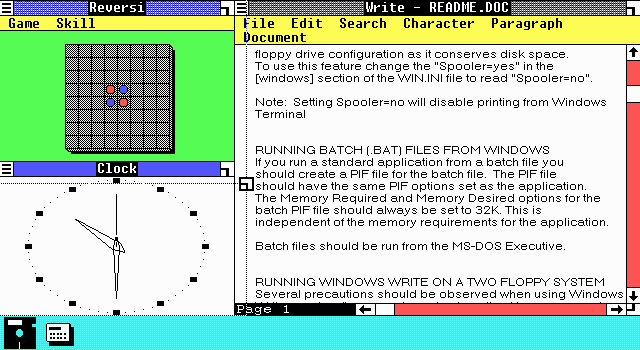
Or -- the horror -- MS Windows 1.0 in 1985: http://fulupik.chez.com/perso4/Images/infor_win101tile2.gif