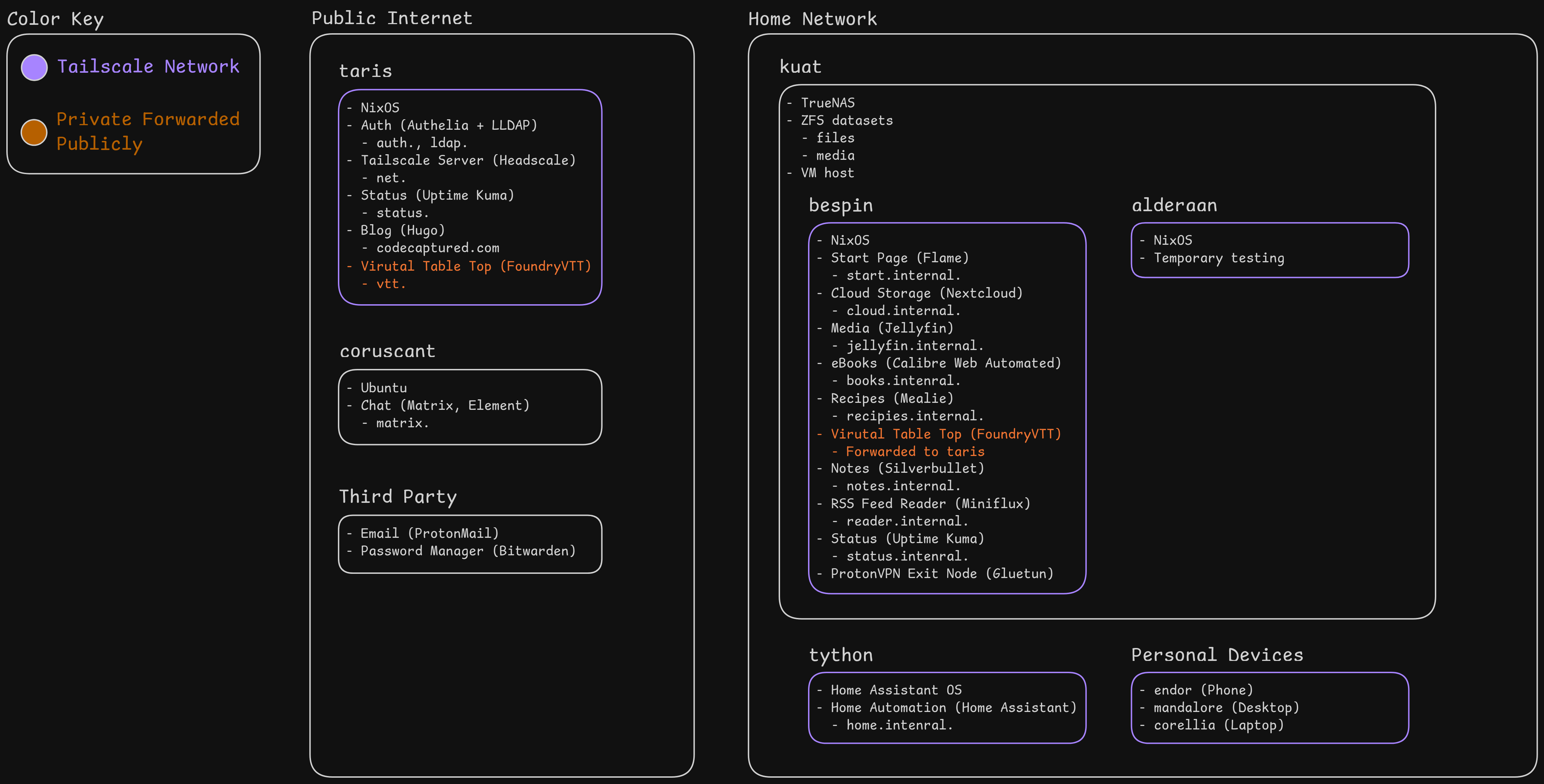
I think "home labbing" fulfils much the same urge / need as the old guys (I hate to say it but very much mostly guys) met by creating hugely detailed scale model railways in their basement. I don't mean that in a particularly derogatory way, I just think some people have a deep need for pocket worlds they can control absolutely.
I'm more worried by home automation in my case ^^;
The chance of someone breaking into your house is sadly much more likely, and them choosing to take any computers they see is almost a certainty at that point.
Your drives are unencrypted. What's your next step if you come home tonight and find the house ransacked and the server gone?
There is no burden of proof and no consequence for perjury. 100% of the search or seizure warrants I have read have had obvious perjury in them.
I encrypt my data at rest not because I fear a burglar breaking in, but because I fear the FBI coming in the front door on some trumped up bullshit. Everyone has a right to privacy, even (and perhaps especially) if they are doing nothing wrong.
I’ve read too many stories of writers and activists getting bogus warrants and charges and arrests thrown at them to inconvenience and harass them to ever have a single unencrypted disk in my house.
The most important thing is to be able to get important data off of it and have access to credentials that facilitate that. You could setup something like Nextcloud to always sync important data onto other people's devices, so make part of that easier
But I think another important aspect is making folks invested in the services. I don't expect my partner to care about or use most of them, but she does know as much as I do about using and automating Home Assistant (the little we've done). Things like that should keep working because of how core they can become to living our lives. It being a separate "appliance" and not a VM will also help manage that
But also that's a lot of hope and guessing. I think sitting down with whoever might be left with it and putting together a detailed plan is critical to any of that being successful
- I have an ntfs formatted external USB drive to which cron copies over a snapshot of changed daily into a new folder. Stuff like paperless, flat file copy of seafile libraries. The size of that stuff is small <50gb, duplication is cheap. In event of death or dismemberment... that drive needs to be plugged into another machine. There are also seafile whole library copies on our various laptops without the iterative changes. Sync breaks... keep using your laptop.
- I've been meaning to put a small pc/rpi at a friend's place/work with a similar hard drive.
- the email domain is renewed for a decade and is hosted on iCloud for ease of renewal. Although I am not impressed that it bounces emails when storage is full from family member photos which happens regularly so may switch back to migadu.
Part one is money and where the important papers are.
Part twonis hiw to dulb down my home. How to remove the smart switches (how to wire back the traditionnal switches). How to mive self hosted key services to the cloud (bitwarden, mostly) and what to pay for (domain and mail). Hiw to remove the access point and go back to the isp box.
My wife is not supportive of the smart stuff but now that she knows she can dumb it down she is fine. Honestly she does not realize what strp back the lack of all this stuff will be. But at least it won't be my problem anymore:)
The biggest thing that makes me stick with 1Password, despite the semi-recent VC shenanigans, is the fact that if for some reason we fall behind on billing (for example, because the credit card got cancelled because I died) the account goes into read only mode forever. As long as 1P is a going concern the data we choose to put there is safe from the biggest risk in our threat model.
I’ve been thinking of making a version of this that does a webhook but it doesn’t offer a huge amount of value over the email method.
Each "stage" above is like incremental failure domains, unifi only keeps internet working, core vms add functionality (like unifi mgmt, rancher, etc), truenas is for "fun extras" etc. k8s lab has nothing I need to keep on it because distributed storage operators are still kind of explodey.
Like each part makes sense individually but when I look at the whole thing I start to question my mental health.
Imagine simplest possible deployment you've cooked up.
Now imagine explaining your mother how to maintain it after you're dead and she needs to access the files on the service you setup.
usually, selfhosting is not particularly hard. It's just conceptually way beyond what the average joe is able to do. (Not because they're not smart enough, but simply because they never learned to and will not learn now because they don't want to form that skill set. And I'm not hating on boomers, you can make the same argument with your hypothetical kids or spouse. The parents are just an easy placeholder because you're biologically required to have them, which isn't the case for any other familial relationship)
While I haven't given all of my keys to my family, there's a clear route for them to get them, and written instructions how to do so. Along with an overview of the setup and a list of friends and colleagues they can turn to, this is enough for them to get access to everything and then decide if they want to carry on using it, or migrate the data somewhere else.
Once a year I write couple of DVD with photos. That kind of archaic but easy to understand and reason about media.
Once in a year or two I print some photos in print shop.
It's probably worth it for most people to go through the excercise
I run proxmox too and I've now got a nice little infra at home.
For my family it's simple: I explained them that the infra doesn't matter. The only thing that matter is data. And that there are many, many, many redundant backups of the data and that the backups are functional. That the data are correct (not a single bit missing) and pristine (deduplicated etc.).
Basically 20 years of family pictures and family movies, notarized documents, many proofs of big money transfer (as we now live in an hellhole of KYC/AML where I constantly need to prove money transfer, even when they're so old my banks don't allow me to get that info anymore), all the invoices related to real estate, medical stuff, cars, etc.
My backup procedure uses an intermediary steps that restore the data from the backup and verifies that the data is correct: once that step passes, the backup gets the greenlight. 3-2-1. Even more than 3-2-1.
Cryptographic hashes everywhere, including in filenames: I've got scripts that do verify x% of the files, random sampling style. I'm 100% guaranteed that at least 99.999% of the files are correct. And there are so many backups (online, offline, onsite, offsite, ...), all checksumed. My family won't lose our data. They're literally in various safe and in several countries.
Once I won't be there, they'll have the data up to that point. FWIW both my wife, daughter and brother --although they're not techies-- all happen to be familiar with computers and all took Python lessons. They know what a CLI is.
So even should they have a problem hooking up a hard disk, there's not a world in which they cannot do that:
"LLM> Dear AI, I've got disks with backups of family pictures and notarized documents, how can I access them?"
The world where you couldn't ask that question doesn't exist anymore.
Data of new memories shall be theirs to do deal with though.
P.S: besides that I think homelab'ing is also for convenience and understanding how things (like the network and servers) do work. It's to me more about thinkering and learning than "controlling".
I wanted to a share my blog post walking through how I finally built a setup that I can just be happy with and use. It goes over my goals, requirements, tech choices, layout, and some specific problems I've resolved.
Where I've landed of course isn't where everyone else will, but I hope it can serve as a good reference. I’ve really benefited from the content and software folks have freely shared, and hope I can continue that and help others.
The reason I ask is I homelab “hardcore”; i.e. I have a 25U rack and I run a small Kubernetes cluster and ceph via Talos Linux.
Due to various reasons, including me running k8s in the lab for about 7 years now, I’ve been itching to change and consolidate and simplify, and every time i think about my requirements I somehow end up where you did: Nix and ZFS.
All those services and problems are very very familiar to me, feel free to ask me questions back btw.
But once I fully understood how it's features really make it easy for you to recover from mistakes and how useful the package options available from nixpkgs are, I decided it was time to sink in and figure it out. Looking at other folks nix config on GitHub (especially for specific services you're wanting to use) is incredibly helpful (mine is also linked in the post)
I certainly don't consider myself to be a nix expert, but the nice thing is you can do most things by using other examples and modifying them till you feel good about it. Then overtime you just get more familiar with and just grow your skill
Oh man, having a 25U rack sounds really fun. I have a moderate size cabinet I keep my server, desktop, a UPS, 10Gig switch, and my little fanless Home Assistant box. What's yours look like?
I should add it to the article, but one of my anti-requirements was anything in the realm of high availability. It's neat tech to play with, but I can deal with downtime for most things if the trade off is everything being much simpler. I've played a little bit with Kubernetes at work, but that is a whole ecosystem I've yet to tackle
What does your persistent storage layer look like on Talos? How have you found it's hardware stability over the long term?
My goal is to have a small nearly zero-conf apple-device-like box that anyone can install by just plugging it into their modem then going through a web-based installation. It's still very nascent but I'm already running it at home. It is a hybrid router (think OPNSense/PFSense) + app server (nextcloud, synology, yunohost etc). All config is handled through a single Nix module. It automatically configures dynamic DNS, Letsencrypt TLS certs, and subdomains for each app. It's got built in ad blocking and headscale.
I'm working on SSO at the moment. I'll take a look at your work and maybe steal some ideas.
The project is currently self-hosted in my closet:
I have dabbled before with FreeIPA and other VMs on a Debian host with ZFS. For simplicity, I switched to running Seafile with encrypted libraries on a VPS and back that up to a local server via ZFS send/receive. That local server switches itself on every night, updates, syncs and then goes into sleep again. For additional resiliency, I'm thinking of switching to ZFS on Linux desktop (currently Fedora), fully encrypted except for Steam. Then sync that every hour or so to another drive in the same machine, and sync less frequently to a local server. Since the dataset is already encrypted, I can either sync to an external drive or some cloud service. Another reason to do it like this is that storing a full photo archive within Seafile on a VPS is too costly.
I want to self-host one of those floss Pocket replacements but I don't want to pay more than what these projects charge for hosting the software themselves (~$5). I am also considering self-hosting n8n. I don't have any sophisticated requirements. If it was possible I would host it from my phone with a backup to Google Drive.
See https://www.servethehome.com/introducing-project-tinyminimic... for a good list of reviews.
It won't give you 99.999% uptime, but for that stage in my life it was just stellar. I even had an open source project (Slackware fork) where I collaborated with someone else through that little machine.
Second-hand hardware is also a great way to get high-quality enterprise hardware. E.g. during the same time period I had a Dell workstation with two Xeon CPUs (not multi-core, my first SMP machine) and Rambus DRAM (very expensive, but the seller maxed it out).
I've looked into Wallabag but perhaps there are more I don't know?
It's nice, has an Android app, auto tagging if connected to LLM (local Ollama works too)
Any old PC with low idle power draw.
> This means keep one login per person, ideally with SSO, for as many services as I can
Truly S-tier target. Incredible hard, incredible awesome.
I've said for a long time that Linux & open source is kind of a paradox. It goes everywhere, it speaks every protocol. But as a client, as an end. The whole task of coordinating, of groupwareing, of bringing together networks: that's all much harder, much more to be defined.
Making the many systems work together, having directory infrastructure: that stuff is amazing. For years I assumed that someday I'd be running FreeIPA or some Windows compatible directory service, but it sort of feels like maybe some OpenID type world might possibly be gel'ing into place.
And I agree with the feeling that open source is everywhere, up until a regular user picks up something. I think part of the paradox you mention is that every project is trying to work on their own thing, which is great, but also means there isn't a single entity pushing it all in one direction
But that doesn't mean we can't get to nice user experiences. Just in the self-hosting space, things have gotten way more usable in the last 5 years, both from a setup and usage perspective
I've been thinking if a platform which connects techies to non-techies can help solve that, say like a systems integrator for individuals.
[1] https://needgap.com/problems/484-foss-are-not-accessible-to-...
The only time consuming thing since then has been figuring out how to use the Cloudflare auth header to authenticate with each individual app (and many don’t have multiuser capability so it’s not a big deal).
I haven't pulled it down yet to find out just how extensive the SSO is. My understanding is that it's not totally universal... But that it is like ~50%, which is super not bad given how many packages it has!
It's good enough for everyone.
should I be using terraform and ansible?
im using cursor to ssh and it constantly needs to run commands to get "state" of the setup.
basically im trying to do what I used to do on AWS: setup VMs on private network talking to each other with one gateway dedicated to internet connection but this is proving to be extremely difficult with the bash scripts generated by cursor
if anyone can help me continue my journey with self hosting instead of relying on AWS that would be great
That is a pretty broad target. I would say start by setting up an opnsense vm, from there you can do very little to start, just lock down your network so you can work in peace. But it can control your subnet traffic, host your tailscale, dchp server, and adguard home, etc.
As somebody who was quite used to hosting my own servers, before I first set up my homelab I thought proxmox would be the heart of it. Actually opnsense is the heart of the network, proxmox is much more in the background.
I think proxmox + opnsense is great tech and you should not be adding in terraform and ansible, but I am not sure that using cursor is helping you. You need a really good grasp of what is going on if your entire digital life is going to be controlled centrally. I would lean heavily on the proxmox tutorials and forums, and even more on the opnsense tutorials and forums. Using cursor for less important things afterwards, or to clarify a fine point every once in a while would make more sense.
Also, I found TrueNAS's interface a little more understandable. If Proxmox isn't jiving with you, you could give that a try
I think the networking experience for hosts is one of the worst things about Proxmox.
Read the docs!
https://pve.proxmox.com/wiki/Network_Configuration#_choosing...
Nobody uses the local nextcloud because they just don't think they can rely on it, it doesn't always work from their perspective, and is too finicky to use, because it needs an external app (Tailscale).
This can be only fixed when the app itself can trigger a vpn connection, and I don't think this is going to happen any time soon.
On PC I agree, you can just leave it running, on mobile though it chews through the battery like it's nothing.
I end up just paying a cloud provider and forget about it.
Anyone else on the same boat? What has been your approach?
I simply have one folder per service, each folder contains a docker-compose stack and a storage directory. Updating is simply a matter of running `docker compose pull` and `docker compose up -d`. Nothing more.
Breaking updates requiring to tweak the config are very uncommon, and even when they happen it's only a few minutes of checking the updated config and applying it.
IMO this is the simplest way to self-host. No VM, no complex software install, nothing more than a simple Docker Compose setup that's fully automated.
If something breaks I can decide to figure out why, or revert.
But also I think using a cloud provider is fine if you're happy with the experience. It is a time sink to get things setup and it's not zero maintenance time. It's reasonable to weight those costs
Joking aside, a minimal setup just using docker compose is pretty manageable. Self hosting many projects is as easy as 'docker compose up -d', and upgrades are straightforward as others have pointed out.
> My main storage setup is pretty simple. It a ZFS pool with four 10TB hard drives in a RAIDZ2 data vdev with an additional 256GB SDD as a cache vdev. That means two hard drives can die without me loosing that data. That gives me ~19TB of usable storage, which I’m currently using less than 10% of. Leaving plenty of room to grow.
I would question this when buying a new system and not having a bunch of disks laying around... having a RAID-Z2 with four 10GB disks offers the same space as a RAID1 with two 20GB disks. Since you don't need the space NOW, you could even go RAID1 with two 10TB disks and grow it by replacing it with two 20TB as soon as you need more. This in my opinion would be more cost effective, since you only need to replace 2 disks instead of 4 to grow. This would take less time and since prices per TB are probably getting lower over time, it could also save you a ton of money. I would also say that the ability of losing 2 disks won't save you from having a backup somewhere...
Also agree, RAID isn't a replacement for a backup. I have all my important data on my desktop and laptop with plans for a dedicated backup server in the future. RAID does give you more breathing room if things go wrong, and I decided that was worth it
Two drives are easy to replace, easy to spare, consume less power and are quieter than 4+.
The only advantage i See in raid5/6 is on 25Tb of storage requirement within 3 years.
As another data point, my NAS runs 4x4TB drives. When I bought them new some 2-3 years ago, all at the same time, they were cheaper than buying the equivalent 2x8TB.
My situation was somewhat different, though, since I'm running raidz1. But I did consider running a mirror, specifically in order to ease upgrading the capacity. However, I didn't expect to fill them /that/ quickly and I was right: yesterday it was still less than 70% full.
Estimating storage growth is hard but when you monitor it regularly, its saving you much money
If you dont have a home lab, start one. Grab a 1l pc off of ebay. Think center m720q or m920q with an i5 is a great place to start. It will cost you less than 200 bucks and if you want to turn it into a NAS or an Opnsense box later you can.
When it arrives toss Proxmox on it and get your toys from the community scripts section... it will let you get set up on 'easy mode'. Fair warning, having a home lab is an addiction, and will change how you look at development if you get into it deeply.
So I started buying junk on eBay and trying to connect it together and make it do things, and the more frustrated I got, the less able I was to think about literally anything else, and I'd spend all night poking around on Sourceforge or random phpBBs trying to get the damn things to compile or communicate or tftp boot or whatever I wanted them to do.
The only problem was eventually I got good enough that I actually _could_ keep the thing running and my wife and kid and I started putting good stuff on my computers, like movies and TV shows and music and pictures and it started to actually be a big deal when I blew something up. Like, it wasn't just that I felt like a failure, but that I felt like a failure AND my kid couldn't watch Avatar and that's literally all he wanted to watch.
So now I have two homelabs, one that keeps my family happy and one that's basically the Cato to my Clouseau, a sort of infrastructural nemesis that will just actually try to kill me. Y'know, for fulfillment.
- Store your SSH public keys and host keys in LDAP.
- Use real Solaris ZFS that works well or stick with mdraid10+XFS, and/or use Ceph. ZoL bit me by creating unmountable volumes and offering zero support when their stuff borked.
- Application-notified, quiesced backups to some other nearline box.
- Do not give all things internet access.
- Have a pair (or a few) bastion jumpboxes, preferably one of the BSDs like OpenBSD. WG and SSH+Yubikey as the only ways inside, both protected by SPA port knocking.
- Divy up hardware with a type 1 hypervisor and run kubernetes inside guests in those.
- Standardize as much as possible.
- Use configuration and infrastructure management tools checked into git. If it ain't automated, it's just a big ball of mud no one know how to recreate.
- Have extra infrastructure capacity for testing and failure hot replacements.
Also, how do you configure Cloudflare for a road warrior setup? How do you track ever changing dynamic IPs? As mentioned, all I need is a Wireguard client and I’m golden.
That's a fair point, but for my use case, I feel comfortable enough with CloudFlare given the trade-offs.
> You also need to trust they Cloudflare doesn’t make mistakes, either.
I think the chances of CloudFlare making a mistake are much lower than me or any other individual Developer.
> Cloudflare for a road warrior setup? How do you track ever changing dynamic IPs?
I think you need to read the docs. All of that works without any extra config when using tunnels.
For a small home network the pros of that approach vastly exceed the cons.
I’ve considered opening some of these apps to family members, and having one place to deal with any auth issues is a high priority for me.
I can’t agree with your conclusion.
My setup is quite simple, it's just a few VMs with one docker compose file for each. I have an ansible playbook that copies the docker compose files across and that's it. There's really nothing more to it then that, and maintenance is just upgrading the OS (Fedora Server) once the version reaches EOL. I tend to stay 1 version behind the release cycle so upgrade whenever that gets bumped.
I do use nix-darwin on my macs so I do _see_ the value of using a nix configuration, but I find it difficult to see if the effort in porting my setup to Nix is worth it in the long run, configuration files don't get written in a short time. Maybe LLMs could speed this up, but I just don't have it in me right now to make that leap
I recently tried nixos and after spending a week trying it out, I switched my home network and 2 production servers to nixos. It has been running as expected for 3,4 months now and I LOVE it. Migrating the servers was way easier than the workstations. My homeserver was setup in a few hours.
I also recently bought a jetson orin nano to play and learn on and I set up nixos with jetpack-nixos there too. I know with gentoo this would have been a (much) more painful process.
I have used gentoo for over 20 years and have always felt very much at home. What annoyed me was that the compile times on older computers were simply unbearable. Compiling GHC on my 2019 dell xps just takes 6 hours or something like that.
But also if you're setup is working for you, I think that's great! It sounds like you have a good system in place
It needs to be stupid easy and reliable.
I really like what's happening in the ublue space were folks are tweaking and optimizing distros for specific use cases (like bazzite for gaming) and then sharing them
NixOS does support that to an extent, but it certainly doesn't have the same community movement behind it like those
I just don't like the lock-in that you get Synology. Plus I do enjoy tinkering with these things, so I wanted to put together something that balances usability, complexity while minimizing that lock-in
- one single machine - nginx proxy - many services on the same machine; some are internal, some are supposed to be public, are all accessible via the web! - internal ones have a humongous large password for HTTP basic auth that I store in an external password manager (firefox built in one) - public ones are either public or have google oauth
I coded all of them from scratch as that's the point of what I'm doing with homelabbing. You want images? browsers can read them. Videos? Browsers can play them.
The hard part is the backend for me. The frontend is very much "90s html".
OS upgrades are easy now and it's declarative but I don't have to learn Nix
I am happy to start digging into Authelia.
Are you using the gokrazy router as well?
In case the author is around: On mobile (Chrome on Android) the screenshot is not readable at all and there is also no way to open an enlarged version, let alone zoom into the page.
Why did you go with Nextcloud instead of using something more barebones, for example a restic server?
As for Nextcloud vs a restic server, Nextcloud is heavier, but I do benefit from it's extra features (like Calendar and Contact management) as well as use a couple of apps (Memories for photos is quite nice). Plus it's much more family friendly, which was a core requirement for my setup
Eventually serving a regular old container doesn't cut it anymore and you find yourself needing to pay these weird newspapers nobody reads to publish your business' alias because it's a requirement for a legal DBA which ASIN needs to let you get your own IPV6 block, which you need to truly own you and your customers' IPs and it's not worth becoming an AS without it, but then you can actually move towards physically become your own ISP and then...
The ingress problem people solve with tailscale is one of the hardest. I'm curious to see if it's possible to implement STUN/TURN [0-1] with a generally good mechanism for exposing the server to the Internet by caching all static files and blocking dynamic access to the backend with a loginwall, which authenticates allowed users with email "magic links" -> nonrenewable access tokens. In theory it should not be excessively difficult, expensive, or risky to do this.
It's just relevant enough to what we're doing with remote development environments for me to justify another rabbit hole
[0] https://en.wikipedia.org/wiki/Traversal_Using_Relays_around_...
Simple caching nginx config on the remote end with a Fly Wireguard peer set up as an extra container in the appropriate ingress pod.
It's not free but it's the least expensive way I can find to get anycast ingress and not expose any ports to the internet from my homelab.
But I found the more services I used with Docker, the more time it took to update. I didn't want to just update to latest, I wanted to update to specific version, for better rollback. That meant manually checking and updating every single service, bringing each file down, and then back up. It's not entirely unmanageable, but it became enough friction I wasn't updating things consistently. And yes, I could have automated some of that, but never got around to it
NixOS, in addition to the things I mention in the post, is just a two step process to update everything (`nix flake update` and `nixos-rebuild`). That makes updating my OS and every package/service super easy. And provides built in rollback if it fails. Plus I can configure things like my firewall and other security things in NixOS with the same config I do everything else
Also, Nix packages/services provides a lot of the "containerization" benefits. It's reproducible. It doesn't have dependency problems (see this for morehttps://nixos.org/guides/how-nix-works/). And most services use separate users with distinct permissions, giving pretty good security.
It's not that Docker can't do those things. It's that Nix does those things in a way that work really well with how I think
I use nixOS on my laptop but don't make many nix projects, and TBH I have no idea how to test this setup locally before deploying it. I have some nix stuff setup that spins up a VM and exposes the ports on localhost, but it's brittle and rapidly spaghettifying. Do you have any tips for testing this stuff as part of a local project?
On my NixOS laptop I you can setup services I'm interested in trying, but just run them locally. So I don't setup things like SSL (you can, it sometimes just makes getting a new SSL cert for that same domain take some time). I just update my /etc/hosts to the local IP and can give that a go
For trying out the more complicated setup parts, like SSL, Tailscale, etc, I created a NixOS VM that I setup the same way I wanted for my "production" use case. Once I have the config file the way I wanted, it's as simple as moving it to my non test VM (baring previous mentioned SSL issues). And I only tested one part at a time, adding them together as I went
But also, one of the great things about NixOS is it's really easy to incrementally try things and rollback. Once I got the skeleton of the setup working, I've mostly done my testing on my "production" server without issue
Homelabbing is fun :')
But it's a totally valid option, just not one that fit with my preferences
Something like this is very easy to setup with projects such as stalwart which also offers CardDAV and CardDAV (think easy synchronization of calendar and contacts without relying on "cloud").
He already has tailscale + headscale, adding in an internal only mail/collaboration server would be a win.
Having an internal only mail server for notifications is an interesting idea. I've been using ntfy and Matrix to achieve something like that, but not all services support those notification methods. I'll keep that in mind!
If I started this setup later I might have also used pangolin, which also provides a nice management interface on top of WireGuard https://github.com/fosrl/pangolin
Recently I found out Gitea or Forgejo can act as an Oauth provider. And since these support ldap you can for example deploy a Samba AD and set it up as an authentication source for Gitea/Forgejo. If you enable the OAuth feature you can connect stuff like grafana and log in with your Samba AD credentials.
To me this is more convenient than running a dedicated auth service considering Forgejo can also provide git, wiki, docker registry (also authenticated) and other function. It's such an underrated piece of software and uses so few resources.
I want to have a block of gunk on the LAN, and to connect devices to the LAN and be able to seamlessly copy that block to them.
Bonus: any gunk I bring home gets added to the block.
First part works with navidrome: I just connect through the LAN to my phone with amperfy and check the box to cache the songs. Now my song gunk is sync'd to the phone before I leave home.
This obviously would fit a different mindset. Author has a setup optimized for maximum conceivable gunk, whereas mine would need to be limited to the maximum gunk you'd want to have on the smallest device. (But I do like that constraint.)
At this rate if I keep seeing good article about NixOS I might actually switch for real haha!
*Leaves page* can't do it...
Security paranoia, but here are the details of my home lab. WHY? If god forbid someone gets in they could in an instant identify the target...