It's not "ultimate" by any stretch, but it's a really good command-line mp3 player, and the one I use the most. It's been a long time since I've researched it, so there may be better ones out now.
I just don't like the cover art manager, everything else is jut right for me.
I also find that I never got into playlists, so something that can easily be coaxed to just swallow 100Gb of content and let me occasionally search for a specific track is my speed.
The amount of visual flare that thing managed to produce in the heydays of WinXP was stunning, felt like operating a scifi-movie prop with all of the alphablended animations shooting out of the player window at times.
getmusicbee.com
And the name is terrible.
Strawberry is better for me but still kind of janky. Quod Libet and Rythmbox would seem closer to my ideal interface-wise, but scored massive own goals they seemingly will never recover from. How in 2025 music players refuse to (not can't, refuse to) get "Album Artist" right blows my mind.
Since I subscribe to Plex I find I'm using Plexamp more than anything else, but that's not really open source.
Strawberry isn't the most solid program (a few times a year, its search hiccups and gets stuck for a few seconds), but it carries the torch of Clementine's UX - which is my ideal music listening experience.
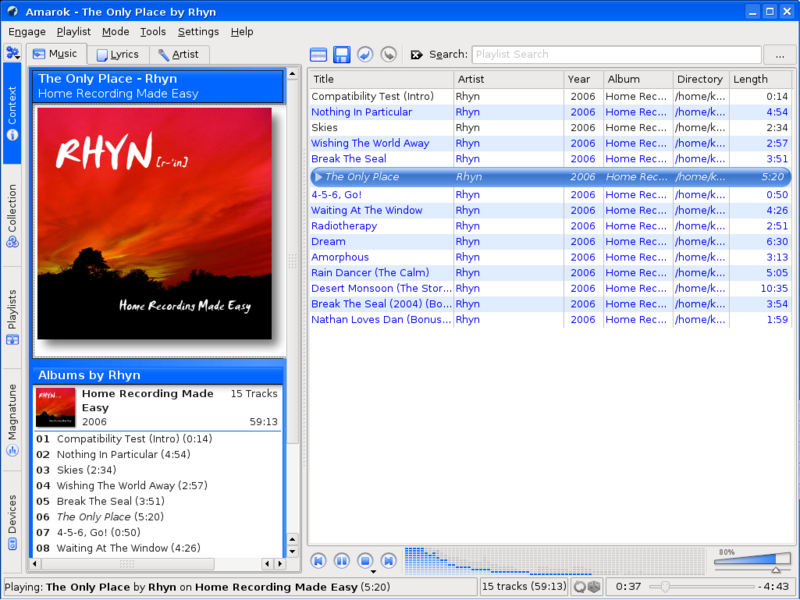
Compare Amarok 1.4: https://amarok.kde.org/files/amarok14/shot7.png
To Amarok 2.0 alpha 1: https://web.archive.org/web/20110820190636/http://blog.lydia...
It was so widely disappointing that the “Amarok 2.0 FAQ” had an entry for “IMO Amarok 2.0 looks terrible” even though that's not a question lol https://web.archive.org/web/20090208231357/http://amarok.kde...
Luckily the Clementine project came along to deliver a straight port of Amazon 1.4 from Qt3 to Qt4 which was all 99% of people really wanted.
*James Rolfe voice* What were they thinking‽‽
I have recently landed on Tauon which has a pretty particular UI that is pretty unlike most others, but after some getting used to worked well for me. Audacious is mostly fine as well, but at some point I did not want to use it anymore because it would just stop responding to MPRIS events too often
For remote playing I have been really enamoured with Navidrome (in combination with Symfonium) lately. It's not super pretty, but it really has the best organization of albums I have seen so far and I kinda just dont use it for local files, because I dont want to do everything in the browser...
Makes it easy to understand why there’s more players than can be counted but few worth using.
In Musium (https://docs.ruuda.nl/musium/) I also handle collaboration albums that have multiple album artists, based on Musicbrainz album artist id.
At the time, the developers claimed changing it to work as people would expect it to would break existing user workflows and so they wouldn't do it.
The name is just a piece of hacker lore from back in the day
Really? I noticed it's slower to start up but other than that it seems the same. I use it pretty regularly because foobar components handle formats the others can't.
Other than that, I'd say Audacious is the closest Linux analogue to foobar2000. My one big gripe was freezing up for a bit when a stream cuts out (blocking socket?) but they fixed that.
Apple Music on macOS broke album artist (click the artist column a few times) a few releases ago and you now have to resort it on every launch. Maddening. They then added an explicit “sort by album artist” column which… does not work.
And many of the few that get "Album Artist" won't respect tags that set the sort order for it either. If you are lucky, they will at least special case "The" so that "The Beatles" are under B, but they'll still put John Denver under "J".
The only one I know of that gets both of these right is cmus; I don't choose to use a terminal-based music player, I'm forced to.
What are the own goals you speak of?
(I'm writing this as a disapproving old geezer, just in case it wasn't clear.)
I organize my mp3s into folders by genre, then named by artist - title. To play one I double click it from the system file browser, and just want a tiny, og winamp style player to open and play that one song. Or multi select for an instant playlist.
These days I use musicbee which has extremely customizable views, so you can browse your music however you want. My wife tends to pick a specific album, whereas I tend to be in a specific music mood so I hunt around for tracks and make a two hour playlist for it. She'd be happy with folders probably but it would kill me not to be able to search for instruments and moods. How else are you going to get a trumpet and piano playlist? Remember every song name?
None of the OSS media players come even remotely close to the UX of Spotify, and that's speaking as someone who has paid way too much for Roon because it's at least 80% of the way there.
That's not to throw any shade on strawberry, it's also incredibly good, but foobar2000 will always have it's claws in me.
> Each platform’s native UI toolkit is employed to deliver the best experience
> GTK2, GTK3, ALSA and PulseAudio on Unix systems
If the author is here, please understand that there is no "native" UI toolkit for Linux or BSD. These platforms have several widely-used desktop environments, some of which use the Qt toolkit instead of Gtk.
For what it's worth, Qt is an excellent cross-platform toolkit, and does a far better job than Gtk at looking and feeling native across all the major desktop environments and operating systems. You might consider it instead of Gtk for future work.
You're wrong. When a library is native to some system, it does not mean that it is always shipped with the system. It means that it runs directly, without an interpretation layer in the runtime.
So GTK3 is native to Linux/Xorg. The desktop environment is irrelevant, and may not be based on GTK3.
To put it in practical context, apps built with Gtk generally stand out like sore thumbs on Qt-based desktops like KDE Plasma, both in the way they look and in the way their widgets respond to input. This rather undermines the app's claim "to deliver the best experience" with its choice of UI toolkit.
But if you like, go ahead and believe that I'm wrong instead of trying to understand.
And while it’s true that Qt fits into a GTK desktop better than the reverse, I still find myself preferring using apps written with the toolkit that matches the desktop in both cases.
enqueue is an arbitrary list so you can have a playlist, leave it in order and/but/then play a song multiple times in a row. everyone else it's a toggle so you enqueue a song and then enqueue again and it removes it; if you want to listen to a song multiple times before moving on you have to add it to the actual playlist multiple times and I do not want to do that.
literally the only important feature to me in a music player.
If you have any windows boxes around, WACUP (WinAmp Community Update Project) is a recent-build of winamp without the bullshit. And includes the Enqueue feature.
Might be useful for someone else though!
I also used to have mp3s but not anymore, with Spotify, SoundCloud, BandCamp or YouTube with UBO.
With individual files I can at least (in console for example) `cycle-values keep-open always`, which makes mpv not continue to the next file after finishing the current file, however, it doesn't work when a chapter of a .cue file has finished, thus continuing on.
It's not on the plugins list because I haven't bothered trying to get it there. I don't think that list existed when I wrote this. I approached the author about upstreaming it instead, thinking it would be a good compliment to the builtin Game_Music_Emu plugin for emulating various old video game and computer audio chips. They seemed a bit upset that people didn't want to maintain external plugins, but actually I didn't really mind doing so. Maybe I should look into getting it on that list some day.
Either way, if streamed video game music formats are up your alley and you like DeaDBeeF, then shameless plug: https://github.com/jchv/deadbeef-vgmstream
Very (very) longtime user, with just under 10K albums I can peruse. Took me a while to tweak everything in the UI to my tastes, but now I can't imagine using anything else to listen to streaming music.
And yes, I really do have that many albums. Most of them are LP's and CD's, the rest are from places like Bandcamp (https://bandcamp.com/jerhewet).
But there's something refreshing about seeing a tool that just gets more useful over time. Contrast that with closed-source software, whose features are driven by OKRs and might vanish if a new PM decides they aren't promotion-worthy or important to the next billion users.
I do wonder about hygiene and vision on such projects. On the one hand, seeing what happens when dozens of people over the decades have all written players for their own weird pet format is cool. On the other, I imagine a lot of that falls out of maintenance if the guy who wrote one looses interest, or if the project gets ported to a platform he doesn't care about.
I also expect that the Linuxisms of "everything is a setting" and "control density over visual appeal" are natural consequences if nobody is in charge of setting a vision.
a) The search could be a bit more fuzzy (search "ade" and you won't find "adé")
b) importing a directory takes ages; what takes me 5-7 minutes is done by Quod Libet in <10 seconds.
Otherwise, love it!
The way it supports alternative UIs by way of its plugin system is interesting too. It’s neat to have a native GTK UI under a GNOME desktop, native Qt UI under KDE, and native AppKit UI under macOS with the same program.
I still have Spotify but I mostly use Plexamp now and have pretty much phased out musikcube. I still have a musikcubed service container pushing a large playlist on repeat/shuffle to a FM transmitter though.
Also, last update was in December, not in 2023.
I mean, even yt gets that right in the browser. Why can't dedicated clients?