I think this is a shame, demonstrating more than a small amount of NIH. Yes, different platforms have different widgets and different design guidelines, so a cross-platform UI using greatest-common-denominator set of native widgets will never look quite native. But at least text boxes will work the way text boxes should work, with keyboard shortcuts, the special characters menu, IME, the works. That already puts you ahead of most cross-platform UI frameworks that aren't browser engines! Menus will work the way menus should work. HiDPI will work (failing to support that is less common these days, but it still happens). Text rendering will look native.
With custom rendering, you have to invest a mammoth amount of effort to even approach native platform behavior. Which means that most small UI libraries produce UIs that feel like toys, and even the big ones have an uncanny valley feel. With native controls, even with a relatively small library, you can make a UI that feels fundamentally _usable_.
While this project is immature, I hope it has a bright future. If it matures into a high-quality library, I would learn Zig for the sole purpose of using it. I'm also keeping my eye on libui and libui-ng, similar libraries which are written in C.
Maybe some of those variations are due to running the same Excel on different versions of Windows, and it conforming to what it thinks native looks like on each. It's hard to tell.
If I redo the experiment on my own Windows 10 machine, I see 7 different kinds of save-changes dialogs, from these 7 programs: VS 2013, Notepad++, Paint.NET, Photoshop CS6, TextPad, UltraEdit and WordPad.
Again, this isn't a perfect test because many of those programs are using non-native GUI frameworks. But my point is that as a Windows user, I can't tell what native is, because approximately every program looks different.
Custom UIs tend to be crufty; slow-ish, sluggish, they don't quite integrate with OS conventions (right-clicks, C&P, tab, overflow behaviour, scaling, rendering quality, window resizing behaviour and so on). If a custom UI is none of those things, and not really ugly, I don't think I mind. For example, I never played a computer game and thought, nice game but why are the buttons so custom?
I think the "native look" requirement got further diluted in the last decade with the rise of so many new platforms. A while back, it was mostly Windows; Linux was less popular, and frequently TUI anyway, Mac was perhaps more niche. Java GUIs were a thing and not very well-received. But then at least these "platforms" came on with different, high-quality, "custom" UIs: Android, iOS, Electron (it has its own custom feel to it), generally web apps, and so on.
So I'm desensitised to native "look", but not native "behaviour".
The greatest and latest in Windows land is WinUI 3 but none of your mentioned applications will probably ever use it because it's completely incompatible with their current user interface API.
OK, but as for "what is native" on Windows, I'd say it is still the Win32 controls because Win32 still underpins everything. Microsoft's problem is they painted themselves into a corner because Win32/GDI has inherently poor support for HiDPI and scaling.
So you shouldn't use the native controls.
It's illogical but partially explains why it's a mess.
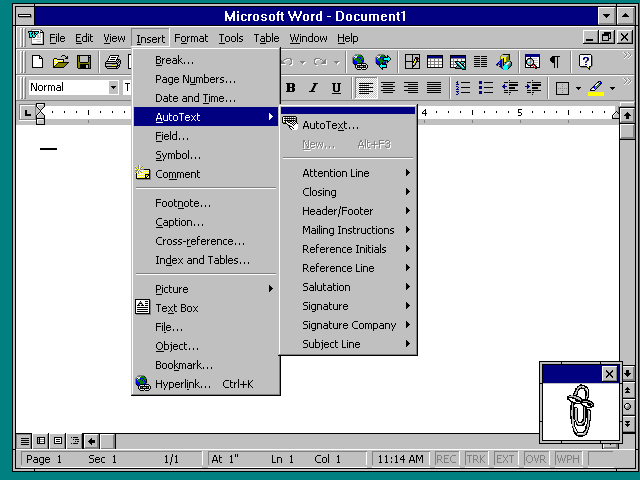
The Office apps have used their own controls for a long time. Check out Word 97 running on Windows NT 3.51 for example: http://toastytech.com/guis/nt351word.png / http://toastytech.com/guis/nt3513.html
This isn’t quite fair — as far as I can see, most of the dialogs use precisely the same GUI framework, running on different OS versions. It seems reasonable to expect the GUI style to have changed between one version and the next.
Of course, nothing is quite so simple: the exceptions to this are the very latest versions of Excel, which use some sort of weird hybrid UWP-esque dialog thingy. Is this ‘native’? It depends on how you use the word, but it definitely seems quite different to Win32 or WinForms-style dialogs.
But even so, I’d still argue that it’s wrong to call the word ‘native’ meaningless on Windows. There definitely exist some GUI libraries which are endorsed by Microsoft and have greater integration with the OS. As you note, it can be quite difficult for the user to tell by look alone which library is used for any particular application, but that doesn’t mean there are no benefits to using a native GUI — the integration with the OS is important. For instance, I use a custom keyboard layout; generally I find this works fine with native GUIs, but non-native ones don’t support it very well (with the notable exception of Qt). And that may be a somewhat niche example, but one can imagine many other preferences which non-native GUIs might not respect: accessibility, dark mode and border colours are three I can think of, and I’m sure there are more.
Everyone wants to have a fancy, nonstandard UI with more freedom and options.
It is still there.
I knew Flutter supports Linux, I used to check on its status every now and then and found that canonical had been collaborating with them; But didn't expected it to have come this far, Of course the credit goes to the developer.
It's not perfect, There are quirks like button presses hanging the app but I presume it's largely because the Linux smartphone community is small and there haven't been enough contribution in terms of issue reports, fixes.
There are a ton of reasons for a UI library to do their own controls and rendering instead of using the native, a big one being consistency across platforms and once you implement something on the UI, it is there on all platforms.
In addition, some platforms - specifically Linux and to a lesser extent macOS - have a very awful track record of backwards compatibility, at least as far as "out of the box" setups are concerned (sure you can install, e.g., Gtk 1.2 on a modern Linux, but aside from Slackware no distro has that available out of the box - not to mention that even where it is available it still lacks a ton of features introduced in later yet backwards incompatible versions). So while it might be more work now to implement something, it saves you a ton of work later when inevitably someone will break something you rely on and you'll have to fix it on your side.
Here is an example from my own experience working with and a bit of working on a library that does expose the "native" controls (LCL, the framework of Lazarus[0]): a couple of years ago or so i implemented MDI support for Win32 (the API was there for years, just never implemented). Spent some time reworking things and refactoring them on both the system agnostic and system specific parts and after a review it was merged. Yesterday i wanted to make a small tool where i thought MDI would fit, however nowadays i'm on Linux as my main OS. Gtk (specifically Gtk2 but in that case it doesn't matter) doesn't have any MDI support at all so of course that wouldn't work there, but fortunately LCL also has Qt backends and Qt does have MDI support - so i changed the LCL backend to Qt5 just for that tool, tried the MDI tool and... MDI for Qt5 support was very buggy. Things that i know worked on the Win32 backend (because i implemented) wouldn't work on the Qt backend.
So now what? Well, i don't feel like fixing the Qt5 backend's MDI support (at least not anytime soon) but Qt itself does support MDI just fine. And thus i made the tool using C++ and Qt6 instead (i had Qt6 Creator installed and decided to go with that since i already had it available).
And of course the tool would work fine under Win32 and probably macOS too because Qt does implement and render its own controls.
Note that this is just one example from my very recent experience. Also it isn't specific to LCL, i had similar experiences with wxWidgets -which also does similar wrapping- at the past.
That is not to say that there are no positives to having native controls, but in my experience the only platform where that works reliably and with little fuss in the long term is Win32, everything else is a PITA, even if you decide to be as conservative as you can (e.g. LCL has its own DPI scaling support but HiDPI scaling in LCL with the Gtk2 backend under KDE/Wayland doesn't work because it seems to lie to the X clients about DPI - it does work fine under KDE/X11 however).
Right now its future is as certain as UWP.
Still plenty of catch up with Win32 to do, when adding up all issues across WinUI, WinAppSDK, CsWinRT, C++/WinRT and new kid in town, Rust/WinRT.
Assuming they don't reboot the whole teams yet again by next BUILD.
> Note: As there's no "official" GUI library for Linux, GTK 3 has been chosen as it is the one that works and can be configured on the most distros. It's also the reason Libadwaita won't be adopted, as it's meant for GNOME and GNOME only by disallowing styling and integration with other DEs.
The never ending unsolvable problems, in-fighting and conflicts that keep plaguing the Linux Desktop has now spread onto aspiring cross-platform GUI libraries to make a compromise to avoid certain integration(s) with other libraries that will limit future functionality if someone decides to use it.
This is a solved issue for macOS and Windows, but never Desktop Linux which is a terrible shame for more than 20+ years.
But they instead decided to break the API with Gtk3, repeating the Gtk1 to Gtk2 transition mistake (which at the time it wasn't that big of a deal since Gtk1.x was never as popular or widespread as Gtk2). And just as some projects finally managed to convert their Gtk2 code to Gtk3 code, sometimes after years of work, the Gtk developers awarded them for their effort by breaking the API again in Gtk4.
IMO at this point relying on anything Gtk4 is a mistake, though sadly there aren't many alternatives. Qt, being essentially a commercial middleware that also happens to have OSS-licensed code drops, has different priorities - and even if they wanted, being written in C++ which has no real stable ABI means they wouldn't be able to provide stable APIs anyway.
Other toolkits are asphyxiated by the oxygen that Gtk and Qt are siphoning away so they barely get any support. EFL seemed to be ok (in that it was a sort of usable, sort of existing, C-based API that is apparently good enough for a desktop environment to be made with) but the author seems to have decided at some point to refactor (and thus break) the entire thing. Motif has been stable since the 90s, but it also has seen little improvement since the 90s either - it is also too tied to X11, meaning that having a crossplatform version (which is something that people would want) is quite hard.
And thus we get Electron, which is almost a step before bundling an entire VM and OS inside a window.
For .NET based ones, WPF or if feeling adventurous since it is still in preview MAUI (which uses WinUI 3.0 + WinAppSDK on Windows).
WinAppSDK is the new name for Project Reunion.
UWP is supposed to be deprecated and on the way out, but given the slowness of WinUI 3.0 improvements, apparently even Microsoft teams are still using it, e.g. the new Windows 11 appstore.
For those using C++, on the MS GUI stack, as rediculous as it might seem, MFC is still the best they can do.
There was a short while where C++/CX seemed to be Microsoft catching up with C++ Builder in regards to RAD tooling for C++ developers on Windows, but C++/WinRT mutiny killed that dream.
So all things considered, Win32/MFC for C++ devs, Win32/WPF for .NET ones, unless feeling adventurous and not afraid of code rewrites.
My only issue is with using literal pixels. With screens that have 3x-4x difference in DPI in wide use, it's easy to shoot oneself in the foot and make a GUI that looks indiscernible on a retina screen, or colossal on a low-end laptop screen.
I hope this will be addressed in a future version (and that there'll be more future versions! and wide adoption!)
Not anymore in browsers with content process isolation (which is essentially all of them). Native controls have to be imitated.
All a browser needs to do to render native controls securely is to render them as opaque to the JS/DOM runtime. This has even been formalized as “shadow DOM”. At least so far as I’m aware, Safari still renders native controls by default. Other browsers vary in their use of native controls but that’s been the case for decades.
If only there was a way to interface to these using some declarative minimal and highly opinionated programming language and paradigm...
There is a Janet binding for it but it looks abandoned.
When designing something like Capy, it would seem like a very good idea to start with something well designed for another language, think about how to support a different programming language, and make whatever changes seem joyful to you, as a developer. I am not suggesting cargo culting, rather appreciate and be inspired by people,solving the same problems.