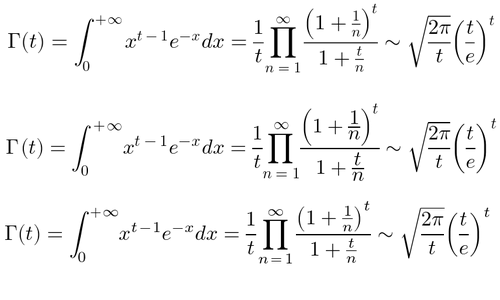
To make it relatively fast, the TeX engine gets snapshotted and shipped to the browser with much of TeXlive already loaded. So even things like TikZ work reasonably well. There is of course a lot more to do! The plan is to convert ximera.osu.edu to this new backend by the fall.
Kinda misses the point of the blog post. The idea is to do that server side, preferably only once.
I'm a wasm neophyte -- even the set up seems complex to me. Do you have any recommendations for where to dive in?
Have you verified that this will not be an accessibility regression for blind users?
And no, MathML is irrelevant: you don't care about MathML, and your users don't care about MathML: all you care about is that users can read your formulae, and all your users care about is that they see decent-looking maths. As much as I like the idea of MathML, there is simply no reason to ever use it. Nothing is mining the web for maths, and semantic markup for maths buys you nothing.
You have a build system (because your content is generated from markdown or the like. No one who wants to deploy a real site writes pure HTML in 2021), make that generate SVG images by literally just running LaTeX during your build, to replace all your maths with SVG <img> code instead. Because why would you even bother with MathJax or KaTeX, they put the burden on your users, which is ridiculous: you're building your content already, just build static content for your formulae)
And sure, does your site have maybe 10 formulae? By all means, use MathJax or KaTeX. But if it relies on maths, generate your graphics offline using actual LaTeX (and this is trivial using github actions[3]) and use <img> elements that point to those SVG images.
(I run my maths through xelatex, then losslessly convert the resulting PDF to SVG by first cropping the PDF, then running pdf2svg[2]. Is that a lot of work? No, it is not. It's a one-time setup and it simply runs whenever content gets updated. It's about as no-effort as it gets)
[1] https://pomax.github.io/bezierinfo
[2] https://github.com/Pomax/BezierInfo-2/blob/master/src/build/...
[3] https://github.com/Pomax/BezierInfo-2/blob/master/.github/wo...
I find that rather unfortunate. A math search engine that find sites with equivalent formulae (or segments) would be quite useful to me.
Of course, that can probably made to work with image alt tags containing latex code.
Because in reality, based on my experience at least, no one actually needs that. Folks can copy a formula that they got from an image into wolfram alpha just fine. And the folks who can't don't actually benefit from MathML: they benefit from the JS Selection and Range functions, when site owners take the time to make sure that text-selection of a formula image leads to a LaTeX formula being put in the clipboard, instead.
"That's way more work" but since we're all using build systems anyway: no it's not. Write once, thousands if not hundreds of thousands of users benefit. The end.
One issue I’ve run into is that it’s not always that easy to get the style of the SVG images right, especially when it comes to sizing & placement. Did you find a good way to e.g. ensure that inline equations have the correct baseline alignment? Or a good method to ensure that equation sizes always match the font size of the paragraph they’re in?
One drawback to this approach is that SVG equations have a fixed layout, so e.g. they can't automatically line-wrap. Most of the equations on your Bézier page are pretty short, but I notice that you have elected to manually wrap them in some spots when they get too long, or in other cases just let them spill off to the side. This is most apparent with a narrow viewport (e.g. a phone), but you can also see this by using the responsive design mode on a desktop browser or even simply resizing the viewport. The longer equations get cut off on the right side and you have to scroll horizontally to see the whole thing, which isn't ideal. One of the benefits HTML is supposed to have over just, say, a PDF is the ability for the same document to reflow to different viewports.
The Bézier page illustrates another common issue with SVG images of equations: they have a lot of text in them, but none of it is searchable text. That means no Ctrl-F and no search engine indexing of that text. This is fixable via SVG, though, since SVG images can provide a searchable text layer. (I don't mean to single out your website, by the way, this is an issue with math all over the web. Also, selectable text is a longstanding bug in Cairo[0], which pdf2svg relies on to generate SVGs, so it's not an easy fix on your end anyway.)
> there is simply no reason to ever use it. Nothing is mining the web for maths, and semantic markup for maths buys you nothing.
MathML supports automatic linebreaking of equations. SVG doesn't. That's one simple reason to use MathML. I'm not sure whether this fits your definition of "semantic markup" or not, but it is useful. Linebreaking even has its own section in the MathML spec.[1]
It's also not true that nothing is mining the web for MathML. SearchOnMath[2], for example, indexes pages from the NIST DLMF[3], which uses MathML extensively.
[0] https://bugs.freedesktop.org/show_bug.cgi?id=38516
[1] https://www.w3.org/Math/draft-spec/chapter3.html#presm.lineb...
Rendering equations client-side doesn't seem absurd to me. All of HTML and CSS and SVG is rendered client-side, why shouldn't equations be too?
I'm completely unclear why the author thinks equations specifically should be rendered server-side. Do they think HTML pages should be delivered as prerendered images or SVG's too...? Because it seems like the philosophy would apply the same way.
“Client-side rendering” means that what is served contains something not in the eventual form you desire to present it, and that it depends on some client-side scripting to convert it into the desired form. When the page loads, it will first show perhaps nothing or perhaps something like $e^{-\frac{x}{2}}$, and then the scripting will kick in and replace that with the proper HTML/CSS/SVG/whatever markup for the equation that the browser knows how to display.
“Server-side rendering” means that you do this translation from $e^{-\frac{x}{2}}$ to the desired HTML/CSS/SVG/whatever that the browser knows how to display, on the server, so that the browser can immediately display what it receives. Ideally this translation is also only done once, rather than on every request.
It's better to do it on the client because it's generally better to send less information over the wire, as well as send information in its most unprocessed form.
This applies, for example, to charts as well -- far better to send the raw data series values to the client and render it on the client-side with a charting library.
Both of these cases have the huge advantage that if you want to use the equation or data yourself, you can just "view source" or "inspect" and grab the equation or data directly to copy.
I don't think we need to be too concerned about the fact there's a slight delay in rendering equations. People are pretty used to browsers loading everything gradually, whether waiting for images to be the last thing to appear, or even lazy loading of images. There's nothing wrong with that.
I definitely agree that is crummy for pages to display the markup first, then swap it out with rendered content later. Does anyone know why common libraries do it this way? Web development isn't my strong point, but I thought it was pretty easy to make the browser run some javascript before it renders the page.
The correct fix is to have MathML natively on all browsers (no JS)--and Igalia is working on that: https://mathml.igalia.com/faq/
https://www.cnet.com/news/google-subtracts-mathml-from-chrom...
A developer who worked on it, David Barton, had this to say in 2015:
> I volunteered for a year and got MathML working in Chrome 24, but Google turned it off in Chrome 25 because I couldn't afford to keep maintaining it for free. (Yes, grumble. Donate your nickels to Google.) There was a security bug, but Google had a fix, which has since been landed in WebKit and the Safari browser, for instance. No one on the Chrome/Blink team cared about MathML, so they preferred removing it to maintaining it. They tell people that a library like MathJax is good enough, but it isn't without native browser support for MathML - it's too slow for many use cases, it doesn't integrate well enough with CSS, etc. (the MathJax team agrees with all this). Presumably as digital textbooks gain in popularity, Google will rethink their position, or schools will have to use a different browser than Chrome (Firefox and Safari would both work). In the meantime, Google has no one working on MathML in Chrome at all, even part-time. Go figure. (And no, I would not work on it again.)
https://www.quora.com/Why-did-Chrome-drop-MathML-support?sha...
There's also a chromium bug report from 2009:
https://bugs.chromium.org/p/chromium/issues/detail?id=6606
and a WebKit bug from 2005:
1- You either use a JS library (MAthJax) 2- Use PNGs or vector graphics (there are tools for that) 3- Use MthML which only works well in Firefox.
Clearly fixing the issue in #3 brings the most benefits.
There are textural representations though which can be copied. They just look ugly.
Just out of curiosity, why would you want to copy/paste an equation into the Google search bar? Can it solve it?
i.e. this worked in the Google search bar "solve 1x^2 - 2x - 3 = 0" this didn't "Integrate e^x from 0 to 1"
Wolfram Alpha did a pretty decent job with the same text string. https://www.wolframalpha.com/input/?i=Integrate+e%5Ex+from+0...
Looks like you have to go Pro to see the steps though, which is fair enough.
On the flip side, I have reverted some of my server-side rendering of mathematics back to client-side rendering, because of considerations like webpage size. On mathematics-heavy pages, I found that pages that would otherwise be about 50KB in size got inflated up to about 1MB after server-side rendering all of the mathematics. After compression the difference was more like 70K, but this difference is the entire size of the (compressed) KaTeX library. I think it is completely reasonable to only transmit LaTeX markup over the wire, and have a client-side library take care of the presentation (as we do for HTML, SVG, ...).
I've also investigated MathML, but cross-browser support is terrible and has been for years. You also still get the size explosion problem, because LaTeX markup is just so much more compact than whatever MathML soup is equivalent.
[1]: https://katex.org/
Maybe the answer is:
Write maths notation on your site with MathML. (You'd probably want to preprocess LaTeX notation into MathML some way, because MathML isn't fun to write by hand in the same way that septic tanks aren't fun to unblock by hand.) This will be displayed natively in Safari/Firefox, and be accessible to screen readers (apparently.. I don't use one so don't know what it's like in practice).
Serve MathJax to Chrome users so they can see your maths.
?
I personally solved that problem by stuffing the equation into a separate vue component and putting the katex compilation into the render function. Indeed, a dedicated equation HTML tag supporting latex (with what packages though?) would be nice. Getting the equation numbering to work nicely in an automatic fashion was a bit annoying though. I appreciate your comment on the page size, since I was considering moving to server side rendering via nuxt and hadn't made this consideration.
MathJax does not support this because, IIRC, it runs layout calculations in the browser whereas KaTeX passes it off to CSS.
If your argument is then that layout calculations should _also_ happen on the server then... I'm not sold and that would be a critique of web browsers and not math rendering.
I think that’s a neat idea in general.
When I make little toy games for the web the part I hate the most is the boilerplate for ensuring every browser, mobile and desktop, gets a viewport of the same ratio. Would be neat to be able to say “give me a 16x9 viewport, and scale everything inside of it depending on how large that ends up actually being on the screen so that the same amount of content is seen by every user.”
That being said I wouldn't hold my breath it'll ship this year either since there is still some work in LayoutNG to be completed at minimum but maybe 2022 we'll all be amazed it finally happened.
Every page involves the browser doing rendering work. HTML is neither fish nor fowl; it's not particularly easy to write by hand, but it's not particularly easy for the browser to parse either. I'm not convinced there are any good use cases for it, and certainly not for CSS.
If partial prerendering on the server-side meaningfully speeds up your site for end users then by all means do it. But I would follow "make it work, then make it work right, then make it work fast". Dropping in a single tag to do client-side rendering is more than enough for the 90% case.
> Every page involves the browser doing rendering work.
Well yeah, but HTML, CSS and JavaScript are different beasts.
The browser can optimise HTML and CSS in various fascinating ways to provide a smooth experience and cope with loading problems in generally-useful ways; your site, if the JavaScript execution was effectively done in advance, would load faster, and skip at least the first three forms, going straight to fully-rendered-except-for-the-header or fully-rendered, depending on how quickly Raleway arrives. Subsequent page loads would go straight to the correct rendering.
JavaScript, on the other hand, is the most likely to not work, perhaps because it was disabled (including most spiders—client-side rendering is still decidedly bad for SEO, even if Google specifically has mitigated most of that for Google search inclusion), perhaps because it failed to load due to network conditions, perhaps because the browser is old or some such thing. Depending on JavaScript does make a site much less reliable. Sometimes that’s warranted, but I don’t think it is on regular content websites, ever.
By using JavaScript in the way you have done, you’ve guaranteed that it will render badly to begin with, that stylesheet loading will not be done smoothly, and that the site is less reliable and accessible. It’s… probably not a big deal, I begrudgingly acknowledge, but it does matter. It may still be faster than most news sites, but you hardly set a high bar there.
Sure it would be nice of browsers could render the LaTeX natively instead of using JS.
I'm not a mathematician but what's the problem with client side rendering - I just about only write equations in jupyter notebooks, the syntax isn't great but it seems to work perfectly and scales to the resolution required. Math rendering is far from the most complex thing being rendered on the front end.
https://jupyter-notebook.readthedocs.io/en/stable/examples/N...
I use this on https://vcvrack.com/manual/DSP to parse $inline$ and $$block$$ TeX into MathML with a couple lines of server-side code (simplified for readability):
    html = require('markdown-it')({html: true, linkify: true, typographer: true})
        .use(require('markdown-it-texmath'), {engine: 'katex', delimiters: 'dollars'})
.render(body)I'm very interested in the notion of using HTML and CSS rendering though! Many thanks to the author for pointing out this functionality.
[1]: https://github.com/qubyte/qubyte-codes/blob/main/lib/render.... [2]: https://qubyte.codes/blog/advent-of-code-2017-day-20-task-2
It would be great if we could have both natively in the browser, and maybe support for math equations as a system level feature of editors everywhere. But the vomiting-green face-woman emoji gets more money than math equations these days
I recently used KaTeX for server-side equation rendering with node. I think people tend to just use mathjax because it’s the more popular solution for web-based equations, but after spending a week trying to render server-side with mathjax and failing, I used KaTeX and haven’t looked back.
Uhh, this happens for anything your browser displays, so why should math be the exception?
> Images are impossible to use with copy/paste
You can select and copy text in an SVG[0]
> Images are not nearly as responsive, and are difficult to style. Line breaking, fonts, and even colors are difficult to change when using images
This is partially true, but it's not difficult to inherit your page's text colour for SVGs.
> Images are completely opaque to users in need of screen readers
Not true of SVG's with text - and in fact SVGs can have alt text which could in some cases by much more accessible to screen reader users that the raw equations[1].