Like others have mentioned here, the Sculpt suffers from other issues apart from being wireless:
My biggest issue is the small, poorly constructed F-keys. Switching to regular sized keys on the Microsoft Surface Ergonomic shows how bad they actually are.
Anyway, is there a way we could get Microsoft to build a Sculpt v2 which fixes the shortcomings of the original one?! I still think it's one of the best ergonomic keyboards, even with issues it has.
I'm still using it, and the mod I dream about is inserting my kensington trackball into the gap in the middle .. it's the perfect position for it!
If you type quickly, it can lose the case of the characters in combination with the shift key.
Hold down the left shift and type CSMSDC. One of them will be lowercase (from memory it's the S). If it doesn't happen for you, either it's not a Sculpt, or you don't type fast enough. Once you can do it it'll happen every time.
Interestingly, I tried it on my modded keyboard and it works properly. :) QMK must correctly handle the lack of NKRO diodes on the matrix.
I have a Sculpt keyboard as well, and the way to fix this is just to move the wireless USB stick that's in your computer closer to your keyboard. I have mine at about a 40cm distance. If I place it over 100cm away I start getting sporadic connectivity issues, which result in delayed or dropped input. It also gets worse if you have a lot of things in the way between your USB stick and keyboard/mouse (duh). For example, if you place the stick at the back of your PC, and below your desk, the signal has a harder time going through the chassis and desk to reach your keyboard/mouse.
The article author actually tried that already: "I’d gone as far as mounting the wireless transceiver directly under my keyboard, on the underside of my desk, and keys were still dropped." - which presumably means the receiver was an inch or two from the keyboard.
This is exactly the reason I'm a wireless hater: every single problem produces the same symptoms. Keyboard battery getting low but hasn't quite failed yet? Dropped keypresses. Keyboard receiver too far from the keyboard? Dropped keypresses. Keyboard receiver getting conducted interference over the USB power rail? Dropped keypresses. Keyboard receiver too close to wifi antenna? Dropped keypresses. Keyboard receiver getting interference from the neighbours' wifi? Dropped keypresses. RF reflective surfaces nearby create nulls? Dropped keypresses.
(This is from a Macbook with USB 3 hub, so that might be the actual culprit.)
I even saw a power-plug > AA battery adapter on YouTube yesterday they could use if they really wanted to make it fully wired.
Due to my (unchangeable) desk situation, wired keyboards aren't really a possibility, so this is a real gap in the market for me and I was quite surprised, given the extreme multitude of keyboard models in the world, that I wasn't able to find one (or even have one custom built within a reasonable price range) that ticked all the boxes.
Unfortunately, my electronics talent is by far not good enough to attempt something like the linked article (but in reverse, as it were).
e.g. Redox-W which falba.tech (Poland) will provide assembled if you need that [3]. It's not cheap though.
For a DIY method, start at [4] or [5].
[1] https://aposymbiont.github.io/split-keyboards/
[2] https://news.ycombinator.com/item?id=26179311
[3] https://falba.tech/19644-2/
[4] https://www.reddit.com/r/ErgoMechKeyboards/comments/ht0pb6/c...
Mine broke recently (a key cap fell off and I thought I could just shove it back on which ended up breaking some plastic bit) and I looked into alternatives but there isn’t much competition for split layout unless you spend a lot more on one of the custom build ones (extra expensive in the U.K. as they all ship from the US). I needed one right away so I just bought another, it’ll be my third in about 7 years.
The USB interference thing does suck, I have mine on a separate USB 2 hub plugged into my USB 3 hub some distance apart and it works fine like that. One other thing to be aware of is that if you lose or break the little USB dongle the keyboard becomes useless as they are paired in the factory (unless you do this mod I guess, heh!)
If a wired one were to exist, it would be pretty snazzy if it had a built-in USB hub like the Das Keyboard so you could stick 2FA dongles in it. Or if someone made a mousing accessory to snap in to the central gap; maybe a wiggle stick or itty-bitty touchpad.
https://www.microsoft.com/en-us/p/microsoft-ergonomic-keyboa...
I only wish they'd make a version without the numpad. I don't use it and it moves my trackball (too) far away.
But when I accidentally wrecked the receiver, here's what I found:
* MS doesn't offer replacement receivers
* Each keyboard is paired to its specific receiver so you can't even buy an off-the-shelf replacement
* MS make it extremely hard to reach a person to speak to
* Their website practically doesn't have support for this keyboard
My Sculpt is now a useless piece of plastic.
Have you considered making it wired?
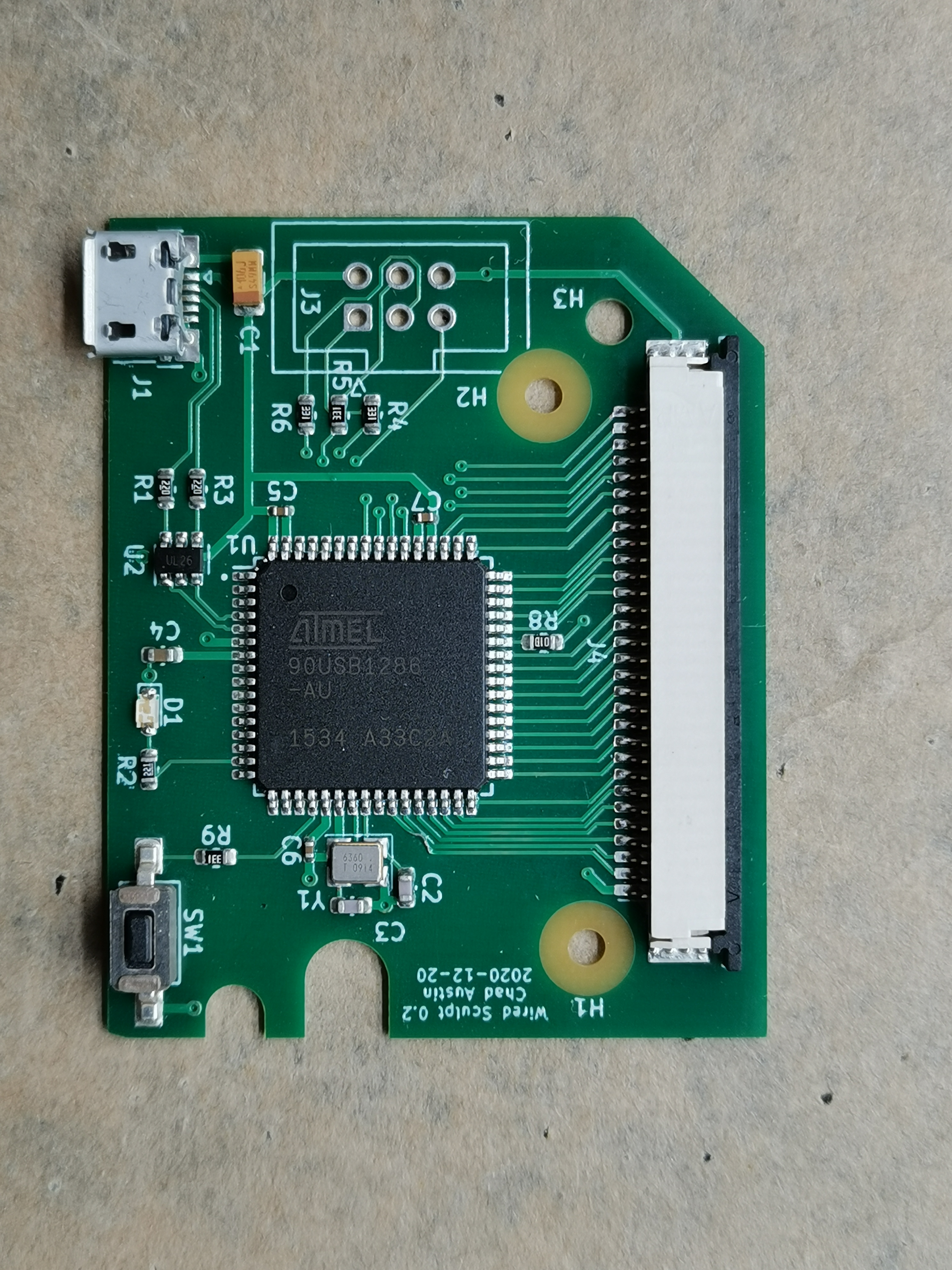
USB allows for 10uF of capacitance, and you don't seem to have an LDO on your board, so you don't need a minimum amount of ESR to maintain stability. I don't think there's any reason you can't just replace the tantalum with a ceramic?
> https://chadaustin.me/images/sculpt/pcbway-top.jpeg
This is shockingly bad. I was thinking of using PCBWay to assemble a run of a dozen or so PCBs, because JLCPCB is limited on solder mask color and part selection, but this has pretty firmly turned me away from that.
A tip: the images are way too heavy for the 600w you gave them. They range from 2 to 7MB. You can probably get them down to like 50KB each!
I haven't had any issues with the laptop going to sleep when it's told with this setting enabled, and afaik battery life is unaffected (still haven't changed batteries in the keyboard after 3 years).
Regardless, I'll still be checking out this mod. I didn't even know this keyboard had LEDs in it.
Suggestions for Microsoft product developers if they ever read this or care:
1. Fn keys have got to be like the rest of the keys. Like other users here, I get F5 (which I use to run code in Visual Studio) stuck probably greater than 50% of the time.
2. Separate Fn key, or separate media keys. The switch is stupid, and I never use the non-Fn functions.
3. Take the calculator key off the main keyboard; it's a duplicate of the key on the numpad, where it is actually useful.
4. I'm ok with the backspace key on the numpad, but the top 3 keys should be regular keys, not microswitches.
5. Better power management and wake-from-sleep. This thing should never be dropping keystrokes. Ever. I'd trade battery life for this feature.
6. Make wired optional! Almost everything has a charger these days...why am I given alkaline batteries for this? This also potentially opens up the gamer market, given the latency reduction shown in this article.
Coupling of dongle with keyboard and mouse is another design issue that deserves changing the entire team - if dongle goes out (and I have 2 that did) you can basically throw away working mouse and keyboard. WTF man ?! Its enough that your laptop goes hot for a month or so to make dongle unusable by melting its electronics.
I have 3 sculpt keyboards and never had one go to sleep on different Windows 10 systems over 2 years ?
One other thing that goes to my nerve is how hand pads look unclean after only month or two of usage, I am basically ashamed when people look at it. Its not possible to keep it clean.
Otherwise, awesome keyboard :)
But what happens after programming, when you unplug the keyboard and plug it back in? Since HWB is still pulled low, doesn't the MCU go back into the DFU bootloader instead of running the application? How does the keyboard run the actual application firmware rather than the bootloader?
As for the mouse that comes with it, I went through 3 of them (left button started to randomly not click, about once every 3 clicks which drove me crazy) and then just gave up.
Keyboard itself could be said that I damanged as I tried to remove key to clean crumb that got inside and I could never get it back.
Improving on latency, even a bit, is surprisingly noticeable and enjoyable.