One consequence of using a moving average is that if the CPU has been idle for a long time then starts running a high power workload instantaneous power consumption can momentarily exceed the TDP while the average catches up. This is often misleadingly referred to as "turbo mode" by hardware review sites. It's not a mode, there's no state machine at work here, it's just a natural result of using a moving average. The use of EWMA is meant to model the heat capacity of the cooling solution. When the CPU has been idle for a while and the heatsink is cool, the CPU can afford to use more power while the heatsink warms up.
Another factor which confuses things is motherboard firmware disabling power limits without the user's knowledge. Motherboards marketed to enthusiasts often do this to make the boards look better in review benchmarks. This is where a lot of the "Intel is lying" comes from, but it's really the motherboard manufacturers being underhanded.
The situation on the AMD side is of course a bit different. AMD's power and frequency scaling is both more complex and much less documented than Intel's so it's hard to say exactly what the CPU is doing. What is known is that none of the actual power limits programmed into the CPU align with the TDP listed in the spec. In practice the steady state power consumption of AMD CPUs under load is typically about 1.35x the TDP.
Unlike Intel, firmware for AMD motherboards does not mess with the CPU's power limit settings unless the user does so explicitly. Presumably this is because AMD's CPU warranty is voided by changing those settings, while Intel's is not.
https://www.intel.com/content/www/us/en/architecture-and-tec...
And on the flip side, if you're building a desktop PC with a more high-end Intel processor, you will usually have to change a lot of motherboard firmware settings to get the behavior to resemble Intel's own recommendations that their TDP numbers are supposedly based on. Without those changes, lots of consumer retail motherboards default to having most or all of the power limits effectively disabled. So out of the box, a "65W" i7-10700 and a "125W" i7-10700K will both hit 190-200W when all 8 cores/16 threads are loaded.
If a metric can in practice be off by a factor of three in either direction, it's really quite useless and should not be quantified with a scientific unit like Watts.
May be we should use a new term for it, something like iTDP.
If they gave it some other name, it would be only misleading. Calling it TDP is a lie.
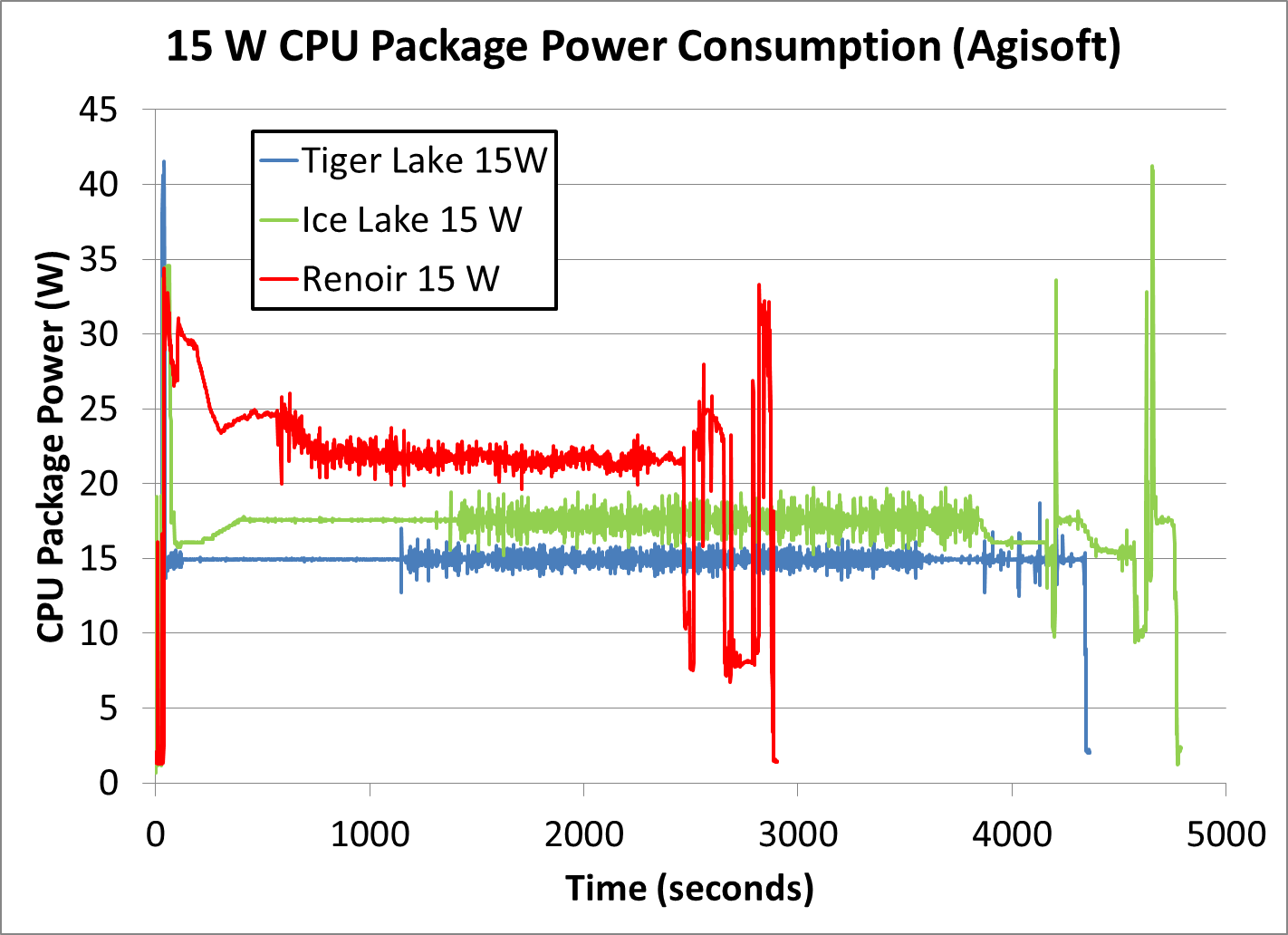
Intel mobile processors actually obey TDP better than AMD processors do - Tiger Lake has a hard limit, when you configure a 15W TDP then it really is 15W steady-state once boost expires, while AMD mobile products will pull up to 50% more than configured in steady-state operation. (the gap is larger than desktop)
https://images.anandtech.com/doci/16084/Power%20-%2015W%20Co...
"the brands measure it differently" is sort of theoretically true but not in the sense people think, and in practice it is not true.
On AMD it is literally just a number they pick that goes into the boost algorithm. Robert Hallock did some dumb handwavy shit about how it's measured with some delta-t above ambient with a reference cooler but the fact is that the chip itself basically determines how high it'll boost based on the number they configure, so that is a self-fulfilling prophecy, the delta-t above ambient is dependent on the number they configure the chip to run at.
In practice: what's the difference between a 3600 and a 3600X? One is configured with a TDP of 65W and one is configured with a TDP of 95W, the latter lets you boost higher and therefore it clocks higher. Configure them both to a 65W PPT limit and they will boost to pretty much the same place.
Intel nominally states that it's measured as a worst-case load at base clocks, something like Prime95 that absolutely nukes the processor (and even then many processors do not actually hit it). But really it is also just a number that they pick. The number has shifted over time, previously they used to undershoot a lot, now they tend to match the official TDP. It's not an actual measurement, it's just a "power category" that they classify the processors as, it's informed by real numbers but it's ultimately a human decision which tier they put them in.
So in practice, for both brands, it is just a number they pick. They have different theoretical methods for getting there but ultimately the marketing department looks at where the clocks would put them and pick a power number that they think represents that. It is not, in practice, a pure measurement from either brand, it is just a "category" they use.
Real-world you will always boost above base clocks on both brands at stock TDP, at least on real-world loads. You won't hit full boost on either brand without exceeding TDP, the "AMD measures at full boost" is categorically false despite the fact that it's commonly repeated. AMD PPT lets them boost above the official TDP for an unlimited period of time, they cannot run full boost when limited to official TDP.
Why does it matter? It doesn't idle that high; it only goes that high of you're using it flat out, in which case the extra power usage is justified because it's giving that much more performance over a 100 W TDP CPU. Now I totally get it if you don't want to go Threadripper just for ECC because it's more expensive, but max power draw, which you don't even have to use? I've never seen anyone shop a desktop CPU by TDP, rather than by performance and price.
Oh oh, me! Back in the day I bought a 65W CPU for a system that could handle a 90W. I wanted quiet and figured that would keep fan noise down at a modest performance penalty. It should also last longer, being the same design but running cooler. I ran that from 2005 until a few years ago (it still run fine but is in storage).
Planning to continue this strategy. I suspect it's common among SFF enthusiasts.
IMO, shopping by performance/watt makes sense. Shopping by TDP doesn't. (Especially since there is no comparing the AMD and Intel TDP numbers as they're defined differently; neither is the maximum the processor can draw, and Intel significantly exceeds the specified TDP on normal workloads).
My passive-cooled desktop is also running a slightly trottled down 65W CPU.
So yes, there are people who choose there hardware by TDP.
Get a huge cooler like Noctua d14, and you pc becomes silent. It lasts forever, requires no maintenance, a good investment.
If you are adventurous, watercooling is even better, but its a can of worms I decided I'd rather live without - possibility of leaks and cost make it harder to justify
That's me. When I start to plan for a new system, I select the processor first and read its thermal design guidelines (Intel used to have nice load vs. max temp graphs in their docs) and select every component around it for sustained max load.
This results in a more silent system for idle and peace of mind for loading it for extended duration.
You can passively cool threadrippers if you underclock them enough and have good ventilation in case.
What specific configurations (CPU, MB, RAM) are known to work?
Let's say I have a Ryzen system, how can I check if ECC really works? Like, can I see how many bit flips got corrected in, say, last 24h?
You must check the specifications of the motherboard to see if ECC memory is supported.
As a rule, all ASRock MBs support ECC and also some ASUS MBs support ECC, e.g. all ASUS workstation motherboards.
I have no experience with Windows and Ryzen, but I assume that ECC should work also there.
With Linux, you must use a kernel with all the relevant EDAC options enabled, including CONFIG_EDAC_AMD64.
For the new Zen 3 CPUs, i.e. Ryzen 5xxx, you must use a kernel 5.10 or later, for ECC support.
On Linux, there are various programs, e.g. edac-utils, to monitor the ECC errors.
To be more certain that the ECC error reporting really works, the easiest way is to change the BIOS settings to overclock the memory, until memory errors appear.
Looking back at my notes, the output of journalctl -b tells should say something like, "Node 0: DRAM ECC enabled."
Then 'edac-ctl --status' should tell you that drivers are loaded.
Then you run 'edac-util -v' to report on what it has seen,
    mc0: 0 Uncorrected Errors with no DIMM info
    mc0: 0 Corrected Errors with no DIMM info
    mc0: csrow2: 0 Uncorrected Errors
    mc0: csrow2: mc#0csrow#2channel#0: 0 Corrected Errors
    mc0: csrow2: mc#0csrow#2channel#1: 0 Corrected Errors
    mc0: csrow3: 0 Uncorrected Errors
    mc0: csrow3: mc#0csrow#3channel#0: 0 Corrected Errors
    mc0: csrow3: mc#0csrow#3channel#1: 0 Corrected Errors
edac-util: No errors to report.They aren't tested on it, so it's possible to get a dud, but it's minuscule chance that isn't worth bothering.
Now, to actual issues you can encounter: motherboards
The problem is that ECC means you need to have, iirc, 8 more data lines between CPU and memory module, which of course mean more physical connections (don't remember how many right now). Those also need to be properly done and tested, and you might encounter a motherboard where it wasn't done. Not sure how common, unfortunately.
Another issue is motherboard firmware. Even though AMD supplies the memory init code, the configuration can be tweaked by motherboard vendor, and they might simply break ECC support accidentally (even by something as simple as making a toggle default to false then forgot to expose it in configuration menu).
Those are the two issues you can encounter.
The difference with AFAIK Threadripper PRO, and EPYC, is that AMD includes ECC in its test and certification programs for it, which kind of enforces support.
    PC C:\> wmic memphysical get memoryerrorcorrection
    MemoryErrorCorrection
    6
When Windows detects a memory error, it will record it in the system event log, under the WHEA source. As a side note, this is also how memory errors within the CPU's caches are reported under Windows.
[1] https://superuser.com/questions/893560/how-do-i-tell-if-my-m...
*not officially, and the memory controller provides no report for 'fixed' errors.
Edit: as detaro mentioned in the reply, there is, and here's the source [0] -- that's what they mean by "RAS" on promotional pages [1]. That indeed looks like a nice option.
[0] https://www.amd.com/system/files/documents/updated-3000-fami...
[1] https://www.amd.com/en/products/embedded-epyc-3000-series
ECC isn't validated by AMD for AM4 Ryzen models, but it's present and supported if the motherboard also supports it. Many motherboards have ECC support (the manual will say for sure), and a handful of models even explicitly advertise it as a feature.
I have a Ryzen 9 3900X on an ASRock B450M Pro4 and 64 GB of ECC DRAM, and ECC functionality is active and working.
Secondly, it probably also means that they do not include tests for this functionality when they perform the final tests against each fully assembled chip. I'd expect that a jtag boundary scan does verify that the bond wires are in place and work, but no functional tests of ECC are run on each processor in the consumer configuration.
The net result is that with a compatible motherboard and memory, ECC almost certainly works (since the memory controller is the same as in the supported model) but AMD does not officially guarantee it. It is much like overclocking. The functionality is present, and it should work, and most likely does, but AMD accepts no responsibility if it does not, since they don't formally test for it.
Found some here -- bottom of the EPYC product line starts at $2849 ...!
I don't know where you live, but around here, (if you buy new?), the vendor MUST take back items up to 15 days after they were delivered, for ANY reason.
So, as long as you synchronize your buying of CPU, RAM, (motherboard), you should be fine.
Any apples-to-apples comparable Intel CPU will have comparable power use. The difficulty is that Intel didn't really have anything like Threadripper — their i9 series was the most comparable (high clocks and moderate core counts), but i9 explicitly did not support ECC memory, nullifying the comparison.
You're looking at 2950X, probably? That's a Zen+ (previous gen) model. 16 core / 32 thread, 3.5 GHz base clock, launched August 2018.
Comparable Intel Xeon timeline is Coffee Lake at the latest, Kaby lake before that. As far as I can tell, no Kaby Lake nor Coffee Lake Xeons even have 16 cores.
The closest Skylake I've found is an (OEM) Xeon Gold 6149: 16/32 core/thread, 3.1 GHz base clock, 205W nominal TDP (and it's a special OEM part, not available for you). The closest buyable part is probably Xeon Gold 6154 with 18/36 core/threads, 3GHz clock, and 200W nominal TDP.
Looking at i9 from around that time, you had Skylake-X and a single Coffe Lake-S (i9-9900K). 9900K only has 8 cores. The Skylake i9-9960X part has 16/32 cores/threads, base clock of 3.1GHz, and a nominal TDP of 165W. That's somewhat comparable to the AMD 2950X, ignoring ECC support.
Another note that might interest you: you could run the Threadripper part at substantially lower power by sacrificing a small amount of performance, if thermals are the most important factor and you are unwilling to trust Ryzen ECC: http://apollo.backplane.com/DFlyMisc/threadripper.txt
Or just buy an Epyc, if you want a low-TDP ECC-definitely-supported part: EPYC 7302P has 16/32 cores, 3GHz base clock, and 155W nominal TDP. EPYC 7282 has 16/32 cores, 2.8 GHz base, and 120W nominal TDP. These are all zen2 (vs 2950X's zen+) and will outperform zen+ on a clock-for-clock basis.
> And though ECC is not disabled in Ryzen CPUs, AFAIK it's not tested in (or advertised for) those, so one won't be able to return/replace a CPU if it doesn't work with ECC memory, AIUI, making it risky.
If your vendor won't accept defective CPU returns, buy somewhere else.
> Though I don't know how common it is for ECC to not be handled properly in an otherwise functioning CPU; are there any statistics or estimates around?
ECC support requires motherboard support; that's the main thing to be aware of shopping for Ryzen ECC setups. If the board doesn't have the traces, there's nothing the CPU can do.