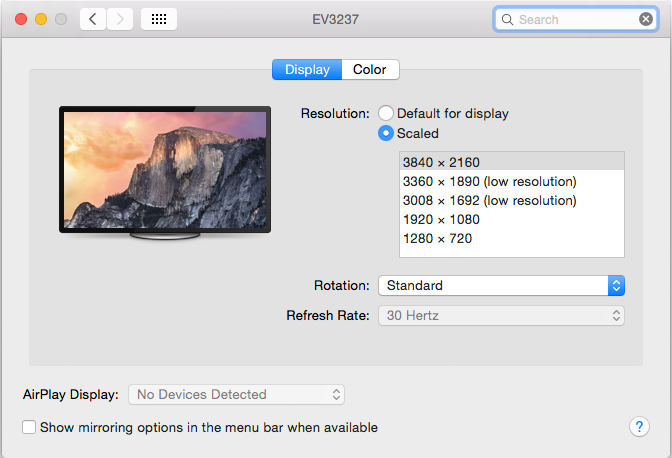
On other monitors with macOS I have sometimes not been given scaling options. I'm not entirely sure what the rules are about when or when macOS doesn't show scaling, so maybe there is something with the laptop model/Thunderbolt -> HDMI adapter/monitor that is catching him out.
Aside from that I definitely agree that 32" is not for everyone and I'm not sure if I would buy it again.
Not sure why.
For a long time I've been using tiling WMs (currently awesomeWM) and I could never go back. Yes there is a bit of a learning curve while you settle on a good configuration for you, but the productivity gains are worth it since you spend so much time interacting with your WM.
Obviously your options are more limited outside of Linux, but there is a WM tool in Microsoft's Powertoys repo which looks intriguing.
https://github.com/microsoft/PowerToys/blob/master/README.md
It's essential for my survival on the 4K monitor that work gave me. Does a better job than any of the commercial products listed in TFA that I tried.
Is it now easy to set up a launcher/start bar with a nice battery/volume/wifi etc. indicator? Do all Windows open normally? Do you get any crashes? Are there any WM-specific settings/fixes you have to tweak more often than once every 6 months?
macOS handles this very good, at work I'm using two 27" 4k displays side by side with virtual resolution set to 2560x1440 which gives me no problem with size of icons/apps and very good image quality at the same time.
Overall, I'm really happy with my Benq 32" it strikes a nice balance between being a larger screen, but still readable at 100% scaling.
Recently I connected a 19" 1280x1024 monitor for a Pioneer DDJ setup and it was by far the best size/aspect for the task. 16x9 is only ideal within the medium-large range of sizes.
Um... yes... yes they are. https://www.eizoglobal.com/support/compatibility/dpi_scaling...
> Moving your head and eyes IS unpleasant.
I mean yeah. Having a display that large on your desk is absurd. That has nothing to do with either the OS or the resolution.
Most of them do it automatically at this point too. So I'm really struggling to understand the position this article presents.
It really just sounds like the author didn't realize a 30+ inch monitor 20 inches from your face requires head movement, and somehow hasn't figured out scaling.
Something with focusing on near/far objects maybe?
I also think "more screen space" == "more productivity" is a fallacy. There was an article here the other day where someone used a Surface Go as his primary development machine. That's a bit extreme, but I used a plain 15-inch MBP without a second monitor for several years at work and didn't feel hindered whatsoever. Of course it depends on your workflow; game developers or film editors tend to need more things onscreen at once, for example. But I think programmers get too excited about more/bigger monitors because they look cool on a desk and are relatively inexpensive these days. And they, you know, feel productive.
It's so bad that they do not produce anymore affordable 16:10 screens...
This is factually incorrect.
By not explaining that what scaling options were tried in the article, it strongly appears that the author did not try them.
By not explaining here on HN what was tried in more detail, it appears to be handwaving away the issue.
It's totally possible that a smaller screen is better for his productivity, but that's a minor argument compared to the incorrect assertion made in the article and here.
This author's notes on distraction reminds me how moving onto a "tinier" screen forces me to stay inside the portal into whatever you have on screen. That single change contributed more to me writing much smaller encapsulated functions than anything else, for better or worse. I'd say it necessitated me carrying a larger/clearer mental model of my projects too. Also, to do anything else you'd have to switch the entire screen away from your current layout and after a while indulging in distractions becomes more tedious thus not worth the cost of switching and much less tempting.
I need the vertical 1080p screen mainly for looking at CVs or console outputs.
With this setup you have less useful parts of the screen, like the very top, but you also have windows that you don't need to look at so much. I run a text editor with two windows side by side and three windows high. The smallest windows are at the top and basically double in size as you go down. The bottom ones are used to edit and the top ones are mostly used for reference.
I find this arrangement incredibly productive. I have actually migrated from 3x 4K screens, which was overkill.
If he had a 48'' 4k display, each pixel would be the same size as on a 24'' 1080p display. Zero font size problems, no need to scale anything.
I use a curved tv of this size (at a low brightness setting ;)) and notice only one problem from the ones the poster mentioned: sometimes the amount of windows on the screen can be a little distracting. However it is easily offset by the productivity gain from having all necessary windows constantly visible. Also, if you need to concentrate on just one window temporarily, just move it to another virtual desktop. Takes no effort.
My Dell 25" monitor has a native resolution of 2560x1440. You don't want to use this native resolutions as everything gets too small to comfortably read/work.
Had to input 3840 x 2160 as a 'scaled resolution' to get 1920 x 1080 HiDPI which gets you a sharp retina like experience. To be honest everything is a tad too big now but SwitchResX does somehow not save any other scaled resolution for my monitor (UP2516D / U2515H).
1. macOS has bugs related to font aliasing from misconfigured setups that makes using external screens harder to use, such as font-aliasing settings that were removed in the latest macOS updates. Some folks had to do a clean macOS install that fixed the problem with Catalina.
2. I wouldn't recommend using HDMI > TB port, DisplayPort is recommended for any 4K setups IMO. He may be using a 30hz screen via HDMI where most older Macs can't do 4k@60hz at all, in this case, even 4k @ 30hz is very uncomfortable to use.
3. If he never had retina screen before, it is possible by moving to a larger screen, he is focusing his eyes more often and causing blurriness. This could be a sign of an eye condition; such as not taking enough breaks and/or vision has degraded. I had this issue and my astigmatism actually got worse, once I got better glasses, no issues.
4. He may need to readjust his desk setup or get a monitor arm that places the monitor correctly to his eye vision. A lot of people used monitor with its stand and they are looking at them facing down, causing more pain than need be.
Many people comment how small text is on my screen, but I think it's nice to view a lot of code at once.
I think going back to FullHD would take some time to adjust.
I get not moving your head, but lower resolution seems odd. I found going from Retina to 1080p was a bit jarring / pixelated.
Main problem was everything was scaled so small. Also scrolling left some white ghost shadow for a brief moment like half of a second.