That way we won’t have this window shuffling nonsense that has plagued multi monitor setups since we started putting pcs to sleep instead of turning them off.
Also, "Hey monitor, here's a frame in a new resolution" "Right away, ma'am, I just need to wait 30ms for the next refresh and your content will be visible"
Modern display management is... well, it's just absolute garbage. We don't tolerate it when our storage devices or graphics cards take 3+ seconds (seconds!) to respond. Why are we OK with the display? I mean, some amount of delay and synchronization for some things is inevitable, but this subindustry has just gotten completely out of hand.
2019 and one still has use the display's buttons to control settings, unless it is a laptop's fixed display.
I think FreeSync somewhat alleviates that. But of course Nvidia doesn't agree to do it the same way. I do agree that video latency is atrocious. It takes longer to do a screen refresh than to send an ethernet packet across the country!
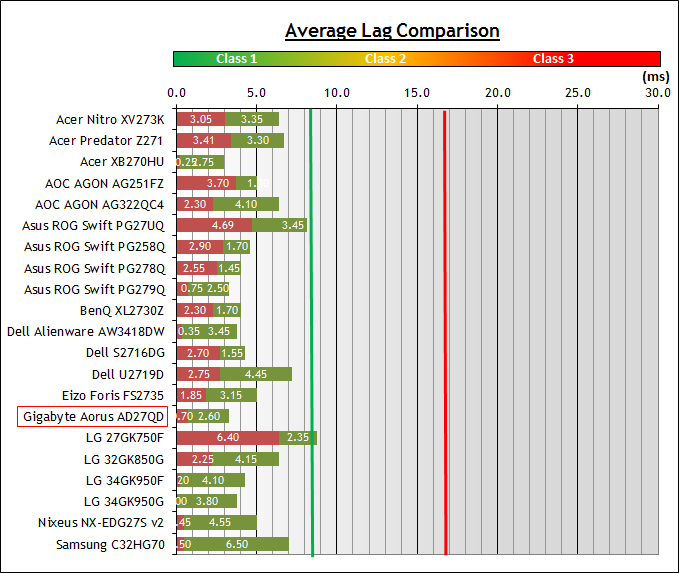
Eh? There's no shortage of monitors with well under 10ms of signal to photon latency: https://www.tftcentral.co.uk/images/gigabyte_aorus_ad27qd/la...
That's processing time + pixel response time measured across a handful of monitors. None of them are higher than 9ms. I have no idea where you got 30ms from? Or even what you're talking about at all. Are you exclusively talking about bottom of the barrel monitors here? Even IPS panels are being driven at 144hz these days and adaptive vsync is increasingly everywhere. Nobody is tolerating being slow?
NVIDIA firmware update [0] solved the problem for me. It seems they ditched the naughty part of DisplayPort standard for good and stopped passing hot-plug events to OS.
Waking from sleep will periodically just not find a monitor at all, or they will come up with the wrong positioning (left and right swapped). If I turn a monitor off, the other one (and the laptop) do some sort of resync operation that interrupts the display. It's annoying, but not something I would expect the industry to consider a priority; I'm not really sure it's a monitor issue at all.
So yeah, it's better than when off really meant off and ports lacked cable detection.
Don't think it's the hardware that's pushing 20-80Gb/s through 10ft of cable causing the issue... they don't specify OS/driver interactions. They just report available resolutions/rates in their PID and display on SleepOut command from the host register/packet interface.
I wonder if at least part of this is for DRM reasons, because having an always-on and "unauthenticated" video signal output does tends to frighten those IP control-freaks.
I do agree with all the others here that the time newer monitors take to sync to the signal is horribly long. CRTs and some older LCDs were basically instant (although the latter would sometimes auto-adjust on signal changes, meaning a slightly unstable display, at least it was still somewhat readable and visible --- crucial for reading things like BIOS screens, for example.)
Probably not, DVI has hot-plug.
I fully understand that tiling WM are not and will never be mainstream, so finding a general solution would be desirable, but I guess for a tech-savvy crowd like HN I want to proselytize tiling WMs a bit. Every time I have to use a regular "hey here are a stack of overlapping windows, have fun" destop I'm genuinely frustrated. It's nice when you're working on a new flow with new apps you're unfamiliar with but once you've got your development "stack" figured out I couldn't imagine coding in an environment where I can't switch to my editor, terminal, browser with a single non-context sensitive command, regardless of where I am.
I suppose just having virtual desktops can be a decent enough compromise (put your editor in a virtual desktop, your browser in an other etc...) but as far as I know even that is relatively uncommon outside of linux DEs.
You can imagine what that does to my windows ;-)
I don't know how DP does it but previously there was a good old I2C link in the cable that was used to figure out what the screen supported[1]. You only needed an I2C EPROM on the other hand containing the various modes. Without this the computer on the other end can't really prepare itself properly, preallocate the framebuffers etc...
Since the EPROM requires very little energy it might even work if the monitor is not powered, just using the +5V coming from the HDMI cable.
You also have to do this with certain desktop streaming solutions if the host PC doesn't have a display. You can buy fake HDMI connectors that are just a cap over the HDMI port to trick the video card into thinking there is a display attached.
I still have to move them back once in the morning when I unhibernate, but it's better than 5 times a day.
It would be really great if someone could figure this out.
What you're complaining about is entirely a software problem. No improvements to display standards will move the situation forward.
By the way, if you're using Linux, consider switching your desktop environment.
Now, if only we could convince PC graphics manufacturers to support CEC instead of ignoring it. It seems the only people who do care are the little set-top boxes that run Nvidia Tegra or Qualcomm chips.
And they really need to have larger displays 30"+ for anything 4K and beyond. There's not much point to a 27" 4K monitor if you have to double the scaling just to read anything. 8K at 27" would be a complete waste.
I strongly disagree that higher resolutions are not interesting on smaller sized displays. I personally find 21.5 inch to be the sweet spot for 4K and welcome the better support for higher resolution so displays in the 24-30 inch range can more easily support 220+dpi, higher refresh rates, and HDR.
But 1440p at 21" I think would be great. Personally I only use 1080p screens as secondary monitors, and would never go back to 1080p for my primary display.
Of course there is! The higher pixel density means everything is significantly more crisp and easier on the eyes. Resolution is not only about how many things you can fit onto the screen.
- It's possible that X->Z adapters are rare/discontinued/nonexistent/whatever, so you need to stack X->Y + Y->Z. If the adapters are active, now you need 2 more power supplies (or USB ports) just to run each display.
- There's many combinations of stacked adapters that don't work together, for various reasons, so this can involve a lot of research, and a bit of luck.
- Even if it basically works, it's common that not all features of every protocol are supported by every other protocol. I can control the brightness of one display from software (it runs directly over DVI), but not my other display (which runs over a DP->DVI adapter).
- It's also common that a lot of adapters just don't work. I've got an active adapter here that the manufacturer and retailer both swear supports dual-link DVI, but it doesn't. I eventually found a review online from someone who tore it apart and looked up the specs on the chip inside. It only supports single-link resolution. Bogus.
- There's also many passive DP->DVI adapters which claim to support dual-link, even though this is (apparently) electronically impossible. More lies.
- I have what seems to be the only working DisplayPort to dual-link DVI adapter, and it wasn't cheap (>$100). It also takes several seconds to wake up, and during that time it displays static and noise and off-color versions of my desktop. It's not the most pleasant experience.
- Newer displays are much less power-hungry than older models, so if you pay for electricity and have your displays on a lot, it's definitely cheaper to just upgrade that.
- I've also tried to convert (single-link) DVI-D to HDMI. Apparently it should be just a physical adapter, as the signals are electronically compatible in that direction. For two devices I have, when run at 1080p, the picture comes out horribly distorted. Each device supports 1080p, but when connected in this particular way, it's unwatchable. No idea why.
Any time you have to convert formats, there's potential for trouble. That's why I'm not optimistic about the new USB-C/Thunderbolt world of "we'll just encapsulate every other protocol in the world". When I've got devices and adapters strung together and it doesn't work, who do I call for support? One of Norvig's rules from PAIP was "Whenever you develop a complex data structure, develop a corresponding consistency checker". I wish I had test equipment for every port type in my house, but I don't, and that's not feasible for most people.
I bought a nice 27" 4K display for gaming. ironically I can't actually notice any difference between (native) 1440p and 4K at that size for games, but fonts really do look a lot better with the extra density. I love writing code on that display.
Evidently you have never heard of HiDPI?
- More stuff on the screen. Some people can see all the pixels of a 4K display.
or
- More detail on your stuff. Some people really enjoy crisper lines.
There is no point to scaling one 1080p-sized-pixel to be represented by four 4k-sized-pixels, à la a digital zoom on a camera, if that's what you mean.
I frankly do not understand the idea of having a huge monitor far away from eyes, so that the angular dimensions of elements on it are the same as on a smaller screen at a book-reading distance. Well, maybe it's easier for some people to focus at a longer distance — but then more people would hold their phones at the stretched arm's length, not 1.5ft away.
Of course they cost a fortune today.
http://www.ti.com/product/TPS65982 is an example of a fairly high-integration IC. Its 5USD/ea in bulk, and you still need some other supporting IC's around it, such as - I kid you not - a flash chip to hold its program code. Take a good hard look at section 9.3.4 of that manual to get a taste for how complex this gets.
They only have very reduced schematics published, but it looks like the RPi4 isn't deploying a PD solution at all. I think they are just relying on the analog signaling of Type-C. The power supply is just a "simple" type-c 5V/3A unit.
This is the first I've heard of the RPi 4 not having PD -- could you point me to the specs you saw? I searched around a bit but couldn't find anything either way.
USB-C alternate mode for Displayport currently (and probably always will) requires an external port controller to negotiate the alternate mode with the other end of the cable over the configuration channel (CC) pins, and possibly a high speed mux[2] if you want USB-3.0 over the same pins as well. Simpler applications like analogue headphones or USB-C to Type A adaptor cables just use specific resistor values instead, a wise decision by the standards body IMO.
Of course, if you have that built into the SoC[3], the cost of that is reduced a lot once the IP license is covered, and makes sense for a several hundred dollar phone/laptop, though there are some extra electical requirements that come with USB-C such as tolerating 20V (in case someone plugs in a laptop adaptor that has not discharged down to 5V in time) that is hard to implement in the same silicon as the rest of the SoC, and so some external logic is almost always needed.
In addition, an actual USB-C connector is relatively expensive due to the high pin count, fine tolerances and the shape requiring use of deep-draw or metal-injection-moulding method.
Micro HDMI has much simpler interface requirements, sometimes some discrete transistors for the hot plug detect signal and a low speed level shifter for the DDC bus. The connector can be cheaper to manufacture as well as the shell can be stamped out like a Micro USB connector.
There are licensing costs[4] for HDMI, while DisplayPort is royalty free, but I reckon Broadcom can negotiate that down considerably from the published figures, and I can't see USB-C being cheaper than the listed 5 cents per device charge.
[1] https://www.cypress.com/products/ez-pd-ccg1-type-c-port-cont... [2] http://www.ti.com/product/HD3SS3220 [3] https://ip.cadence.com/ipportfolio/ip-portfolio-overview/int... [4] https://en.wikipedia.org/wiki/HDMI#HDMI_Fee_Structure
I would be thrilled if USB-C became the ubiquitous connector.
==============
13:45 - Raspberry Pi 3 released
13:46 - Amazon mysteriously sees 5-year boom in sales of mini-HDMI cables and runs out in minutes.
Forgive me, but since we are talking about DP 2.0 at the same time as the new RPi4, I am wondering:
- how many hi-res (4k@60hz) monitors can I drive from a single RPi 4 ?
I think the answer should be 4 since there are already two (mini) HDMI ports and, additionally, two USB3 ports.
The question is, can Displayport (or any display format) run at 4k@60hz over USB3 ?
Thanks.
Just one. If you connect a second 4K monitor it drops to 4k@30
> run at 4k@60hz over USB3
No. USB 3.0 only has a maximum bandwidth of 5 Gbit/s. It takes around 15gbit/s to drive 4k@60hz 4:4:4 8bit color. That was first available in DisplayPort 1.2 which had 17gbit/s available bandwidth.
> additionally, two USB3 ports.
The USB ports are all on a single PCI-E bus with a maximum bandwidth of 4Gbit/s. So technically you don't even get full speed of a single USB3 port, much less 2.
I've resolved to just use a classic screen saver to keep the TV from shutting off, which causes total chaos when resuming from sleep.
Aside: anyone else notice how hard it is to actually use a screensaver these days. Linux desktops have removed it from in the box mode, and windows has totally obscured it away from you.
Monitors use DPMS: DPMS: https://en.wikipedia.org/wiki/VESA_Display_Power_Management_...
I tried this with my Pi and could get it to sleep and wake, but waking would not seem to send an image, even though the backlight came on.
Also confusing is that monitors also use HDMI, which seems to be from another standards body. It appears some TVs can do lots of stuff using HDMI-CEC:
https://en.wikipedia.org/wiki/Consumer_Electronics_Control
but the TVs I've bought support it poorly. Either it's hard to find if they support it, and when they do they might only support it piecemeal. It's sort of age and odel dependent. I've never seen a monitor that supports HDMI-CEC.
I know I have it on my TV/AVR/ShieldTV as the volume for any of the above works as I expect.
And rightfully so. Now that we have moved to display technologies which are not affected by burn-in, what's the point? All they do is waste energy.
  CURRENT=$(sudo ddccontrol -r 0x60 dev:/dev/i2c-3 | tail -1)

  if [[ $CURRENT == *"+/15/3"* ]]; then
    sudo ddccontrol -r 0x60 -w 17 dev:/dev/i2c-3
  else
    sudo ddccontrol -r 0x60 -w 15 dev:/dev/i2c-3
  fi
Edit: whoops, missed that you're looking for DP. For what it's worth I'm using HDMI for all of the above with no performance issues.
[0] https://www.amazon.com/dp/B07CWR31PN/ref=cm_sw_r_cp_api_i_bS...
At 6K, 120hz, 10bit ( Basically Pro XDR with 120Hz ), that is roughly ~88Gbps of Raw Bandwidth.
The above two scenario aren't too far off. Although a 5K / 120hz / 10bit only needs ~64Gbps. I assume in two config above they will have to use 2 x DisplayPort 2.0 ?
( That is assuming Apple will gives us Pro Motion on Mac, why they haven't done so is beyond me. And Why Windows haven't done something similar? )
So the future USB4 and DisplayPort 2.0 will both be based on Thunderbolt 3. Are there any reason why TV keep sticking to HDMI? ( NIH Syndrome? )
And since DisplayPort 2.0 essentially turn TB3 into a one way connection, does that mean there will be no more USB Pass through or Charging Laptop while using it Display?
What do you mean why Windows hasn't done something similar? It's existed on Windows for longer than Apple had it in the iPad - it's called gsync or freesync, the later now being a VESA specification called "adaptive vsync." You can go have the ProMotion experience on Windows right now, and have been able to for years. There's a ton of 120hz, 144hz, and even 240hz gsync & freesync monitors on the market at a variety of sizes, resolutions, and even panel types. You can find 120hz+ monitors in IPS, VA, and TN panels, at a variety of price points.
When will this stuff run into the physical limits of copper?
Of course, that might be because Intel IGP is still stuck on DP 1.2 and so an overwhelming majority of laptops are DP 1.2 only as well. But for video cards, we have been there for three years now: nVidia went full DP 1.4 with Pascal in 2016 AMD has been DisplayPort 1.4 since Polaris at least in 2016 as well.
As an aside, I am unclear whether https://nvidia.custhelp.com/app/answers/detail/a_id/4674/~/g... enabled them on most Maxwell cards as well? https://www.geforce.com/hardware/desktop-gpus/geforce-gtx-95... still says DP 1.2.
a USB type-C connector actually carries a USB-2 lane, as well as carrying a couple of USB-3 lanes (and some other miscellaneous stuff). So it's not really the same category of standard.
> VESA PUBLISHES DISPLAYPORT™ 2.0 VIDEO STANDARD ENABLING SUPPORT FOR BEYOND-8K RESOLUTIONS, HIGHER REFRESH RATES FOR 4K/HDR AND VIRTUAL REALITY APPLICATIONS DisplayPort 2.0 enables up to 3X increase in video bandwidth performance (max payload of 77.37 Gbps); new built-in features enable improved user experience, greater flexibility and improved power efficiency
HDMI 2.1: 16 Gbit/s per pin, 3 pins total, less efficient 8b-10b encoding: 16×3×8/10 = 38.4 Gbit/s
DP 2.0: 20 Gbit/s per pin, 4 pins total, more efficient 128b-132b encoding: 20×4×128/132 = 77.576 Gbit/s
The article claims "77.37 Gbit/s" but I think that's a typo+rounding error (.57 → .37)
They both handle HDMI so I ended up getting an adapter for one, but I never even thought this would be something to worry about. And I'm not sure if it's DP related but when I wake the PC from sleep one of them has a frozen image for a little while until Windows realises it has to start animating again.
My work laptop, an HP Elitebook, has only a Displayport for political reasons (HP wanted to push Displayport adoption). Do you know what presentation infrastructure has Displayport? Absolutely nothing. The world decided upon HDMI to be the de-facto-standard.
So I am stuck carrying dongles and adaptors around (which means I will never have the one I need on hand) - or, if I am very lucky, I get a meeting room with a Clickshare device (which works reasonably well, but might be unpopular with external colleagues because it means installing some piece of software onto your laptop)
I know how standards work ... but for the sake of it, we do not need another option that brings virtually nothing to the table.
I'm also gonna need a sound system with a 200 dB dynamic range, with speakers demonstrating a flat response out to 100 kHz.