I'm not saying i don't believe you, I'm just genuinely curious.
Edit: Looking at this thread, I have to say there has to be a cause and effect here somewhere. You have a million web-developers saying they need more than 8GB to use Chrome to surf web-pages and web-apps.
I'm pretty sure web-apps sucking that amount of resources was caused by giving web-devs machines with 8GBs+ of RAM to begin with. Giving them more, wont fix the problem. It will only make it worse.
As for a developer-anecdote: Almost all bugs post-shipping bugs I've experienced and had to fix, more than 50% has only been reproducable on low-resource constrained environments.
By super-specing your dev-environment, you are shipping bugs you cannot detect. You just don't know it.
not being facetious, but as time goes on it seems more websites load more javascript and chrome takes more memory keeping it's state, my macbook has 8G of ram and when I'm actually working on it doing my daily basics it's nearly unusable. (Word,Excel,Thunderbird,Chrome,MySQLworkbench,PGAdmin,Cyberduck,MS Remote desktop, terminalsx10(a few python shells) and gvim x5)
I've taken to using my desktops more because I have the freedom to just "spin up" whatever I need in virtual machines and in minutes have an entire test infrastructure.
Anything under 16 GB is unacceptable to me.
Developer edition? Nope, not really. I need Linux, Windows and OS X. So my only option remains, as ever, a macbook pro with 16GB RAM.
If you are OK with running an illicit OSX VM, then a Thinkpad T or X series should be a fine choice if you prefer to run a flavor of Linux as the native OS. Thinkpad native Linux support is better than the macbook pro hardware (no funny fan glitches, etc). It basically "just works" and you can get 16GB's from the factory.
Because you've set very high requirements, as you've stated.
> Developer edition? Nope, not really.
Yes, it still is.
In particular, I tend to run a tab-heavy browsing style. Between that and Eclipse and whatever I'm puttering around on in Eclipse, it adds up.
And it's not a 8GB limit, unfortunately. In practice it's substantially less. If I go above about 5GB in use, I start dropping file cache, and things slow down substantially. (It doesn't help that I'm not running an SSD currently.)
Is any of this crucial? No. I could work around it, and did so frequently on my previous machine. But, if nothing else, the time adds up. And RAM usage isn't exactly going down over time.
And that's not even getting into when I boot up a VM.
An extreme case, for sure.
You likely would be remoting into this machine to compile this work, in any scenario involving you working on a mobile device.
With that being said, 16GB would preclude you, too.
Like the fellow above, still genuinely curious how 8GB is repelling a significant amount of people for a development machine.
A pixel2 with 8GB is a rocket ship, for my general full-stackery and system administrationating purposes.
I've never managed to exceed 10-ish GBs memory usage when you exclude OS caches, which strictly aren't needed to complete the build.
Run two or three VMs, plus an IDE, plus have the standard apps open.
The cherry on the cake is then being able to then fire up another VM or separate IDE without giving it another a thought.
Those applications are crucial to my workflow.
(I'm pretty sure it's shoddy third-party addons rather than eclipse itself - a clean eclipse can run fine in <1gb - but either way I end up in the same place)
As a consultant I need to be able to travel and won't always have access, or be able to send code across the internet.
I think my case is common for technical consultants doing deep code inspection.
In fact, Android Studio shocked me with how large it grows, even for very simple projects (which is all I've ever attempted thus far). And, I moved my Mac OS X and Solaris VMs over to my desktop machine, which has 16GB of RAM and more CPU cores, and I connect to them remotely. Running either would make my machine just sluggish enough to where I'd notice when scrolling or changing windows, etc.
Anyway, I've ruled this machine out, since it seems to max out at 8GB. Otherwise it is very nice, and I have gotten over my grudge at Dell (now that I've tried alternatives and found they're often even worse), so the XPS line is definitely a contender. But, my next laptop is going to have 16GB of RAM.
More memory is always good, but I'm pretty good with 8 for the Erlang and Ruby on Rails hacking that I do.
I would never buy another 8GB laptop as long as live.
And I thought my Eclipse install was a hog, weighing in at 500MB's through 1GB sometimes.
Also, I've had a similar experience running Visual Studio + SQL Server.
1) 16GB RAM (or more) 2) High density display 3) SSD drive 4) Quad core or better CPU 5) Small and thin 6) Discrete NVIDIA GPU (not the Intel integrated crap)
Apple's MBP is the only machine I know of that fits this bill. I'm becoming less and less a fan of OSX, but you can't argue against the hardware. Can anyone point me to a non-Apple machine that does these things?
EDIT:
Thanks for the pointers! I'll look into the Dell and Lenovo machines mentioned here. It's been a year or so since I've looked for machines comparable to my older MBP, so it's cool to see some new options.
1: https://news.ycombinator.com/item?id=9341506
2: http://www.dell.com/learn/us/en/555/campaigns/xps-linux-lapt...
for me, it needs to last 5+ years (sorry, company policy).
Anything with comparable specs (15", core i7 quad core, 8-16 gb ram, 1920X1080+ screen, decent battery life, 3yr support and <=5 lbs) comes to same price as a 15" mbp. and this mbp and others in my company lasted 5+ years without any issues. Well, i had to get my logic board replaced due to some known issue, which was covered. battery life is awesome, dont care for keyboard but its ok, hate OS X. Also, I want to move 100% to Linux but not at the cost of a good hardware. Yes, I can install ubuntu on mbp but whats the point then in paying apple tax and not everything works flawlessly in ubuntu on mac hardware, already tried it. They just seem to make the best hardware at the moment.
m3800 is very close to these requirements but ends up costing same as 15" mbp and battery life is not as good.
w540 is heavy
t series dont have discrete graphics
Thinkpad's T series fits some of your bill but I doubt the screen is high density enough.
PS - I must be the only person on earth who thinks the user experience with 1080p is better than super-high resolution. Currently most operating systems (Windows, Linux, and OS X to a degree) suck at high DPI so your fonts and UI elements shrink as the resolution increases.
[1]http://www.xoticpc.com/sager-np7339-clevo-w230sd-eta-0320201...
For me - the touch screen, the pen and the extreme portability more than make up for the lack of GPU and if I need to play high-end games I can use my Playstation, Xbox or my tower workstation that has an Nvidia GPU. Outside of games though, I think the Surface Pro's GPU is fine for most graphics work using Photoshop, et al.
And my favorite offense: they removed Fn+Arrows as media control. Didn't replace it or have any justification. Just removed it to spite users. Or because they somehow forgot. Sigh.
It is not unibody, it is not aluminum, the screen is basically without bezel.
This is the first non-Apple ultrabook that is genuinely interesting to me, design wise.
Machined aluminum construction means the XPS 13 is precision-cut from a single block of aluminum for a sturdy, durable chassis.
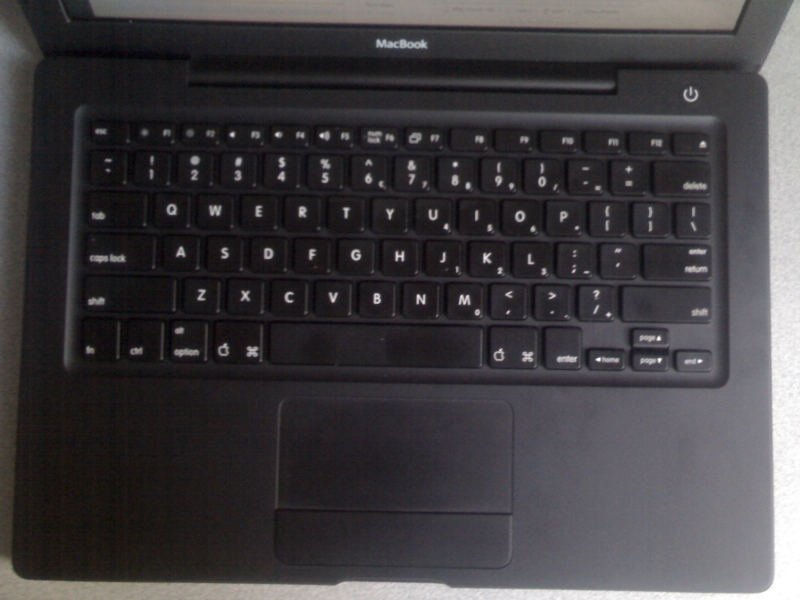
The keyboard picture there...
http://i.dell.com/sites/imagecontent/products/PublishingImag...
...also looks very similar to that of the old plastic-bodied black Macbook:
http://old.javconcepts.com/modules/blog/media/4/keyboard.jpg
What's to keep Dell from heavily customizing and releasing / packaging a version of Ubuntu in the same vein that apple customized, released, packaged nextstep as OS X? The only thing I can think of would be "talent at the company". And I know next to nothing about the internals of dell, let alone what they've done since being repurchased and privatized.
Kind of a fun thought, even if it's a little far fetched.
That's not to say Dell has to remain incompetent at software...with a will to do so, and enough money and competent management (which Dell does seem to have), they could theoretically build a top-notch software engineering organization.
Dell focuses heavily on Profit & Loss for each team and that drives the investment. Their focus is to keep OpEx as low as possible.
Unless the company culture changes heavily, which I dont see happening, esp. with Michael back at the helm, things wont change. They make good cheap hardware and thats about it. Everything else, including some hardware, they push work upstream to vendors.
It's not at the point where it's constantly an issue, but it does become an issue relatively commonly. Especially if I have, say, Eclipse and Pale Moon (FireFox fork) open at the same time.
16GB is fine for now but it wont be long beofer I need to look for 32GB. Multiple VMs, Docker clusters with several memory heavy JVM apps (Scala), too many browser tabs, etc. just don't play nice with 8GB anymore.
A nearly $2K laptop aimed at developers with 8GB is a bit of a joke to be honest. Shame, as otherwise it seems like such a nice piece of kit.
I'm working on a Macbook Pro w/ 16Gb of ram but I'm not doing anything I couldn't do on a machine with 8 or even 4 Gb of ram (replacing Intellij w/ Emacs, as I'm planning to do anyway.)
2. Sublime Text works okay if youre running Gnome since it uses the gtk text scaling factor. But if you use something like dwm it will not work correctly.
3. Gtk apps as such work well.
4. XFCE is the window manager that works best because it has a simple no nonsense knob to set the dpi exposed via the control panel.
5. Oddly enough dwm works fantastically well since I can control all the font sizes manually via things like .emacs / .Xresources
Sadly, Apple is still the only game in town when it comes to automatic and correct resolution scaling.
i would consider the file explorer nautilus to be part of ubuntu and it's broken too.
`echo "Xft.dpi: XXX" >> ~/.Xdefaults` typically takes care of everything.
I'm dying to buy a laptop that's as good as my X201 (and keeps 12" format, though thickness doesn't matter much), but with modern specs. I'm probably gonna break down and get an X250, which is limited to 8GB of RAM for no good reason, but I've heard newer processors can handle IM's 16GB SODIMM, so that particular problem might be solved. The X250 is the first gen ThinkPad after Lenovo partially realized they had destroyed the ThinkPad line and started, albeit slightly, listening to customers again.
Any other suggestions? I've tried using a macbook, and the screen is great, but the keyboard, clickpad, and hot metal are very uncomfortable.
I'd spend hundreds on a conversion kit to drop new guts into an X201. (And to mod it with mechanical switches... I'd spend a lot.) It seems you can't spend as much on a ThinkPad these days. My X201 was over $2000 without WWAN, but the X250 tops out around $1600.
Also, here's a link related to the 16GB SO-DIMM modules that you mentioned https://forums.lenovo.com/t5/X-Series-ThinkPad-Laptops/16GB-...
Biggest drawback of the X230 is the AWFUL trackpad and the low res screen. Highly recommend getting the extended battery.
If I had to make the decision again, I'd definitely get the M3800 instead of the XPS 13.
1. Google about trackpad configuration (palm detection, etc.) on the XPS 13 Dev Edition, it seems to be a combination of the hardware and Linux driver support. Maybe it's fixed in this new rev, I'm not sure.
2. There are known issues with audio popping and crackling when you plug the XPS 13 Dev Edition into speakers.
3. When you're sitting in a quiet environment, like a home office at night, you can hear electrical noise coming from the laptop. It's a known issue, maybe it's resolved in this new generation.
4. One of our XPS 13s was DOA. It happens. It took eight weeks to get a replacement, starting from the first time I contacted support. Once I was connected to somebody in USA on-shore support, they were very helpful, and told me much of that turnaround time is based on their suppliers.
'Course, disabling CPU power saving modes kill battery, but my T440p never got much life to begin with (I get maybe 70 minutes max now, down from around 2 hours. But I'm running VMware for everything, so perhaps that hurts.)
It's most noticeable when scrolling image-heavy webpages, or with pretty much anything that ends up with framerates in audio frequencies. Older versions of Dwarf Fortress on the menu screen, for instance.
actually this is a frustrating trend, native ethernet adapters are 0 cost to CPU instructions, I know you can use thunderbolt (and I've not looked at the spec in detail) but USB ethernet controllers use the CPU when plugged in- and I'm not a large fan of that honestly.
what happened to the very small, fold out ethernet ports? like the one on the old XPS 15 (or: http://www.pcstats.com/articleimages/201304/sam540U3C_edge2....)
Maybe I'm too much of a power user for a 13" but for me this feels like a step back from netbooks from a functionality and mobility standpoint, and not far enough a leap forward for performance to justify stepping "up" from a Thinkpad X201. (which I have loaded with an SSD and 8G ram)
but, I agree that my use-case is significantly different from most peoples. I'm still left recalling a time where manufacturers were reluctant to stop shipping with 56k modems- but seem to have dropped Rj45 pretty quick.
I thought the issue was that these laptops are thinner than an Ethernet port.
How does the keyboard compare to a MBP? Love that keyboard.
Do they also include free Ubuntu stickers to cover up the Windows logo on the keyboard? :)
Would love to hear from real devs using this.
MBP Chromebook Pixel System76 Galago
Anything else that even exists?
It is more comparable to a Mac Book Pro and can be configured with 16 GB of memory as well as the hi res display.
The fact that OS X has gotten worse and worse with every version makes me switching next time even more likely.
16GB of RAM An SSD drive An FHD display
Unfortunately, most of the products available with these features were either similarly priced as the MBP but with clumsy trackpads reputation.