gg -> go to the top of the file.
G -> go to the bottom.
:set splitright -> makes :vs open the file on the right
:set splitbottom -> makes :sp open on the bottom
Ctrl-w cycles through split windows. Ctrl-[h,j,k,l] goes to the window in that direction [left, down, up, right].
When either :vs or :sp are invoked without filenames, they open the current buffer. Very useful for looking at 2 sections of the same file at once.
:tabe [file] -> how could this get forgotten? Opens the file in a new tab.
:set number -> shows line numbers.
[Line#]G -> jumps to that line.
O -> capital oh, inserts a blank line above the current line and goes into insert mode. Perfect for comments.
:set ic -> ignores case for searching, usually useful. :set noic makes searching case sensitive again. (:set no[setting] turns that setting off)
:set lbr -> visual word wrap.
Text objects are also damn cool. In visual mode (v):
i" -> selects the contents of quotes.
i( -> select the contents of parens.
i[ -> selects the contents of square brackets.
i{ -> selects the contents of curly brackets.
Using a instead of i for the above commands selects the delimiter also.
>> -> indents. << does the opposite.
% -> goes to matching paren/bracket. Great for debugging.
* -> go to next instance of current word. # to go to previous instance. Good for cycling through function definitions.
Edit: formatting, more commands.
Here's another one a Byte of Vim, also free on a CC license, but not as good as the Vim Recipes I've found.
A Byte of Vim: http://www.swaroopch.com/notes/Vim
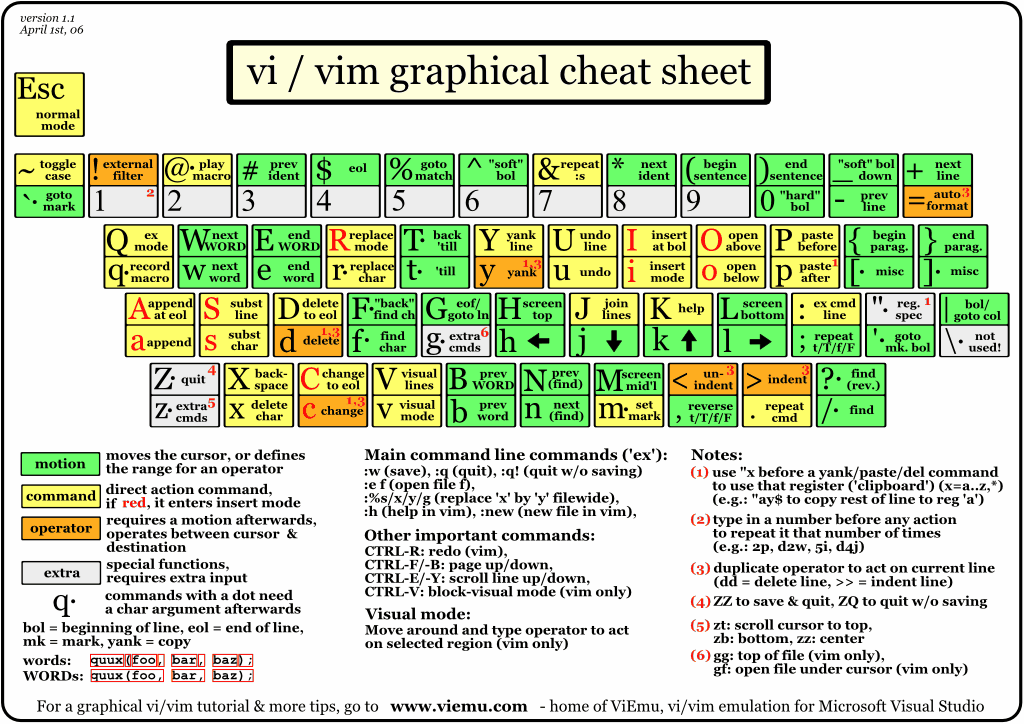
This cheatsheet has worked really well for me: http://www.viemu.com/vi-vim-cheat-sheet.gif
vimtutor is good for getting started too.
Vim tips wiki: http://vim.wikia.com/wiki/Main_Page
The best collection of vim scripts: http://www.vim.org
#vim on freenode