consider something like grep on multiple files. it should produce a list of lines found. the graphical terminal takes that list and displays it. it can distinguish the different components of that list, the filenames, the lines matched, the actual match, etc. because it can distinguish the elements, it can lay them out nicely. a column for the filenames, colors for the matched parts, counts, etc.
grep would not produce any graphics here, just semantic output that my imagined graphical terminal would be able to interpret and visualize.
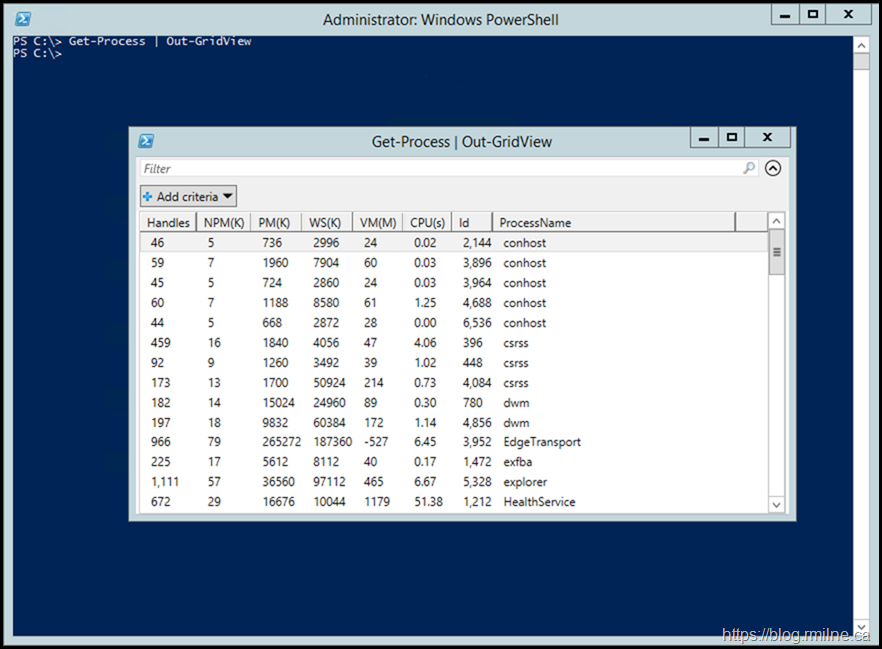
https://blog.rmilne.ca/wp-content/uploads/2020/04/image_thum...
PowerShell cmdlets output .NET objects with properties, in that example Get-Process makes an object-per-running-process with properties for Name, Id, and more. Out-GridView takes arbitrary objects and draws a resizeable GUI window with a list of the input, properties as columns, sortable, filterable, and has options to use it as a basic "choose one of these and click OK" user-prompt. It works with the grep-analogous cmdlet:
    select-string '<regex>' <filename(s)> | out-gridview

    # shorthand
    sls foo *.txt | ogv
If we're talking about things we imagine in terminals, one I have wanted is multiple windows for making notes, similar to having a text editor open constantly reloading a file on any changes and running some terminal commands with tee into the file, but better integrated - so I could keep a few useful context results but ignore logspam results; and "keep" in another window without having to copypaste. Something better integrated - it always gets all command output, but disposes of it automatically after a while, but can be instructed to keep.
PowerShell, for instance, has Format.ps1xml[0] that allows you to configure how objects get displayed by default (i.e. when that object gets emitted at the end of the pipeline). Such a concept could in principle be extended to have graphical elements. How cool would it be to have grep's output let you collapse matches from the same file!
[0] https://learn.microsoft.com/en-us/powershell/module/microsof...
incidentally ttyphoon is a terminal that uses a browser base gui framework. maybe there is that browser for the teminal...
It could be an interesting paradigm, though, to have a hybrid between fullscreen and traditional tty programs: you output some forms, they are displayed by the terminal inline, but your scrollback just works like normal, and you can freely copy and paste stuff into the form. Once you submit the form, it becomes non-interactive, but stays in your scrollback buffer. You can select and copy textual data from it, but the form’s chrome cannot be selected as line drawing characters.
Probably could be a piece of concept art, I guess.
Emacs is text based (mostly), but customization happens through the the concept of Faces, not ansi escape codes. You can then embed properties in the text objects and have them react to click events. The only element missing is a 2D context that could be animated (if it's static, you can use SVG as Emacs can render it).