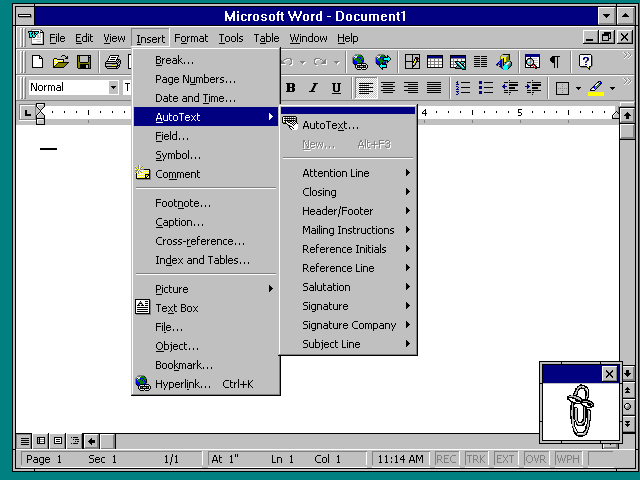
I don't know how we got here and I don't know how to fix it, but "bring back idiomatic design" doesn't help when we don't have enough idioms. I'm not even sure if those two behaviors are wrong to be inconsistent: you're probably more likely to want fancier formatting in a PR review comment than a chat message. But as a user, it's frustrating to have to keep track of which is which.
Given the reduction to a single key, the traditional GUI rule is that Enter in a multiline/multi-paragraph input doesn’t submit like it does in other contexts, but inserts a line break (or paragraph break), while Ctrl+Enter submits.
Chat apps, where single-paragraph content is the typical case, tend to reverse this. Good apps make this configurable.
It’s turtles all the way down.
I have accidentally sent so many messages trying to get to a new line.
The behavior also changes if you start editing a numbered or unordered list. Maybe that enters the "formatting tools" mode you mention?
I had managed to be on Slack exclusively for at least 10 years. Recent acquisition has me using Teams and it's hilarious to see for the first time what people have been complaining about. I thought surely people are exaggerating. No, no they are not.
It only took a couple weeks for me to figure out that I would have to compose longer messages somewhere else and then paste them into Teams.
But if you click an arrow on the top of the text box, it expands to more than half of the height of the window, and now Enter does a line break and Shift-Enter sends. Which makes a lot of sense because now you're in "message composer" / "word processor" mode.
If you turn on Markdown formatting, shift+enter adds a new line, unless you’re in a multi-line code block started with three backticks, and then enter adds a new line and shift+enter sends the message.
I can see why someone thought this was a good idea, but it’s just not.
When you enter a code block, that assumption changes. You are now in a “long text” mode where the assumptions are shifted where you are more likely want to insert a new line than to send the message.
I think people that have used tables or a spreadsheet and a text editor kind of understand modal editing and why we shift behaviors depending on the context. Pressing tab in a table or spreadsheet will navigate cells instead of inserting a tab character. Pressing arrow keys may navigate cells instead of characters in the cell. Pressing enter will navigate to the cell below, not the first column of the next row. It’s optimized for its primary use case.
I think if the mode change was more explicit it’d maybe be a better experience. Right now it is largely guessing what behavior someone wants based off the context of their message but if that mismatches the users expectations it’s always going to feel clumsy. A toggle or indicator with a keyboard shortcut. Can stick the advanced options inside the settings somewhere if a power user wants to tinker.
Ctrl+Enter: Always submits
Shift+Enter: Always newline (if supported)
Enter: Reasonable default, depending on context
It even works inside bullet points to add separate lines as part of the same bullet.
I have a suspicion — it has to do with instant messaging clients. The idea being that you want to type short one-line messages and send them as quickly as possible in most cases, but in a rarer case when you do want a line break, that's Ctrl+Enter or Shift+Enter. Probably the first one where I personally encountered "enter is send" is ICQ, but I'm sure it's older than that, I would be surprised if no IRC clients did that.
Then make it easier for users to learn that they can enter more quickly with control+enter which you can advertise via tooltip or adjacent text.
Better that 100% find it trivially usable even if only 75% learn they can do it faster
I don’t understand why we ever let plain Enter send a prompt out.
I think I'd be OK with some inconsistency in how Enter works as long as the key chords are consistent!
It is very easy to fix. Add button somewhere around text box. Which turns it into multiline text edit control, increases its height. Now <Enter> works as line feed and to submit the text user have to click "send" button. Most of chat messages are not multi-line, but few are and for them, proper edit UI is essential.
I, personally, just use separate text editor like Gnome Text Edit to compose my message and then Ctrl+C/Ctrl+V to send it.
I've been playing with making a chatbot with llama.cpp and FLTK[0] and FLTK's default behavior is actually to add a newline in the multiline editor when pressing Enter even if a 'Return button' is in the form (Return buttons are buttons activated when you press Enter or Return though Return is also handled kinda differently). And i have a big Submit 'Return button' there.
And TBH it annoyed me a LOT that i have to move the mouse and press the button to submit or that Enter adds newlines instead of submitting so that i explicitly added code so that pressing Enter is not handled by the editor (letting the Return button submit the input) and pressing Shift+Enter is what adds the newline (Ctrl+Enter also works, this comes from FLTK's behavior, but i've been used to Shift+Enter myself).
Which is basically how pretty much every chat interface (be it AI chatbot or something like Discord or whatever) that i've used in recent times works. And TBH it makes sense to me that the simplest/easiest shortcut (Enter) is what does the most common thing (send text) in a chat interface whereas the more involved shortcut (Shift+Enter or Ctrl+Enter) is used for the exceptional/less common case. In such an interface, the multiline editing is there as an exception (for when you want to paste some stuff and even then often Ctrl+V by itself can be enough), but most interactions are going to be single line submissions (often wordwrapped to look like multiple lines but still a single line).
We can easily fix this by just letting everyone choose, but no one wants to make configurable UX.
This is normal/standard behavior for multiline inputs such as the textarea, while input type=text/search/email will trigger a submit.
https://html.spec.whatwg.org/multipage/form-control-infrastr...
So basically a chat input based on web technology is saying:
"I'm a single line input, but will allow multiline editing if you ask nicely"
Nearly drove me insane, until I developed separate muscle memory between the two apps/sites.
For me, Enter to send and Ctrl+Enter for newline is the norm in an IM application, while longer and more asynchronous communication (like this textbox on HN for commenting, or a forum post, or an email client) implies that Enter inserts a newline and something more substantial (Alt+S is common, or Tab,Enter to move to and press the submit button) submits.
One must always research and find the dominant or most applicable idioms for whatever they're doing. Are you building a command line tool? For which platform? What other similar tools are you basing its design on? You have to check yourself and see whether your software conforms to the idioms of the platforms, communities, etc that you're targeting.
Infuriatingly, some apps try to be smart — only one line, return submits; more than one line, return is a new line, and command-return submits; but command-return on just one line beeps an error.
Years of muscle memory are useless, so now I’m reaching for the mouse when I need to be clear about my intent
So much is solved when developers just use the provided UI controls, so much well-studied and carefully implemented behavior comes for free
- For single-line text fields, pressing enter is an alias for submitting the form. - For multi-line text fields, pressing enter inserts a new line. There is no shortcut for submitting the form.
In mobile chat apps, the enter key inserts a new line, so you have to press the non-keyboard submit button to send a message. In mobile browser address bars, since they are single-line text fields, the enter key becomes a submit button on the virtual keyboard.
Tbf, this is almost certainly what the vast majority of people want, most of the time, from chat apps like Slack. It would be much more frustrating to have to click a button after each thought.
Slack also has the option to invert this in settings. I always have it inverted, so that I can freely type multiline messages, and require the more intentional ctrl-enter to actually send.
Exactly, and that's how you keep track
You are right, of course this is your account name! Do you want me to be keep you logged-in?
> _
ChatGPT does it.
Claude does it.
Nextdoor does it.
And none of those give you the courtesy of being able to turn it off.
Slack does it, but if you dig through the settings you may find the way to switch it.
How on earth did so many "designers" fixate on this idea that we must want to share our thought immediately instead of allowing a calmer interaction?
Next door and social media apps, to answer your question, I'm sure a PM somewhere was able to prove that engagement increased if we let people share their thoughts immediately, and the PM got a tidy bonus because of this.
I would be OK if they put a checkbox next to the text input that let me choose whether enter sends or line breaks. I would be OK even if that lived in session storage, to remove the friction of a new Db column. Just give us the option!
On Mac it's also not unusual that the Enter key is linked to the outer window's Ok button even when an a text input field is active (for instance in the "new" settings panel when trying to enter a DNS server address - pressing Enter closes the entire DNS panel, infuriating if you want to add more than one DNS server).
There is incompetence and there is also malevolence in the encouragement of dark patterns by the revenue side of the business.
“But why can’t you just do it?” Because I recognise the importance of consistent UX and an IA that can actually be followed.
Just like developers, (proper) designers solve problems, an we need to stop asking them for faster bikes.
The answer should be "because users will hate it and use a competing product that's better designed".
A shame that it isn't actually true any more.
For real though, when UX became an actual official discipline wasn't too long before a lot of the arse fell out of graphic design and a load of them moved over. A lot of people from newer generations of UX/UI people are possibly worse, often just rolling out conventions wholesale with little thought. Hiding behind design systems and clutching Figma files like they're pearls.
Contrary to what the author says, actual idioms are more common than ever before. They've just cherry picked older examples. He's talking about an era of software where one of the Windows media player skins was a giant green head (No shade, I loved that guy) the real issue is in the superficial changes and the aforementioned lack of consideration when rolling them out
As someone in the middle of arguing about API design and service boundaries in a complex system with a product manager right now, who has redesigned our full system's architecture and release roadmap himself, I wish it weren't true.
Let's take a credit card form:
- Do I let the user copy and paste values in?
- Do I let them use IE6?
- Do I need to test for the user using an esotoric browser (Brave) with an esoteric password manager (KeePassXC)?
- Do I make it accessible for someone's OpenClaw bot to use it?
- Do I make it inaccessible to a nefarious actor who uses OpenClaw to use it?
I could go on...
Balancing accessibility and usability is hard.[0]
[0] Steve Yegge's platform rant - https://gist.github.com/chitchcock/1281611
The same applies to fields that expect telephone numbers. They should all accept arbitrary amounts of white-space.
If you don't allow me to paste a card number in I might well not buy from you.
- Anyone who recommends disabling paste as a security feature is a fraud
- Doing UA sniffing is always a mistake
- If the user's browser doesn't support `autocomplete="cc-number"` then they're already used to it not working, you don't need to care about it
- You should always make your form as accessible as possible regardless of if the user is a robot or visually impaired
- Making your website intentionally inaccessible may be a federal crime in the USA as the ADA doesn't care what you think about openclaw.
Eh nostalgia/survivorship bias. Not saying that you're wrong about the shift to shoving it out door for a PM, but "nerd who is adamant THEIR layout is the only one" wasn't exactly the heyday of software design either.
I'm still of the opinion most people should get more comfortable with layers and smaller keyboards, but I've also met the linux nerds who swear the world NEEDS insert.
Ugh, date pickers. So many of these violently throw up when I try to do the obvious thing: type in the damn date. Instead they force me to click through their inane menu, as if the designer wanted to force me into a showcase of their work. Let your power users type. Just call your user’s attention back to the field if they accidentally typed 03/142/026.
If you have an international audience that’s going to mess someone up.
Better yet require YYYY-MM-DD.
This is the equivalent of requiring all your text to be in Esperanto because dealing with separate languages is a pain.
"Normal" people never use YYYY-MM-DD format. The real world has actual complexity, tough, and the reason you see so many bugs and problems around localization is not that there aren't good APIs to deal with it, it's that it's often an after thought, doesn't always provide economic payoff, and any individual developer is usually focused on making sure it "looks good" I'm whatever locale they're familiar with.
- Use localization context to show the right order for the user
- Display context to the user that makes obvious what the order is
- Show the month name during/immediately after input so the user can verify
(And yes, always accept YYYY-MM-DD format, please.)
The best is when a site uses the exact same date picker for birthdate as for some date in the future. Yes, I'd love to click backward 50 years to get to my birthdate. Thank you for reminding me how old I am.
I wish the analog clock picker where two quick taps set the hours and minutes (and one more tap for am/pm) was more common.
The system UI frameworks are tremendously detailed and handle so many corner cases you'd never think of. They allow you to graduate into being a power user over time.
Windows has Win32, and it was easier to use its controls than rolling your own custom ones. (Shame they left the UI side of win32 to rot)
macOS has AppKit, which enforces a ton. You can't change the height of a native button, for example.
iOS has UIKit, similar deal.
The web has nothing. You gotta roll your own, and it'll be half-baked at best. And since building for modern desktop platforms is horrible, the framework-less web is being used there too.
First, what he calls "the desktop era" wasn't so much a desktop era as a Windows era - Windows ran the vast majority of desktops (and furthermore, there were plenty of inconsistencies between Windows and Mac). So, as you point out regarding the Win32 API, developers had essentially one way to do things, or at least the far easiest way to do things. Developers weren't so much "following design idioms" as "doing what is easy to do on Windows".
The web started out as a document sharing system, and it only gradually and organically turned over to an app system. There was simply no single default, "easiest" way to do things (and despite that, I remember when it seemed like the web converged all at once onto Bootstrap, because it became the easiest and most "standard" way to do things).
In other words, I totally agree with you. You can have all the "standard idioms" that you want, but unless you have a single company providing and writing easy to use, default frameworks, you'll always have lots of different ways of doing things.
The Windows I remember was in some ways actually less consistent than what we have now. It was common for apps to be themeable, to use weirdly shaped windows, to have very different icon themes or button colors, etc. Every app developer wanted to have a strong brand, which meant not using the default UI choices. And Microsoft's UI guidelines weren't strong enough to generate consistency - even basic things like where the settings window could be found weren't consistent. Sometimes it was Edit > Preferences. Sometimes File > Settings. Sometimes zooming was under View, sometimes under Window.
The big problem with the web and the newer web-derived mobile paradigms is the conflation between theme and widget library, under the name "design system". The native desktop era was relatively good at keeping these concepts separated but the web isn't, the result is a morass of very low effort and crappy widgets that often fail at the subtle details MS/Apple got right. And browsers can't help because every other year designers decide that the basic behaviors of e.g. text fields needs to change in ways that wouldn't be supported by the browser's own widgets.
That's overemphasising the differences considerably: on the whole Windows really did copy the Macintosh UI with great attention to detail and considerable faithfulness, the fact that MS had its own PARC people notwithstanding. MS was among other things an early, successful and enthusiastic Macintosh ISV, and it was led by people who were appropriately impressed by the Mac:
> This Mac influence would show up even when Gates expressed dissatisfaction at Windows’ early development. The Microsoft CEO would complain: “That’s not what a Mac does. I want Mac on the PC, I want a Mac on the PC”.
https://books.openbookpublishers.com/10.11647/obp.0184/ch6.x... It probably wouldn't be exaggerating all that wildly to say that '80s-'90s Microsoft was at the core of its mentality a Mac ISV, a good and quite orthodox Mac ISV, with a DOS cash-cow and big ambitions. (It's probably also not a coincidence that pre-8 Windows diverges more freely from the Mac model on the desktop and filesystem UI side than in regards to the application user interface.) And where Windows did diverge from the Mac those differences often ended up being integrated into the Macintosh side of the "desktop era": viz. the right-click context menu and (to a lesser extent) the old, 1990s Office toolbar. And MS wasn't the only important application-software house which came to Windows development with a Mac sensibility (or a Mac OS codebase).
Most people only uses one computer. Inconsistency between platforms have no bearing on users. But inconsistency of applications on one platform is a nightmare for training. And accessibility suffers.
I don't care if your app looks different on Windows, because I'm on a Mac. I care that it behaves like a Mac application, and the muscle memory I have from all my other Mac apps also works on yours.
One reason so many single-person products are so nice is because that single developer didn't have the time and resources to try to re-think how buttons or drop downs or tabs should work. Instead, they just followed existing patterns.
Meanwhile when you have 3 designers and 5 engineers, with the natural ratio of figma sketch-to-production ready implementation being at least an order of magnitude, the only way to justify the design headcount is to make shit complicated.
> building for modern desktop platforms is horrible, the framework-less web is being used there too.
I think it's more related to PM wanting to "brand" their product and developers optimizing things for themselves (in the short term), not for their users.
This feels like the root cause to me as well. Or more specifically, the web does have idioms, the problem is that those idioms are still stuck in 1980 and assume the web is a collection of science papers with hyperlinks and the occasional image, data table and submittable form.
This is where the "favourites" list and the ability to select any text on a web pages came from.
Web apps not only have to build an application UI completely from scratch, they also have to do it on top of a document UI that "wants" to do something completely different.
Modern browsers have toned down those idioms and essentially made it "easier to fight them", but didn't remove or improve them.
This eroded on the web, because a web page was a bit of a different “boxed” environment, and completely broke down with the rise of mobile, because the desktop conventions didn’t directly translate to touch and small screens, and (this goes back to your point) the developers of mobile OSs introduced equivalent conventions only half-heartedly.
For example, long-press could have been a consistent idiom for what right-click used to be on desktop, but that wasn’t done initially and later was never consistently promoted, competing with Share menus, ellipsis menus and whatnot.
Date picker and credit card entry should always always always use the default HTML controls and the browser and OS should provide the appropriate widget for every single web page. For credit cards especially the Safari implementation could tie in to the iOS Apple Wallet or Apply Pay and Android could provide the Google equivalent. This allows the platform to enforce both security policy and convenience without every developer in the world trying to get those exactly right in a non-standard way.
<button>Click me</button>
You can definitely do so, it's just not obvious or straightforward in many contexts.
It used to be, in AppKit, that a normal NSButton could have its size class changed (small, regular etc.) but you couldn't set the height without subclassing and doing the background drawing yourself!
Underrated. Except for dyslexic people, and the most obvious icon forms, I am pretty sure most people are just better and faster at recognising single words at a glance than icons.
A difference needs to be made between general public applications and domain specific employee applications. SAP is a great example of this. Of domain specific icons I mean, not of good UX design.
If it was the opening to the alternate dimension, I wouldn't still know. If it was something harmful like backup and delete, I wouldnt know. I just took the plunge and hoped it wasn't gonna be harmful. Luckily it was archive.
These kind of stupid things are there now in their calling screen and other places. Absolutely ridiculous and hard for me. Now imagine my parents who are 60+!!
Tell me you know nothing about web development without saying you know nothing about web dev ...
1. React is an irrelevant implementation detail. You can have a plain HTML button in a button component, or you can have an image or whatever else. React has nothing to do with the design choices.
2. React is also how you get consistent design across a major web app. Can you imagine if every button on every site was the same Windows button gray color, regardless of the site's color? It'd be awful! React components (with CSS classes) are a way for a site like Amazon to make all their buttons orange (although I don't actually know if Amazon uses React specifically). But again, whether they look and act like standard buttons comes down to Amazon's design choices ... not whether their tech stack includes React or not.
Look idiomatic design is incredibly important to web design. One of the most popular web design/usability books, Don't Make Me Think, is all about idiomatic design!
But ultimately it's a design choice, which has very little, if anything at all, to do with which development tools you use.
I don't understand this point specifically. I make all buttons on a site have the same theme without needing a framework, library or build-step!
Why is React (or any other framework) needed? I mean, you say specifically "React is also how you get consistent design across a major web app.", but that ain't true.
Not a webdev, but can't you just use CSS on the <button> element for that?
As it happens, this is how it was for years and years, actually, for most of the existence of the Web. The basic appearance of form elements used to be un-styleable, locked to the OS UI-appearance, for general usability concerns.
Speaking as a user not a developer, it'd be lovely.
> It'd be awful!
Why do I care about their choice of a screaming color for my buttons?
> same Windows button gray
We don't need to go the other extreme, can there be no middle ground of letting users pick between the boring gray and the bright orange? You know, a good system could even offer you a choice of palette that takes the website color into account...
Imagine how cool would it be if we had a pure, logical language where we could set properties in a page based on the properties of the objects around it!
This Twitterism really bugs me.
You took the time to write a really detailed response (much appreciated, you convinced me). There’s no need to explicitly dunk on the OP. Though if you really want to be a little mean (a little bit is fair imo), I think it should be closer to level of creativity of the rest of your comment. Call them ignorant and say you can’t take them seriously or something. The twitterism wouldn’t really stand on its own as a comment.
Sorry for the nitpicky rant.
UX has gotten from something with a cause to being the cause for something
Also, the trend of hiding scrollbars, huge wasted spaces, making buttons look really flat, confusing icons, confusing ways of using drop downs rather than using the select/option html controls etc have all made the whole experience far inferior to where desktop UI was even decades ago
...curious who decided seeing scrollbars wasn't useful on mobile though. it's very useful knowing where i am in a long scrolling thing.
laughs in linux wouldn’t that be nice.
> that a link? Maybe!
When Apple transitioned from skeuomorphic to flat design this was a huge issue. It was difficult to determine what was a button on iOS and whether you tapped it (and the removal of loading gifs across platforms further aggravated problems like double submits).
Another absurdity with iOS is the number of ways you can gesture. It started simply, now it is complex to the point where the OS can confuse one gesture for another.
Mystery gesture navigation is also now on by default and terrible on Android, too. It's awful with children or older folks (or even me!) who trigger it by accident all the time. Some of it I was able to disable on my children's iPads. It's still frustrating that easy to accidentally trigger but impossible to discover gestures are the default and also frustrating that we have the very last iPad generation with a button.
I generally don’t need any fancy keyboard shortcuts on a website. I have a mouse, I can just click around.
But also, Vivaldi is awesome here is allowing you to block overrides for specific shortcuts so you Ctrl F is always yours
* Undo & redo
* Help files & context sensitive F1
* Hints on mouse hover
* Keyboard shortcuts & shortcut customisation
* Main menus
* Files & directories
* ESC to close/back
* Drag n drop
Revelation features when they first became common. Now mostly gone on mobile and websites.
The best part is, it's super easy to customize them, read others for inspiration or to see how they did something, or even ship multiple per site to deal with different user preferences. Through this "forms" api, and little-known browser features like url-fragments, target/attribute selector, and style combinators, plus "the checkbox hack" you can build extremely responsive UIs out of it by "cascading" UI updates through your site! When do you think they're going to add it to next.js?
I'm tentatively calling this new UI paradigm "no-framework" or "no package manager", not sure yet https://i.imgur.com/OEMPJA8.png
I tried that and it was an absolute nightmare. There was no way to tell where a given style is used from, or even if it's used at all, and if the DOM hierarchy changes then your styles all change randomly (with, again, no way to tell what changed or where or why). Also "minimizes clientside processing" is a myth, I don't know what the implementation is but it ends up being slower and heavier than normal. Who ever thought this was a good idea?
- they don't get to make this decision - they fail when pushing back - Hacker News eventually blames the FE dev
Another annoyance is that many web forms (and desktop apps based on web tech) don’t automatically place the keyboard focus in an input field anymore when first displayed. This is also an antipattern on mobile, that even on screens that only have one or two text inputs, and where the previous action clearly expressed that you want to perform a step that requires entering something, you first have to tap on the input field for the keyboard to appear, so that you can start entering the requested information.
The other day I used Safari on a newly setup macOS machine for the first time in probably a decade. Of course wanted to browse HN, and eventually wanted to write a comment. Wrote a bunch of stuff, and by muscle memory, hit tab then enter.
Guess what happened instead of "submitted the comment"? Tab on macOS Safari apparently jumps up to the addressbar (???), and then of course you press Enter so it reloads the page, and everything you wrote disappears. I'm gonna admit, I did the same time just minutes later again, then I gave up using Safari for any sort of browsing and downloaded Firefox instead.
Well, the keyboard takes up so much space. IMO it's important to view the form and the context of the inputs before you start typing.
Is it really consensus in the UX world that it's an antipattern?
All of these people who keep saying that webapps can replace desktop applications were simply never desktop power users. They don’t know what they don’t know.
I wish more people would avoid or at least introduce abbreviations that may be unfamiliar to the audience.
I don't advocate for removal of this checkbox but I would at least re-consider if that pattern is truly a common knowledge or not :)
The menu bar in Office 2000 does not look like the standard OS menu bar, for instance. The colors, icons and spacing are non-standard. This is only slightly jarring, because it's pretty well done, but it's still inconsistent with every other app.
This was kind of the beginning of the end for Windows consistency -- when even Microsoft thought that their own toolkit and UX standards were insufficient for their flagship application. Things have only become worse since then.
* This becomes very obvious when you run Office 97 on NT 3.51, which generally looks like Windows 3.1, but since Office 97 renders itself and does not care about OS widgets, it looks like this: http://toastytech.com/guis/nt351word.png
I had the pleasure of using a web app a few years ago that somehow managed to have buttons that looked like buttons, buttons that looked like static text, static text that looked like static text, and static text that looked like buttons, all on the same page. It was very memorable and extremely confusing to use.
    Checkboxes are square,
    Radiobuttons are round,
    Beware those who dare
To switch them aroundSince then, the "idiomatic design" seems to have been completely lost.
As soon as UI design became a creative visual thing rather than a functional thing , everything started to go crazy in UI land..
Secondly, idiomatic is good if it matches your mental model. However, what does idiomatic mean in the context of billions of people coming from various computing starting point. Just as a simple thought exercise, how do you design idiomatically for people who are most familiar with Windows era computers and people who start with touchscreens, both generations who are still alive today?
For most of the history of computation, things were moving too fast for anyone to really worry about standardization. Computing environments were also somewhat Balkanized. Standard keyboard shortcuts, for just one example, weren't. They still aren't. e.g. If you fingers are accustomed to hitting Ctrl-C to copy on most computers, they'll hit Fn-C on a Apple keyboard, which isn't Copy.
Today, things are moving slower and web interfaces have largely taken over. Your choice of OS mostly just affects how you get into a browser or some other cross-platform program... and what keys you hit for Copy and Paste.
Now would be a reasonable point in the history of computation for us to seriously consider standards. I'm not talking about licenses, inspectors, and litigation if you get it wrong. I'm just talking about some organization publishing standards that say, "This is how you build a standard login form. These are the features it should have. This is how they should be laid out. These are the icons to use or not use. These are the what keyboard shortcuts should be implemented." The idea is that people who sit down and start building a common bit of interface, instead of picking and choosing others to copy, should have a clear and simple set of standards to follow.
And yes, Apple needs to fix their #$%@ing keyboards.
(I did not do an extensive search into this, so there might be Ctrl-based standard shortcuts that predate Apple.)
G Suite (no s) was the old name for Google Workspace. Google Workspace includes GMail, Google Docs, Google Sheets, Google Calendar, etc., so it doesn't really make sense to say that Google Workspace has a different UX than Google Docs, if Google Docs is part of Google Workspace.
Disclosure: I work at Google, but not one of the listed products.
IDK if such was the intent, of course.
In particular Microsoft Word 2000 was panned at the time for not following native conventions. Its inputs, buttons, and File/Edit menus actually do not match the underlying OS.
Do developers who came from Photoshop or Fireworks days actually like Figma? Maybe it's just down to how our designers are using it but I find pawing around a giant 2 dimensional document awkward as hell versus just opening a well named PSD in a folder.
And yeah, I've met a lot of people who love Figma. I hate it so much, personally, getting around and finding what I need in it is so much pain.
When someone asks me for a checkbox so they can have my app work their way instead and everyone else can do theirs, the hair stands up on the back of my neck. The check boxes are hard to discover unless you put them front and center, in which case they remain there forever serving no purpose.
I would rather redesign the entire interface, either to find the right answer that works for everyone, or to learn what makes one class of users different from another. The check box is a mode, and nodes are to be avoided if I possibly can.
I realize that this puts me at odds with a whole class of users who want to make their box do their thing. It's your box and you should do what you want. And I really love style sheets for that. Rather than cobbling together my own set of possible preferences you should have something Turing complete. Go nuts with it.
I don't care about the new features in a browser update. Ideally, nothing at all has changed.
I don't want a "tour" of the software I just installed. I, presumably, installed it to do something, and I just want to do that thing.
I don't want to have to select a preference for how a specific action is performed in your software. If it's not what I expected, I will learn it.
And for the love of GOD, nobody wants to subscribe to your newsletter.
If you inset an unobtrusive newsletter button 60% of the way through the article, perhaps I'll actually click it (or, more realistically, follow your RSS feed).
This also means more support tickets and internal escalations. Just like how you should drive predictably on road to avoid maximum accidents, predictable UI's are important for maximum productivity. People will use it more. And when they move to another software and don't get the same, they will talk sh*t about it. They will tell people how a certain software is soooo good.
ClickUp for example is the most disastrous UI I've used in recent history. If you get angry while using software, you've done your job poorly. When someone discussed about ClickUp, I immediately shut it down. It's the same reason why people disliked Jira. AWS console Etc. They might tolerate for a while. But they will jump ship at the first opportunity. So can't figure out how it is a feature.
Find a run you like, and build off that.
They added more customizability in Material 2 (or was it 3?), but yeah at that point some of the damage was done.
On the web, the rise of component libraries and consistent theming is promising.
> Both are very well-designed from first principles, but do not conform to what other interfaces the user might be familiar with
> The lack of homogeneous interfaces means that I spend most of my digital time not in a state of productive flow
There are generally two types of apps - general apps and professional tools. While I highly agree with the author that general apps should align with trends, from a pure time-spent PoV Figma is a professional tool. The design editor in particular is designed for users who are in it every day for multiple hours a day. In this scenario, small delays in common actions stack up significantly.
I'll use the Variables project in Figma as an example (mainly because that was my baby while I was there). Variables were used on the order of magnitude of billions. An increase in 1s in the time it took to pick a variable was a net loss of around 100 human years in aggregate. We could have used more standardized patterns for picking them (ie illustrator's palette approach), or unified patterns for picking them (making styles and variables the same thing), but in the end we picked slightly different behavior because at the end of the day it was faster.
In the end it's about minimizing friction of an experience. Sometimes minimizing friction for one audience impacts another - in the case of Figma minimizing it for pro users increased the friction for casual users, but that's the nature of pro tools. Blender shouldn't try and adopt idiomatic patterns - it doesn't make sense for it, as it would negatively impact their core audience despite lowering friction for casual users. You have to look at net friction as a whole.
I'm working on a GUI app and a web app in concert right now. They work in the same niche, but at different levels (one is desktop-level management, the other is enterprise-level management). I stepped back and developed a unified design language (Tela Design Language, or TDL) which has saved my sanity and made the apps actually usable again.
https://parkscomputing.com/content/tdl-reference.html
https://github.com/paulmooreparks/tela/blob/main/TELA-DESIGN...
Something not mentioned here (that came from the Mac world as I understand it): everywhere that the text ends with an ellipsis, choosing that action will lead to further UI prompts. The actions not written this way can complete immediately when you click the button, as they already have enough information.
It might have started in an innocent way, all those A/B tests about call-to-action button color, etc. But it became a full scale race between products and product managers (Whose landing page is best at converting users?, etc.) and somewhere in this race we just lost the sense of why UX exists. Product success is measured in conversion rates, net promoter score, bounce rates, etc. (all pretty much short-term metrics, by the way), and are optimized with disregard to the end-user experience. I mean, what was originally meant by UX. It is now completely turned on its head.
Like I said, I wonder if there is way back of if we are stuck in the rat race. The question is how to quit it.
> Avoid JavaScript reimplementations of HTML basics, e.g. React Button components instead of styled <button> elements.
I've been hearing that for the entire Internet era yet people continue to reinvent scrollbars, text boxes, buttons, checkboxes and, well, every input element. And I don't know why.
What this article is really talking about is conventions not idioms (IMHO). You see a button and you know how it works. A standard button will behave in predictable ways across devices and support accessibility and not require loading third-party JS libraries.
Also:
> Notwithstanding that, there are fashion cycles in visual design. We had skeuomorphic design in the late 2000s and early 2010s, material design in the mid 2010s, those colorful 2D vector illustrations in the late 2010s, etc.
I'm glad the author brought this up. Flat design (often called "material design" as it is here) has usability issues and this has been discussed a lot eg [1].
The concept here is called affordances [2], which is where the presentation of a UI element suggests how it's used, like being pressed or grabbed or dragged. Flat design and other kinds of minimalism tend to hide affordances.
It seems like this is a fundamental flaw in human nature that crops up everywhere: people feel like they have to do something different because it's different, not because it's better. It's almost like people have this need to make their mark. I see this all the time in game sequels that ruin what was liked by the original, like they're trying to keep it "fresh".
I don't get this at all. I find the screenshot clear and beautiful if anything.
Some developers raised on Macs don't understand the need for this behaviour in the Windows version of their software. Most do, but it's frustrating when the windows version of a multi platform framework doesn't afford for this.
Also the arrival of windows 8 which put controls and buttons at top and bottom of the screen was a big step backwards in consistency. Mobile interfaces (Android) still do this and it slows down interactions.
Then the website has made its first mistake, and should delete that checkbox entirely, because the correct answer is always "yes". If you don't want to be logged in, either hit the logout button, or use private browsing. It is not the responsibility of individual websites to deal with this.
Who do I need 50 different “save” icons in different apps when I could set just one and have instant “idiomatic” recognition anywhere? I could even ditch the text because it’s one of the top 10 commonly used icons that require no text. Oh, and the web apps would also use it in their menus… Or not, I never need this icon in the first place since I always use a shortcut, so one config change, and now not a single app has the icon!
Can I have “Close” menu use X as an accelerator shortcut everywhere instead of C, and let it work on Windows and Mac and Linux?
Can I not waste the most ergonomic thumb modifier key Alt to open menus I rarely use? And if I waste it, can I also have it working on a Mac, where it would have the same physical position, ie, Cmd?
Especially now, in the AI era, where each person can make a relatively working app from the sofa, without any knowledge of UI/UX principles.
- "Not-Boxes": Negatively formulated text (disable... / don't...)
- "Button-Checkboxes": Checkboxes with verbs that trigger actions
- "Radio-Checkboxes": Radios that are actually checkboxes (not mutually exclusive)
- "Toggle-Checkboxes": Checkboxes that are actually toggle buttons and can't decided wheter the text should show the current state or the state that will happen when you click.
Moreover, if you change the color, you should also change the color of visited links, otherwise they will be the same color. And ideally, you should use a shade of blue for links, and purple for visited links.
Are you serious? Nothing has come close to it. Yeah we have higher resolution screens, but everything else is much less legible and accessible than that screenshot.
Developing a VB app in the 90's was simple; just drag'n'drop components around the place and boom, you're done. There were very little design choices to make, and most of those were about accessibility rather than style. It had to look like a Windows app, and that was it. A developer could (and we did) slap together screens in minutes, and while they would never win any prizes for best-looking application UI, they were instantly usable by users because they all shared a consistent UX.
Making a web app means following a Figma thing where a designer tried a new experiment with some new thing they read about last week, and it kinda looks OK as a static screen design, but has huge problems as a User Interface because users don't understand it (and that's not even considering accessibility). And as a developer it's a pain in the arse to implement; lots of work to work around the standard way of things working because the designer thinks it looks good.
My personal bugbear on this is scroll bars: just leave the fucking scroll bar alone. No, it's not "pretty", but it tells me how far down the page I am and it's useful. Removing it is actively making my life worse. You are spending effort making my life worse. Stop doing that.
I mean, you know that if they can't do that, any other idioms from last century are right out the window as well.
It's... beautiful.
> The easiest programs to use are those that demand the least new learning from the user — or, to put it another way, the easiest programs to use are those that most effectively connect to the user's pre-existing knowledge.
The Art of Unix Programming
http://www.catb.org/esr/writings/taoup/html/ch01s06.html#id2...
... checks publication date ...
... right, 2023. I think the article needs an update.