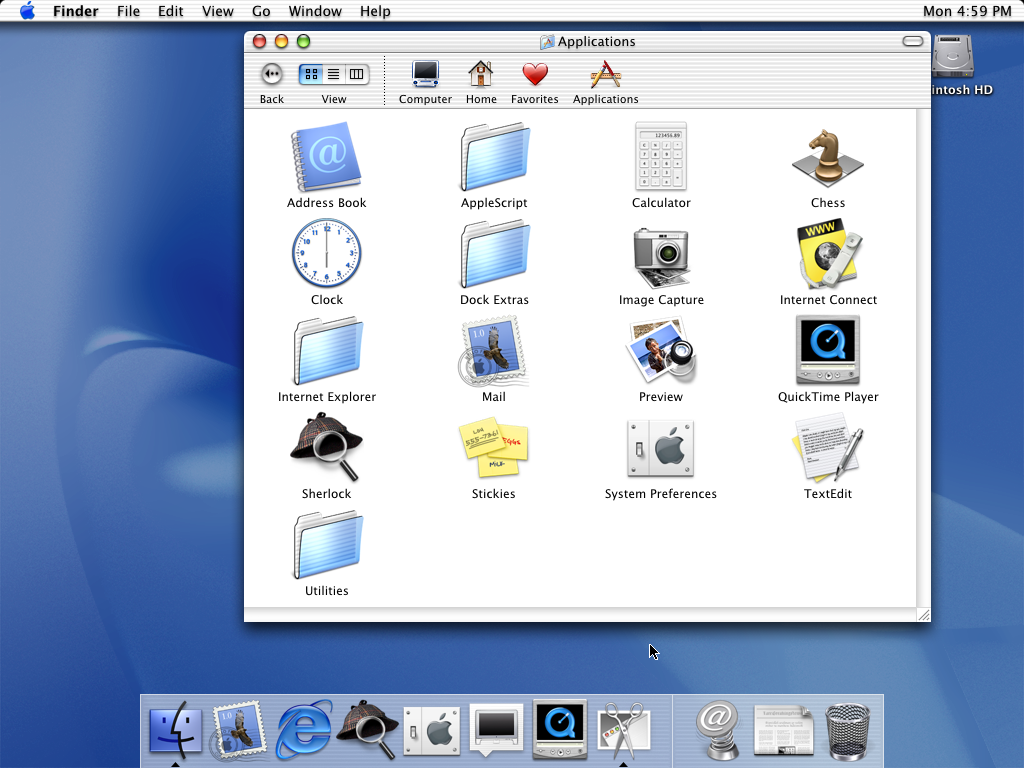
I think if there's any upside to Tahoe, the grievances may push me into blogging for the first time ever, because I can't keep these to myself.
I actually feel sorry for Apple's developers because there's no way you ship software this bad and inconsistent unless you've been handed a terrible design spec from Dye's team.
edit: On my screen, three layers' corners https://hcker.news/tahoe-corners.png
One example that I hate on iOS: the notification/lockscreen curtain is supposed to cover the content as it slides down. That’s what a curtain does, this has been the language for years. Now the curtain is transparent, so it can’t cover the content behind. How does the content disappear then, as you slide the curtain down?
… it doesn’t. Icons do a buggy looking animation crashing toward the user and through the screen, and if it’s an app there is just no transition. You can check by sliding the curtain down slowly and then letting go.
i disagree about that one.
im not a UX expert by any means but my first impression at WWDC seeing liquid glass was "holy shit, they pulled that off? i know apple would never compromise on legibility, so... how? there are so many situations where this won't work, and they can't exactly control the content that the buttons are overlaid on top of"
cue my confusion when it was exactly that: an obviously problematic idea implemented with all the obvious flaws showing up
they have largely fixed it now, half a year later, but the liquid glass isn't very liquid anymore. it's frosted. which is fine, but obviously not the original idea they were going for
contrasty backgrounds are fundamentally incompatible with legibility
That's what I mean, even if worded badly. Someone probably managed the glass distortion effects as an experiment, or demoed a transparent redesign of a small portion of the UI, and it looked awesome. I think it's cool that they can green light weird ideas, otherwise there's stagnation. But it is obvious that there were fundamental unresolved issues, and yet something in the process pushed the idea forward anyway.
It signals something very wrong in company structure. If you can't trust the process to drop what doesn't work, then trying new things is risky. And as you say, it's an experiment that feels so unlike apple, to disregard polish and accessibility that way.
... liquid glass isn't very liquid anymore. it's frosted.
Is this compromising readability? Yes, but now there's another kind of perception problem, and it's whether you can see what's literally in front of your eyes in physical space.
Why ? I'm sick of square windows. I want disc windows. And instead of scrolling them, i want to rotate them. /s
Fixing bugs is hard. Better focus on the aesthetics.
Probably nobody, just some artifact of the overlay APIs used default behavior that they didn't bother to streamline.
I see this kind of trend with apple since big sur. It's not new but it's becoming more obvious with every release.
Used to be this sort of thing "just worked" on Mac OS --- you'd think with a diminishing number of UI tool kits/dev tools this sort of thing would get better/more consistent.... always liked "Themes" and this just gives me one more reason to wish that they would come back.
Does it matter if it's 3rd party apps or not? Wasn't a huge part of the sell with Apple's own GUI toolkits that all native apps work uniquely, but look familiar and like part of one and the same? The consistency and "all apps look and work great" I seem to recall being one of the "features" people used to tout about OSX.
FWIW; TFA compares the border radius of TextEdit and Calculator, both two Apple apps, built-in nonetheless.
Edit: it is fixed and they polished up the UI since then.
Or some well-done malicious compliance.
I assume it’ll rectify in the vast future, but it’s weird to see regressions in core areas because the new hotness has made it so that these gigantic-corps can’t walk and chew gum at the same time.
I won’t be surprised if there is a rollback in 27 (i’m hoping there will be - else going to buy a retro mac with a magic bar upon no tahoe runs).
Left for Meta in Dec 2025. Hopefully things normalize a bit? Wishful thinking, I suppose.
That started in 2010, a bit more than 5-10 years.
Uber flat, you don't know what's a button, what's a text. I dunno if I just adjusted to it or it actually somewhat got better up to iOS/macOS 15. Though with iOS/macOS 26 - it's iOS 7 moment yet again.
NB: not sure about Liquid Glass - though I was recently (and weirdly) recommended to watch iOS 7 trailer on youtube[2]. Comments are overwhelmingly positive. Dunno if it's just people who were kids/teens looking through rose tinted glasses. Though I am not sure anymore, maybe people actually like such designs and it's just HN bubble complaining (IMHO complains here are 110% valid) about nothing. Maybe in 10+ years ordinary guy will praise iOS/macOS 26.
> Comments are overwhelmingly positive. Dunno if it's just people who were kids/teens looking through rose tinted glasses.
as an aside: personally (and at $work in user tests) very flat design seems to lead to cognitive load increase and difficultly discerning interactive vs non interactive elements so i'd say we have one step forwards two steps backwards for sure...
[0] https://osxdaily.com/2011/07/23/change-ical-leather-interfac...
For around a decade typing "word"+return into the windows start menu search box usually opened Edge with a search result of "ord". Recently it opens Word most of the time.
I'm specifically commenting on their UX decisions, and in that respect literally everything. Tahoe, like every major upgrade, is iterative. Very few things that bowl a person over. Somethings are good, some things are "meh". But Liquid Glass is an abomination.
It's wrong though, because the window is the higher element in the hierarchy (container) and should not be affected by what is inside. It creates a larger inconsistency than the "consistency" it supposedly brings.
Notice two things:
1) The window chrome with traffic lights and title is entirely separate from the toolbar, not unified with the toolbar.
2) The top of the window is rounded, but the bottom of the window is not!
I think the old design was superior for several reasons, one of which is that it made the windows much easier to drag around the screen. In any case, though, even if there's an argument about concentricity and window controls, it makes no sense that the bottom of the window has the same corner radius as the top when the toolbar is only at the top.
Traffic light buttons were already equidistant to the edge of the window. Now they are trying to center circles in squircles[1], breaking window edges and draggability, etc.
> It creates a larger inconsistency than the "consistency" it supposedly brings.
That's why I am baffled (as many commenters here) - how did this went out all the way to release, instead of ending as an experiment at design floor.
[1] parent comment: https://news.ycombinator.com/item?id=47321065
A better solution would be to adjust the sizing/placement of the window controls (and allow the hit area to include the original placement maybe?).
It certainly doesn't feel like there's a trillion-dollar-company difference between those two and Tahoe.
I haven't had this much fun with computers in years. It has certainly helped with my Tahoe grief.
- Raising the lid of the laptop and the base wouldn’t stick and fall off on the desk,
- A single-button click,
- A Cmd+C to copy and Ctrl+C for the interruption 7 in the terminal,
But now you have to configure that, yes, activate the right-click; yes, activate the three-finger click (wtf, 3 fingers); yes, activate the swipe-across-desktops on the magic mouse, all those items were selling points, so they should have studied the best behavior and implemented it by default on all deployments. But that requires studies, aesthetics, and a taste that only Steeve Jobs had, otherwise everything becomes an option. That’s right, I’m going to paraphrase Jobs’ argument against the 1990ies Microsoft:
The problem with Apple is they have no taste.
Apple doesn’t understand and respect that.
Firstly, alt-tab doesn’t consider windows, it considers apps. So if you have multiple browser windows or word windows open, you can’t alt-tab between them. It’s totally confusing. So I install an app just to get the normal alt-tab behavior of other OSs, to alt-tab between windows (mine is called alt-tab, and it’s a bit buggy and slow, I think they all are)
Next, Apple does not respect the multiple desktop boundary. If I click on the safari icon in the dock, it will switch to some seemingly random safari window in some other desktop. If I close any window, it will also run off to some other window of the same app in some other desktop (who came up with that behavior?) when I dismiss an outlook notification, it will run of to another desktop to look at outlook (actually I think this one is Microsoft’s fault, but Apple could probably do something about this one).
The result is that while working, I have trouble staying on the desktop I’m working on, I constantly am getting sent off to some other random desktop, and have to find where I am and where I was.
There must be a better, more productive way to manage windows and desktops.
(Also what’s up with the autocorrect, I had to retype every instance of “I think” in this message, because it insists it should be “o think”)
I assume you mean cmd-tab.
>doesn’t consider windows, it considers apps. So if you have multiple browser windows or word windows open, you can’t alt-tab between them. It’s totally confusing.
You use cmd-tilde to switch between windows.
>So I install an app just to get the normal alt-tab behavior of other OSs, to alt-tab between windows (mine is called alt-tab, and it’s a bit buggy and slow, I think they all are)
You don’t need an app.
>Next, Apple does not respect the multiple desktop boundary. If I click on the safari icon in the dock, it will switch to some seemingly random safari window in some other desktop. If I close any window, it will also run off to some other window of the same app in some other desktop (who came up with that behavior?) when I dismiss an outlook notification, it will run of to another desktop to look at outlook (actually I think this one is Microsoft’s fault, but Apple could probably do something about this one). The result is that while working, I have trouble staying on the desktop I’m working on, I constantly am getting sent off to some other random desktop, and have to find where I am and where I was. There must be a better, more productive way to manage windows and desktops.
This is a configurable setting.
>(Also what’s up with the autocorrect, I had to retype every instance of “I think” in this message, because it insists it should be “o think”)
This is a configurable setting.
I really miss that in Linux. That said, some terminals implement smart Ctrl+C which will interrupt if there's no text selected and copy otherwise. But terminal I use (Gnome Console) does not, so I have to press Ctrl+Shift+C to copy text and then I press that in browser and everything exploded because it opens developer tools. So annoying.
All this version alignment, the blurring of "here is a laptop with A processor and iOS" points to that direction.
The errs of Tahoe are basically a result of the rush on that direction
Why would they if they just released a brand new MacBook?
The SoC is just a way to differentiate from the Air and to keep costs low.
they also briefly took away the ability to disable gatekeeper per terminal command (now back)
next they wanna launch a touchscreen macbook, presumably this fall
Maybe I’m missing something. How would a touchscreen MacBook improve on something?
That being said, based on what I’ve been seeing at Apple, I would not be surprised if they did go down that mediocrity route.
It won’t, but there’s now an entire generation of users who get confused and angry if any kind of display doesn’t react when you poke it with your finger.
Does this require a Tahoe upgrade?
But macOS? Good lord. I can only hope 27 will unfuck things somewhat, there are so many small annoyances and all of them add to a constant sense of unhappiness throughout the day. I’m really tempted to downgrade back to Sequoia. At least the M4 will be good enough for years if this truly is the new path Apple will take.
HOWEVER, due to the open nature of the platform, you can install an extension to clean this up. Now, all my windows have identical corner radii, strokes, shadows etc. My Linux desktop is, surprisingly, more consistent now than macOS in this regard.
https://extensions.gnome.org/extension/7048/rounded-window-c...
So this is what they decided to do? Use so many different rounded radius variations that competitors don't know which one to copy?
Hopeful they don't wait 7 years to change stance.
- Unified toolbar and titlebar dates from much earlier... it was 10.4, not 10.7.
- The brushed metal look was supposed to be applied to "appliance-like" apps as opposed to "document-like" apps... But Apple was never able to stick to that rule themselves.
There are a few design ideas that always turn out to be bad when implemented, but which designers seem to have to learn the hard way. Transparency is the biggest one, but I guess so is excessive rounding now.
I'm one of the people who actually mostly likes Tahoe. Funny to see how new versions of MacOS always get piled on, in such a groupthink manner.
For me personally, once in used to the new UI, going back seems crude.
What do macOS window styles have to do with iOS? iOS (mostly) doesn't have windows!
What does the MacBook Neo have to do with iOS, other than coincidentally using some of the same components? Maybe Apple decided to make a cheaper Mac because they thought people might want to buy a cheaper Mac.
They are trying to use a common design language across all their devices, sure. But you would hardly expect them to do the opposite! They might try to make a hybrid tablet/laptop or something at some point, sure, but none of their current moves point inevitably in that direction. Except maybe for software notarization, but that has nothing to do with window corners or cheaper laptops.
Just so, so sloppy. I'm supposed to trust a multi trillion dollar company with my privacy?
https://developer.apple.com/videos/play/wwdc2025/310/?time=4...
> Each element is designed with a curvature that sits neatly within the corner radius of its container, in this case the window itself. And this relationship goes both ways. In the new design system, windows now have a softer, more generous corner radius, which varies based on the style of window. Windows with toolbars now use a larger radius, which is designed to wrap concentrically around the glass toolbar elements, scaling to match the size of the toolbar. Titlebar-only windows retain a smaller corner radius, wrapping compactly around the window controls. These larger corners provide a softer feel and elegant concentricity to the window but they can also clip content that sits close to the edge of the window.
I am not saying that it's a good idea to have different corner radius, just that it's nothing new.
Did they explain the reasoning?
The assumption being that the majority of reactions would be "its shit."
When you maximise, make it have straight corners (at the very least at the top), this is just ridiculous
If you made it this far, know I am totally messing with you. It really is unnerving.
I just did an image search for "classic macos" and one of the first hits was from https://www.versionmuseum.com/history-of/classic-mac-os. Look at those System 1 screenshots, from 42(!) years ago -- round corners on Puzzle and Calculator, square corners on Note Pad and Control Panel! No consistency at all, isn't it infuriating?
Article author here. I think the quoted claim is somewhat misleading. There are at least two different ways to interpret a UI feature as "not new":
1) The feature has been in the operating system all along.
2) Something analogous existed 40 years ago and then disappeared long ago.
You're referring to 2, not 1.
The only reason I chose Calculator app for my screenshot is that its window is very small, which allowed me to make a small screenshot, because people may be reading the blog post on small phone screens. In other ways, admittedly, Calculator is not a great example, because its window is not actually resizable, and thus it's not the type of window that you would normally place in the corners of your screen, like a resizable document window.
Rounded corners on a "widget" type of app are not as objectionable. As other commenters have noted, the calculator in "classic" Mac was a special Desk Accessory. In contrast, on Tahoe, the varying corner radii affect ordinary document-based apps.
Consider Mac OS X 10.0 Cheetah. The top of the windows had rounded corners, but the bottom did not! https://512pixels.net/wp-content/uploads/2018/08/10-0-Cheeta...
TextEdit, for example, did not start to have rounded bottom corners until Mac OS X 10.7 Lion, which was itself much maligned for bringing the iPhone UI to Mac.
You're right, what I had in mind was 2, although a bit more general; I think there have been similar kinds of inconsistency in the Mac UI since the beginning, in various forms, almost always intentional.
So I think it would be wrong simply to say "the UI has gone a cliff, they've just thrown away their own HMI guidelines." You can certainly dislike what they've done (and I do dislike it!) but they at least have a somewhat logical goal in mind -- in this case, making the corners neatly fit various different kinds of window content.
Having said all that, there are also some real bugs and unintentional glitches, like scroll bars and other widgets not fitting correctly. I'd agree that seems to be happening more often in recent years, so their quality control has gone downhill.
My own view is that Mac OS X 10.5 Leopard was the beginning of the end, and it's gone downhill ever since.
> they at least have a somewhat logical goal in mind -- in this case, making the corners neatly fit various different kinds of window content.
I would emphasize "somewhat", because as noted, the corners do not neatly fit the window content at the bottom, which is ironic, because Apple claims that their intention is to emphasize the content, but their implementation actually clips the content!
Some cool details here: https://en.wikipedia.org/wiki/Desk_accessory
Like Tahoe, it was deliberate and there's an explanation for the difference.
But I do wonder if people at the time felt the same way.
I particularly like this Bill Atkinson tidbit at the end:
Bill Atkinson complained to me that it was a mistake to allow users to specify their own desktop patterns, because it was harder to make a nice one than it looked, and led directly to ugly desktops. [...] So he made MacPaint allocate a window that was the size of the screen when it started up, and filled it with the standard 50% gray pattern, making his own desktop covering up the real one, thus protecting the poor users from their rash esthetic blunders, at least within the friendly confines of MacPaint.
(He was totally right, making your own desktop patterns was fun but the standard checkerbard was far and away the best choice.)
The author notices that adding a toolbar changes the radius, and to me it makes sense. If theres a toolbar, I know how much I can cut the corners, because the icons in the toolbar are not gonna be in far corner. At the same time, when I am unsure about what type of content might get cut by the corner, I will reduce the cut slightly to give that content more space.
I couldnt care less that one radius is not the same as another, I guess my OCD levels are not that high (yet?).
And I say all of this as someone who dislikes the glass design, and especially hates the small, slowly fading in volume/brightness indicators in the corner replacing the mid screen beautiful instant indicator.
I don't see the big deal. That seems like a reasonable design choice. Make nice rounded corners when content allows, but rectangle them up as needed?
Seems like a nice adaptive design choice.
Honestly making different apps slightly more visually identifiable in a sea of sameness doesn't seem like a big deal.
Maybe it shouldn't irritate me, but it's the first time I've encountered it in 30 years. I'm all for change and trying new things, but this doesn't feel like progress.
And then ... Apple lost its way. Now when I get a new Mac I spend the better part of a day turning off as much of the pointless eye candy as I can so that I can focus on the task I'm working on, not the distracting UX conventions.
I want a computer, not an iPad with a keyboard. That already exists, and there is a reason I don't have one.
What's worse too is that the means of reducing this distraction and visual mess are arguably only a trade for a different, often equally (though sometimes even more) poorly implemented interface. The high contrast and reduced transparency modes are not well designed at all in my opinion, and they seem like vague afterthoughts in this transition.