Netrinos creates a LAN-like overlay network across your devices. Connections are direct P2P via WireGuard, with no central server routing traffic. Each device gets a stable IP and DNS name (pc.you.netrinos.com). When direct connections fail, they fall back to a relay server that's still encrypted end-to-end. We can't see your traffic.
The most challenging problem to solve was NAT traversal. UDP hole punching works most of the time. The rest is a cocktail of symmetric NAT, CGNAT, and serial NATs. We use STUN-style discovery and relay fallback for the edge cases. I was surprised by how unreliable low-end ISP routers really are, and how much technical wizardry it takes to hide that behind a clean, simple UX.
Our stack is a Go backend for client and server, WireGuard kernel mode for Linux and Windows (macOS is userspace), Wails.io for cross-platform UI. WireGuard does all the heavy lifting. Go ties it all together.
Popular use cases include: RDP to home PCs, accessing NAS without exposing it, and SSH into headless Linux boxes. One customer manages hundreds of IoT devices in the field, eliminating the need to deal with customer routers.
We just released Pro with multi-user, access control, and remote gateway routing. Personal is free (up to 100 devices).
I'd love to hear what you expect from a simple mesh VPN, what's missing from current tools, and what's lacking from your remote access setup. Use code HNPRO26 for a 30-day trial of Pro.
The obvious competitor here is Tailscale. But let's say, reasons, and Tailscale isn't an option. Then you go down the path... TwinGate, Teleport, Netbird, Pomerium, Netmaker, ZeroTier, etc...
Even the initial pricing and free tier are you're up against are going to mostly be a deal breaker compared to what's out there.
Trusting a VPN provider is a lot. If you're running the control plane - why should I trust Netrinos?
"After years of SSH tunnels, IPsec headaches, and the ssh log horror movie, I wanted something simpler: install, sign in, get work done."
"Target market" could be the author
There's no good reason to discourage people from writing overlays, unless one is doing so for commercial (i.e., anti-competitive) reasons
A more interesting question might be, "In your opinion, what is unsatisfactory about XYZ that does essentially the same thing"
For example, one might be a Layer 2 overlay whilst the other is Layer 3
Maybe we'll never have web browser diversity (or meaningful competition) as the web browser has become an instrument of surveillance and advertising controlled by "Big Tech", but overlay diversity (and competition) is still a possibility
If everyone thought IPsec and OpenVPN was "good enough" then Wireguard and Tailscale would not exist
I still use an unpopular non-commercial L2 overlay from before Wireguard existed that is smaller and faster than anything else I have ever seen
IMHO, the more overlays that exist, the better
Where did I discourage them? I have no vested interest in any competition. And what I said can be publicly validated: their pricing isn't exactly competitive.
> "After years of SSH tunnels, IPsec headaches, and the ssh log horror movie, I wanted something simpler: install, sign in, get work done."
OK, again - they all solve for this. What's different?
> For example, one might be a Layer 2 overlay whilst the other is Layer 3
OK, I've been doing VPNs a long time. What does this have to do with anything?
> If everyone thought IPsec and OpenVPN was "good enough" then Wireguard and Tailscale would not exist
OK. Thanks? This isn't a protocol discussion. This is a product discussion built on existing protocols. Netrinos has brought zero new to the plate comparatively at the underlying level.
> I still use an unpopular non-commercial L2 overlay from before Wireguard existed that is smaller and faster than anything else I have ever seen
A lot of tools like that exist. If it's "unpopular" there's, generally, a reason why. It could be: niche use case, it could be: doesn't solve a majority of people's problem. But since this is such a super secret L2 overlay I guess we'll never know.
> IMHO, the more overlays that exist, the better
This isn't an overlay. This is a VPN as a service - and my question was intentional: why should I even trust Netrinos. This is a VPN.
Edit: Just found this post https://netrinos.com/blog/tailscale-alternatives-2025, so it looks like main differentiator is pricing right now.
One isn't.
- Connected to my phone hotspot in the car outside my son's therapist, it worked for months, but then for 2-3 weeks tailscale wouldn't connect. Browsing worked fine. In the 6 weeks since then, it's worked fine.
- A couple nights ago I was in a Holiday Inn Express. I could successfully connect to tailscale, and ssh to machines at the office (which has tailscale on a public IP, but couldn't pass traffic to my machine at home (behind NAT, we have a DERP next to the machine at the office and also another one on the headscale node at AWS). Maybe they blocked the DERP port?
We all get that sometimes companies have IT policies which are outdated and get in the way, but that's a problem for someone up the chain to solve. A team or department deciding to just start doing their own thing with something like this which isn't managed by or even known about by the official company IT is at best a path to future problems if not an immediate compliance problem.
These are all things that the target audience either doesn't have, or doesn't want. If the above words are important to you, then you're probably not in the target market.
Think of an SMB where you might know you need to do something (like connect a new store location to the server in your main location’s closet), but don’t know how or can’t afford to hire an IT person full time. This is probably the main market for this. Then once you get more buy in, experience, and reputation, this VPN could stay to see larger clients. That’s at least how I’d expect to see this grow.
Each also gets a friendly DNS name in the form device.account.2ho.ca (try finding a short domain these days).
So yes, you can...
$ ssh user@server.myaccount.2ho.ca
C:\ net use S: \\server.myaccount.2ho.ca\Home
etc.
Our target market is smaller teams and people with limited IT skills. So, we chose not to send all traffic through the vpn. The only traffic going through the VPN is traffic to and from your other devices (in your account). Internet access is still through your default network.
In the Pro version, you can route specific destinations through other peers, also belonging to you. An example use case here would be accessing your web banking while on vacation in a distant country. You would route your bank website through your home connection.
Similarly, our access control is only restricting traffic that comes from your devices on the wireguard network. We do not interfere with the settings of your own personal firewall.
Either provide the Github (for whatever reasons) or remove the link from your website. I am assuming it is closed source.
Personally I don't trust new VPN solutions without published source code!
Alternatives: Tailscale with Headscale or better Self-hosted Netbird if one is a itty-bitty IT savvy.
Netbird (self-hosted) offers a lot lot more with the self-hosted solution. - SSO - Independent networks - Superb policies / ACLs - Keybased onboarding - auto-expiration and a lot more like integrations and what not!
Tough to beat the Netbird Open source offering if one tends to spent a little time and effort (though not everyone's cup of coffee!)
Such can look at tailscale's offering since the free version of Tailscale offers more than what is offered here and all the client applications are open source and constantly updated.
If pricing is going to the only difference, (at a high level, everything under the hood looks similar - wireguard based, zero config, p2p mesh, port forwarding etc etc.,) bring a lot more trust by offering an open source version like others.
As I understand it, with traditional VPNs, you basically have to trust third-party audits to verify the VPN isn't logging all traffic and selling it. Does the WireGuard protocol address theses issues? Or is there still the same risk as a more traditional VPN provider?
In this case, though, it creates an encrypted tunnel _only between your own devices_. This allows you to connect to all your devices, home desktop, phone, laptop, as if they were on the same network, allowing you to do fairly sensitive things like remote desktop without having to expose your machine to the public internet or deal with firewall rules in the same way.
Assuming this project is legitimate, then the only traffic this service would even touch would be those between your own devices, nothing related to public internet requests. And, on top of that, the requests should be encrypted the entire way, inaccessible to any devices other than the ones sending and receiving the requests.
There are many caveats and asterisks I could add, but I think that's a fairly straightforward summary.
If a direct connection cannot be established due to a very restrictive firewall or a messed-up ISP modem, it will fall back to a relay server. But in that case, the relay relays the traffic, but it does not have the keys to read it.
You can learn more here: https://www.wireguard.com/
TL;DR WireGuard itself is a relatively small project at roughly 4,000 lines of code. It has been thoroughly audited and is even built into the Linux kernel.
Love to see the ecosystem of wireguard based services growing into different business segments, i.e. you targeting SMBs/small teams.
Not for me, but legitimate use case and product :)
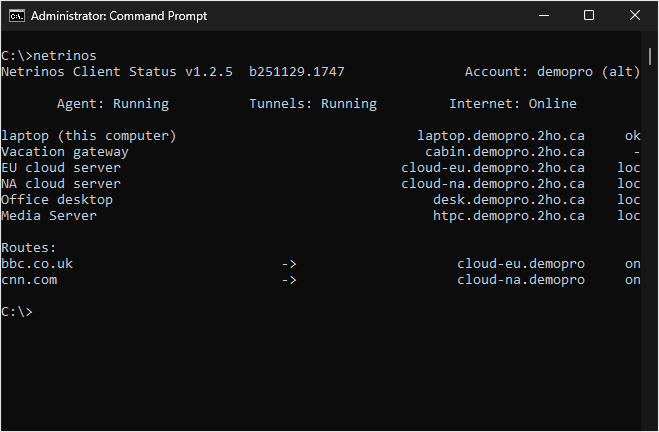
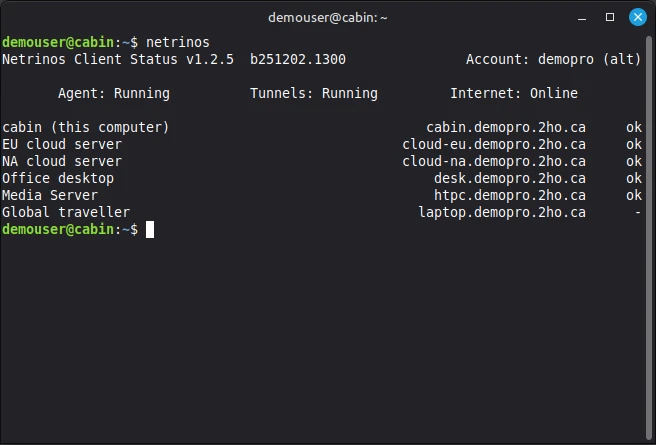
If you install the OpenSSH server on Windows, you can manage Netrinos in a terminal, just like on Linux or Mac. e.g.
https://netrinos.com/cdn/images/screens/windows-terminal.png
https://netrinos.com/cdn/images/screens/linux-terminal.png
On a trip to Europe last year, I tried it from the Air Canada in-flight WiFi somewhere over Iceland. I was able to RDP to my desktop at home, then RDP right back to my laptop on the plane. Performance wasn't great. And it's not a terribly useful use case. But it did work.
Wireguard deserves a lot of credit there. No ports were opened on my home end. And who knows what the plane has for NAT.
Only downsides are no mobile support & seems to be somewhat abandoned
Thanks
https://netrinos.com/help/gateways-routing
You can also have multiple gateways and send traffic through different locations. e.g. You can access a NAS on one site and a website through another.
How does your relay compare to Tailscale's (DERP)?
Netrinos uses a central rendezvous server that participates in WireGuard handshakes solely to collect your devices' public endpoints and share that information with your other devices. When a device roams to a new location, the server learns the new endpoint and updates the other devices in your account.
When direct P2P fails, Netrinos connections fall back to a relay server. The relay is a WireGuard peer, but it can only relay traffic between peers in your account. All customer accounts are strictly firewalled from each other.
If you want more control, you can enable a device in your account as a relay server with a checkbox in the app. This could be a home PC with a stable connection or a low-cost cloud server.
Not really related to the product itself, but your landing page design looks close to the official Microsoft style which I dont have the best memories of..
It might be intentional to show the "seamless integration" to Windows users but my penguin loving soul got scared!
If it makes you feel better, all core development for Netrinos is done on Linux. Then, the code is adapted to work on macOS and Windows. Almost all of the code is cross-platform, including the UI. Only the implementation details are platform specific.
e.g. Linux uses nftables. MacOS uses pfctl. Windows, we had to write our own packet filter to avoid touching the often misconfigured Windows Firewall.