You can thank Windows for this. Back in the day when we went from DOS to Windows, this notion of a "proper shutdown" was introduced, and God forbid you press the power button, or bad things would happen.
I'm not positive Windows was the first to do this, but I think it's safe to say it was the one that started this habit for most people.
And now, it has became so engraved in our brain that it's nearly impossible to un-train. I to this day never use the power button on any device to shut it down out of uncertainty that I don't know what will happen[1] if I do.
[1]http://www.aeropause.com/wordpress/archives/images/2008/11/a...
Way faster than going through the Apple menu.
It seems shutting down just "mini hibernates" it does not shutdown Windows 8, you need to choose restart when installing updates.
I think the real trial for the OS will be whether people will be able to re-learn these basic metaphors that Windows has fostered up until this release. I think we'll see something very interesting happen with the consumer uptake in the short-run, but in the long run I feel they've made some actual forward-thinking decisions.
Maybe, after this change (and ones like it) has been accepted for a few years, people won't be terrified of their power buttons and flag keys anymore.
[1] where random amount of time is best-guess 'more than 5 seconds', but depends on hardware implementation and varies widely in practice
In Ubuntu I do: <Super Key> + <Space Bar>, type "SHU" and press enter.
I love Gnome-Do. (Of course not limited to Ubuntu. You have Launchy for windows and spotlilght(?) for mac.)
For sure, there was no "software shut down", but the issue with that was it put the burden on the user to be careful about when they shut it down if they were saving stuff to disk. The floppy and hard drive lights (if you had one!) were there, and as long as you trained yourself to not turn it off while those lights were on, you would probably be fine, but it was far from a sure thing.
I adored the Amiga, and it was way ahead of its time in a whole lot of ways, both software and hardware, but this wasn't really one of them.
This will improve immensely when we all use SSDs.
Unicies were probably similar.
These "not bad" changes in Windows 8 also underscore a recurring problem with software: people are forced to choose between "take the good and the bad" or "nothing", they can't just take the "good". Software updates are too big and bundled when the reality is that a lot of components could sensibly be upgraded by themselves.
Changes in Task Manager for instance could have been folded into any version of Windows to date, and if a few programmers had access to the right source code I'm sure they could have added this at least to XP. Yet they can't, and Microsoft won't, and users of any version other than 8 are kept from a perfectly sensible improvement.
Rather than charging $200 for an "upgrade", sometimes I think it would make a lot more sense if you could pay Microsoft $10 for the "new system utilities package" (which would update your Windows XP Task Manager alone, and whatever else falls into that category). In other words, don't restrict access to the truly useful upgrades just because no one wants Metro.
And here you people complain about Android platform fragmentation...
Furthermore, when someone does send you a link for a Win8 app you won't be able to run it. Or if you want to developer a Win8 app then you won't be able to.
I've been using Win8 since the release preview as my main desktop machine and as a desktop OS it's almost strictly better than Win7. The Metro UI is just a curiosity at the moment as I don't have a touch screen, but Win8 is still a better desktop OS than Win7.
Got any facts to back that assertion up? For all we know, the task manager changes couldn't have been added to Windows 7 or Windows XP. Maybe there's a new API that allows them to get these sorts of detailed statistics and present them to the user.
And the fact they HAD a start menu interface until the final release (it was in the beta/candidates) is just a bigger insult.
W8 is actually usable once you add back in the start menu and have it go immediately to the desktop via a 3rd party program. Why microsoft didn't allow that option when they original did, is clear demonstration of them being obstinant.
Once again the lesson is - if you must change your product:
     1. change it gradually
2. give an option for the old wayFrom my perspective there seems to be a very clear purpose: unifying the interface across platforms, which is one of the disadvantages they had when compared to Apple. With Windows 8, they will basically have the same UI for desktops, tablets and phones.
Even hotmail.com's look has been revamped into outlook.com; and not only that, but Microsoft went as far to even update their logo from 1987, to match their new tile approach.
Were all these changes necessary? Time will tell, but strategically it seems to make sense to unify the desktop experience (where they are dominant) to grow 2 of their new market segments: windows phone and tablet (surface).
Why would they want to unify DOWN to that level?
It's crazy how much a lead Microsoft had with personal computers in the 80s and how far they've fallen. Once arm starts becoming powerful enough for desktops, Windows is pretty much done and the days of the wintel tax are over. We're almost there, give it about 3-4 years.
I think it's quite the opposite. OS X has a very different interface from iOS. Some of the visual styling is similar, but for the most part the similarity ends there. Everything with any meat on it - the basic shell interface, the user interface controls and their behavior, even the machine's basic capabilities - is markedly different between the two platforms.
That's part of why iOS started eating up WinCE's market share when it came out. WinCE tried too hard to be like Windows and its user experience suffered as a result. A bicycle and a motorcycle serve fundamentally similar purposes. But I think we can all agree that it would be wrong to jump from that observation to the conclusion that it would be a good idea for them to have the same controls.
Windows 8 is clearly a platform intended as part of a migration from classic Windows UIs and APIs over to their (née) Metro Windows 8 environment.
This strategy is high-risk. Will their partners and the customers come along to Metro and Windows 8, or will the partners and customers continue to use classic Windows UIs, APIs and tools? And this obviously hinges on whether Metro adds enough stuff to pull customers over to it; whether to the Metro portion of Windows 8, or to the Metro Windows 8 RT ARM boxes.
This is about as big an in-your-face platform migration as has been tried in recent memory.
What makes you think this is a good idea? They are different devices with different use-cases. Why would you want the same metaphor across all of them? I don't try to drive while I'm sitting on the toilet, and I don't flush the driver's seat after I've parked the car.
That statement might only be valid for the blind users of Windows.
The OS was redesigned to fit the (new?) market...
More or less, the desktop was too difficult for 95% of the users, and just got in the way of their use-cases.
I'm a Windows developer, and I confess that I haven't tried Windows 8 yet. I'm usually eager to try new OS's and learn new things, but this time I'm not. I think it's a sense of dread about having to spent several hours learning an environment that just seems tedious.
That said, I have used Windows 8 out of curiosity for some weeks (as a UNIX user since 1994), and I have to admit that I quite liked it. I didn't really use Metro, except for checking Facebook and Twitter every now and then. Of course, I am not a regular Windows user who has learnt usage patterns over the years, but I think there's also a lot of inertia.
The company I work at is just starting to upgrade to Windows 7 (from XP) to our 40,000 employees, starting with the IT Department. I'm sure we're not the only ones who have been hesitating.
I mean this article is targeted at what, the top %15 or so of Windows users? Look at how long this article is! For us!
In all honesty, how the hell can someone not just say "By a mac pa/ma" at this point. I mean the recent patent thing makes me want to spit in Apple's eye, but wtf Microsoft. Who can pretend this is a reasonable alternative for anyone who isn't pretty computer literate?
They are obviously betting on the merging of tablets and laptops in the future, but seriously, this shit better have a 30 minute tutorial and 30000 minutes of M$ tech support budgeted in.
> how the hell can someone not just say "By a mac pa/ma"
The median household income in the US is just under $50k. Mac's are not priced for the masses.
Having said that, it looks like both Gnome3 and Windows 8 were designed with ease of use as a higher priority than workflow efficiency, but with that argument, we should move back to the command line.
BTY, as someone who uses the compute 8+ hours a day, I use the Awesome WM with a-lot of command line apps.
If, like my family, 90% of what they use their PC for is Word, browser, Outlook then they wouldn't need these tips or care about why you would want to use them.
They'd never need a menu option to shut down Windows because they've already been using the power button for the last 10 years.
This is because I've basically got everything configured like Windows 7 (I don't really use the Start screen), but the Win+(key) combination is what makes the difference.
Take a typical almost-every-day activity for instance: checking the weather report. On Win7 (unless you had things specially configured for this event), you'd have to go online via a browser, find a suitable website, and wait for results - quite possibly having to physically type in your location if the site couldn't get it automatically.
On Windows 8, I just press Windows + (the letters w e a) and the search instantly finds the Weather app - I've got it open in less than 0.3 seconds, and the app itself fetches the data in just a few seconds. This kind of stuff works straight out of the box, and wasn't possible on Win7. It shows that even desktop-only users like me can make at least >some< good use of the RT apps.
(Note - I use Dashboard a dozens of times a day for one function - I have eleven international clocks running to help me keep track of what time it is when I'm IMing or SMSing one of my international colleagues.)
Good to see that they got this done at last. OS X had spotlight for what, 7 years?
I believe (weakly) that OS X treats window managers the same way Linux does.
"In other words, it knackered my productivity for a while".
This is not acceptable.
Also, don't forget Scott Hanselman works for Microsoft in the web platform team, so I'd say that is enough bias to ignore the article.
Besides, of course he's not gonna bash the product, but Scott usually won't lie to your face about how good something is if he thinks it's crap.
The 'new interfaces' generally (Windows 8/TIFKAM, Ubuntu Unity, Gnome Shell) seem to me to be making less functionality manifest, and hiding a little more. I have not tried Windows 8/TIFKAM yet, but I use Unity/Gnome Shell much of the time.
"I am a web guy SO much more than a desktop guy so if you look in my Taskbar on any of my machines you'll see mostly web browsers, text editors and shells. I live off my taskbar and I'm ALL about HotKeys. If I can avoid touching my mouse at all I will."
I think a significant number of more ordinary computer users do use the mouse a lot more.
The rest of the planet just want it to work just how it always did and piss off at the end of the day so they can go home, cook dinner, dig holes in the garden, watch television, build LEGO with their kids and play golf.
Our job as software engineers is to SERVE those people unconditionally, make their lives less laborious and to reduce the burden of their jobs. After all what else is technology for?
Marketing driven change does nothing but enslave people further and demand more attention. Incremental changes and improvements are much more useful as they allow people to adapt slowly without having to deal with life-changing events every few years.
To hell with everyone who doesn't see it this way - you are doing a disservice to humanity.
Also, see the below:
The Macintosh uses an experimental pointing device called a 'mouse.' There is no evidence that people want to use these things. -- John Dvorak
What happened to affordances? https://en.wikipedia.org/wiki/Affordance
All these people aren't stupid. They're coming up with these crazy ideas because they don't know what else to do.
One task of good design is to make it obvious what I can do and how I can do it. No one likes to discover, 3 months later, that you could do a 3 finger pinch with a middle finger wiggle gesture to do what you wanted. I shouldn't have to sit there and try all the combos of what I can do.
Now, obviously that was still a pain in the ass and Microsoft wisely axed that requirement for mouse-based computers. Now I think things are much better -- yes, there is no affordance telling you what to do, but if you do literally _anything_, then you get what you wanted. That's not too bad.
Any interface has to take into account a variety of "cognative styles". Some people, when they don't know what to do, start exploring and discover what to do. But people just freeze and do nothing until they discover the right thing. If you making a mass-market UI, you have to take both styles into account, especially when you are talking about entry-points and exit-points.
When you have 3 different modifier keys, this increases the number of key combinations exponentially vs 2. So take for example a cross platform IDE that is keyboard shortcut friendly, with lots of actions you can assign to keyboard shortcuts, like Eclipse. In the Windows version you only have shortcuts that can be a combination of Ctrl and Alt plus another key. With OS X (and Linux), you can have any combination of Ctrl, Alt, and Command plus another key, giving many more possibilities. I miss the lack of context menu key support in OS X, though.
As a UNIX/Emacs user, a side benefit of having Command as the primary modifier key in OS X, used for many of the typical actions, is that typical OS X keyboard shortcuts don't generally get in the way of UNIX/Emacs keyboard shortcuts, which use Ctrl and Alt as modifiers exclusively. I can use Emacs keyboard shortcuts right alongside OS X keyboard shortcuts in the same application (I'm accustomed to both; for example, I might paste with either Cmd-V or Ctrl-Y, depending on whether my right hand is on the home row or not). But I don't expect that most Windows users would benefit from that particular aspect. However, I think having an extra modifier key, available to applications, would benefit a good portion of Windows users.
I disagree; the entire point of the Windows key is that it isn't interpreted by applications. It provides instant keyboard-driven access to OS/shell functions (i.e. cross-application functions), and I love it.
Linux (really X Window and window managers, I suppose) could benefit from using that key in the same way; Ubuntu's Unity does so to a limited extent. Imagine having useful keyboard-driven system/window management that's guaranteed not to conflict with any of your applications. (If that already exists, someone please clue me in, I'm less familiar with Linux than I am with Windows.)
If you explore some less mainstream WMs, you will see a completely diffent standard of key-binding, which uses the windows key in all of its commands.
For example, ALT+F4 would be WIN+SHIFT+C And ALT+TAB would be WIN+j
The only time I ran into a problem with an app conflicting with keybindings in this system was when I ran windows in a virtual machine, and my window manager kept thinking I was giving it commands when I used the windows key.
I get that, and I understand what Microsoft is doing, but I don't think the two usages are mutually exclusive. So it can be used for all it's current functions, but individual applications could assign shortcuts to Win + [modifier key(s)] + [key] or even Win + [key] (providing warnings if it conflicts with an existing OS/shell shortcut). Users should be able to override existing OS/shell shortcuts for something else if they want. I understand that this means that if Microsoft introduces new Window key shortcuts in future releases, this could potentially conflict with existing application and user assignments, but I think the benefits make this worth it. As it stands, Microsoft is wasting the full potential of the Window key. Maybe there are some guidelines they could establish that would leave things open enough for future releases (e.g. applications shouldn't assign Win + [key] combinations, it must be Win + [modifier(s)] + [key]).
In OS X, you have some cross-application functions using the Command key, but applications can use the key too, and when there is the possibility of shortcut configuration, users can choose whatever [modifier(s)] + [key] combination they want. Granted, many of the usages of the Command key are for in-application shortcuts, but I don't see the huge benefit to isolating a single key for only cross-application functions that is worth giving up a potential modifier key. I'm ok with using multiple modifier keys for new cross-application functions that may come in later OS versions, or sorting out conflicts that may arise. I'm ok with the "cheese" moving a bit, and I think those who aren't wouldn't be heavy keyboard shortcut users anyway.
Maybe there is the possibility for this in Windows already, but I just haven't seen it? Apparently One Note has it's own shortcuts that use the Window key, but that is a Microsoft application, so they may be using private APIs or something.
I haven't been a heavy user of a Linux or X11 GUI in a while, but back when I was, in Gnome/KDE/etc you could assign the Window key to whatever you wanted, and it was mostly unused by applications by default, so I was able to assign it to window manager functions, etc. The defaults of Gnome/KDE seemed to be mimicking Windows. If I went back to Linux, I would try to setup an arrangement more like OS X, or at least come up with something more comfortable for an Emacs user (e.g. Ctrl-V should do page down, not paste; I have setup OS X to act that way through a 3rd party app). The beauty of Linux is that you can configure things how you want it, and you are not stuck with what the OS designer thought was the best idea. I haven't used Ubuntu Unity, but if that happens to be restrictive, there are plenty of other window managers that aren't.
I must admit I feel the same way about Fn keys on laptops: that's another modifier key I could be using that is limited to only a handful of functions.
http://www.hanselman.com/blog/content/binary/Windows-Live-Wr...
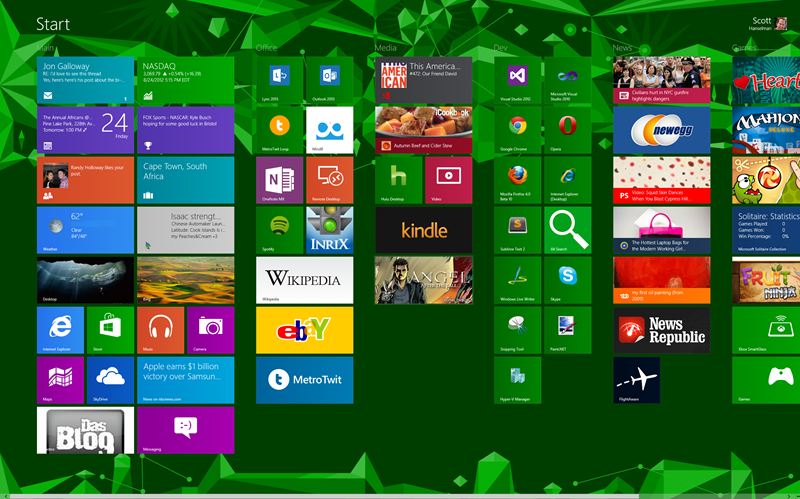
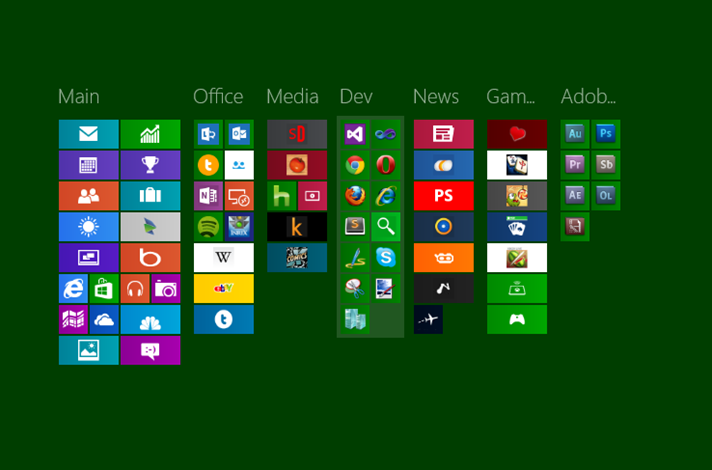
I have to ask myself, how can anyone think this: 1. Looks good. 2. Is ideal usage of screen real estate.
And even this:
http://www.hanselman.com/blog/content/binary/Windows-Live-Wr...
Now you have a bunch of icons without text labels, how do you know what does what? Obviously the 3rd party apps are clear if you use them, but the main Windows apps aren't clear. For example, what is that purple icon next to the blue clouds? (And what are the blue clouds? Weather? or is the Sun weather?)
2) Metro does look a little odd with such a tall screen. It makes more sense on a widescreen laptop or tablet display. Also he chose a pretty garish background.
3) Also remember most of these icons are legacy. Will look better when more of your apps are Metro-ised.
4) And of course Metro looks best - really only makes sense - when seen and used in motion. Metro is an extremely fluid, motion-heavy OS - traditional WIMP in comparison is as heavy and immobile as a pile of rocks.
5) Purple icon is maps. Blue clouds are skydrive (cloud service.) Sun is weather (once you've used the app once, local weather conditions are displayed on the tile.)
This is a taste thing. Myself, I'll take the crammed bar over the grid any day.
Even though I'm primarily a Mac user these days, I'm a Luddite when it comes to Windows - I still prefer the look and feel of Windows 2000 over its successors.
They didnt exist, Microsoft created them. And that was not a good thing. Many of them had a beaten wife syndrome: they became experts because even doing mundane trivial tasks, like burning a cd, organising your documents, installing software, required "poweruser level skills". Now they are afraid of change. They worry, they have to relearn all they know. They prefer to stick to the man they already know. Sure, he may beat them, but after all these years they know where its going hurt, and what his triggers are. Who knows how much more another man will beat them?
Im glad Microsoft is cleaning ship, and i understand that the windows "power users" will need counseling. I dont like the walled garden future though. But wouldnt it be great if my mom buys a new pc and she was actually capable of doing things with it, like she can with her ipad, without needing the assistance of a power user?
So, there i stand: death to the poweruser. They have to either man up and get professional, or lounge in the casual area, but lets not have them keep things back. From people being scared of shortcuts or powerusers dismissing linux because they have nightmares of terminal commands. Grow a pair, or embrace the new usability for casual users.
I think the subtext of these posts is that time will tell if they're cleaning ship or just filling it with a whole new generation of powerusers around a system designed primarily for casual use. That's nothing to say if casual users find it useful either. Ultimately the whole casual/power user is sort of a false dichotomy. On a long enough curve, all users are powerusers for their case.
Besides giving users choice and creating competition, this allows people to experiment and inovate with new systems with much less risk than Windows model of forcing people to use their latest and hoping for the best.
It had to happen eventually. Windows 7 and OS X 10.8 are really nothing more than highly-polished iterations of the basic WIMP GUI. Apple has done nice work with iOS but seems loathe to rethink OS X beyond tossing in a few multitouch gestures. Enough has changed in computing technology, from processor power to network connectivity to interface technologies to the whole suite of activities people use computers for, that WIMP is really starting to show its age. And even more will change over the next 20 years - we should prepare ourselves for departures even more radical than W8. The WIMP desktop isn't the pinnacle for UI evolution. At least, let's hope it isn't! It is pretty clunky.
Microsoft, now in the weaker position to Apple, is the company to usher in that shift. We should be glad we have a Microsoft in 2012.
I see W8 as a reaction to a new world of computing: more powerful computers, a proliferation of device formats, ubiquitous connectivity, a dissolving desktop-cloud barrier, pervasive social/identity services, mass-consumer computing, mostly for a whole emerging range of novel, non-traditional computer tasks.
The WIMP desktop is a legacy product from the days of computers as workstations and computer-users as skilled specialists. The desktop is very static and rigid. Windows only move when clicked and dragged, only change size when their edges are pulled. The desktop can become as cluttered as you want with multiple windows and desktop folders and icons. This made sense in 1995, but now computers are far more powerful, and graphical display techniques are better too. W8 is fluid and dynamic where WIMP is sluggish and static. Tap or click on a tile and a whole new screen flips up, filling the screen. Even compared to iOS, Metro is far more dynamic, mainly due to its radically simpler design language. The basic fonts and block colours of Metro can squish and stretch and dynamically resize in a way which is largely impossible with the carefully detailed chrome of iOS.
This fluidity also extends to the way the tasks flow into one another in the OS. Talking mostly from my experience with WP7, it’s remarkable how wall-less the OS can be. The way you can move from a messaging thread to your messagee’s contact card, simply by tapping their name, and seeing all their latest social activity on Facebook, is great. Ideally, Metro is wall-less - the opposite of iOS’s carefully segregated app ghettos. The platonic Metro ideal is that all the parts of the OS flow seamlessly together (it remains to be seen how successfully Microsoft can pull this off - also this quite different model may be difficult for developers used to iOS to get their heads around and take full advantage of).
Furthermore, visually the Metro frontend is clearly the cleanest and simplest consumer OS ever. It's a massive decluttering effort to display only relevant info, and much much easier to understand than any previous OS. And Microsoft is aiming to make this design language uniform across phones, tablets and PCs, and their web presence. It has the most common net identity services baked in - and the whole platform is tied together with Windows ID, and all your files and info synced seamlessly across all of your Windows devices with Skydrive. So, for example, if I made an account on a W8 PC, it would prepare all of my contacts from Facebook and my calendar appointments because it knows me from my Windows phone. The aim as I understand it is radical flexibility - you can shift seamlessly from device to device and the environment is consistent throughout - it just works. Also part of the idea with Metro is to dissolve the web/desktop barrier - instead of just accessing web services through a browser and some dedicated programs (IM, torrent clients etc) and perhaps some desktop widgets, the web is baked in to the skeleton of the OS. Which makes sense.
Not sure if I'm explaining this well... As I said, it remains to be seen whether Microsoft makes good on this potential. I’m just trying to articulate what I think Metro represents, what I sense is possible here. And trying to do so without just sounding like Microsoft PR :)
It seems like maybe a lot of people are offended by W8 because it's too simple and potentially interferes with the quite complex workflows I assume average HN readers do with their computers. But for the average user, I think W8 is going to be great. Computers need to be democratised further - right now, the vast majority have almost no idea how to use WIMP. It’s just too complex. OS X is just as bad - in some ways even worse than W7! The value of W8 will be through hiding 95% of the compexity of computers from the average user, while preserving the technical backend for more advanced users. Normal users get a massively more approachable experience, allowing them to think less and spend more time doing the stuff they really want to with their computers. Advanced users can still go deeper (unlike Apple, which seems intent on locking down their entire system at the expense of advanced desktop users - and without giving any real gains in useability to justify it!)
People forget, I think, that Microsoft focuses a lot on useability. Metro is the result of a lot of hard work thinking how to make computers more useable. Apple focuses on products that wow people. But from my experience with the iPad, it seems Apple thinks less about useability than people might expect (non-resizable thumb keyboard, I’m looking at you...)
I think W8 is best seen as a transition product, making the first steps away from the old WIMP desktop. So yeah, right now, they haven't tinkered with the old desktop much. But a split is forming: between the simple easy-to-use frontend of the OS and the technical backend. Expect this split to become more coherent in W9.
As for Windows 8 itself, I feel like the Task Manager alone is something worth upgrading for.
I suspect I would have had a simmilar experience with Windows 8 if not for its horrid use of green, but that was an early developers preview, and I will be shocked if they haven't improved the cosmetics for the general release.
While I am so thrilled that this power user enjoyed his experience, mine was infuriating for the first two hours and made me feel stupid. Those with dramatically less patience and investment in personal computing will probably feel the same way.
It was quiet a shock because I am used to investing time in learning tools ( openindiana and VIM I am looking at you) and totally expected to go into the experience expecting the same, but I found myself just thinking about the task at hand and not so much interacting with a computer.
So, how does anyone get anything done using Win8 on a tablet that doesn't have a keyboard?
But to answer your question, I think the real plan is that you don't try to do your work on a Windows 8 tablet without a keyboard. Instead, you get a lightweight, convertible Windows 8 tablet. That way, you can have your cake and eat it too.
this may work great for a 10 inch tablet screen but its a serious problem for any modern professional workstation/content creation setup.
i also had issues (explorer freezing) with my external USB3 drive even for simple things like copying files back and forth. it seems like with each iteration of Windows the basic file copy operation gets slower and slower. all this on hardware that's current. (win7 experience score 7.9)
i'd rather be focused on making cheese instead of figuring out who moved it where.
Some of the tips in this article are great and the more you dig, the more you find they actually HAVE improved a lot of things in the 'old' OS as well (this seems to get ignored/glossed over in alot of reviews, especially the negative ones).
So far, Metro/Win8 is just a toy without touch. I honestly can't see myself getting much work done here but it seems to keep out of the way enough.
Ultimately (for me), would I use Windows at all unless I had to for work? And would I replace OS X 10.8 with Win8 as my primary OS? Quite simply: hell no. You'll have to pry this rMBP out of my cold dead hands (not just because Retina is such a game changer visually - I still MUCH prefer the speed, power, efficiency, apps and overall experience of OS X. It's no competition IMO).
Whether Win8 is a winner on touch devices like Surface, time will tell. Metro/Win8 is nice enough but there are next to zero apps for it. I'm also still not convinced having the 'old desktop' on a tablet really is what people are going to want. Obviously it's a stopgap until Win8 takes off but is it really much of a selling point? Anyone who has done RDP or Citrix from an iPad can get an idea of what it's like (I've used it enough times to know): It's OK in a pinch, but shoot me if I had to use it to actually get serious work done.
Microsoft have definitely thrown a Hail Mary here, not long to find out if it will work...
Just a note that ARM tablets running WinRT will not have the desktop, except for few Microsoft programs, specifically office. So, we really don't need to worry too much about the old desktop on a tablet problem. For tablets like the surface pro, running Win8 x86, I don't see why using a mouse would be a big deal if you are power user-y enough to specifically get the not ARM version of the tablet.
It's just a shame that they bolted on Metro and then force feed it to you by making it your start menu. The metro interface is truly unintuitive. I feel more at home on in OS X than I do in Metro, and I hate OS X.
Startup/shutdown speed is also totally awesome, even I basically don't power off my computer, never. So, now, when there's no much metro style apps, win8 as desktop OS works great, and in about one year when Store fills up, it'll be even better.
Other things I really like that are much improved over win7: HyperV inside OS, ISO Mount, multi-monitor support (taskbar, wallpapers), cloud integration, copy/delete/move dialogs with speed graph, task manager.
Just wait, in 6 months, we'll see that Mr. Hanselman was paid for this pro-Metro blog post. By then, the positive spin will have made us all forget the past two months of anti-Metro postings.
I have been too long on the MS side. That's my only regret.
Isn't it super cute to see these windows "power-users" at work? Pretending that their new OS is for anything other than their grandma checking their email? And look at all you "hackers" congratulating Microsoft for an improvement on the dumbest series of operating systems (per dollar spent on it) of the last two decades. Awww, the intellectual poverty is really adorable.