I found it:
- oddly heavy, the Daylight is made of all plastic (body & screen) - yet it’s heavier than an iPad Air made from metal & glass.
- handwriting lag, the input lags when I use the pen is so much that it distracts me while writing a sentence. I have to concentrate to ensure it’s keeping up with each letter I write. No such lag exists with my iPad Air.
- no setup instructions or tutorial on its unique gestures. You boot it up and have to figure out how it works and getting it on WiFi
- display resolution is much worse than I was expecting.
- when using chrome, webpages render incredibly small. I’m having to constantly zoom in. There’s a setting in chrome about “desktop mode” but it made no difference.
And I also wasn’t expecting to have to sign up for a Google account to even get Daylight OS/software updates. (Maybe I don’t but that’s what the Google App Store made it seem like).
Wish I had read this review before I had bought it. https://www.theverge.com/2024/7/20/24201356/daylight-compute...
* Note: I truly love the idea of Daylight, and I hope they succeed. But in my mind, a considerable device improvement needs to be made to realize that vision.
Until then, I’ll revert back to using my iPad Air (and now with nano-texture coming more broadly across Apple lines, Daylight is going to have that much more to overcome - because Apple is also cheaper product).
Oh, that's a deal-breaker for me.
I currently have a Remarkable 2, and the handwriting latency is imperceptible - it feels like I'm writing with a physical pen. However, the latency of doing anything except writing is very high - it takes almost a second to undo/redo or open the pen palette, for instance.
The advertised 60Hz display of the Daylight and the underlying Android platform (that makes it possible for me to write my own applications, something that is technically possible but difficult and unreliable on the RM2) made it sound like an upgrade, but if handwriting latency is bad enough that it doesn't feel like paper anymore, I think I'll stick with a combination of my RM2 and desktop.
Theoretically this is something fixable in software (in which case I'm sold), but from what I've heard about Android, it's very much not latency-optimized in either the video or audio space.
I've also found that my eyes are physically repulsed by the brightness of OLED displays after using my Daylight for a few hours indoors with the brightness down. It is much easier on my eyes and much less addictive / attractive than my phone.
An iPad Air's screen is still going to hijack my dopamine system like my phone does. The Daylight doesn't. I bought a Daylight because I wanted a healthier device, and it delivered on THAT promise.
But you're right, if you only have OLED Tablet use-cases, it's not an OLED Tablet, so an OLED Tablet is better for those things.
the fact that I can slide my fingernail between the display and the case and literally pry the thing apart
As long as it doesn't RUD, opening with no tools seems like a feature but the review reads like its a bug.
I had the same experience with Remarkable. I've found I'm much happier now that I bought a color laser printer and just print things I want to read! Similarly, I take all my notes on paper and have a sheet feed scanner for digitization
I found the design poor - reminds me of a first gen iPad. Too much wasted real estate.
I need to spend more time with it, but I still prefer my iPad Pro.
I can't read my own handwriting anymore, so "real" paper is out of the question for me.
I really appreciate using it as a writing device in portrait mode, something that I really wish the iPad pro could do with its "magic" keyboard. I continue to look for more intuitive drawing solutions.
I also agree with the author that Android has that 'dos' feel of poorly bodged together hardware specific drivers/stuff and OS stuff.
As a result it hasn't replaced my ReMarkable 2 like I thought it might, I'd really love the RM2 to have a higher refresh rate than it does alas.
E-ink is interesting as it's nice wrt long battery life but the slowness sucks too and this is not about the Android devices with an e-ink screen. RM2 you could program so that was cool.
i totally recommend getting a textured screen cover if you can find one.
i had one for my SP7 and it made sketching and annotating dramatically more tolerable - even pleasant. i was concerned it'd degrade stylus nibs more quickly but it wasn't a problem. colors were naturally a hair less vivid but it was acceptable and a good tradeoff for less glare in general and honestly i liked how it looked - it felt less like i was looking at a screen, if you know what i mean. in hindsight i think it's crazy that they sell these tablets with untextured screens/nibs.
edit: this is off-topic but i enjoyed reading your bio. i hope you have a nice day.
Hard pass. I have an android tablet laying around, and never use it.
A Linux version / polished installable rom would make it compelling for me, especially if it included stuff from the kindle jailbreak community. Other than that, the ability to ssh, a shell with apt or apk, running vs code, and a web browser would cover a big chunk of my daily driver requirements. Bonus points for docker.
Its a Debian Linux based e-ink tablet. It doesn’t look particularly premium, but it’s not android. There is a pressure sensitive stylus that comes with it as well.
https://pine64.org/devices/pinenote/
Not many reviews out there but here is a video of it:
you cant run things like vscode but there is an app called andronix that lets you run a full linux os and then you remote into it from a browser. its probably clunky though
For me, direct sunlight is a 100% negative experience. It’s physically dangerous to skin, generally unhealthy if you aren’t Vitamin D deficient, extremely bright, causes wild temperature flux throughout normal working hours, etc.
I have spent a lot of time and a fair bit of money making sure natural sunlight never reaches the places I regularly work and sleep. I would live deep underground if I could. The incessant changes in light, temperature, humidity (even indoors) are a constant annoyance that must be compensated for.
It’s a wonder to me that anyone enjoys such experiences.
Insufficient Sun Exposure Has Become a Real Public Health Problem https://pmc.ncbi.nlm.nih.gov/articles/PMC7400257/
Say I'm on my porch with a bright sun lit background, but not in the sun myself. I'd love to work there, but I cannot read my screen.
Electric light suffers from none of these problems.
The ideal application for this technology is in a smart phone. That's the device that people use most out doors.
Also don't forget that there are a lot of people who work outdoors and need to check things and write things down when they're in the field.
Below that it's very healthy.
See https://pmc.ncbi.nlm.nih.gov/articles/PMC5129901/
Just feeling the warmth of the sun on your skin is a delight, it's also delightful to be outside (even if perhaps in a shadow or half-shadow) and read something.
I would remain indoors forever if it were possible. I find being outside to be just as archaic as swimming in the middle of the open ocean; unnecessary and uncomfortable.
What it is NOT good at is doom scrolling, social media, or video. The format and refresh rate actively discourage that... and also, the battery may go all day with wifi off, but it drains pretty quickly once you're online. It is definitely an offline device, with the full range of Android functionality (and amazing offline handwriting recognition).
I take it out to read and write for hours every evening, and don't carry anything else. Bar none the best device I've ever owned for mixing creative and literary pursuits and turning my back on the shittified internet.
Although no-one is perfect, I really like Supernote and their way of developing as much as possible in the open[2]. The devices are really great to use[3]
[0] https://www.reddit.com/r/Onyx_Boox/comments/19czc16/a_genera...
[1] https://einktab.ca/dealing-with-a-broken-e-ink-screen-what-y...
[2] https://trello.com/b/l0COP24j/supernote-a5-x-a6-x-nomad-soft...
Also check your card benefits. Mine has theft and damage coverage and I've used it to replace a phone I dropped.
Other features seem pretty comparable with the DC. I suspect DC's high-speed refresh beats E-ink, but that E-ink's persistence, resolution, and clarity are strong counterpoints.
The observations on B&W v. colour are interesting, and mostly match my own experience. Coding (in vim under Termux) takes me back to monochrome screen days (though those were largely green/amber rather than B&W), and the loss of colour syntax highlighting can be somewhat jarring (though I remember finding the garishness of it being initially offputting when I'd first begun using it). I find the Web much less distracting in B&W, and only rarely miss colour, though for some data presentation (e.g., graphs and charts) it can be conspicuous by its absence). I'd like to try a colour e-ink device at some point.
For a device that maximises portability, preserves battery life, functions spectacularly in all lighting conditions (though diffuse overhead lighting tends toward glare), and is principally aimed at reading / listening / notetaking, with light technical work (largely under Termux w/ a Bluetooth keyboard) I strongly recommend the form-factor, and would suggest exploring either e-ink or e-paper depending on specific preferences, the key distinction likely being the refresh/persistence aspect noted previously.
And for those purposes, the device is quite satisfactory.
Max the "warm" frontlight slider, min the "cold". Voila la orange!
I have no use for an android tablet like this, but as soon as they make a PC screen (either laptop or desktop) I'm pretty sure I'd buy one fast! Keep it up folks!
Just did a quick search on HN and while it did get posted recent ones didn't get many comments, not many users perhaps?
I'd be greedy and wish there was something in the middle (13 is tiny for desktop but there's no battery so it's not really laptop friendly; 25 is a bit too big for my desk), but perhaps...
There's a reflective lcd subreddit that discusses reflective lcd pc monitors, looks like at least one company is launching a commercial product soon.
They have their own FPGA based controller to enable much higher refresh rates and lower latency.
I kind of see it similarly to this review - a new category of device and not quite a 1-1 replacement of anything I have.
I have reluctantly owned Kindles & iPads since v1 of each, and don't particularly like either.
For me the iPad is always the 2nd (or 3rd) best device - if I'm seated indoors at a table or sofa, a MacBook is better.. if I'm on the go, a big iPhone is better.. if I am doing book length reading, a kindle is better. I can go a week or three without picking up my iPad. I find the OS annoyingly close to being a proper mini MacOS that never quite gets close enough in terms of multitasking/etc. It almost would be better by not trying to do so many things.
That said I find Kindles to be the worst tech product I regularly use, hands down. It's good for reading books in bed, thats basically it. But its so much better at that, I use it daily.
All the notetaking/highlighting/sharing functionality is garbage. Attempts to download/purchase more books on it are clunky enough I just wait til I'm back at phone/desktop. It also has the most bizarre ad targeting showing me content I would never read despite having nearly 20 years of my reading history.
I've even tried the Remarkable (v1) for a couple years as a work note-taking device.
So I'm hoping the Daylight solves the "3rd device" issue a bit better, but tbd. Light computing, mostly for reading, plus some light note taking, touch & keyboard, better battery life and a screen that works outdoors.
I can't remember the last time they added a new feature that was useful. I used to actually read the newspaper on it but they killed it. They used to make a giant one which was kind of a cool idea, but they killed it. Etc..
But yes it's good for reading in bed. That is why I use it regularly and the only thing I use it for.
I ended up with a Meebook E-Reader P78 Pro. It is an android based e-reader with a stylus and note-taking capabilities. Even has the ability to enable Google Play Store.
I added Kindle, Library, and Audiobookshelf to mine, along with Obsidian and some note taking stuff. it works fairly well, nowhere near perfect, but its also much cheaper than the DC-1.
Maybe look into that also. There might be newer versions or alternatives. Maybe something from Boox
from the transflective wikipedia page [1]
"A transflective liquid-crystal display is a liquid-crystal display (LCD) with an optical layer that reflects and transmits light (transflective is a portmanteau of transmissive and reflective). Under bright illumination (e.g. when exposed to daylight) the display acts mainly as a reflective display with the contrast being constant with illuminance. However, under dim and dark ambient situations the light from a backlight is transmitted through the transflective layer to provide light for the display. The transflective layer is called a transflector. It is typically made from a sheet polymer. It is similar to a one-way mirror but is not specular."
[1] https://en.wikipedia.org/wiki/Transflective_liquid-crystal_d...
Transflective displays are also generally "low quality" in eyes of regular consumers. That drives down margins and eliminate less flashy options.
*I did find the HannsNote2 [1] does, but it only came out last year, and this tech has been around for donkey's years.
Unfortunate, my Stylistic Fujitsu ST-4110 w/ transflective display was one of my favourite devices ever.
This would make the device unusable to me. I wonder if others have had the same issue? Fundamentally, I need typing to be reliable. I guess this probably doesn’t happen via USB keyboards?
There are also emissive display laptops brighter than 1000 nits, which is about where they become sunlight-readable. Battery life might be a problem.
<https://www.androidpolice.com/origins-daylight-dc-1-with-cre...>
The problem is that in order to run linux you'll probably want a kernel with quite a few patches and their DTS, and I haven't found anything for this yet. Android is almost linux so with a bit of effort it's probably not unreachable, but I don't quite have the time for this yet... If someone does it then Linux with an external keyboard would probably work for me as well, there was someone who did it with the remarkable (it's already linux but they ran standard X11 on it), but the refresh rate was a bit too sluggish, something like the daylight computer would probably do nicely!
I took mine in a backpack up to my parents place and apparently something lightly caused a scratch on the screen so now I just have a permanent little gouge.
Thankfully I've learned to ignore it over time but yeah, don't assume it's as indestructible as a lot of screens.
The DC-1 does/did ship with a padded cover which makes me think it doubled as the engineering fix for when/if they realised that might be an issue.
A rare exception is the BigME E-ink phones but those have glossy glass over the screens and a matte screen protector to combat the gloss.
Yes? Phones have gotten incredibly scratch resistant over the years. It's kind of expected that portable devices will do a good job of this because they get moved a lot.
Not saying it's easy with e-ink and touch capabilities though, it may be very hard. However, I can see why someone would expect it to 'just work'.
Just something shaped like some cylinders to grip yet somehow are able to piggyback on existing touch typing knowledge sounds cool to me (but might be unreasonably heavy or something)
TapStrap 2: https://www.tapwithus.com/product/tap-strap-2/
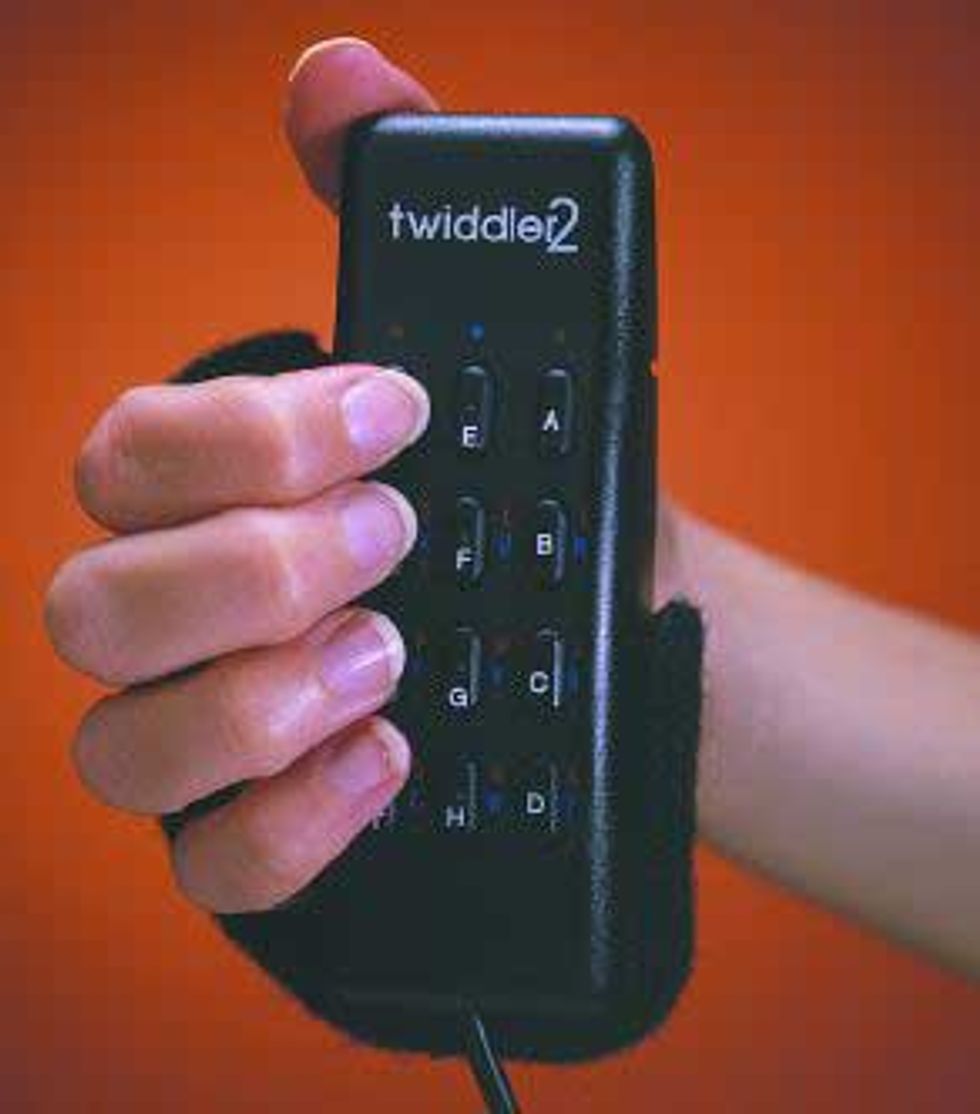
The ancient Twiddler2 wearable chording keyboard: https://spectrum.ieee.org/media-library/the-twiddler-chorded...
The never productised Senseboard: https://www.nyteknik.se/nyheter/virtuella-tangenter-gor-nytt...
The never productised DataEgg chording: https://www.friedmanarchives.com/dataegg/
But that never turned into a product, and this display tech might be more suitable as response times would be better?
I have two primary usecases - reading on the train and taking notes in meetings. On the first - being a full Android, I can use apps or a web browser, and it's extremely responsive and highly legible. On the notetaking side - hands down, the best experience I've had with a digital product - for comparison, I've got a Remarkable 2 tablet sitting on my desk, and by comparison, remarkable's writing delay is noticeably uncomfortable.
I wish they had an official cover (I've found an acceptable generic on amazon). For the retro-computing feel, there's definitely something surreal in watching a B&W movie on a B&W device.
I honestly don't miss the color spectrum, so unless you're doing some work that actually requires color, I would definitely recommend this device. Somehow, it gets the "less distraction" thing right. And the software support will improve with time.
As for the UI, etc, it's just Android with a non-standard launcher. They didn't even write the launcher, it's a launcher you can get off the app store. It's pretty vanilla except for the gestures for back/home. Whether or not this bothers you is probably a function of how much you like or dislike a pretty vanilla Android experience.
Is it really that good?
Okay, I found a video... Wow! https://www.youtube.com/watch?v=iHeIw9rXzUQ
Very expensive right now, too much to impulse buy, and the OS is not what I want. I would like a chunky little laptop with this display tech.
That being said, the screen technology is amazing and I hope they're able to continue the business. Unfortunately the bar for products is very high now but I think they have something here.
I love my Daylight so far but I received it right at the end of the season that I would want to be working outside. Spring is just around the corner here in Georgia so I am looking forward to putting it to work in the wifi-enabled woods behind my barn office.
It's very good though and latency is good enough to watch Broodwar videos on YouTube and still enjoy the content (though of course the colors are off).
What draws me to use this device is that it creates a sense of "roominess," allowing me to lean back and consume, write, and engage in a non-aggressive way. This quality is something I miss in my other devices.
The monochrome display makes playing Wordle harder :).
I like a different tool as much as the next person, but I think before we jump to the most complicated to for the job we should align our priorities..
Do you mean that it doesn't sufficiently reject palm touch while writing with stylus? I'm a long-time Onyx BOOX user and hoping that DC-1 writing experience is as good or better.
"When I get to write or read on a screen that’s reflecting the sun back at me instead of needing to be shielded from it, I get a dose of this feeling that this is what all computing could feel like. I want so much more of this in my life."
I have the DC-1, and where I've used it in direct sunlight, it's a great feeling. However... it's rare that this matters. But... it's winter. And so I'm inside because it's f*king cold out. I'm holding onto hope that this will bring me outside to read and note take a bit more eventually.
My iPad is still king for my "tablet computing". Especially note taking, drawing, design tasks (like CAD), casual gaming and entertainment consumption. I don't see the DC-1 replacing my iPad use any time soon. The app ecosystem, screen, sound, etc, are just not good enough to replace my iPad. Frankly, I just don't see anything that can really compete with the iPad, which sucks, because I feel like Apple continues to underestimate what the iPad could be. (It should be more like a mac and not like a phone. The hardware can do this, the software can not.)
... but anyhow, the DC-1 makes me excited to be able to, say, go to the park and read and note a design doc. Etc. Like, this device could be a lifestyle changer... when it's nice out. Or it might be a device I read documents on and take notes on the iPad. This is a second use case I'm just starting to figure out.
So I'm going to keep onto mine, and I'm optimistic and excited. But it's early.