The position that most people use the mouse, off to the right side (if you're right-handed), causes your arm and your hand to twist unnaturally, since it needs to be flat to the table. This puts pressure on the nerves running down your arm, and for me, this is what caused the most amount of pain, to the point where I was worried my career as a programmer was over.
I've discovered that keeping the mouse to the left side of my body (I'm right-handed) and keeping my hand perpendicular to the tabletop as I use the mouse has all but alleviated my back and wrist pain, going on 15 years now.
To be clear, I don't hold the mouse normally. I have both my elbows on the table and keep the mouse almost all the way to my left elbow. I sort of cradle the mouse with my right hand, with my thumb and index finger on on the left button, and most of my hand on the right side of the mouse so that my hand remains perpendicular to the table. This mimics how my hand would be if I were writing with a pen, which is a more natural position.
I've been programming mostly pain-free ever since 1997 this way. I even use a regular mouse, I just hold it differently and use a posture that ergonomic specialist would probably reject, but it has completely worked for me.
Instead I use a Trackpoint basically all the time now. I have ThinkPads at home and a MacBook Pro with one of these http://www.amazon.co.uk/Lenovo-ThinkPad-Travel-Keyboard-Trac... at work. The best features are less waving my arms around and a much more convenient location for note paper to live that doesn't require stretching or sliding things around when I need to write stuff.
Sadly (due to what I assume is a patent issue) there aren't very many hardware options for static pointing stick devices and they are all either ex-IBM hardware or current Lenovo hardware.
You just use your thumbs to move the bar around without ever taking your hands off the keyboard. It's a bit awkward at first, but you get used to it quite fast.
An ergonomic specialist would reject everything I do, and you probably should too, regardless of how it works for me.
Then in 2005 I started having problems with my arms. It got so bad I thought I had to quit programming all together, but I managed to sort it out, and today I can work without problems.
The most important part of the solution for my was to start using a break program to force me to take regular breaks (preventing the problem in the first place instead of treating the symptoms). I also started to use a split keyboard without a numerical pad, and using a penclic pen-mouse.
I wrote about it at http://henrikwarne.com/2012/02/18/how-i-beat-rsi/ and it was dicussed here at HN here: http://news.ycombinator.com/item?id=3635692
I've been using it for about 5 years[2] along with a mouse pad with palm rest and I've never had any wrist issues. Granted, I tend to use the keyboard as much as I can (even on Mac OS).
Incidentally, I also use Microsoft's Natural Keyboard, which is good enough for my typing habits. e.g. I don't hack non-stop for 6+ hours warranting a more expensive keyboard such as the Kinesis, and I tend to stretch and flex my fingers often.
Edit: Hmm, I just noticed the other comments regarding vertical mice. I'd never seen them before!
[1] http://www.amazon.com/Microsoft-Natural-Wireless-Laser-Mouse...
[2] I had it stored for a few months when I switched jobs and kept forgetting to taking it out, but it has lasted that long. I had to remove the gel pad a few months ago because it started to turn yellow and started to fall off. Otherwise, it's in perfect shape.
PS: steve8918 is right about the mouse. Build some strength, and stop flicking your wrist sideways to reach the mouse. A laptop's trackpad is a huge improvement.
I found this balance issue important when I started working on my deadlift and my grip got a bit out of control. Also, if you have wrist problems, you might consider avoiding alternated grip deadlifts and just pulling hook grip.
worth mentioning: i can't imagine typing in qwerty now. it just doesn't have that buttery flow that dvorak does. i'm quantitatively 20% faster at typing now as well.
however, i've come to the conclusion that of all the changes i made at the time, buying a good chair and desk made the biggest impact, because in the process of doing so i did enough research to realize i had to correct my body position.
at the time i had an anthro fit console cart and a humanscale freedom chair. these two were the perfect combination.
there's a collection of pretty good information here: http://www.hermanmiller.com/research/topics/ergonomics.html
i am now using an aeron chair (not because of the herman miller guide above) with an anthro 60" adjusta unit for my computer workstation and a 48" standard unit as a return desk. the main reason i switched to an aeron is that the freedom chair wasn't good for my needs, which changed (i have a fairly high metabolism and stay very warm during the day, so the cooling the aeron offered was very welcome).
i was using the freedom chair with a fit standard cart for a while, and the pain returned. immediately purchased a desk with a height adjustable keyboard tray that would allow me to have my keyboard in such a way that my shoulders were relaxed and my elbows were neutral. pain went away immediately.
Edit: sorry for the edits, i've had a little bit of wine.
(disclaimer: I absolutely love emacs, but had to switch to vim just because of strain it puts on my wrists)
[1] http://5digits.org/pentadactyl/index
[2] http://visualstudiogallery.msdn.microsoft.com/59ca71b3-a4a3-...
I saw some youtube videos of Dr Sarno [http://en.wikipedia.org/wiki/John_E._Sarno] and read some testimonials on his technique.
At that point I could change the pain in my wrists into a feeling of anxiety in my chest.
I then bought the book (this step isn't nessacary) - "The Mind Body Experience), and now when I get pain I can sort of concentrate on the area it happens and it will dissapear - it also helps to think of things that might be stressing me at the time.
His theory is along the lines that the mind tries to distract you from stress by making you get pain at the site of old injuries, or RSI etc.
I'm sure that it doesn't work exactly like he says it does, however after about 10 years of RSI I can pretty much control it by just concentrating on the area in pain, whic is pretty cool.
Still, this will probably sound pretty odd.. note: I don't ascribe to any other alternative medicines and am pretty sceptical in general.
This cured me of 3 years of horrible RSI pain. I did go to Doctors, physiotherapists, chiropractors and acupuncturists and had anti-inflammatory creams, you name it. Nothing worked for more than a couple days... and this was a last resort. I wish I would have tried it sooner, but I doubt I would have given it a shot if I wasn't desperate.
Read this for a well written account from a hacker: http://aaroniba.net/articles/tmp/how-i-cured-my-rsi-pain.htm...
Then buy the book and read it. It'll cost you less than an MS Natural Keyboard, not to mention all the other crap (wrist braces, heating pads, etc etc).
It appears you have been hellbanned (as of this comment: https://news.ycombinator.com/item?id=4026814 ). You might be able to appeal it by emailing pg, or just create a new account.
1) If I need to, I take a break and soak my hands in hot water.
2) I program in Perl and tend to find that my hands shift positions. In particular my right hand tends to shift at least one place over compared to typing prose. I find standard keyboards, not ergonomic ones, accommodate this best. But the keyboard needs to be at a low, relaxes angle (on one's lap is best) and ideally a wristpad helps.
3) Mice are the root of most wrist pain! Ditch the mouse and get a trackball. This one really is close to universal. I know a number of others who have found this to be true.
4) Pay attention to your body.... If your wrists are bothering you stop and relax them before proceeding. Also pay attention to your arms and make sure they are relaxed. This should be common sense but....
5) If your wrists hurt for more than a little bit, prompt medical attention is a good thing. Chances are if you catch things quickly a wrist brace may even allow you to keep working or at least it did me when I started to develop carpal tunnel briefly. Early attention is very important.
I have tried ergonomic keyboards and found they did more harm than good. I also found that wrist pads did more good than harm at least for me. YMMV which is why I keep coming back to listen to your body.....
Its worth spending money on a decent one, and I'd avoid Logitech units if you have a choice. The main things to look for are ball size and extra buttons - yes, you can get two-button trackballs with no scrolling ability or third button.
I highly recommend the Kensington Slimblade, which has a massive ball and lovely twist-to-scroll mechanism. Ignore the reviews saying the software is terrible on OSX, all the problems have been fixed.
http://www.amazon.co.uk/Kensington-K72327US-SlimBlade-Trackb...
One slight oddity is the hardware "clicker". Twist-to-scroll feedback is achieved by a tiny piezo speaker inside the unit that clicks whenever you scroll. Its worth spending ten minutes with a screwdriver and soldering iron removing it if you want to keep your office mates sane.
Use.
A.
Trackball.
Period. Especially at work. It's vastly better ergodynamics. It has a little bit of a learning curve but it's not that bad. And for clicking and dragging windows around and whatnot, it's just fine. And it doesn't stop you from using a mouse if you need to use photoshop or play an FPS game or somesuch. I have a mouse and a trackball on my home computer. If for some reason you spend all day in photoshop then you should probably switch to using a stylus input tablet.
If you have to use a mouse, please don't use an Apple mouse. They are generally far too small and don't provide any support. I'm still amazed that a company which does great hardware aesthetics completely fails to understand ergonomics.
1. stretches
Do this before any extended typing session: http://www.youtube.com/watch?v=SSbf4mBKq-o Doesn't have to take more than 30 seconds, just DO IT
2. height of the keyboard
The vast majority of desks simply aren't the right height. Your hands should be comfortably pointed down and not over your wrist. Had some issues with wrist pain a couple years ago, never had any problems since.
(I had a bout of pain that lasted about three weeks, with a longer period of discomfort that followed. If I typed at all, it was with two pencils; I paired with a guy I was training and he did all the typing for that period. I was only able to get back into it after a month of physio appointments, directed exercises and remedial massage. I know I'm just a single data point, but I don't see how at least getting a professional opinion just in case would be a bad thing.)
They exist for a reason, they will no how long (if at all) you need to rest an injury, and they'll know how to treat it to minimise downtime.
This has completely ruined my life, so I recommend taking wrist pain seriously. Preventative measures are probably best. Here is a nifty sit/stand keyboard tray that will significantly improve the ergonomics of your desk and also allow you to stand to work whenever you want to:
http://www.amazon.com/Waterloo-Keyboard-Featuring-Lift-N-Loc...
That's my story, and it sucked, but it worked. Once you're at PT, if you're lucky they'll use ASTYM on you, which works wonders. Leaves you bruised as hell, but absolutely the only thing that worked for me.
I also use regular keyboards.
http://www.amazon.com/Logitech-Trackman-Marble-Four-Button-P...
http://www.amazon.com/Exercise-Fitness-Powerball-Blue-Exerci...
As far as stretching goes, take a look at this: http://www.eatonhand.com/hw/ctexercise.htm and just google "wrist stretches for carpal tunnel" and you'll get plenty of useful results as well as video tutorials on youtube.
Keyboards, Mice... I've used pretty much all of them. I even went out and bought a ~$1k ergonomic chair, changed desks...etc.. I figured that if my career was in danger I would need to invest a significant amount of money to recover it so that I could continue to work. So I've probably spent hundreds in different mice and keyboards. Ergonomic devices and furniture are great, but they are a temporary solution. For long term results, just don't be lazy.
Do three things to help and get rid of wrist pain: 1. Take small breaks throughout the day (or find a Rob). 2. Exercise 3. Stretch. In my opinion, these help the most.
One note, if you're just starting to try and remedy your pain and you can't work at all, try switching the mouse to your left hand. This helps a ton and it'll only take you a bit to get used to it.
Hope this helps someone as much as it has me.
I suffered from a lot of wrist pain (RSI) for a number of years, tried everything including alternative keyboards and trackball mice. The only physical 'device' that improved things was getting a proper chair with actual armrests (which I assumed would make things worse by constricting arm movement).
When I read an article mentioning a book called 'The Mind Body Problem' (I didn't actually read the book), the penny dropped.
My mental state of agitation, of needing to 'get shit done' was translating into increased tension in my wrists. Just recognizing this has pretty much solved my RSI problems (going strong for over a year). This explains why some people can work on laptops etc. in the most contorted positions without ever having any adverse physical effects - they are not under any mental stress.
[1] http://www.bookdepository.co.uk/Mind-Body-Problem-Rebecca-Go...
I certainly do other things to keep my wrists healthy, such as trying to maintain good posture while typing, sitting in a good seat, etc., so I can't attribute sleeping position with all of my continued good health. But I certainly won't go back to sleeping with my wrist bent in; it's an easy thing to maintain and it seems to help a lot.
http://aaroniba.net/articles/tmp/how-i-cured-my-rsi-pain.htm...
To my understanding this kind of pain will come due to stiffness in the muscles in hands,shoulders,neck.This stiffness radiates the pain to wrist.After some months of pain i visited a famous doctor (http://www.deepaksharan.com/ (india)) he asked to take 6-7 session of Myotherapy (http://en.wikipedia.org/wiki/Myotherapy) and also suggested few exercises , good posture which has removed the pain from my wrist and hands.
If you want i can send you scanned copy of those exercise posters.(rama.vadakattu at gmail dot com)
I feel you should also consult a professional and get rid of that pain by myotherapy ,regular exercises and good posture.
It is defintely curable (although they may be few exceptions).
I was skeptical about this, a friend eventually all but carried me to an osteopath. It is instant and amazing relief.
BUT the most important thing about seeing a professional is that they will be able to tell you specifically what is causing your problem - wrist pain, in particular, has numerous causes and comes in many forms. An expert will be able to diagnose the cause and recommend ways to avoid it - in my case it was largely posture based, and getting a better chair has basically eradicated my problem.
1) I switched from a mouse to a trackpad. On my PC I have an old Fingerworks trackpad I got off eBay, and on my Mac I have a Magic Trackpad from Apple. The trackpad allows me to completely relax my hand between my use of the pointer--which is most of the time. When I do move the pointer, and click, I can do it with a single semi-relaxed finger. Whereas a mouse, or even a trackball, required me to hold most of my hand in tension to move or click. On the trackpad I exclusively use tap-to-click...mechanical buttons are bad for fingers and wrists because they require a lot more force.
2) I go kayaking regularly. Gripping and manipulating the paddle gives my wrist and fingers a low-impact workout through a wide range of motion. It helps keep the muscles and tendons healthy. Plus being healthy in general helps improve almost any physical ailment.
Edit to add: With the trackpads I have had to train myself to let my right hand completely relax when I'm not pointing the mouse. When I started trying to pay close attention to my right hand, I realized that I was holding it in tension most of the time even when sitting back--sort of anticipating the next mouse usage. I've had to consciously focus on completely relaxing it whenever I'm not mousing or typing.
I had pain/numbness in my ring and pinky fingers a few years ago that was progressively getting worse. I switched to a Kinesis Advantage keyboard and left-handed mouse but only saw modest improvements. It was only after nearly a year that I realized that I had been resting my elbows on my chair all day, and that was pinching my ulnar nerve and restricting blood flow. After lowering my elbow rests, I saw an dramatic improvement within weeks. Today I have zero issues.
I never saw a professional, but may have saved myself a lot of pain and worry if I had.
And I completely agree with the other comments about the mouse causing wrist pain. I have learned more and more keyboard shortcuts to keep myself from using it too much.
My solution step 2: Apple external keyboard with low key action
My solution step 3: Logitech MX revolution: gets rid of mouse wheel action, which cause for me the most significant wrist problems - more or less solved the problem
My solution step 4: Apple magic trackpad.
Maybe don't work too long without a longer break. The company gets all the benefits while you get into the hospital, eventually.
Wrist problems did not come back since three years now.
I feel that switching my keyboard and mouse to Apple keyboard and mouse helped (especially the mouse), because of their low design, preventing my wrist from bending too much.
I also started practicing indoors climbing and this helped a lot for the flexibility and strength of my hands. I didn't feel any pain since then. You don't mention any physical activity in your blog but I'm convinced any sport involving the hands practiced regularly would help.
Read more at http://saveyourself.ca/
1. Dragon NaturallySpeaking, which works pretty well for text.
2. Zero force keyboard http://specialneedscomputers.ca/index.php?l=product_detail&#... for writing code.
3. Replacing the mouse with a trackpad.
- Dynaflex and powerweb exercises
http://fitter1.com/Catalog/Category/35/HandWrist.aspx
- wrist curls:
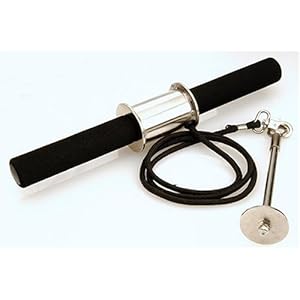
http://ecx.images-amazon.com/images/I/41z5INkAENL._SL500_AA3...
i'm now practicing alexander technique. i've got my 6th lesson and i start to understand how all these things that i've been doing were simply work-arounds. alexander technique shows you how to get a proper and relaxed posture. i now see how tensed up i am in many areas (keyboard, some projects more some less, eating, walking, everything).
i can recommend it. and it's cheaper then being forced to work half-day for a few months.