These comments are largely talking about how centring is hard from an implementation standpoint and can mean different things. Sure, but the whole "CSS centre meme" is just "How do I put one element dead centre within another". I can't point to data to back this up, but I'm pretty sure that's what 99% of people mean when they ask "Why is centring so hard?"
For those of us who grew up with GeoCities and AngelFire etc, the reason not being able to easily do this felt so ridiculous and why it was hard to buy that it's hard to implement is that we were able to do this no problem with HTML, and still can!
    <table>
      <tr>
        <td width="600" height="600" bgcolor="yellow" align="center" valign="middle">hello</td>
      </tr>
    </table>
PS, maybe it's Stockholm Syndrome, but I love CSS FWIW.
[0] You actually don't even need the `valign` which surprised me, at least not in chromium... I'm not sure if that is a recent thing because I haven't actually written code like that in around 15 years.
But then again, in my experience many of the people who wax poetic about just using tables and/or complain about how CSS is limiting and confusing...never actually put in much of an effort to learn how it works. At least the article's author is self-aware about this.
Notably not a `block` element like a div or p - which is what most people are going to use as a container.
I remember that as an extremely painful experience. I can't remember all the details, but I remember that until flexbox and grid were implemented, everything CSS related was a pain. I vaguely remember that until 2008-2009 (maybe I'm off by 1-2 years) something trivial as rounded corners also was a pain.
I also remember that about 80% of the CSS pain was caused by Microsoft Intenet Explorer 6.0. It was complete garbage when dealing with CSS and Javascript (I was working with huge JS codebases at the time). But nobody in the web world could ignore it because it had a huge market share. I hate that browser and Microsoft with passion till this day. So many hours, days, weeks wasted to make everything work in a browser that wasn't updated by MS (why spend money when everybody is using it - they even fired the team that worked on it) and had a very "specific" implementation of Web standards.
In any event, the main reason I stuck with tables (and this of course was only in person projects) was because CSS didn't have a viable way to do layout until 2017. Semantics aside, I still view table layouts as superior to floats and clearfixes. I was terrible about thinking about accessibility back then, of course, so I'm not sure of the impact there.
display: table-cell came along with CSS 2.0 (1998), and display: inline-block came along with CSS 2.1 (2011).
Unfortunately, there were huge amounts of CSS 2.0 that weren’t supported by Internet Explorer 6 (2001), and there was a five year gap until Internet Explorer 7 was released in 2006, which didn’t improve CSS support much (basically just support for a few selectors was added). It took until Internet Explorer 8 was released in 2009 before it supported the eleven-year-old CSS 2.0 properly. And after that point, web developers had to wait years before enough people had upgraded that it became possible to drop support for Internet Explorer 7 and below and start relying upon display: table-cell etc.
So even though CSS had display: table-cell in 1998, web developers couldn’t actually use it until after ~2011 or so. But still, that was 13 years ago now – time to stop beating the “Centring in CSS is difficult” drum.
I think the big issue in the 2000's was cross compatibility, and how seemingly simple elements on one web engine simply wouldn't work or look right in another. IE 6 was infamous for this. Tables were one of the few consistent elements, could be dynamically generated with ease, and simply feels easier to think about from a designer POV
I think that misalignment (no pun intended) is what lead to the huge snowball that is using frameworks upon frameworks to solve issues that some simple HTML/CSS should have solved. By the time the web engines evened out (and IE died) and CSS got better options, the damage was done. JS ruled the landscape.
As somebody who was actually there back then your opinion reads as arrogant and condescending. Do you really think the entire industry just did it wrong for decades? That people did not frantically search for an easy solution for this silly problem they faced constantly? You'd do well to learn to be more humble.
I can't believe I didn't know about this until now.
Before flexbox and grid, I don't know how many times have I written `position: relative;` on parent, and `position: absolute; top: 50%; left: 50%; transform: translateX(-50%) translateY(-50%);` on the thing I wanted to put in the middle (vertically and horizontally).
Go look at Gwern Branwen's web site[2]. That is art. But the trick is decide how you want the site to look and then constraining your written material to be expressible in that style.
I've been looking at web page layout since 1995 when I joined a startup that was doing the "first magazine on the web about Golf!"[3] When the Zen Garden folks did their web site and started the 'A List Apart' mailing list which is now a website[4] it really helped me understand just what one was up against if you wanted to produce web content that rendered nicely on a wide variety of projections. And yes, the term projection is intentional because the function of going from semantic content to presentation on a screen or paper or other flat surface of finite size, is a mapping (or projection) from a native space into the rule set of the destination space. That rule set consists of both physical constraints (pixels per inch, total pixels horizonally and vertically, color capability) and software constraints (how much of the underlying capability can the browser software that is currently running express). Not to mention that every browser wants to do their own special thing.
So yes, CSS is a "hot mess" for people who decide one day "I'm going to build a web page from scratch." And yet, that mess is really just an abundance of choices rather than constraints on what you can do. The process is the same for everyone, find the tools that help you achieve the results you want and then package your material into a form that you can easily convert that into that look.
[1] https://scholar.google.com/scholar?hl=en&as_sdt=0%2C5&q=thes...
[3] It was called Golfweb and eventually ended up being part of CBS Sports apparently (golfweb.com sends you there)
Combine this with the amusing goal of targeting any and every size of window. Why would anyone think that is doable?
I like that when I visit a web page on my mobile phone, it loads regardless of whether or not the site owners hired someone to build a completely separate interface. And I like that when I design interfaces for phones and for large screens, I don't need to learn 2 languages to do it. And I like that when I stack two browser windows next to each other on a 1920x1080 monitor they resize and I can read both of them.
When people say that they don't want to worry about multiple screen sizes in their layout, they mean that they want an interface that works on one screen size and ignores everything else. And that would be a huge loss for accessibility and innovation if the web pushed developers in that direction. The reason it would be simpler for people to work with a more targeted language is because they wouldn't build the other interfaces at all. They'd learn one language, target one device that their most predominant customers used, and then we'd have a mobile Internet and a desktop Internet and they'd be separate things with no expectations that sites would work on both devices.
----
And I think this sort of gets to the complaints about complexity in general, because the complexity of this UI design is reflecting a reality that good interfaces are adaptable and people have multi-faceted needs from their software. Even on desktop, people use different screen resolutions, they scale fonts, they mess with layout. And there's this subtle idea behind complaints about complexity that when you dig into it is not actually "why do I have to target so many devices" but is really "why do people use so many devices? Why isn't the world more uniform, why on earth are people changing their screen resolutions, what's wrong with them? Why can't they just decide on a device and stick with it?"
But good UX design is about designing for the real world, not for a hypothetical standardized human, and in the same way that cars need adjustable seats and can't just say "well on average everyone is this height and width", good UX acknowledges and responds to the idea that software and content are delivered in multiple contexts.
Of course that's a balancing act, it does make interface design more complicated, and it's not something we can do perfectly. But it is a balancing act, it's not a problem we can solve by saying "heck it, everyone needs to stop buying HDPI laptops." I mean, we're not all Linux developers, we can't all just pretend that touchscreens don't exist ;)
The same exact complaints show up with the extensible web and with progressive fallbacks in general. It is real annoying to build software that degrades nicely depending on what hardware support someone has and what features they've turned on and off in their browser. But it's also a better way to build software that better reflects how software is used in the real world by real people.
People in the web bubble: oh it's impossible to do layout for different sizes.
https://css-art.com/the-girl-with-a-p-e-a-r-l-css-earring/
Not sure how many centred divs are in it though...
Some of the demos are jaw-dropping, if not always practical.
And yet, that mess is really just an abundance of choices rather than constraints on what you can do
Also known as TMTOWTDI, long forgotten and buried for good.
However, the rest of your text is: "look how difficult it is on the web, and look at all these amazing things people do despite this being so difficult on the web".
All the complexity on the web is 100% self-inflicted. It started as a simple system to display a couple of paragraphs of text accompanied by a couple of images in one rendering pass. That's it. And then it grew haphazardly, with no roadmap or plan, through a series of hacks bolted on top to give it more capabilities.
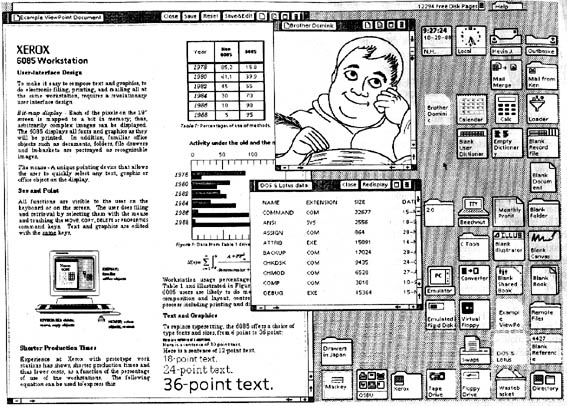
We could do the "near-impossible PhD-level stuff" in 1970s [1]. The Mother of All Demos from 1968 arguably had more capabilities than the web even today: https://www.youtube.com/watch?v=yJDv-zdhzMY
For some reason you took "it's difficult to do on the web" as an inviolable axiom of "it's difficult to do, period". The entirety of "impossible layout on the web" is about as complex as what WordStar could handle in mid-1990s
[1] This screenshot is from 1981: http://www.catb.org/~esr/writings/taouu/html/graphics/starsc... (from http://www.catb.org/~esr/writings/taouu/html/ch02s05.html)
It's nuts that this is true after so many years of HTML and CSS.... software sucks any way you look at it.
Why we still can't get a bug-free OS is beyond me.
https://developer.mozilla.org/en-US/docs/Learn/CSS/Building_...
https://developer.mozilla.org/en-US/docs/Learn/CSS/CSS_layou...
They have long since given up on actual releases. Instead, the current state of CSS is a collection of states of individual modules, all of which are under continual change.
This is not how you develop software. Or anything, really.
/rant
What are the first things someone learning how to make a web page visually look how they want is going to learn? Probably text size, color, background color, and alignment. All of these except alignment translate pretty much 1:1 from pre-css days. Color on the body tag, size/color on the tag surrounding the text you want styled. Or, css color/font-size property on the surrounding tag, or background-color on the body. All very similar.
Prior to CSS, if you wanted content centered, you just slapped it in a <center> tag. Didn't matter if it was text or html objects like divs, tables, buttons, etc. IMO too many people expected CSS to work like what we had in the past - no distinction between inline and block objects - and when CSS didn't fit their pre-conceived mental model, these questions came up. And centering just happens to fit in the niche of being basic enough that beginners want to know about it.
Also something I have been using since forever that almost always does the trick for me: http://howtocenterincss.com
HTML Tables need at least `<th scope="row|column">` to be accessible: https://developer.mozilla.org/en-US/docs/Learn/HTML/Tables/A...
"CSS grid layout": https://developer.mozilla.org/en-US/docs/Web/CSS/CSS_grid_la... lists a few interactive resources for learning flexgrid:
- Firefox DevTools > INTRODUCTION TO CSS GRID LAYOUT: https://mozilladevelopers.github.io/playground/css-grid/
- CSS Grid Garden: https://cssgridgarden.com/
MDN > "Relationship of grid layout to other layout methods": https://developer.mozilla.org/en-US/docs/Web/CSS/CSS_grid_la...
MDN: "Box alignment in grid layout": https://developer.mozilla.org/en-US/docs/Web/CSS/CSS_grid_la...
Sure they do. HN is, famously, rendered as tables.
Tables for non-table data are not semantic and break accessibility.
There is more to web development than where content lands on a page, which is only part of why good web development is hard.
My gawd, just earlier today I saw a help wanted that said "...PSD to pixel perfect..." I would have laughed if I wasn't already crying. "This is my life" and then the tears kicked in.
Pros and cons of using DIVs and CSS:
+ hipster cred
- DIV soup
- CSS back then was wildly, W I L D L Y unsuitable for what people where trying to do (I think it boils down to it being designed to format documents, not web apps or on-screen layouts)
Pros of using TABLE:
+ Actually works
We value your privacy data.
We use cookies to enhance your browser experience by selling this data to advertisers. This is extremely valuable.
Tables have border, padding, and a cell-based layout arranged in columns. At a stretch they and their cells need white space around them, ie “margins”.
Tables are a long established element in layout.
And it turns out tables actually contain this wisdom, that all elements should work a bit like table cells: they should follow the box model (fairly obvious to anyone working in typography) but also that they should be arranged in columns (much less obvious and the foundation of grid layout and bootstrap).
It’s a natural evolution to come across some layout problems, solve them with tables (as any typesetting system is likely to support tables), and then realise that you need a new facility that has some of the properties of tables but not all of them.
CSS has discovered this. Oddly, some systems have not - for example, word processors have not unified elements under a box model etc.
If you look through the article, none of it is intuitive. Even with flexbox, the horizontal setting is called "justify-content" while the vertical is "align-items". I personally simply can't remember what a lot of CSS properties are called anymore -- there are so many now, and the names are so arbitrary. (Even hyphens are maddening -- why is it "white-space: nowrap" instead of "whitespace: no-wrap"?)
At the end of the day, there's a big difference between:
1) Simple, intuitive, reliable building blocks that let you build complex solutions out of simple parts
2) Convoluted, partially-overlapping, constantly-needing-to-Google building blocks that let you build complex solutions out of complex sets of parts
A language like Go or Python is #1. A language like CSS is #2.
justify always refers to the main axis of a box model element, and align refers to the cross axis. by default, flex-direction is set to row, so justify often means horizontal and align often means vertical.
until it doesn't of course. when we switch tbe flex direction from row to column which is a very handy trick for easy responsive on small devices, the main axis is now vertical and the cross axis is now horizontal.
<Button HorizontalAlignment="Center" VerticalAlignment="Center"/>
There was a reason people loved Bootstrap's grid system so much, Flexbox does all that and more straight in your browser. Cannot over-express how much I love it.
css grid however is perfect for this and represents one of the most underutilised powerhouses in the css kit
Everyone expects it to be as simple as <div centered> and everyone is surprised it isn't. That's a pretty universal experience in web development.
For example, what does `<div centered>` do when there are two children? And what do you do when you want the opposite behavior?
I honestly don't understand why people would find Flexbox hard to understand. Yes, there's a little bit of new terminology, and there's a reason for that. There is a main axis whose orientation can be changed, which affects the interpretation of other properties you use, but most of the time, you won't change it.
    .container {
       display: grid;
       place-content: center;
    }
My problem with CSS now is that it's gotten too bloated to the point where it's introducing privacy and security risks. I really want an add-on that restricts CSS by default to only a sane subset of features.
    <div style="height: 100vh" id="one">
        <div id="two">
            <div id="three" style="overflow: auto">
                I need
            </div>
        </div>
    </div>
isolation: isolate;
I consider it only slightly less offensive than <blink> as being useless. I also find it incorrect from attempting to have the markup dictating the layout. Sure, this was before CSS was robust, but it is one of the reasons that I just had no problem with it going the way of the dodo.
My guess is that the specification treats vertical margins in a weird way. For example, margin-top:50% means 50% of the width, not of the height. I don't know why they decided to do it like that.
It seems like Browser makers, Languages creators, and developers all have a pretty strong incentive to solve such a fundamental, basic problem in web development to make the design experience easier.
Why haven’t these groups come together to make an easy solution to this? What am I missing?
The problem with designing and implementing application layouts for the Web is that it's such a dynamic medium. You can't ever rely on a particular viewport size, and you generally can't rely on content size either.
Like, just as a simple example: build me a page which has a white background and three blue boxes in the middle which contain white text saying "foo", "bar", and "Supercalifragilisticexpialidocious".
How big should these boxes be? Should they even be the same size? How should text wrap within them? How should the text itself be aligned within the boxes? When you say the "middle", do you mean centered vertically or horizontally? Are they laid out in a row or in a column? What's the expected behavior when the viewport size is too small to accommodate them? Should the boxes themselves wrap in some special way? Should they resize themselves?
This isn't even really splitting hairs or anything, it's just sort of the mindset you get into when you start working within a domain that's governed by *constraints* rather than specific sizes.
The most obvious example: horizontal and vertical centring are different because our writing system has a specific direction it flows in. You can’t just do the same thing for horizontal as for vertical because text doesn’t work that way.
And yet it's not standardized[1], so if you implement it in a new layout engine you're left with reverse-engineering what other browsers do (a classic).
[1]: OK, I lied. It is standardized... in the HTML standard. https://html.spec.whatwg.org/multipage/rendering.html#align-...
Notice how it's not a stylesheet, not a presentational hint, just prose. It's because standard CSS can't do what browsers could since before its invention.
https://html.spec.whatwg.org/dev/obsolete.html#non-conformin...
  <div class="parent">
    <div class="child">hi</div>
  </div>

  .parent {
    display: flex;
  }
  .child {
    margin: auto;
}Very well done!
Clean and to the point - virtual coffee on me!
As someone who jumps on-and-off of webdev it can be a little frustrating catching up on latest javascript frameworks and, at lower level, modern Javascript and CSS.
His avatar popping up mid scroll did “startle” me, though. A bit creepy sneaking in slowly from the edge. But it's effective, for sure.
<center>Here you go!</center>Level 2: Put a form and form elements in it.
Level 3: Do it with flex.
<div style="display:flex;justify-items:center;align-items:center">
<div>I'm centered</div>
I love his posts. So much information and insight. But why the hell does a guy obviously so good at UX stuff fuck around with my scrolling? I cannot stand it.
it's when you combine styles and inheritance that things get nasty.
then add on top:
viewports,
orientations,
layouts,
negative margins,
collapsing margins,
relative positionings
...which can make even "simple" centering into a 6-dimensional puzzle.
place-items: center;