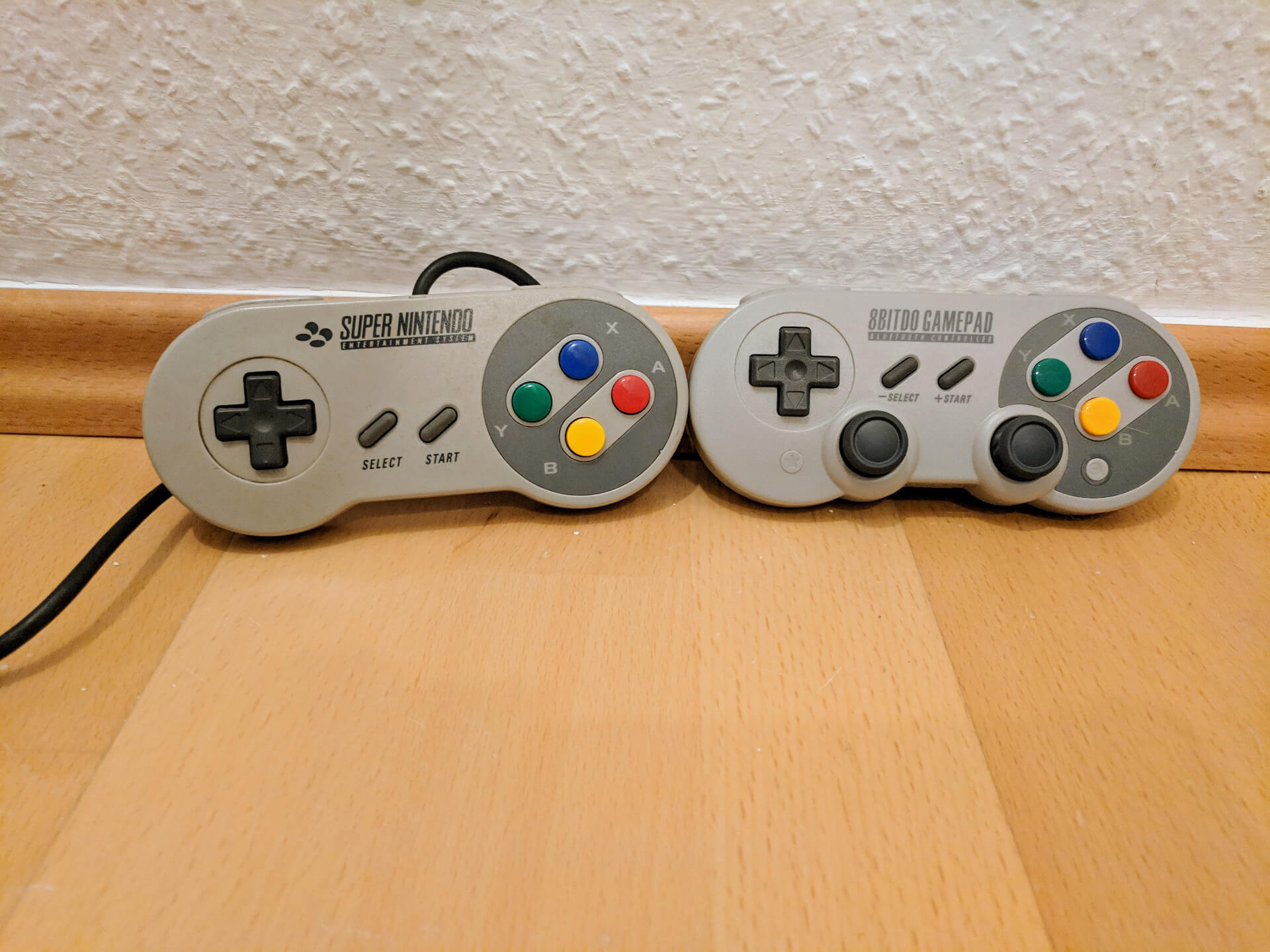
However, if you yourself want a USB SNES controller, consider buying one instead. 8BitDo offers them with the SN 30 Pro - the quality is good, they work with the Nintendo Switch or PC (including Linux), they have the additional buttons needed for modern games, there is a wired and a wireless version and the newer variant has afaik a replaceable battery (unlike the first).
Edit: I was probably wrong about the replaceable battery, that was the 8BitDo Pro 2. Which might indeed be the better choice. Looks less like a SNES controller, but at least still has the correct button labels and core layout, see https://www.8bitdo.com/pro2/
Fwiw, the ones I have remember their last pairing setup, so I only need to power them back on via the "Start" button.
Still think it's worth it, also to not destroy an original one. On the other hand, better to modify it like this than to throw it away of course...
But it has a huge problem of false diagonals, making is absolutely worthless to play tetris, or any fighting game that requires precise control. If you need precise controls, avoid this model.
On the other hand I've had back luck with generic NES and SNES knockoff USB controllers. The quality is much worse than the originals especially in the D-Pad. It seems nobody but 8BitDo can get this right.
If you stick with 8BitDo you'll have great quality but they don't necessarily match the form factor of the originals. I can see why OP would want to convert a real one.
> Look What They Need to Mimic a Fraction of Our Power!
That tiny arduino has a 16Mhz chip, while the NES main CPU ran at 1.66 MHz. Just a funny fact :)
I think my PCB had more parts for its simple power supply than all 4 NES controllers combined.
These things are an absolute masterpiece of simplicity!
Now the SuperFX chip, in Star Fox, ran at 10Mhz. Later versions like the one in Doom on SNES went up to 21Mhz.
• you can plug this controller into any USB host, and the host can probe the device and discover that it's got a USB HID gamepad device
• the SNES buttons get mapped onto standard USB HID event codes (HID Usage IDs), such that you could have a SNES controller plugged into one USB port and a Sega Saturn controller plugged into another USB port on the same computer, and they'd both be using a common language for events like "D-Pad Up button pressed", such that a framework like DirectInput or SDL can understand that out of the box. The SNES just uses the same 16 bits of input register no matter what's plugged in (gamepad, mouse, super scope, etc) — with games either assuming a specific static input device type and thus parsing those 16 bits in terms of that; or telling you to have a gamepad on P1 and whatever on P2, and then asking you on startup what type of thing you've got plugged into P2.
• And — not so applicable to the SNES — but with USB, you can also have more than one of any given HID Usage ID reported by the same device. A gamepad with two analogue sticks can† just report analogue data for X/Y/Z-axis Usage IDs twice.
• You can also have as many USB HID gamepads plugged into the same host machine at the same time as you like†. Even USB 1.1 is a very fast bus compared to the SNES's input polling rate; tons of HID reports will "fit" down the pipe as packets. The SNES, meanwhile, fundamentally only supported four input devices at once, because the hardware had exactly 64 bits mapped starting at $4218, representing the 16-bit readouts from polling of up to four input devices. And even then, if you wanted all four inputs to be polled, then you'd only be getting input for devices 1+3 refreshed on even frames, and 2+4 polled on odd frames.
• You can have tons of other things — more data-intensive things! — plugged into the USB bus at the same time as the gamepad, and it'll still work just fine, because USB HID reports are given high QoS by USB host controllers and hubs. The SNES needs a separate bus for the cartridge, but on a PC the equivalent of a "cartridge" (an eGPU + eFPGA + NVMe, let's say?) could be connected to a USB4 dock, that your gamepad is also plugged into — and a single USB cable will take all that into your computer.
• You can hotplug USB devices, without confusing either the client input device or the running program on the host. Both sides of a USB link (well, assuming the client retains power when unplugged) have knowledge of the connection lifecycle state. "Device unplugged" or "device plugged in" or even "a new, second device plugged in" are just like any other gamepad events, that your game can have a handler for. Meanwhile on the SNES, both input ports are just assumed to be populated at all times — and are therefore electrically live‡ and receiving a polling clock at all times. The distinction between there being 1/2/3/4 input devices connected, has to be made manually, by the game asking. There's no way for the game to know that a device was plugged/unplugged.
---
† Consumer OSes mostly don't like this — but that's because consumer OSes are dumb, and have to this day never surfaced a high-level "gamepad API" that actually exposes the full extensibility of USB HID reporting.
A high-level API that was actually designed to reflect the HID spec, would have an input-event report be a dictionary where the keys are usage IDs and the values are arrays of sensor readouts. Or a stream of polymorphic Usage-ID-keyed sensor-readout records. And either way, each report would at the very least identify which USB device it's coming from, so that you can tell apart reports from two identical controllers.
But instead, what most gamedevs get from using industry "best practices" when writing an app-game using e.g. DirectInput or SDL for input, is an API that's even more naive than the SNES joypad input registers — it assumes that there's exactly one gamepad, and that it's reporting exactly one of each HID Usage ID. (And even worse with XInput, which assumes a fixed set of Usage IDs corresponding to "what an XBox controller has!")
As such, most USB HID gamepads sold to consumers for use with PCs, in practice, don't take real advantage of what USB HID gamepads can in theory report.
USB HID gamepads made to be used in proprietary ecosystems, on the other hand — think "the Nintendo Switch Pro controller" or "the input board on an arcade machine" — are free to be designed to actually use USB HID correctly. Which is why such devices usually need special drivers on PCs. They're not speaking a brain-damaged wire protocol; rather, they're living in the present and taking full advantage of USB HID features... while consumer OSes are still stuck in the past, unable to cope. :)
This is also why so many systems like emulators that support these proprietary input devices — or games complex enough, that they expect USB HID devices that are themselves complex enough to only be possible if using the spec the modern way (think, uh, this thing: https://www.amazon.ca/Logitech-Saitek-Vehicle-Panel-945-0000...) — just skip the high-level gamepad-input-handling frameworks, and just register to listen to USB HID events directly. Because that's the only level at which they'll receive the information they actually care about, without the OS first mangling it into incomprehensibility.
‡ I believe polling for the input ports get zeroes rather than garbage if the ports aren't connected — but this is likely more for hardware protection than anything else, with pulldown resistors on the read path to prevent you from shorting out the input pins by unplugging while the console is on. Nintendo at least learned the lesson of the PS/2 bus.)
I've actually gone the opposite direction from this post. I have a Neo Geo arcade board (JAMMA) and it has plugs for Neo Geo controllers (as in the controllers for the console version of the Neo Geo). I wanted to use the Neo Geo without plugging it into an arcade cabinet, so I got a "Supergun" board to play it on an RGB monitor. However, I didn't have a controller for it.
I noticed that there was an emulator-based "Neo Geo X" system out in the wild and you could purchase a controller accessory on its own, so I got one, not realizing it was purely a USB controller in the shape of the original Neo Geo ones, but no problem. I bought a Neo Geo controller cable and just desoldered the button to USB connections inside the controller and connected them directly to the Neo Geo controller cable. Worked like a charm!
As a poor college student, I home-built a dance pad for Dance Dance Revolution, out of wood and foil and by soldering the connections into a controller. Worked perfectly!
And one year later I also used a Raspberry Pi Pico to convert a USB controller's signals to MSX: https://blog.qiqitori.com/2023/09/using-a-usb-hid-game-contr...
(And later, USB controller to Nintendo Switch, https://blog.qiqitori.com/2023/09/playing-on-the-nintendo-sw...)
This means the timing is almost certainly quite loose, and there's a pretty decent chance you might even be able to poll it as the 1kHz "needed" for "serious" gaming. And it'd be pretty trivial to offload the readout to the MCU's SPI peripheral.
I do wonder how much original SNES devs had to consider similar scenarios.
https://www.retrousb.com/product_info.php?cPath=21&products_...
Their equivalent product is currently out of stock: https://www.raphnet-tech.com/products/snes2usb_1player_adapt...
You can get decent retro styled USB controllers, but they will be a bit more expensive than this one.
delayMicroseconds is a busy-wait loop, so is relatively precise (to within a few instruction's execution time.
However, interrupts can happen during that sleep, and the time spent handling interrupts won't be accounted for properly.
It isn't a real real-time system, but for a project like this, it'll be good enough.
Most instructions for ATmega and ATtiny execute in 1 clock cycle so writing deterministic, time-critical code is straightforward.
One thing I'm wondering is how the SNES implemented its Multitap support[1] with such a simple "wire protocol". Could it be that the two missing wires and/or 4 unused slots in the polling cycle are used for some kind of adressing scheme when a multitap is plugged in?
The video below goes over the controllers, Super Scope, mouse, etc. A brief discussion of the multi-tap starts around 16:00. You are correct that it leverages the spare pins.
[1] https://archive.org/details/SNESDevManual/book2/page/n385/mo...
[2] https://www.downtowndougbrown.com/2013/04/homebrew-snes-4-pl...
The IR wireless one was, in my experience (it was the only one I had) far less janky and failure-prone than one might suppose. Actually worked quite well.
It would be much better to target 120Hz or higher to reduce input latency and bring it as close to the original hardware as possible by ensuring there is always an up-to-date input state ready for the game to read.
At slightly faster than 60Hz, the net effect will be that the delay between input and having an effect on the SNES will wander about 1/60th of a second over time, as the sync varies, and every once in a while a particular input will be overwritten before it makes it into the emulator. It may be very difficult to perceive this, though, due to other delays already built into such a set up. On a real SNES, it would be right on the edge of perception anyhow.
Being very close to the poll rate but not quite there is probably near the theoretically worst case. It would probably be much better to poll at 240+Hz, cutting the latency between input to a consistent 1/4ish of a frame. However, I doubt this improvement could be "felt" by very many people at all.
In any case, if you can handle the wait, you can get a knockoff SNES USB pad from China for a few bucks. The plastic will feel way off, but you can probably swap over the shell from your original pad with little effort. And you'll get fresh rubber button pads, rather than 30 year old spongy ones, as a bonus. :)
It's got low latency and good compatibility for a bunch of platforms. Even some compatibility for PS4.
going to show this article when people ask 'how do i get started with a fun electronics project' :)
This was my introduction to Arduino programming, bitmasks and direct port manipulation. I have changed the recently to not use direct port manipulation since it really isn't need for the Saturn and I wanted to make the code more portable.
I have since made a wireless for the official 3D controllers for the Saturn with no noticeable latency. Something it seems is still taking others a while to figure out it. I am not doing anything fancy so I don't know how they can't figure that out yet. They are using Blue Retro though where as I am just using an nRF24L01. So maybe the Blue Retro is adding some unnecessary over head. This i have not released the source for though.
https://github.com/MickGyver/DaemonBite-Retro-Controllers-US...
It's how to build your own demon bite adapters using Arduino, for various console. These are super low lag.
If you Google demon bite you can find various sites selling premade adapters.
These are really popular with mister fpga users:
https://en.m.wikipedia.org/wiki/MiSTer
This is a bit of a rabbit hole, the mister is the best retro related thing I've bought / built.
Here's a useful listing of various usb adapters and their latency:
[0] https://www.raphnet.net/divers/ntt_data_sfc_controller/index...
See eg the OMG cable: https://mg.lol/blog/
https://wandel.ca/pic.cgi?49ceb103
Totally authentic for playing old C64 games in an emulator. But these days, I'd leave the joystick alone and just use an Arduino to do a DB9 to USB translator.