I think I'd prefer an adjustable magsafe attached keyboard that can do either landscape or portrait, though. Sadly, I don't see ctrl, alt or arrow keys. SSH won't benefit as much.
All that said, if this were $50, I'd already have ordered it.
Ryan Seacrest (yes the Ryan Seacrest) bankrolled a startup 10 years ago with an almost identical product. (They were sued out of existence by an already dying BlackBerry.)
I remember listening to an interview where he explained they restricted the product to smaller iPhone models because user testing showed the product didn't work well in larger models - the increased weight of the larger phones caused too much of a bending moment whilst holding the phone by the extended bottom, making it extremely uncomfortable to handle and not conducive to typing. It was therefore restricted to the iPhones 5 & 6 only.
Recall QWERTY phones of yore were literally half the size or even smaller than the models this is targeting. I recently found an old BlackBerry cleaning out a junk drawer and was shocked by how small it was. It would fit inside my current phone and remember these phones had removable, user-replaceable batteries.
Not to mention this looks much cheaper quality than Seacrest's forgotten startup produced. Perhaps it's the children's toy-inspired design asthetic.
This will fail.
https://www.cnet.com/a/img/resize/fd8703ad0b0ec545ac98701c39...
That said the keyboard in OP looks so unbelievably fucking stupid and impractical I can't understand how it made it to production.
https://en.m.wikipedia.org/wiki/HTC_TyTN
Before that I had a Palm 5 PDA, which I loved. So interesting that you can add features and connectivity and still make the thing suck.
But not like this, this is too long and I don't think one will have a pleasant typing experience with this.
I thought about this one for a few minutes, but I can't think of a good way to integrate a keyboard in a smartphone case, that will give you the experience of a blackberry or similar.
The slide-out ones that you could use in horizontal orientation are probably the best way I know of, but I wish something similar could be feasible in vertical orientation.
EDIT: I just realised that the coolest way would be, if the phone display is only as large as the current phones minus the keyboard, and then a physical keyboard beneath it. The phone would be physically as large as the phones today and you would have a superior typing experience. Only problem would be watching videos or images which are all either 16:9 or 21:9 (or vice versa). And I'd personally trade the screen size for a physical keyboard
I could almost envision a clip-on (or magnetic?) keyboard that sits on top of your screen when you need it. Perhaps it could be taken off and stored on the back of your phone, much like a MagSafe battery on an iPhone.
iOS Reachability, but pinned to top of display?
https://support.apple.com/guide/iphone/use-reachability-iph1...
Granted, part of if is Android's fault, and part is the keyboard itself (the modifier keys in particular), but overall, it made me feel better using a touchscreen keyboard. I no longer have rose-tinted memories that make me complain so much about on-screen keyboards.
Would you? I don’t think so. All to permanently lose 30%+ of your usual screen space on a device that you likely use to consume 90% of the time and input 10% of the time.
If anyone wants one PM me, I'll mail you a couple. I've got like 30 of them.
[0]: https://github.com/Dakkaron/Fairberry [1]: https://imgur.com/a/wYub8JD [2]: https://imgur.com/a/DLhlY7m
How should I message?
I like having a physical keyboard, but not like this... it makes the phone too long. A slide out is preferred. I'm just going to stick with a regular bluetooth keyboard.
http://images.amazon.com/images/G/01/wireless/detail-page/mo...
>Your request has been blocked due to a network policy.
>Try logging in or creating an account here to get back to browsing.
>If you're running a script or application, please register or sign in with your developer credentials here. Additionally make sure your User-Agent is not empty and is something unique and descriptive and try again. if you're supplying an alternate User-Agent string, try changing back to default as that can sometimes result in a block.
>You can read Reddit's Terms of Service here.
>if you think that we've incorrectly blocked you or you would like to discuss easier ways to get the data you want, please file a ticket here.
>when contacting us, please include your ip address which is: [REDACTED] and reddit account
lol, reddit is even more useless now
ps. It will succeed.
Speak for yourself. I just type "n" into the browser.
For the curious: https://news.ycombinator.com/item?id=539753
Nope. Zero electronics. The reverse of the PCB has pads that fit over regions on the screen. On the front of the PCB, tactile dome switches short each pad through to a plane, presumably capacitively coupled to the hand.
(Edited for detail)
Why won’t anyone do this for iPhones? (Patents or market?)
My first concern would be tolerances - enough press to feel good, but not so far that you have to press too hard. Too short and you might accidentally press keys you didn't mean to.
Phones were sliding, folding, twisting. Then at some point everyone decided that a glass rectangle was the only way to go and that was it.
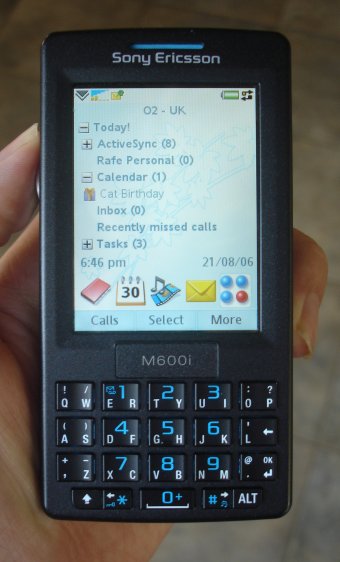
https://www.gsmarena.com/sony_ericsson_m600-pictures-1425.ph...
And these:
https://www.gsmarena.com/nokia_6820-pictures-565.php
Had the N900 and N95 as well. Back then it was easy to have a cool/unique phone because carriers weren't on top of their hardware lineups. Now everything is a boring rounded-corners slate. Even Sony gave up with the squared-edges on their Xperia lineup. I'm optimistic that rollable screens will bring back some real innovation beyond just clam-shells.
I sit in front of a full-size keyboard and mouse literally all day, yet when I need to do something on my phone I'm forced to physically pick it up and use its horrible tiny little keyboard to achieve something I could achieve in 10% of the time on a PC.
The 15 promax is more than capable of doing this, but iOS is the limitation from a usability standpoint. Can't even split the screen like you can on an iPad.
I've used this since 2014 when I made the first version, and I have yet to meet anyone typing faster with the stock iPhone qwerty keyboard.
7AMYNPKN63KY EMMHTLRA9399 Y4TPAXMJFHLL 4F3Y4JJ3RHME YREJF6L4TYE7 KWM9LRRXJEXW Y6JJRM99NYLM KRJXYPLE666L 43Y3EANXXW9F 9H99XY3FTT7L
It's got a cult following among dumbphone and dumb-er-phone enthusiasts (think Lightphone, Punkt, etc) and has personally tempted me, but I'm put off by it being a Xiaomi product and haven't been able to decide if that hardware is safe enough for me to consider using after a ROM swap.
[1] https://www.aliexpress.us/item/3256804386537909.html?gateway...
I'm saying this as a person who loves physical buttons and everything quite a lot, but for any non-English user this keyboard would be s non-starter
Especially the switched Y/Z keys on some layouts are hard to handle. And the French layout with different AZWQM positions is just pure madness.
There are a few layouts that include most latin characters on one layout. A lot of European layouts have most latin characters somewhere (with the help of dead keys or AltGr). There are also international English keyboard layouts, although I will never get used to the small return key of the US keyboards, why make it so small if it's even one key short (101 vs 102)? :D
For people who write in different alphabets (cyrillic, arabic) this might be a completely different story.
At the extreme end, there are older Chinese users who often hand write Chinese on the screen to write a sentence, one character at a time.
In the middle there are many things, like Latin but unusual layout such as French bepo, or Chinese input methods based on shapes, or Japanese kana, or the old T9 that I still see some people using (probably to have bigger letter targets).
A touch screen really ease custom input methods!
I'm typing this very message on a keyboard that has no labels at all, it's all muscle memory.
The fact that the iPod touch, iPhone, iPads, and other surface devices didn't need physical keys was seen as more modern and desirable at the time. Now it looks like people are circling back around and wanting physical keys again.
History moves in a helix I guess.
Except they didn't. How many phones with keyboard are there?
Edit: obviously I'm talking about popular ones.
One of the main arguments for hardware keyboards was you could type without looking. I don't really look at my phone keyboard when typing, I roughly know the spacing of the letters. Plus auto correct is really good at this point, so when I do make mistakes the phone usually just corrects them.
The only use case I could see for this is if the keyboard had control/alt/esc keys - in that case shelling into a machine on my phone might become slightly more efficient than an onscreen keyboard.
> Free up your screen for content > Content First > Maximize your screen space for apps and content while you create with Clicks. > Clicks on. Screen size up. > Make more space for apps and content by moving the keyboard off your screen.
I have had the experience of the software keyboard making my screen feel claustrophobic from time to time. It has never been bad enough that I would consider reaching for something like Clicks, but it's certainly a problem I would rather never encounter if I had the choice.
> Launch Spotlight
> cmd + space
Cool that there's a keyboard but this is more easily done by just dragging the home screen down. There are probably more powerful hotkey combos they can pick for the marketing here.
Those are the standard shortcuts all keyboards get, meant for keyboards on iPads that also work on iPhones and thus work here.
Article back in 2019: https://appleinsider.com/articles/19/04/10/the-textblade-key...
https://www.amazon.com/MoKo-Ultra-Thin-Rechargeable-Compatib...
I feel crippled typing on my iPhone. It takes ages to type and correct messages. I often can’t get my pass code right first time. And I remember that typing was never an issue on a blackberry.
That it plugs into the USB-C port is both expected and worrisome (also none of the product photos show this for some reason). I know it has the whole case to help but I'd be worried about putting strain on the USB-C port while your hands are down on the keyboard. Again, the case will help but you are absolutely adding strain to the port, the whole phone's weight is on it aside from what the case can help relieve which can't be much since it's not rigid. It's "Liquid Silicon" but since the phone plugs into the USB-C/Lightning in the bottom you probably have to first plug the phone in, then pull the case over the top/sides of the phone meaning its ability to reduce strain is extremely limited
It should also be Bluetooth. Which is annoying to pair but easier to put on. My guess is that people would put the keyboard on when they need it instead of putting in case.
Unihertz Titans
The tagline is "Create without limits". The page says "the first creator keyboard" as well as "Maximize your screen space for apps and content while you create with Clicks." In one of the videos on the page, the big pitch is that this can "double your effective screen size when you're working on captioning your Instagram stories".
Is this keyboard specifically marketed at content creators / influencers? Why? Is there some special market for this that I'm not seeing? Is adding a caption to your instagram story really something that needs extra screen space?
Are they implying you get a low serial number as an early adopter, or are they going to stop putting serial numbers on future hardware?
You pay extra to be a beta tester for the plebs that follow?
[0] Can't recommend GPD products - they're just not made to last, and rely on hacked-up Windows installations to drive them. Which is a shame, because the Win 2's form-factor and cursor control scheme are basically perfect, and also seemingly unique.
https://www.pcmag.com/news/ryan-seacrest-invests-in-typo-iph...
https://www.cnet.com/tech/mobile/typos-hardware-keyboard-for...
The first patent quoted in that lawsuit article has expired [1]. The second patent is still active [2], but is related to a "ramped-key keyboard" (essentially curved), which this new product is not AFAICT.
The third, a design patent [3], is still active, but would appear to only apply to a complete handheld device that includes an attached keyboard, not a separate accessory... Not a lawyer or patent expert by any means though.
I guess we'll see - none of that stops anyone from suing them.
[1]: https://patents.google.com/patent/US7629964B2/en?oq=7%2c629%...
[2]: https://patents.google.com/patent/US8162552B2/en?oq=8%2c162%...
[3]: https://patents.google.com/patent/USD685775S1/en?oq=D685%2c7...
Body needs an 'overflow-x: hidden' rule, or a wrapping div to the rotated images. The main heading is off-center. And almost 18 MB of images on pageload is wild, see what https://pagespeed.web.dev says.
I generally enjoy Mr Mobile's reviews, but I just don't know about this product.
https://assets-global.website-files.com/6571c5a614be2a1a6376...
These are going to end up in a drawer by end of the week.
There is a reason the mixed screen and physical keyboard phones lost. Screens can be keyboards but keyboards can’t be screen.
I still miss my N900 keyboard…
The OS, on the other hand, not so much. I remember it slowing down (after ~2 years? Maybe 3) where if someone called me, it took roughly 30s for the phone to get responsive again so that I could accept the call. It was cool to run Linux on it though :)
extending the already small phone would basically bring it in line with larger phones in its class, but with a keyboard
They'll never make another phone this size, and accessory manufacturers ofc take their cue from Apple. I thought about some bespoke/custom keyboard for mine as I have experience with USB periphials but I kept coming back to "will I have this phone in 4 months?"
There are actually a bunch of other negatives that the cofounder did not mention. You will also lose the ability to quickly type emojis(might actually be a good thing). No more autocorrect/prediction and the keyboard is missing some common symbols such as angle brackets.
Another likely problem with this keyboard is that the keys are too small because they are round. Square keys were the common choice for most cellphone keyboards for this reason.
I've got a Pixel 3 right now, but I'd be willing to change phones if one worked very well with a physical keyboard.
Or maybe I just have to buy one of those GPD Win 4 devices, or the Ayaneo Slide...
I've got a fork working with Android 14
Really the only thing stopping me is that this doesn't also include a touch sensitive volume rocker that would scroll the screen for me. That would really reiterate that focus on 'not touching the screen'. I know that's not something anyone has every developed before, nor is it something anyone promised. But it is both super feasible, and seems like a really killer feature, so if I'm buying a luxury item, I'd like it to have every feature I'm looking for instead of just most of them. Again, if an iPhone were my daily driver, that calculus would be different.
[1]: https://www.keychron.com/products/keychron-k7-ultra-slim-wir... [2]: https://pine64.com/product/pinephone-pinephone-pro-keyboard-...
Also concerning that no where in the landing page does it specify how it connects, or show an example of how "easy" it is to put on and take off (On second glance - it is shown in passing 2 minutes into the 10 minute long intro video.)
Not to mention being called "clicks" but no audio demo of what the keys actually sound like?
> Clicks for iPhone 15 Pro (and models that use USB-C) only support fast charging while Clicks is on your iPhone. At this time, the USB-C connector will not allow for both Clicks to be connected to the iPhone and allow for data and charging. This means using wired CarPlay or transfer data will require you to remove your iPhone from Clicks. Listening to music via Bluetooth and connecting to CarPlay wirelessly will still work with Clicks installed.
I want one for my 13 Mini, and (secondarily, even for normal sized iPhones) it should use the M600i/P1i keyboard
http://www.allaboutsymbian.com/images/reviews/m600/m600-fron...
QW is one key, you rock left for Q and right for W, or rather you tap on each side! It works amazingly well, especially with modern autocorrect id imagine, and makes it easier to hit the key.
Or you could the TouchPal approach and just do QW as one key entirely and use autocorrect for the rest of it
Blackberry sacrificed screen for the keyboard so balance was all OK.
I also caught myself thinking these buttons were too round and too tiny as compared to my on-screen keyboard. Also not having the luxury of seeing all my special characters appear on the keys when pressing the 123/#+= etc to toggle keyboards would be something to get used to. E.g. Type a {} or ~.
If I'm going through the trouble of attaching a hardware keyboard, I want the largest size that's still practical.
A landscape keyboard of the same type might even be possible to type on with ten fingers. Which seems like it would be a massive productivity boost for many people.
This is just a hardware version of the standard iOS keyboard. I doubt that the benefits of having physical keys are worth the trouble.
The on-screen keyboard is pretty good, but makes coding and typing markdown hard. Will this solve this?
Also, this seems to be missing cursor keys. How do I move back and forward precisely? If the onscreen keyboard is hidden, I can’t even long press on space to move the cursor.
Missing a trick with no arrow keys though because the worst part of iOS typing is moving the caret.
The competition is any external Bluetooth keyboard (or, for iPhone 15+ users, external USB-C keyboards as well). There are plenty of such options available online on Amazon or Temu etc including compact and folding options.
You have my permission to steal this idea if anybody wants to hive that a shot. ;]
Also I’d love a keyboard with more buttons personally. I know I’m in a tiny minority here but I get ~70 WPM on an iPhone keyboard but if I have to do symbols or anything it goes down to like 4.
I know you can buy a separate Bluetooth keyboard but then you need to rest your phone and stuff.
Assistive devices are necessary for a large audience, as they allow users to leverage their strengths. Just as my 3yr old beat my phone speed with a game controller, users will be able to type faster than me with this keyboard.
It is nice to have a single device that tries to do it all, but interacting with flat UI buttons in a 2D plane of light and glass is limited to a very small set of sensory inputs and therefore cumbersome for anyone to use. There is physically no way around this HCI problem without adding additional hardware. Thanks for working to bridge the gap!
My guess is you have to grip a bit harder than you normally would to keep it stable, and this may impact the typing speed (vis-a-vis old school BB). Cameras make iPhones pretty top-heavy.
I don't see the weight of this Clicks case, I'd guess it's at least the same density as the iPhone (~32g/in height) so minimum of +70g, and possibly more like +100-120g.
Nevertheless I love the chutzpah of this device.
* So much of my typing includes selecting emoji, using odd symbols, and the need for inputs not provided on this. In addition, having to switch between the touch screen and keyboard as inputs was very annoying.
* It significantly decreases the experience of using the phone in touch situations.
* I was using it with my iPhone mini and the phone and case had terrible weight balance. My hands fatigued quickly. I can't imagine how bad it would be for a iPhone Max.
* I lost the use of my port.
This was really surprising for me, as also the precision was not really worse than on the PC.
I have to admit that I can't type perfectly with 10 fingers, but reach around 350-500 keystrokes per minute, which is far beyond average.
So the OSK is fine for me, as long as the UI is handling the missing screen space well, and doesn't provide a bad UX, like jumping scroll positions or covering important buttons by the OSK.
Also, most of the problems with onscreen problems for me were mitigated by swype -style typing at which I'm faster than a physical phone keyboard now. Though not faster than a real PC keyboard which I still highly prefer when I'm at home or at the office. So I use my phone mainly for when I'm out of the house, at home I still have a PC that's on 24/7. As such I'm not really happy with the mobile-first attitude of most services but what can I do :)
If the answer is going to be: we’re a low volume startup and this is as cheap we can make it. And it has to be a premium product so can take a sustainable margin…
…what’s stopping a cheap Asian knockoff manufacturer - if the product achieves any sort of success/notoriety - from selling much, much cheaper clones?
PS: I own a medium-size iPhone case that is a complete, fully functioning, handheld game console with its own screen, keys and speaker. It cost me 12€ on Amazon.
And the Typo2 for iPhone 6 in 2014-5: https://www.amazon.com/Typo2-Keyboard-for-iPhone-6/dp/B00O49...
I have a feeling that Apple dropped the ball with the more modern keyboard implementations, but I can still type (and swipe) with good enough speed and accuracy to not really miss a physical keyboard.
edit: lol, nevermind https://news.ycombinator.com/item?id=38875842
> Ryan Seacrest (yes the Ryan Seacrest) bankrolled a startup 10 years ago with an almost identical product. (They were sued out of existence by an already dying BlackBerry.)
Only issue is I might need to store my new iPhone pro max in the water bottle compartment of my backpack with this case
https://news.ycombinator.com/item?id=37713211
My personal workaround is to have a Bluetooth keyboard + iPad or Lenovo X1C laptop with me at most times (in a backpack), which isn't ideal. But neither is this "Clicks" product :)
That being said, this product doesn't look good - it seems uncomfortable to hold. The keys are low, the device gets comically tall and I suppose significantly unbalanced or top heavy.
Related to that, I'm missing a video showing a longer typing session, or an unaffiliated review.
The issue with typing on touchscreens is not only about keyboard but also about the whole UX around it. All these short/long taps, struggling to make selections etc.
I see this product as a gimmick.
However I’m still on an iPhone 12 which is not supported. Hopefully when I upgrade they’ll have a superior version available. The ergonomics look goofy but I’m sure you adapt over time.
Some interesting layout choices. mostly ortholinear but not totally, double size enter key, same size backspace, tab, language globe.
Neato idea, glad to see interesting accessories coming out. This is a hard sell for me.
A less elegant but practical option for note taking in class or writing docs is a portable folding keyboard for iPhones, like this iClever Bluetooth Keyboard
I love the idea of it but I don’t think it’s practical for me.
But I do feel that it might just be a niche.
Since I think most people have already gotten used to all display phones, there were even some phones in the past that tries removing the volume buttons and such.
I despise having to write on a small touch keyboard, but I am pretty sure this would not solve any of my issues
I feel like this is going to be ridiculously top heavy.
With all seriousness, keyboard should have flipped or slid out so its more compact. I can't see that in peoples pockets.
Ryan Seacrest had started a iPhone physical keyboard company, Typo I think, and got sued so bad he abandoned the whole thing. How will these people get around it?
But I suppose I wouldn’t really need a Pro Max size after using a keyboard like this.
How will this keyboard replace that for cursor movement?
Or a full size flip-phone version, for my friends who think those were the golden years? With all the emoji keys?
(Yes, these would be prank gifts. But such great ones!)
I’d be more likely to order it if the keyboard was mounted in a case that could be changed when upgrading iPhone.
That day is sooner than we think.
Clearly, I'm not the audience for the branding, but a smart device I would be interested in if marketed for adults.
What I'm trying to say is it looks great and just iterate!
but that just makes the phone even bigger.. they're already huge
Bring. Back. Keyboards.
Phone calls, text message and email is what it did well. And it did exceedingly well.
The thumbwheel was just the right spot to quickly scan an email.
The keyboard is as good as they get.
The operating system was built to do exactly this and not that much more.
It is really hard to convey how great it was, without being able to offer up demos. I have bought keyboard add ons for iPhone and Android as they have become available and usually died quickly.
I even tried to get a company going to create a "blackberry look alike" on Android but in the end I didnt get financing and making Android be classic BB is not easy.
It was not good for games, web browsing, apps in general, but that didn't matter because it did what I needed it to do
BB from then on was a sinking ship, b/c they figured they would add all the features from the iPhone and Android to it. And eventually released an Android phone.
They lost focus on what the existing customers really loved.
Obviously I am not the target demographic but I am interested to see where this goes.


:max_bytes(150000):strip_icc()/iPad-split-keyboard-65dab2877165402ca3edc79bb46ab3cb.jpg)