He currently has an iPhone but if android phones are superior for blind users, I would happily help him switch.
- All used iPhones (Check out https://www.apple.com/accessibility/vision/ )
- Disable passcode if he's okay with it
- Enable VoiceOver (Settings -> Accessibility) and learn how to enable/disable it (triple-tap the side button. Might be difficult for elderly) - Apple video on it: https://www.youtube.com/watch?v=qDm7GiKra28
- Having a learning partner really helps the blind person. Try to learn to use a phone blind with him, it will allow you to help debug his (most definitely occuring) issues
- Watch some videos on how blind people use the iPhone, lots of tips there. For example Molly Burke, or even simple ones like this one: https://www.youtube.com/watch?v=3FVjLXIaBC4
- For elderly, an iPad is really nice. Especially as dexterity gets worse it's easier to use blindly. Also usability between iPhone and iPad is almost the same, so easy transition between both (i.e. on the go)
- For movies, check out Greta. It plays the AD in parallel with a movie via the iPhone - so they can watch movies together with the family, without everyone listening to AD https://www.gretaundstarks.de/starks/GretaAndStarks
And bring lots of patience :)
What is really amazing is how fast people tend to improve: VoiceOver lets you adjust the speech speed etcpp, and so it "grows" with you
I remember how happy he was with the iPhone. He said it was the first device he was able to use without special accessibility software, and that was in 2007, I imagine the experience is better today.
I’m sure you’re (OP) already on the ball with ways to help him, but if you haven’t looked into movies with described audio, apparently it makes a whale of a difference.
[1]: https://support.apple.com/guide/iphone/receive-image-descrip...
Both IPhone and Android have screen readers, with Android having the ability for alternative sr-s and voices. The Iphone is more integrated as far as I know, but the default google apps are pretty accessible on Android as well. There is a mailing list for blind android users if you want more advice, but if your grandfather is used to the Iphone, there is no reason not to use it. The default apple recourse on the topic is applevis, if I remember correctly.
I'm looking forward to a system that only describes what it sees (and what can be drawn from it), rather than doing stuff like trying to explain non-visual jokes (that, inevitably, it doesn't get). As I understand, that would require training new models from scratch, on training data that might not yet exist – but unlike the majority of the LLM GenAI hypey nonsense, this is actually a real, useful tool.
One really smart thing they do is localize the volunteers as much as possible, so often if the question is something like "Am I at the corner of X & Y" there is a good change you (the volunteer) know the area, etc.
Things I have learned on the "volunteer" side: keeping track of canned food is often a problem, people worry about their outfits a fair bit, and parks are sometime difficult because there are lots of alternate paths/routes.
My grandmother went blind in her old age. She is pretty intelligent and wanted to learn new things so I thought I'd try to set up VoiceOver and similar things mentioned in this thread - various assisted screen technologies. Unfortunately it was a complete failure. I think that for whatever reason, in general trying to teach new things to an elderly person who's newly blind is an uphill battle. If you don't think he'll be able to hack it I wouldn't try, it's somewhat demoralizing to fail at something at any age. My grandmother dealt well with it but it was clearly somewhat upsetting to fail to learn something, especially as she was proud of learning other things quickly throughout her life (for example learning to drive, where she passed her test the first try with minimal prior instruction.) If you do think he has a decent chance at learning it I would start slow and build your way up.
What did work was Siri, an audiobook player, and a Google Home connected to speakers. The one she uses most of the time is the audiobook player, it's a large chunky machine that takes CDs that she gets in the mail. Every so often she gets a menu of new available audiobooks and someone sits down with her to pick out which she'd like. The next most used is Siri on her iPhone. I set up her contacts with various easy-to-say names and now she can call whoever she needs whenever. She uses Siri 95% just to call people, the other 5% she occasionally does look something up or ask the weather but it's mostly just calls. The least used is the Google Home, which she uses to play classical music through the speakers.
One thing that's not technology related is that being blind is lonely. The biggest thing that helps with this is regular small interactions. Any way you can facilitate more short visits is good, for example with the mailman, neighbors stopping by, family, et cetera. Even short phone calls help. The best are the visits that happen "automatically" so they don't slow over time. For example if you plan a phone call once a week to pick out some new audiobooks or podcasts to put on his device of choice.
Good luck!
Trying to teach elderly people involved usage of technology will be frustrating to them and everybody else. All they really need are social connections/emotional support and little bit of entertainment (source: living with and taking care of my Mother for the last decade of her life). Teach them simple things/phrases and have them use it on auto-pilot without too much thought. Automating the calling of people (Audio/Video) is the number one need/requirement. For further safety having a cctv-like setup so somebody can always check on them/interact with them remotely is also best.
As I understand you're in the US, your grandmother might also benefit by the US Library of Congress NLS / BARD services I mention in another comment on this thread: <https://news.ycombinator.com/item?id=38410991>
They are roughly identical in a11y, there is no point in switching. Apple got there first, and they had full-time blind developers on staff working on it first, so they got first mover a11y advantage, but mostly now it's a wash between the two.
> Does anyone have recommendations for how to help set this up?
If "holidays" mean the weekend, anything more than getting Siri turned on is probably pushing it. If "holidays" mean through New Years, then you have a much better chance of being useful.
Unless you are going to be there in person long-term to help him, you are better off getting him connected with someone that will, preferably a family member close by or an organization dedicated to the blind, that can help him adapt his life.
Otherwise just https://www.apple.com/accessibility/vision/ and turn those things on that make sense for him, make sure he knows how to talk to Siri and access to audiobooks/podcasts, etc.
> longer device operating system updates and Apple Stores for in person support
That's outside of a11y stuff, irrelevant for this context. Though I agree, for non-technical users, if you happen to live near an Apple store, it's a way better experience than any Android phone when something goes wrong.
[3] https://www.loc.gov/nls/how-to-enroll/sign-up-for-bard-and-b...
Android is not particularly good for the visually or otherwise disabled, in part because there's simply so much variance amongst devices and vendors. I'm not sure that iOS is particularly better but it is at least far more consistent.
I'd strongly suggest looking into physical players. One of the best in the US (presuming from your "in town for the holidays" remark) is the US Library of Congress National Library Service for the Blind and Print-Disabled:
In particular this piece of shinay kit:
<https://www.loc.gov/nls/services-and-resources/equipment-for...>
That's the NLS Talking Book Player. What you'll note is that it has large, physically-differentiated, Braille-labeled buttons. Less obvious are other features:
- Physical headphone jack.
- Cartridge and USB slots. The player will support up to ~16 GB USB sticks, which can hold well over 100 books at a time.
- An integrated, audio, information and help guide which will walk the user through all the features and functions, as well as give current player information (book position, book title, elapsed, remaining, total time, power/battery status).
- "Bookshelf mode" permitting navigation through multi-book cartridges and USB sticks.
- Excellent and detailed printed documentation including a user manual (<https://www.loc.gov/nls/wp-content/uploads/2018/08/Digital-T...>) and service manual (https://www.loc.gov/nls/wp-content/uploads/2018/08/Digital-T...).
What that will play are the 300,000+ items in the National Library Service's BARD (Braille and Audio Reading Download) collection: <https://www.loc.gov/nls/services-and-resources/catalog-and-b...>. That includes recent and classic publications, magazines, fiction, nonfiction, cookbooks, and more.
BARD will send selections unprompted, though these tend to be highly arbitrary. I strongly recommend directly requesting materials directly through the NLS Catalog: <https://nlscatalog.loc.gov/>
Price is free, to any US resident or citizen with a qualifying temporary or permanent reading disability as certified by a qualifying authority: <https://www.loc.gov/nls/how-to-enroll/apply-for-nls-services...>
Another option is, again, a dedicated audio playback device with physical buttons. I've just learned that boom-boxes are still A Thing, and that dedicated MP3 / audio players exist. From Best Buy:
Boom Boxes (and related devices): <https://www.bestbuy.com/site/docks-radios-boomboxes/boomboxe...>
"MP3 Players": <https://www.bestbuy.com/site/audio/mp3-players/abcat0201010....>
(Most will of course play from many available audio formats.)
Other than that ...
- There are dedicated Internet Radio devices which can play from any streaming broadcast worldwide.
- I'm not aware of dedicated podcast player devices, though that would also be of interest. I will strongly recommend podcasts as another form of information and entertainment. There are many which cover short stories, either contemporary or classical, inclusing "Selected Shorts" (https://symphonyspace.org/selected-shorts), a whole slew of short-story collections from Librivox (e.g., <https://podcasts.apple.com/us/podcast/short-story-collection...> ... there are over 40 collections with 10--20 stories each), and "1001 Classic Short Stories and Tales" <https://podcasts.apple.com/us/podcast/1001-classic-short-sto...>.
- Libravox also has iOS and Android apps: <https://podcasts.apple.com/us/podcast/1001-classic-short-sto...> <https://play.google.com/store/apps/details?id=com.paid.libri...>
And since the context is phones, I'd also strongly recommend at least one physical, large-button, telephone within the house.
Alexa can be made to work for podcasts. Once you figure out the magic incantation to launch a specific podcast, that can be mapped to human-friendly short name via a Routine in the Alexa app.
Thought also occurred to me after posting my comment above that the original hardware-based podcasting device was ... the iPod. I'd be surprised if MP3-based players didn't have the capability to manage and play podcast episodes somehow, though there might be some issues navigating through those for someone who's blind.
BARD lists some commercial vendors for devices and accessories, though I've not explored their suggestions.
Turns out there's at least one audiobook player intended for blind / visually-disabled persons, or at least was in 2009:
<https://www.cnet.com/tech/home-entertainment/an-audiobook-pl...>
Then again, this was the original portable audiobook player:
<https://www.philips.co.uk/c-p/AQ1001_05/portable-cassette-pl...>
If you are in the Bay Area, an organization like lighthouse for the blind would be a good place to start: https://lighthouse-sf.org/about/getting-started/ -- there are many regional organizations similar to this filled with good people who want to help.
Or: https://nfb.org/programs-services
Organizations like NFB and Lighthouse for the blind offer rehabilitation services and training, and might be able to provide some recommendations as well.
Also, you likely already know this, but there are many degrees of legal blindness, so the technology tooling varies based on specific challenge to overcome, and only 10% of the blind population knows braille.
If you really want to go down the technology rabbit hole, the CSUN conference in March is like the CES for assistive technology: https://www.csun.edu/cod/conference/sessions/
Assistive tech is a pretty fascinating area. I expect this area to grow as we have more aging tech savvy folks who want to keep using technology as they age.
If the family member is within the medical system, there would/should be an occupational therapist part of their care team that could identify and provide supports around day-to-day life.
We want to jump in to assist at times like this, but you and they are not alone if the supports are in place.
Advice in this thread will be helpful but a person who can come to his home on a semi regular basis to help continually train will be far more beneficial. Additionally they can assist with a broader range of tasks like caning, adaptive equipment for meal prep, braille instruction, etc.
+1 for this suggestion of starting by reaching out to your State if you’re in the US (or other government entity if outside) as a starting point for assistance. My state’s division for the Blind and Visually Impaired (DBVI) resources have been very helpful over the years. They provide adaptive tech kit for free (e.g., iPads, PCs, large screens) and software/instruction for those who need it).
The OP didn’t indicate whether their grandparent is retired (suspecting so?) but in that case, sometimes the State’s path is a little different—they put a huge effort into workforce development, and sometimes different efforts into adaptive tech & services for folks not intending to return to the workforce. In our state, there is an association for the blind that I believes handles more of those cases (but I don’t know for sure).
I’ll also give a +1 for everyone I know who is blind and visually impaired having an iPhone. It’s possible that platforms could be nearing parity now, but in the early 2010s there was just zero competition. I use iOS built in accessibility features every day and they have (not exaggerating) changed my life from an accessibility standpoint.
TL:DR - Yes go to your state, definitely good with an iPhone, built in accessibility features are amazing.
On iPhones, you can use Shortcuts to make an audio announcement after tapping any NFC tag, even an expired transit ticket! No app needed.
For elderly not already familiar with phones, Alexa can answer or place landline calls, play streaming radio/podcasts, provide directions between rooms (using multiple Alexas), control TVs via IR remote, maintain shopping lists, announce appointments from Google calendar maintained by caregivers, provide timed medication reminders, make audio announcements based on door/motion sensors, ask Tile to locate (ring) objects, control microwaves, turn on/off lights & more, https://news.ycombinator.com/item?id=37295992
Recalibrate your culture: live with (or very near to) family so you can help your family. We see concerns like these often enough about complex technological solutions to help lonely, elderly, and otherwise impaired family members, and the tech suggestions are nice, but there is no substitute for actually being there for someone, no substitute for actually being a family member in the traditional sense, i.e. to be physically available free of charge, no strings attached, and without technological limitations, to almost immediately help a kinsman, your blood, with whatever it is they need.
Modernity has dealt a serious blow to the traditional family, Anglo cultures in particular. What used to be provided with tender love and care for free from one's kinfolk is now packaged and sold to you as a variety of products and services. I think it's a bad thing for everyone involved, on many levels, financially, liberty-wise, and socially.
I realize this solution is likely an unfeasible change for you, for many, but it really ought to become the norm again, for our children's sake.
We can learn much about ourselves from elder family members. To give is to receive. Free time travel!
> What used to be provided with tender love and care for free from one's kinfolk is now packaged and sold to you as a variety of products and services.
Impersonal institutionalized caregiving is something to behold.
For android I do the following things: 1. assign swipe with 4 fingers left and right to FirstItem and LastItem on screen, respectively, in talkback settings > customize gestures
  a. download labels and icons so unlabeled buttons with icons can be guessed and spoken

  b. in advance settings, choose typing preference as hold and double tap (any key). Also turn on "speak passwords"
3. turn on google assistant by tapping and holding the home key
a. setup your voice by saying ok google and following the prompts to train on your voice
  a. in its settings > preferences, turn on number row (show always)

  b. make sure suggestion strip is not off in text correction as it won't longer show voice input on the keyboard as well0

  c. make sure in emojis, stickers and gifs, the predictive suggestion content is off
a. download food labels/images caption/currency (for your country)
Also must learn and practice gestures in the tutorial app.
Additionally, I keep screen lock turned off and instead use Secure Folder (Samsung) for critical apps like banking, though I wouldn't recommend this unless you are sure that you have no prying eyes around at all times.
Whatever you choose, swap the settings on your phone so you can experience it as he would use it. You will be able to talk him through problems easier, and you will see the common issues with the features that aren't mentioned in documentation.
Doing this and setting up an alt account that's matched to a blind / visually-disabled friend's configuration, and using that to learn and walk through tasks and issues might be useful.
In addition to the usual programs of people reading newspapers and magazines to the blind, it had programs to help blind people use technology. The program I stumbled across was specifically about how to use an iPhone as a blind person. I think it was a daily program.
I don't know if it's still on in Houston, but if it was a national program, you might be able to find it online somewhere.
Internet radio is also available for a tremendous number of stations. It appears that KUHF has a stream, though that appears to be the primary band, not the HD4 subchannel.
Looking at KUHT's website, I don't see DH4 listed among broadcasts: <https://www.houstonpublicmedia.org/ways-to-listen/>
Sight Into Sound does have its own podcasts: <https://www.sightintosound.org/podcasts>
Does this newly blind person have any sight?
Another good one is Seeing AI. This one is from Microsoft, and it has all sorts of useful utilities inside it, including a way to tell how bright a room is (helps to know if you left lights on or not), a barcode scanner that gives you product info (it beeps at you faster or slower to let you know you're getting warmer), a color analyzer that kinda' works sometimes, a document reader with voice guidance to help you get the camera lined up, a currency reader, and I think a few more goodies.
Many countries also have a library service for the blind. In the United States, it's called the National Library Service for the Blind. Definitely get him setup with them, or your other country's library service. The one in the U.S. let's you download an app and download tens-of-thousands of audiobooks for free. They also have a few magazines that they record each month. It's pretty amazing, and all available from his phone. The app is called Bard Mobile in the U.S.
I happen to be blind myself, so feel free to ask anything else you would like. I've been doing this for a while, and there are several more of us here as well.
3 months ago, 133 comments: https://news.ycombinator.com/item?id=37293002
8 years ago, 81 comments: https://news.ycombinator.com/item?id=9546311
My mom never got the hang out of using her iPhone with VoiceOver, but she uses Siri regularly ("Hey Siri, send a new WhatsApp message to Tom"). Siri is sometimes annoying because it will answer "this is what I found, take a look" which, unfortunate wording aside, is difficult for her to follow because (again) she never really got the hang of touch-only iPhone and therefore cannot scroll well through the options. It depends on how technical your grandfather is.
I wanted to set an Alexa as a music+podcasts+audiobooks station but the awful integration between Alexa in Spanish and Kindle cut that short. But you may have better luck.
My tips: 1. iPhone 2. The best help comes from other blind people! They all work with the screens turned off and use voiceover. This is a different way of looking at menu's and navigating the phone than what seeing people do. But they perfectly understand each other when explaining navigation of apps.
My dad’s phone is set up to announce callers and auto answer. Hanging up is a bit of pain. You can set siri to listen to ‘siri hang up’. I think there’s an option to use the side button too.
There’s also a new more accessible home screen in ios 17 that I was going to try setting up for him which might work better with voiceover.
I also tried a bluetooth controller with him instead of the touch screen but at this point he thinks Siri is easier than any option that requires him to touch the screen or use a controller to move through options.
https://www.facebook.com/francis.ching.731/videos/1646247715...
So you may just have to read on what his existing phone can do and turn it on for him.
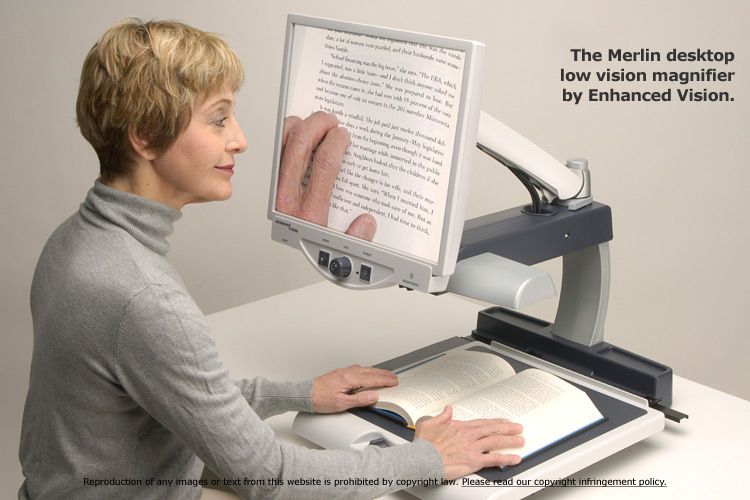
https://cdn.allaboutvision.com/images/ev-merlin-book-750x500...
Dad used his mostly for reading, but it would work equally well for hitting buttons on a phone (but obviously is not portable). He didn't need to use his for the phone since he already had a big button amplified phone for his landline.
Back then it had a camera that fed a CRT, I'm sure there are much better devices today, or you could probably make your own with a webcam and a big screen monitor or TV.
To me, that’s the place to start because they are often familiar with bespoke technical solutions.
Also they are more likely to be around year round.
I’d put it this way, if your grandfather decides to learn braille in six months, the occupational therapist can help if they are involved to a degree you probably can’t.
They can also adjust a phone solution without family dynamics resisting complaints.
Good luck.
[0]: healthcare systems vary so I am being vague, but your grandfather is already navigating it.
This is a prime example as to why it is not. High quality voice interfaces are a life changing revolution for people like this.
https://news.ycombinator.com/item?id=38157524 - Show HN: LLaVaVision: An AI "Be My Eyes"-like web app with a llama.cpp backend
Probably worth a try. I suspect with the advances in AI the accuracy, performance and UX of these apps would improve significantly in the next few months.
66yyy