How is web design this bad acceptable? It's insanely slow, annoying to read and impossible to navigate.
Most laptop webcams are terrible. Heck, most desktop ones are too. Even the high-megapixel ones have an image quality comparable to 10 years ago, and the average smartphone will blow them out of the water (hence Apple adding the iPhone as webcam feature, I guess).
It's actually rare to see a webcam with a sensor this big (half inch/12.7mm).
--------
But yeah, god, that is probably the single worst product page I've ever seen in my life. When I tried to scroll down to the specs section, it locked itself into a giant version of its logo and I couldn't do anything else. Sigh. So annoyed by the website I left, even though the product is of real interest...
(1) https://support.d-imaging.sony.co.jp/app/webcam/en/download/
(2) https://www.elgato.com/us/en/p/cam-link-4k
(3) https://www.blackmagicdesign.com/products/blackmagicwebprese...
(I use both almost daily for my trainings.)
https://www.elgato.com/us/en/p/facecam
which is using a 1/1.8" sensor (8.8mm diagonal) at f/2.4 aperture, and this has a 1/1.2” sensor (13.33 mm diagonal) at f/1.2.
In this age of remote work, there are a lot of people who really value making a good impression - for whom the default webcam in their budget business laptop won't cut it - but don't want to have a whole DSLR-on-a-tripod streaming setup.
We have some high end 1in cameras with glass zoom lenses and they look about as good even with dedicated encoding hardware.
Now, I haven't used THIS webcam, but it's definitely the sort of thing I'd be interested in.
I was using the Opal C1 for a while on my PC, but gave it away due to lack of official support on Windows, and it constantly losing focus/focus hunting in meetings.
But,
> The Opal Tadpole Was made to go with you. Wrap it around your wrist or put it in its case to keep it safe.
Who the hell is wrong to wrap their webcam around their waist??
> wrap your camera around your wrist as you go from meeting to meeting.
???
Especially for extended work sessions or presentations.
Appearing clearer and sounding clearer can go a long way to being better received.
The product is obviously somewhere in the niceties bucket; no one needs this, but I am happy it exists. It gives me the warm and fuzzy feeling only something thoughtfully designed does.
It's basically a $10 sensor, a $5 mic, $5 of miscellaneous plastic and circuitry, and yet they want $175 for what?
I might have given all their typical startup BS and hyperbole a pass if it was like $79 or something reasonable, but at $175 it just seems like a scam.
The form factor here is ideal. Also unclear if it’s 4K (can help with brightness in less than ideal lighting.
My understanding is the same components still have to be driven well to work together by custom software for high quality?
Some people will pay, just for the illusion.
Seems like a cool idea though, but it seems like it could be done even better: get an iPhone 15 Pro Max sensor and put it behind an actual quality glass lens, then add in the beam-forming mic array stuff and MAKE IT A NORMAL CLASS-COMPLIANT WEBCAM, which unlike the C1, the Tadpole is from what I understand.
I have sketched out a design for a bracket that dangles your phone upside down, in front of the screen and turns the phone front camera into a webcam that's much closer to where you are typically looking.
The interesting bit is that software on the phone displays the part of the monitor that's covered and creates a "seamless display experience" (slightly tongue in cheek).
Not perfect by any means but maybe worth creating a prototype of both hardware and software to see how it feels?
I use https://snakeclamp.com/ - you can build a custom arm setup. I use a magsafe attachment and mount a phone running Camo on it. Works wonderfully and easy to move out of the way when it's blocking my screen.
Edit: Sorry didn't see the part about the part that projects your screen portion to the area that is occluded. That seems interesting but not sure how that would actually work...
The idea is that the desktop would send the content of the rectangle occluded by the phone screen and the phone displays it, appropriately tweaked, tinted etc. I have no idea if it would work well enough to be useful but seems like a fun experiment.
I find myself using the Camo setup with the phone in front of the screen and I just "look around it" - I dislike the "looking into space" on calls more than the inconvenience of moving my windows a bit I guess.
https://www.amazon.com/gp/product/B0B722VBX1/
https://www.amazon.com/gp/product/B0B5S7X6BN/
But, seconding PlexiCam.
The L clamps' cutout works with most any screw-in tripod mount.
If you get the PlexiCam Road Warrior Mini, you get two clamps and a miniature battery pack fill light:
https://www.amazon.com/gp/product/B0C164VQ43/
I find these work well with Logi Brio 4K + Xsplit Vcam, or, with Lumina which has all the autoframing and soft bokeh you could want (far better than what's built into most web conf platforms):
https://www.logitech.com/en-us/products/webcams/brio-4k-hdr-...
The other new thing to solve eye contact is Elgato's miniature teleprompter:
* Connecting wirelessly to the computer would be ideal. Camo and Apple's own Continuity Camera do this so it's certainly possible
* There should be a computer companion app that lets you tweak the position of the monitor segment displayed on the phone screen - both for position, offset, color, temperature etc.
* There would be a parallax effect, even with how thin today's phones are - I wonder if you could correct for that in the phone app and make it appear to be on the same plane.
* Should it hand upside down from the top of the computer/laptop screen via a (magnetic?) widget or allow for positioning with a tall, skinny phone stand on the desktop in front of the monitor? Ideally both I guess.. Even left/right side if that made the engineering easier.
Countless examples from forums and elsewhere of the same issues.
Shame, because the hardware is cool.
Most importantly, the new camera does not need any software - it’s just a high quality webcam.
I know HN skews traditionalist anyway, but even here, a site this bad stands out.
I feel like normally we argue about user-invisible stuff like JS frameworks and analytics and tracking, but in this case it's a very in-your-face design meant to subvert all the common UX best practices in favor of something chic.
Does anyone like this? (Who is supposed to?) I can't tell anymore if I'm just old-fashioned and grumpy, and totally out of touch with modern preferences, or if this is just... universally bad.
The product itself looks suspiciously like a regular web cam as well, so it wasn't even worth the wait ¯\_(ツ)_/¯
This one, on the other hand, reminds me of a "YouTubeified" website, where every thirty seconds there's some insane distraction flying in from the side of the screen and begging for your attention.
Literally: I clicked on the link and all I could see was a white dot blinking on a black background. After about 20 seconds I gave up.
The mute button is a good idea - I strongly prefer having a nice dedicated button, though in my case it's on the headset - but that placement seems guaranteed to put force on the USB port in a way that risks damage.
The patent: https://patentimages.storage.googleapis.com/94/2b/ff/984fa6f...
PR about the partnership: https://www.prnewswire.com/news-releases/opal-launches-tadpo...
> A first on any consumer device, Tadpole's trademarked directional VisiMic™ microphone only captures audio that the camera can see. VisiMic is made in partnership with Soundskrit, the Quebec-based audio firm that specializes in cutting-edge directional microphone technology.
Isn't that just some EQing for the vocal presense range and a level activated gate to turn it on when it's only above a certain threshold?
Something something tiny ribbon mic that only responds to sound waves perpendicular to its axis, something something, shielded from the sides something something. (Sorry, it's all a bit over my head, but it's more than using smart EQ and volume monitoring)
I'm sorry but I cannot take them seriously. Who in hell thought this is normal or acceptable?
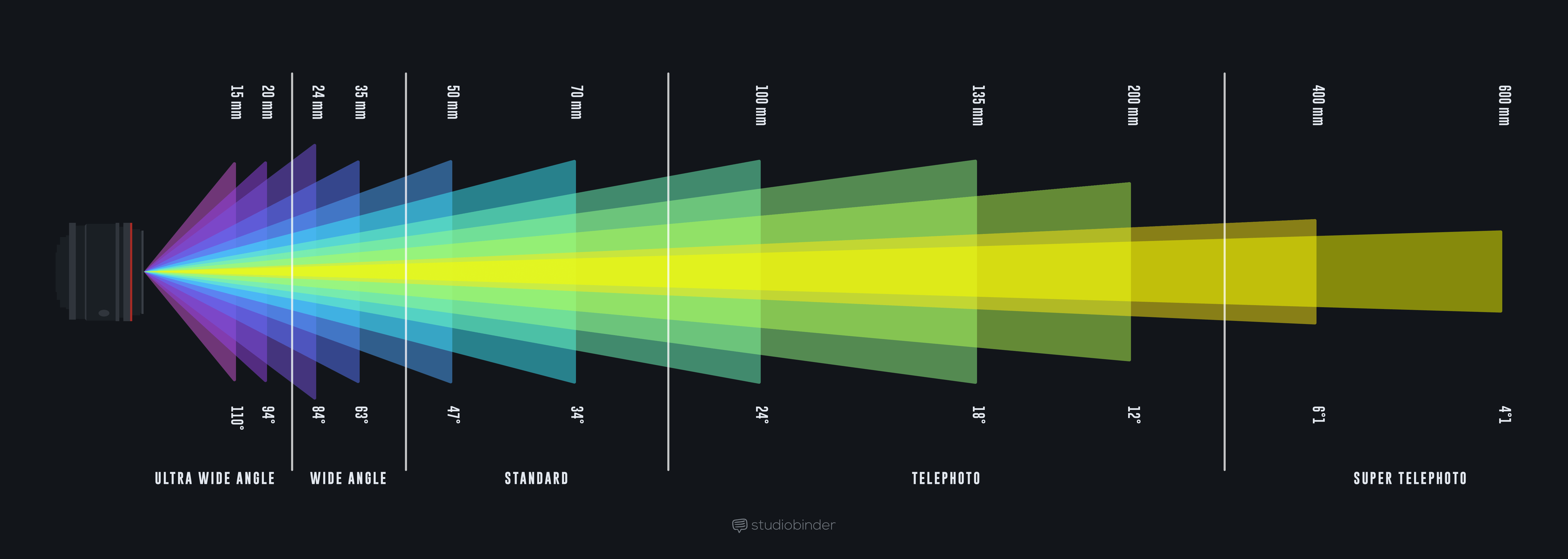
to look pro, you want maybe 35 degree field of view, equivalent to 70mm or more
see: https://s.studiobinder.com/wp-content/uploads/2019/02/Focal-...
there's a reason studio newscasters have flat faces, while the people they interview via webex or zoom look like giant nosed clowns, it's the focal length
if you can't get a narrow field of view, you can pretend you have a "crop sensor" by getting a true 4K, cropping it down to 1080p since web conf software aren't sending more than that anyway, and positioning yourself farther from it.
this farther position also helps your eyes seem to be looking more directly at the lens.
Most of the time, you don't need to worry about focal length ( especially because it's so complicated when you're trying to talk about different sensor sizes)
The real measurement here is distance from the camera. The further you are physically from the camera, the flatter things look. Now, when you're further away, you obviously need to zoom in to make your head fill the frame, but it's way easier to think about it in terms of distance first, and then find a webcam/lens/crop that works.
I use a pro camera as a webcam (with a cheap HDMI/USB stick), and I have it mounted on my desk around 3/4 feet from my face. That seems to work well for my face shape.
So, to underline the "position yourself farther from it" part of my post where to go from a wide 4K to a cropped 4K the important part was moving back, and underline the distance from the camera part of your post, readers may enjoy this movie on the "dolly zoom":
https://www.youtube.com/watch?v=tod2qZnKZEQ
The face distortion bit starts about 1m15s in.
TL;DR: To fix your face, zoom out with your feet! Then zoom in with your lens, or crop back in, to frame.
(All that said, if you're shooting faces, aka a portrait, consider a "portrait lens", and for this you're back in focal length talk. Pick 85mm focal length or longer, though I'm partial to 105mm up to 135mm myself.)
For clarification, this device is 1.75x2.25x1 international haribo gummy bear heights.
Don't get me wrong, I don't particularly care seeing as the camera is suitably small and the other webcams are not fit for the same purpose, but my point is that if all I have to go on is the marketing, it doesn't inspire confidence.
Edit: The average height of a gummy bear is 2cm and the Tadpole is 3.5cm tall. A gummy bear is nearly half as tall (57%) as a this camera. I really dislike this copy.
It’s 0.0319 football fields tall.
Who wraps their webcam around their wrist to go to a different meeting? I just don't understand the target of these ads/marketing.
200 Mbps should be more than enough to stream good quality video. YouTube suggests 40 Mbps for 4k@60Hz (compressed) https://support.google.com/youtube/answer/2853702?hl=en#
Your iPhone is crazy powerful with a beautiful picture- if you want to look great during meetings, use it.
No wires- just works
My C1 has been far too hot ever since the day I got it. The heat causes it to shut down and disconnect after using for more than 5 minutes. The only way I can actually use it is in low power mode, which removes all of the cool features and makes the video look worse. I have tried all of their software updates for the past year and nothing changed. I reached out to them multiple times over email for support and none of their suggestions helped much. Additionally, they advertised that PC support would come soon. It never came, and when I asked for a refund because they cancelled PC support I was ghosted.
They texted me ads multiple times today.
There's a bunch of professional photos of the camera, two with a hand, then two next to a pair of pants, then on a handbag.
Only after all that it is shown on a laptop, where it is actually used! It should be the first image. Also, there's so little comparison between built-in webcam image and their offerings.
Then there's a huge video with a bead sliding on the rope holding the camera. It seems that the marketers are just masturbating with the high-quality photography they made. It's not actually useful.
This is not a problem users were like "I don't know how I can go from a meeting to another with my camera".
Also, their "Have you ever wished you could instantly mute yourself in a video call without having to look for that elusive mic button? Well, now you can have it." -- this is a solved problem with mute buttons on F1/F2 or whatever your laptop does. Or at least, current mute solutions are not harder than "I'm bring my own webcam, plug it in, configure the audio source, position it correctly on the top of my screen"
This landing page is out-of-touch with actual problems users may have.
Except for that I don't get what problem this is going to solve to justify the price. All laptops have a builtin camera. Any good or bad one would do for a business call, especially between established partners that don't even need a video feed and possibly spend the call on a shared desktop. With friends, same thing. For anything else, turn on the light and it will be fine. If you have to make a call in low light conditions, that's OK: a good camera might help.
That is the single worst site I've seen since winamp.com which told me, with 100% lossless fidelity, that the new version of the app was going to be a giant dumpster full of burning dumpsters full of toxic waste.
It alone is enough to ensure that I'd not give the company $1 let alone $179. Yuck.
Hard pass for me; I was excited when I saw what appeared to be a large lens and sensor but I don't think that quality translates to the footage.
Yeah probably not. What size sensor are they using?
(And ideally could be clipped on a laptop like this one)
Top of laptop is not always ideal.
Altogether it comes off to me as parody, except they will actually take your money.
The camera coats $175.00?
The little plastic case is not included and costs $50?!?