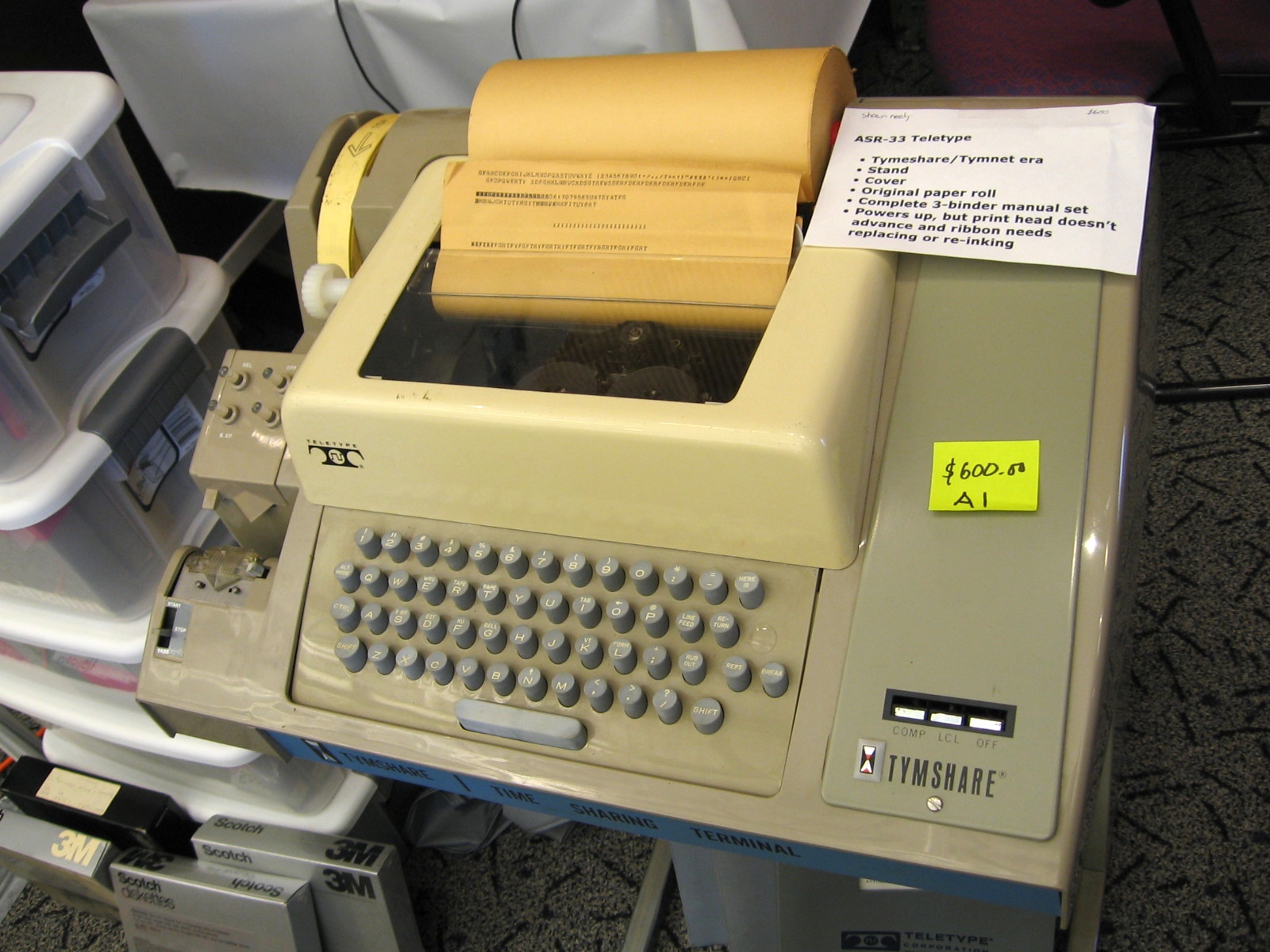
This explanation of the origin hjkl is the first one to satisfy me. Now I can see the others, not as explanations as to why it is, but explanations as to why it stuck.
I picked that up a few years back playing World of Warcraft and some other games, to avoid having to move my left hand away from WASD as much as possible, but it has served me very well in a lot of other applications since then.
Edit: Well, that was supposed to be an answer to cheatercheater below this comment. Woops.
https://bitbucket.org/cheater/us_split/overview
I see a lot of people in the comments talk about vim's "weird" layout choices. I suggest in your OS you change caps lock to esc; and that in vim you remap ; to : and : to ; in order to stop having to press shift every time. You can then really start doing the whole home row thing; IMO it's impossible without those two crucial settings.
This is a bit of a compromise, but all the other programs that are not vim will benefit from it.
The reason that keyboard had those arrows keys on it was because those keys correspond to CTRL-H, J, K, L and the CTRL key back then worked by killing bit 6 (and bit 5) of the characters being typed.
The effect was that H which is ASCII 0x48 would become 0x08 which is backspace. If you look at an ASCII table (e.g. http://www.asciitable.com/) you will notice how the uppercase ASCII letters line up nicely with the control characters so that just dropping bit 6 will get you there. Same thing with the lowercase (drop bits 5 and 6) and you are on the control characters.
The CTRL-H, J, K, L therefore correspond to BS, LF, VT, FF. BS is backspace (i.e. left), LF (down), VT is vertical tab (so up) and FF is form feed (which in this case takes you up). I'm not sure why FF was used for up.
This is also why CTRL-I is tab, CTRL-D ends a communication. All of that goes back to teletype days. Also for telnet users out there you'll see that CTRL-[ lines up nicely with ESC. And when you see a ^@ being printed on the terminal you can see why it corresponds to a null byte.
One other interesting thing about ASCII: uppercasing and downcasing can be done by twiddling a single bit.
If you look at this picture of an ASR-33 Teletype you'll see that come of the control characters on the keyboard correspond to those in the ASCII set. This is because ASCII evolved from the earlier teletype character sets: http://upload.wikimedia.org/wikipedia/commons/0/0b/ASR-33_2....
When I saw the title I was expecting to see a picture of the rogue screen. Rogue (and later hack, and nethack) is a text displayed dungeon exploration game and was often the first exposure folks got to the convention of h,j,k,l as left right up down.
I really miss having control over there. I xkeymap it there of course but some keyboards have a physically 'push-on/push-off' caps lock key there which is annoying.
IT IS THE NATURAL ORDER OF THINGS.
> I'm not sure why FF was used for up.
Did you mean "used for right"?
[Edit:] or at least that's what I thought, wavetossed's comment below provides interesting insight.
The thing about ASCII Control characters doesn't quite map to left-up-down-right, and even if it were part of the answer, we could ask again: why were those characters chosen for those control-roles?
    " remap h to i and use ijkl for inverse T cursor movement
    map k g<Down>
    map i g<Up>
    map j <Left>
    noremap h i
If you're worried this breaks anything else, I've had this interfere with just one other thing: a plugin that let me select text based on indentation of the line the cursor was on, but I made a few minor changes to the vimfile for the plugin and fixed that pretty easily. The other thing is that random servers won't have these mapped, but just copy the config over if you'll be doing a lot of text editing on that server. Otherwise, you can just fall back to using hjkl awkwardly.
  " disable arrow keys
  nnoremap <Up> <nop>
  nnoremap <Down> <nop>
  nnoremap <Left> <nop>
nnoremap <Right> <nop>Though I guess the mappings I provided would have to be noremap instead of map.
Seriously though, I think with a tiny bit of key-swapping in the vimrc, you can use dvorak or colemak just fine.
And then one day I walked into the lab with shiny new VT-100 terminals with their soft keys; but started hammering on them by habit. And everybody turned around and looked at me as if I was possessed..... :-D
  " remap <Leader> to ,
  let mapleader = ","

  " save with ,w
nmap <Leader>w :w<CR> 8 H backspace
9 I tab (right a lot)
10 J line feed (down)
11 K vertical tab (down a lot)
12 L form feed (down a page)
13 M carriage return (left a line)If you make a serious commitment to vi(m) though, binding your capslock to esc is probably the better way to go.
It seems more the case that the designers of that computer chose those particular keys on the basis of a desire for efficiency that vi also followed, so there was no need to create a new convention.
How does the author's "That's the whole story!" ending make you feel like he's saying hjkl being used as the navigation keys was a coincidence?
The coolest part is that there is no microprocessor, just a bunch of 7400 series ICs and some DIP switches to configure things.
All those awkward Control reaches originally laid comfortably under the thumbs.