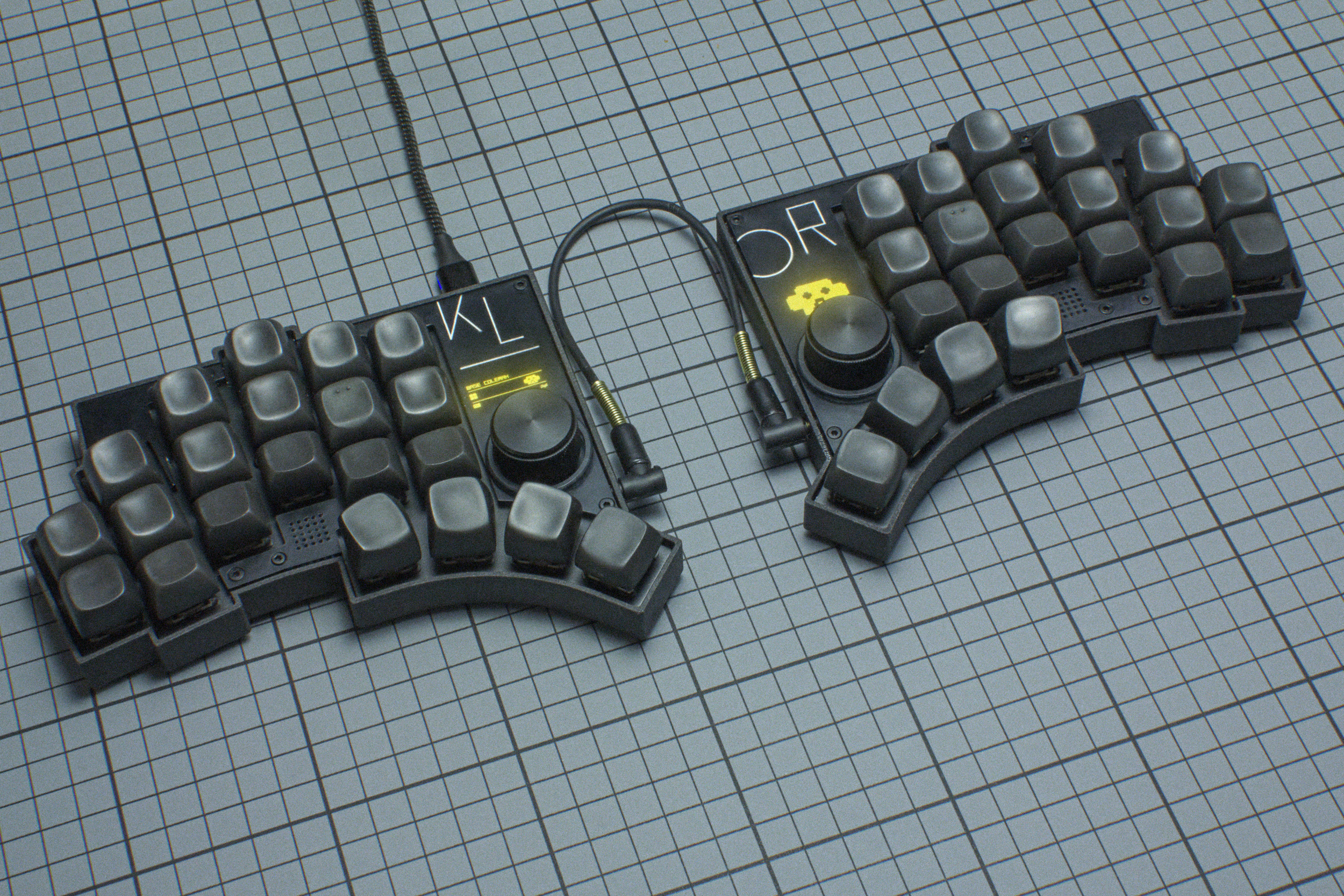
But this, this kind of keyboards, that's masochistic! :-)
I honestly doubt that these make your life easier. Please explain if you have one of these what drew you to this?
And while I don't like this particular layout in the link I do have a very similar 42-key keyboard and after a couple days of practice it was the most natural and smoothest typing experience I've ever had.
Terrible for any one-handed use (e.g. gaming), though, and it's definitely not everyone's cup of tea.
> 100% of the functionality without hand movement.
Yeah, this is the key point.
These keyboards ultimately trade-off "benefit of reduced hand movement, at the expense of a more complex layout".
A standard keyboard has some bad design flaws that these keyboards fix: the spacebar is impractically large, asymmetric row-stagger is bad. -- On a standard keyboard, you'll end up using your (weak) pinky fingers much more than your (strong) thumb. Ideally, it would be the other way around!
With these keyboards, the thumbs get to reach 2-3 keys each. This allows bringing all the keys on a standard keyboard to within reach of the hand, without having to move the hands.
e.g. Without having to move my hands, my thumbs can press space, esc, tab, backspace, and enter.
With 'tap-hold functionality' (key acts as normal when tapped, acts as a different key when held), I can put Shift/Ctrl/Gui/Alt underneath asdf (and mirrored on the right hand side), so that I can use the modifiers without having to use my pinkies as much. -- And the other complexity is putting all the other keys (like numbers and symbols) on layers.
Overall, I think it's the same power-user trade-off as vim/emacs make: more complex to use, but allows for more concise usage.
I do have another keyboard - a 61 key that I use for gaming, but for day-to-day productivity the corne is absolutely glorious.
This is fine and dandy for simple usage, but I happen to do do a bunch of more complicated stuff: ctrl + arrow to go to start/end of line, ctrl + alt for words, all of this + shift for selection. ctrl+shift+mod+arrow gets really tricky to operate for me, I haven't been able to reach a level of proficiency that was anywhere near equivalent to what I had without the modifier key.
Moving to a custom 34 key layout fixed my RSI, which has been an amazing benefit for me.
Of course, the tradeoff is that my layout is far more complex than a standard layout, and it has required a lot of time to tweak it to where it is now.
For me, it's been one of the best decisions of my programming career (together with learning Vim).
Wrist pain posed me to research other keyboards than the Apple Magic Keyboard and Microsoft sculpt. Within a brief amount of time I tried a Kinesis Freestyle Edge RGB, Kyria, and Ferris Sweep. I found the Kyria and Sweep pretty awkward (for different reasons) and caused other pains. Then I got a Kinesis Advantage2 and that really changed things for me, my hand/wrist health improved a lot. I did replace the controller with a KinT to get QMK though.
I am also using a Model 100, since it also allows me to experiment with different switches. But the Advantage2 is my main work keyboard.
I also have an Advantage360, but I don't use it much, because I don't like the switches. Review:
I added o-rings to the keys and think that made it a little nicer to use.
The Miryoku layout is a popular choice: https://github.com/manna-harbour/miryoku
As a Dvorak user, here's mine: https://github.com/1MachineElf/qmk_firmware/tree/_sb4dv/keyb...
Maybe it was because I started getting old, but I started feeling it was a waste of time. Still miss it a bit though, but when I could spend an hour on a huntsman v2 and have it feel better than any of my other linear keyboards I just felt it wasn't worth it.
The only one making keyboard for typists these days seems to be Matias, and they DO feel like a snappy rubber dome.
Debilitating neck spasms, I was willing to try anything. I can reach any key with minimal movement of my hands. Though my keyboard is 50 keys, which I find the closest compromise, by keeping the layout somewhat more compatible to normal keyboards.
Column stagger is theorised to better match finger 'layout' and therefore be better/easier/more even to type.
Both are debated.
The history of spltting and tenting go way back. If you look at Microsofts somewhat popular "Natural" and "Sculpt" keyboards, they are semi-split and slightly tented already since late 90s.
Apart from also having tried a lot of different varieties and figuring out what works for me (it's not always what you think):
Full typing range with no hand-movement. Call me old-fashioned but I'd like to have access to the upsides of soon-ubiquitous immersive VR but keep typing with my fingers and maintain tactile feedback. At the desk or on the train. Not interested in neurolinks, voice or AI-camera-hand-gesture stuff for the foreseeable future. FLOSS purist.
This seems like the best direction if one has a similar inclination and wants to make it a progression.
I have a bastardKB Charybdis Nano as my daily, and I'm developing my own low profile board too. My next iteration of both will be 34 key only, that's plenty for me.
You can see my layout/firmware here https://github.com/pixelbreaker/qmk_userspace (layout is in layout.h)
Let me elaborate — on a laptop computer (esp MacBook ) the nicest thing is that we don’t have to reach for a mouse, and we use the trackpad with either thumb.
With an external keyboard, the ergonomics are great EXCEPT that you have to move your hand off the KB to get to a mouse. For me that kills the ergonomics!
If someone designs a combo mech kb with an easily reachable trackpad below the thumbs, that would be amazing.
I like the UHK in terms of build quality and functionality but it would be much, much better if it were a 75% layout instead of a 60% layout.
Pricy sure, but really great build quality. Except the plastic feet. Buy extras, they will break.
> It supports a per key RGB matrix, encoders, OLED displays, haptic feedback, speakers, a Pixart Paw3204 trackball, the SplitKB tenting puck and four different layouts, through break off parts.
If not I am going to buy the Dilemma this week.
If you like it you like it. I used a trackball with a 75% (the best %) and an external numpad that I put the left of my kB. I use my mouse very little, so it wasn't much of a context switch.
https://www.macworld.com/article/229228/the-evolution-of-app...
There was also a laptop with this mouse "thing" that pulled out of the right side. Not Apple, I can't remember who made it.
Keyboards with integrated mice, trackballs and touchpads have been done a million times. You can buy them today in many forms (switch to image search to see the options):
https://www.google.com/search?q=keyboard+with+integrated+mou...
That said, trackpads are horrible things. They exist because they are massively cheaper to integrate into laptops than trackballs or having to ship something like a docking mouse, etc. They also reduce mechanical complexity and likely less issues on many other fronts.
In other words, trackpads are a huge win for manufacturers and a massive UI/UX loss for users.
Sure, for occasional browsing or low intensity tasks, no problem. Anything works. The little pointing gizmo on my Lenovo is there for when I have no other option. However, for anything that requires some level of complexity or performance on quickly learns trackpads just don't work. For me this means CAD, coding, applications like Excel, graphics work, etc. I use a thumb-operated trackball, have been doing so for decades. If I was forced to use a trackpad every day and had no other choice I would take a sledge hammer to the computer...that's no way to live.
I would imagine gamers have a similar opinion. I used to play games like Doom and Duke Nukem bak in the day. My performance using a trackball, when compared to others using mice of the era was just impossible to beat.
I'd like to try some other options with key wells. Like the glove 80.
Aside from the key well, the integrated palm rest is a big factor of how the keyboard works. The ergodox variants all require to raise your hands to operate, or use a dumb palm rest. But the position of a normal palm rest doesn't work with the shape of these keyboards.
I also don't get why so many try to reach for the small form factor, literally shaving 1-2 cm and loosing a ton of keys and then spend time adding layers later with all the complexity that this entails. This is also something I'm not fond of the advantage 360 -- loosing the fn row (I would likely have upgraded otherwise).
I wasn't aware of the glove 80 - that's a very nice option. Thanks for mentioning this. Just looking at this (without trying), I instinctively prefer the thumb cluster of the kinesis due to the double-length keys: these allow to move your hands vertically and still allow the thumb to hit the key without flexing). Considering space/bk/enter is placed there, this is not a small point.
However, this might just be bias after years of kinesis use.
I find that I like it but not as much as the advantage. It's harder to use. One of the problems is that I picked too stiff of a key type (MX clear). The other is that the keys are just a little further out of reach.
I like that I can customize it but I find that I don't use many of the features such as layers. I really don't like that I have to use layers to access the F keys. I use F2 all the time to rename things, and F5 to refresh webpages. One extra modifier key is not much but it seems to make the experience much worse for me.
I like that it's split so I can set it to my wider than normal shoulders but I don't like that it keeps moving. That seems to throw off my muscle memory of where the keys are. I'm in the process of making a fixed mount to correct for that.
I 3D printed the default case in the repo - I'm yet to start poking around with customising the parameters and OpenSCAD but eventually I'd like to be able to make the case to fit my hands perfectly (as it stands the default thumb cluster on the 5x6 keyboard is a bit large for me).
Without that, it is a broken mess filled to the brim with showstopping UX failures.
I'm paying someone local to desolder and resolder with 15g Kailh Choc Pink switches (aka gChoc). Requires resoldering because of the curved IC boards not accommodating hot switching unfortunately but that's the same w the Kinesis Adantage360
glove80 downside is bottoming out. upside is mountability (my chair arms, or flanking my LC4 chaise longue, etc.), better tenting ability, maybe portability, and more immediate availability. the choc switches are also interesting because they're more compactly placed. not as much pinky stretch.
I don't have a glove80 yet but will probably get one before figuring out which advantage80 model to get / if the wireless is still crap. I currently use an advantage and a sofle choc with gchocs and mkb poms and magsafe mounting.
The build guide is very informative and quirky, it has everything from tips in how to solder smd diodes to "use a sharpie to paint the PCB sides black so it looks nicer", way better than some expensive kits I've bought in the last few years!
As such, I do not like using them. In fact, my favorite keyboards are Ortholinear, where keys are arranged in a straight grid of rows and columns with no deviation, and I especially enjoy combining this aesthetic with blank keys. There is no better looking keyboard than this, it appeals to an intellectual’s sensibilities, and when you master the use of one, you feel you have ascended beyond the status of mere human, and into something more. A union between man and machine.
Now that is how a keyboard should make you feel: ergonomics for the soul.
A nice fellow mentionned kmonad as a kind of ultimate tool for that.
As I had never heard about this utility, I found this very simple introduction to kmonad: https://dev.to/ram535/kmonad-and-the-power-of-infinite-leade...
I hope you will like it too.
> KLOR is a (open-source) 36-42 key column-staggered split keyboard. It supports a per key RGB matrix, encoders, OLED displays, haptic feedback, speakers, a Pixart Paw3204 trackball, the SplitKB tenting puck and four different layouts, through break off parts.