One way we can all directly make impact is making a commitment to make our software accessible to all, starting with educating ourselves about common mistakes folks make when designing UI that produce software that can't be used by folks who have temporary or long term low vision, low hearing, neurological, and other disabilities.
There are a ton of free educational events on accessibility going on today, and if you don't have time today, find a recording, or listen to a podcast, there is a huge opportunity to make impact once you better understand the challenges.
A couple of years ago while doing research on accessibility I came across the Global Accessibility Awareness Day, and the GAAD foundation (https://accessibility.day/) - there are many such orgs, but if you consider yourself accessibility curious, today's a good day to get curious.
/PSA
I've recently had surgery on my shoulder, and have to have my left arm in a sling with no use for 6 weeks. I've made heavy use of my phone's one handed mode, and window's sticky keys
When my partner goes to bed at night, I can keep watching Star Trek TNG with subtitles.
One lens for looking at disability is that a disability is a system’s inability to cope with a particular user’s set of needs.
I think the classic example of accessibility being better for everyone is the ramps at crosswalks. They help people with wheel chairs, they let blind people know they're walking into a crosswalk. But they also give people more traction, or help people with strollers move around.
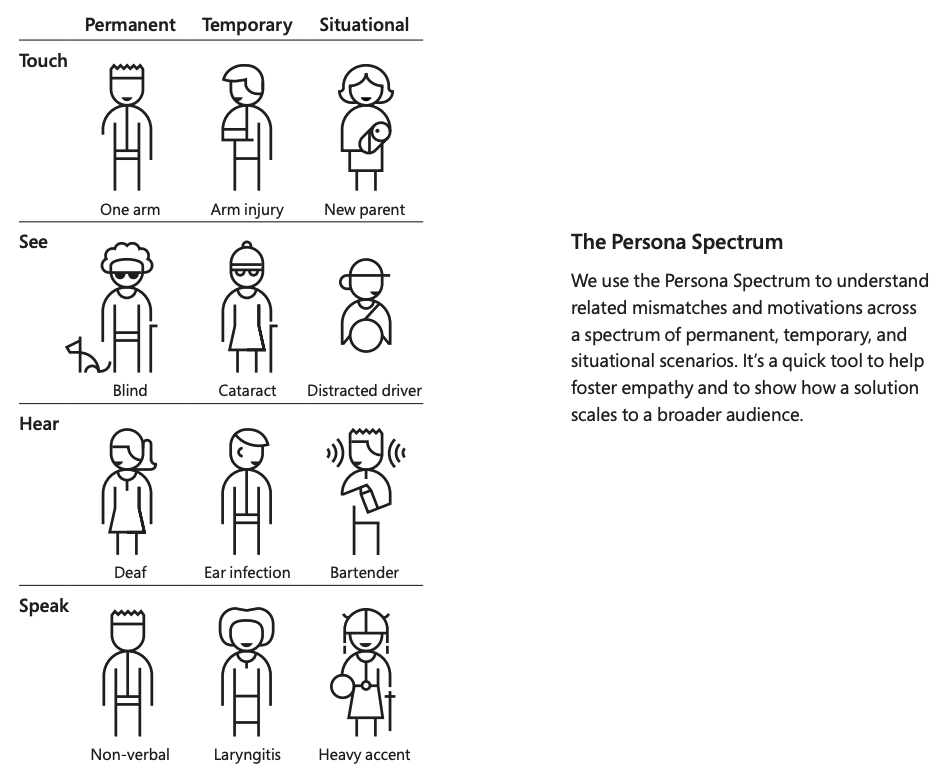
[1] It looked like this: https://www.coursearc.com/wp-content/uploads/2023/03/Persona...
Don't take this as a snarky remark, but why are subtitles the solution to this over headphones?
I wish more things were designed with an accessibility-first mindset - enabling edge cases might seem like overkill at first, but it could bring unforseen advantages.
A good example of this is tables. Tables are amazing at conveying large amounts of complex data in a very intuitive way. Not only that, it's great at manipulating data as well. It is not without reason Excel is powering a significant portion of the business world, and try as many startups have, it's very hard to pry Excel out of the hands of people who are using it. Excel is extremely versatile and very good at what it does, owing largely to the table metaphor.
Problem is that tables are also not very accessible. Among other things, they all but require sightedness. They also don't really work on mobile in any practical sense. At the same time, any accessible alternative to large tables are a strict utility downgrade for people who are able to partake in tabular data.
Starting with an accessibility first design principle, it would not be possible to produce something like Excel. We'd be stuck with a hell consisting of a million mobile apps, one for each conceivable workflow and task, rather than having one tool that can be made to perform any data manipulation task.
2. "Tables" are primarily for static tabular data (but not exclusively). Excel is a "spreadsheet," a grid of interactive cells.
3. While accessibility is best thought of as an aspect of usability, the practical limitations of tables or spreadsheets on phones are usability problems for everyone, not just for people with disabilities. It's more about the touch interface than what you can see on the screen; a modern phone can display a lot more than the monitors used for the first spreadsheet programs.
4. While having vision can make it more efficient to take in and understand a lot of information in a table or spreadsheet, a screen reader user can navigate them in two dimensions if they're made correctly. Excel's core functionality is useable with a screen reader though not every single feature is.
https://support.microsoft.com/en-us/office/screen-reader-sup...
They did this on Windows and on Android. It didn't work. Try resizing a window on 4k screen in win 10. Or try to get rid of an error message in Android 10 (hint: there is no Ok or Cancel button and the error message obscures other UI elements).
- Have you also witnessed your product-business / employer ignoring user pain to chase MVP?
Maybe you can make the case for why every link and image should have aria tags, since it’s a new app and assets are more likely to be missing.
Or maybe you know that keyboard controls need to be implemented, but you didn’t consider focus trapping for assistive users.
Accessibility isn’t a binary, but a sliding scale. At the top of the market you get insanity like WCAG AAA, which straight up invalidates most of the modern web because it’s so restrictive.
Unfortunately there are more customers who aren't handicapped.
Small and Medium businesses "waste time" on all sorts of things, one anecdote that might help your libertarian leanings is that majority of disabilities are age related, and the majority of the wealth is controlled by older folks who are far more likely to just not spend money at said small/medium business without providing any feedback to said inaccessible business.
In general, I might look at the "curb cut effect". Curb cuts are those things you see on sidewalks that let folks roll bikes, carts, strollers, walkers, and even wheel chairs when cross streets. You might take for granted that the build environment for folks is far more accessible than it was in the 80s pre ADA.
My philosophy is well designed systems fully embrace the constraints and benefit everyone.
For example, there are still games created which do not support button remapping because why would they? It's an accessibility option, they don't need to support 'everyone'. But I, as someone who is not disabled, use it because it allows me to make the controls more comfortable.
I figured he'd be interested in suggestions on how to raise the likelihood the occupants would know it's the police and not some gang bangers. Especially since it could save lives on both sides of an incident, including his.
He wasn't personally interested in yet another thing to carry/deploy/remember when he knocks on doors, and said we can't worry about every "edge case". Whatever I said, he tended to push back.
But after I pressed him some more, he said I could email a suggestion to my state's peace officer standards and training "POST" org. (usa)
We really have to train new attitudes into our police, starting with the idea that as peace officers, their first priority is to keep the peace, like "first do no harm" for doctors, and not roll into every situation expecting to get a chance to be Dirty Harry.
Are there laws about sticking something under a door?
There are hockey-puck sized devices you can attach to surfaces, which can turn them into speakers. Perhaps you can make clearer, calmer announcements compared to yelling, especially if the device can take a second to calibrate itself against the material. Once it's attached, your hand is free to do something other than knocking. And the device can play some standard announcement, so your voice is freed up as well to communicate with other officers or whatever.
Yes such a device wouldn't be cheap, but if I were an officer and there's a risk of being misunderstood, I'd be interested.
Sad, but true.
I, perhaps naively, think that training a better model(s) that helps with accessibility is a much better path forward for users that need it. Just a genuine question, not sure why I am getting downvoted. By no means, I am implying that this is not important.
A good ethos for accessible design is that making designs accessible and inclusive often the raises the bar for the average non-disabled user.
99% invisible has a good podcast on this with the development of the curb-cut. Oriignally it was for wheelchairs but it turns out to help parents with strollers as well!
Also love to point to the disability persona spectrum. Shows how disabilities can vary from permanent, temporary, and situational. I think the Microsoft's Inclusive Design Toolkit is partly responsible for it (but doesn't appear in the deck).
- https://99percentinvisible.org/episode/curb-cuts/
- https://infinum.com/handbook/img/accessibility/Persona_spect...
- https://scope.bccampus.ca/pluginfile.php/52293/block_html/co...
It's pretty amazing what you can accomplish with a philosophy of progress over perfection, the right framing, and some specific goals.
I'd challenge you all to set some public goals for accessibility (even if they are small) (for ideas: you could see what we've been doing, see: https://www.linkedin.com/pulse/olarks-accessibility-journey-... , which links out to the goals and results for the past 3 years)
and then check back on them in a year. NOTE: if you are inside a bigger org, odds are you won't be able to post it super publicly, but at least write them down somewhere and come back to them to check progress, and set goals for the next period.
The main issue I see is that most devs simply do not care, and/or dev management not prioritizing it unless required by regulations.
The biggest problem I see is that isn't likely ever going to change.
In the olden days, people referred to the "curb cut" — the smooth cutout at the edge of a curb that allows a wheelchair user to traverse from street level onto the curb. This turns out to be useful for UPS drivers with dollies, parents with strollers, and many other users as well.
In the digital world there are other examples, including better SEO ratings for websites that have proper accessibility and can be more accurately parsed by web crawlers.
I've found that if you present both the accessibility benefits and the business benefits, you can make a lot more progress than if you just rely on one or the other.
That said, I'd say Global Accessibility Awareness Day is mainstream enough at this point to be called out, given that it's being mentioned at the bottom of Apple's press releases for accessibility (https://www.apple.com/newsroom/2023/05/apple-previews-live-s...)
Stuff like Jupyter notebooks are also not accessible, making it a little bit harder for visually impaired people in stem
See BoldContacts.org, and you can email me at joel@joelparkerhenderson.com. I'm seeking help with app dev, healhcare outreach, and the UK visa.