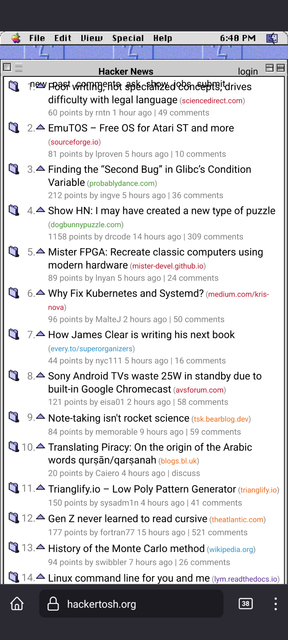
Internally, this is just a proxy to news.ycombinator.com that injects a custom `news.css` style sheet on some routes (login routes redirect back to HN). If you want to use the style sheet on the client side, there are browser extensions and a custom style sheet available at the github repo [0].
[0] https://github.com/anthmn/hackertosh.css
edit: try https://hackertosh.org/news if the page is blank
The day `old.reddit.com` stops working (and the API prevents a remake) is the day I stop using Reddit.
One small immersion break for me was that the triangles next to comments are upvote buttons; I expected them to toggle the threads open and closed (even though they're pointing upwards - a toggle would point to the right in the open state). I'm not sure what an idiomatic upvote button would look like. A checkbox?
(A classic wonderful document that even us Atari ST users used to consult when developing apps!)
See page 216 (240 in the PDF), "Controls Not Supported by the Macintosh Toolbox".
"Little Arrows The control that is two arrows pointing in opposite directions is commonly called little arrows. It is used to increase or decrease values in a series. Figure 7-16 shows one example of the little arrows control.'
So two small vertically stacked arrows as you'll see in their screenshot.
And you're right, those arrows to the left of the article title should be for expand/contract. (See 7-18, page 242 "Outline triangle control" in the same PDF)
Upvoting, hmm... well together with downvoting, you could appropriate the number spinner/stepper widget [1], the tiny little up and down buttons attached to the right side of a number field? I'm not sure that was ever native to the Platinum design language [2], but IIRC Microsoft Office at least used it at the time.
[1] https://en.wikipedia.org/wiki/Spinner_(computing)
[2] https://en.wikipedia.org/wiki/Appearance_Manager
EDIT: whoops, cmrdporcupine's sibling comment basically says the same thing. Leaving this comment here in case anyone's interested in the additional links.
https://github.com/arturbien/React95
https://github.com/botoxparty/XP.css
https://github.com/Gioni06/terminal.css
https://github.com/jdan/98.css
https://github.com/jianzhongli/csswin10
https://github.com/khang-nd/7.css
https://github.com/kristopolous/BOOTSTRA.386
https://github.com/lachsfilet/Renkbench
https://github.com/lolstring/window98-html-css-js
https://github.com/micah5/PSone.css
https://github.com/nostalgic-css/NES.css
https://github.com/npjg/classic.css
https://github.com/robbiebyrd/platinum
https://github.com/bryanbraun/after-dark-css
https://github.com/npjg/new-dawn
https://github.com/ritenv/retro-desktop
https://github.com/RoelN/c64css3
https://github.com/sakofchit/system.css
  .comhead>a[href^="from?site=w"] {
    color: #0098ce !important;
  }
  .comhead>a[href$="apple.com"]:before {
    content: "---";
    color: #ffffff00;
    background: var(--mac-apple-icon) 0px;
}Taken on Windows 7/Chrome
I miss that weird smiley face logo-thingy.