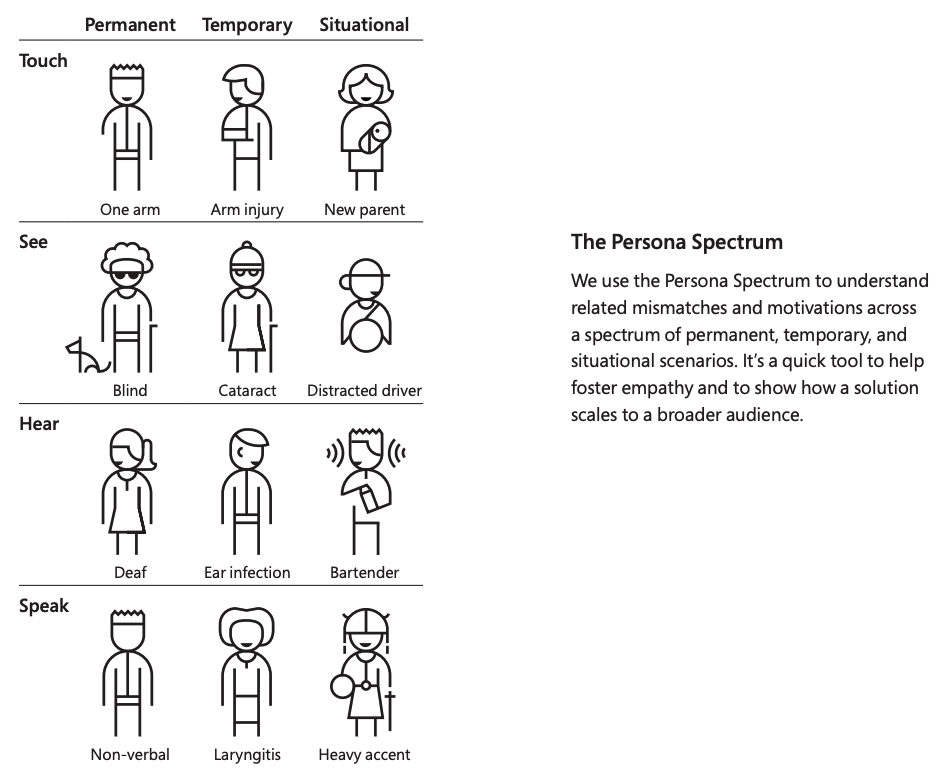
I don’t think it’s unusual that creators who have thought about accessibility have also thought a lot about UX, etc. So there may be some correlation there. But as others have posted, while there are some criteria more targeted at those using assistive technology (like screen readers), there are just as many things helping everyone else.
Besides all that, none of us are getting younger, and with age comes reduced mobility, dexterity, sight, hearing, etc. You never know what tomorrow brings. Someone who self-identifies as having no disabilities today may have a different experience tomorrow.
But then again, web accessibility is what I do for a living, so of course I’m a bit biased. :)
https://devblogs.microsoft.com/xamarin/wp-content/uploads/si...
(Google keyword: "microsoft inclusive design situational accessibility"; ironically, the canonical image comes from a guideline at https://www.microsoft.com/design/inclusive/ which is a PDF -- nowhere as accessible as web)
> people who can hear still use captioning on their TVs
Something that is rarely mentioned: foreigners who are learning the language. Captions are a turbo booster of learning, without them it can take years to understand what's up in TV when you're learning from zero.
And Microsoft’s toolkit is wonderful. My favorite part of working in accessibility for [big company] is that we don’t have business rivals in the a11y space. Everyone is in it to get better together.
Good accessibility is too often a competitive advantage in web products, when it should be the standard.
I've given up on hearing people talk clearly in most shows and movies. Sound mixing is horrible and seems to be getting worse! The music should not be just as load as the speaker!!!!
It's great to be able to mouse over images in Tweetdeck and (if the poster provided it) have the alt-text pop up in a tooltip so I can scan it to see if it's worth the time to open the image, and it's great to have textual descriptions of toolbar icons.
I suppose it makes sense now that the web has gone from primarily being a document platform that's sometimes used to create simple applications to primarily being an application platform.
..but you know what helps more? big buttons I can click with the eye tracker! not hidden in modals that vanish when I move the mouse away!
I would guess that 'them' refers to nondisabled users, who are the only group mentioned in the headline.
One particular thing is that it is generally recommended against auto focusing in fields, but for sighted non-keyboard navigating users there are many applications in which setting the focus automatically in a field just makes a lot of sense.
But, as should be noted by my word choice, there is also an asymmetry to the damage accessibility considerations or lack thereof can cause - in disabled users they can make the site unusable, in non-disabled users they can make the site slightly annoying.
What do you mean by "generally recommended"? The publication reviews WCAG 2.0. I don't know any WCAG recommendation that fits your described annoyance. In fact, WCAG 2.1 does recommend to e.g. put focus on the first form element with failing form validation, see https://www.w3.org/WAI/tutorials/forms/notifications/#after-...
More information: https://www.w3.org/WAI/WCAG21/Understanding/on-focus.html
If for example you have an application for finding service errors in an area you might show a form when people first enter the application, search for address, users search and select the address the form goes away and shows results (this right there would be an accessibility error although quite reasonable for a non-disabled user) at the top of results there is a change address button, clicking that brings the search form back into view and sets the focus in the search field.
The loss of context with that operation could be a real problem for a blind user (there are of course lots of forms of visual disability, so I will in this case specify it is blindness that is most seriously bothered by this common functionality that benefits sighted users, but at any rate I have interacted with some applications that did this which navigating blind was an irritant and navigating with sight a benefit)
So what I mean by generally recommended is - don't do things like my scenario above which violate point 3 https://www.w3.org/WAI/WCAG21/Understanding/on-focus.html even though that behavior is a minor benefit for the sighted user with no disability, and in the case of a sighted user with motor disabilities probably a real benefit.
My team at LinkedIn is trying to solve the eng side of this with a combination of automated tooling like linting & headless testing, reporting, etc., trying to make it as painless as possible for an engineer to fall into a pit of success re: a11y for web/mobile experiences.
Do you think it's more expensive to implement a few accessibility features their site had with little effort in the 90s, or to fight a case to the Supreme Court, as in the case of Domino's?
If that is the case I wouldn’t be surprised if churn rate was negatively correlated with accessibility.
I've seen this in the usability feature that my startup created. I initially launched on HN and got great traction in the lifehack community. Then I started hearing from people with disabilities who find our tech to be indispensable as an assistive technology. Our partners have reported 40% more reading on general-purpose platforms and 70% more reading on platforms for people with ADHD or dyslexia. (You can see what the reading tech looks like here, under Enhance Readability: [1])
Not all accessibility features benefit people who do not identify as disabled. But the ones that do are a win-win (and they help make the case for accessibility more generally).
1: https://unreasonable.is/how-to-stop-working-and-be-more-prod...
1: https://beelinereader.medium.com/the-best-accessibility-feat...
I think the name says a lot: access ability.
To me, it means allowing to access.
There is no word disability anywhere in there. It has nothing to do with disability.
It is about thinking ahead about different scenarios and situations you users could find themselves in and trying to address them.
Is a slow or unreliable connection an accessibility issue?
Well, does it prevent someone from accessing your service?
What if someone has an older browser and has no control over it, unable to upgrade either the device or the software?
Will your service refuse service to them?
Vision impaired and such "extreme" accessibility challenges are only the tip of the iceberg, and I think most Web developers today are hiding their head in the sand, creating a rather rude experience for all except those privileged enough to be both physically able and not situationally impaired.
Finally, I flipped the script. Making something more accessible generally gives it more SEO juice, in my experience (such as it was back then), and I could always sell people on that.