Not sure if you're aware, but older protocols are still around to be used for this use case, and Gopher has even had a bit of a resurgence as of late
If you don’t specify a username, your local account name will be used and thereby disclosed.
Much more seriously, if you have the ForwardAgent option enabled, the remote server can impersonate you, using your SSH agent to log into any remote server. Don’t enable ForwardAgent globally, despite its convenience, unless you have an agent that requires manual action for every action; and be exceedingly leery of using it even on trusted servers, lest the compromise of one machine allow the compromise of everything. Consider ProxyJump instead.
I think this is sufficient regardless of configuration (but don’t trust me to be correct, I haven’t verified the actual traffic or anything):
ssh -a -o PubkeyAuthentication=no nobody@git.charm.sh
Now of course using this will make you comparatively fingerprintable (though not identifiable) unless enough other people do it too. But then, they have your IP address, so—
If you want to skip the host key stuff, you can add `-o UserKnownHostsFile=/dev/null -o StrictHostKeyChecking=no`, though it’ll emit a warning about adding the host key to the known hosts file every time.
Also these https://marc.info/?l=bugtraq&m=104612710031920&w=2
I think I should write a web app that handles the SHH connection on the backend and renders the SHH app into HTML so that they can be enjoyed by the masses.
=)
wetty is another good option if you want to run a nodejs server: https://github.com/butlerx/wetty
Both use xterm.js for the client terminal, which is these days the only game in town for a web terminal (it's what VS code and many other electron apps use too). It's quite good.
Do be aware though that running a web-accessible terminal is a huge security headache. You're opening up a websocket to effectively allow commands and code to run on your server. Pay attention to security and authentication options any web terminal gives you, and use them. Most are not very secure out of the box or just following their readme examples.
And watch out as many rootkits use web terminals as payloads so smart organizations and security policies will be looking for them or their traffic and you might get a very concerned IT person asking you questions if you use these on a network or machine you don't control.
A few months ago I implemented a telnet chat server[0] for fun and it was surprisingly easy to do so. Even by using a wasm vm that I was still working on at the same time.
But: These mostly aren't command line applications, they're mostly terminal applications. They're no more "command-line" than running "firefox" from your shell is "command-line".
There's a big difference... a terminal application takes over your terminal and doesn't have all the usual advantages of command-line applications used from the shell, like history and easy scripting.
Yes, there is a difference. It might be better if they were called 'terminal applications', i.e. an app you run from the terminal, instead of command-line tools.
To put it another way,
sed -i -e 's/command-line/terminal-app'
:)
Regardless of name (while agreeing that names matter), they are some cool tools. I think I'm going to switch to Glow for my default markdown reader.
What do you mean "takes over"? You can always open another tab inside your terminal. You can use tmux to open multiple panes inside the same tab.
> and doesn't have all the usual advantages of command-line applications used from the shell, like history and easy scripting.
That may be true but at least TUI apps can be truly platform and DE independent, unlike GUI apps coming out from GTK4 where every non-trivial GTK4 app in existence is a libadwaita app. Qt apps are buggy on Wayland right now. In such a scenario, anything that runs on a terminal is a welcome addition for me. I'm done with GUI apps, except my web browser.
A good example is the lf file manager.
https://github.com/gokcehan/lf
I was using ranger before this but yeah, I have no reason to use GUI file managers anymore.
I can't quite put my finger on what I like about it so much. Something to do with the simplicity and directness of these UIs, guaranteed optimised for efficient keyboard nav, widespread adoption of vim-like navigation keys, and the fact that they link directly with my terminal shell so I can stay entirely in a stream of thought while working through complex series of tasks that weave in and out of these apps and shell interactions.
I do wish it was easier to select text from the terminal screen without using the mouse. It is supported in terminals to place text onto the system clipboard, but rarely implemented in most of these apps. It's the main reason my hands leave the keyboard.
I can.
Doesn't require a 1.5GB build directory to make a 500MB binary that uses 3GB of RAM to display a chat client/music player/etc.
> Hyper is an Electron-based terminal
In terms of responsiveness, there are plenty of terminal based apps that respond poorly to window resizing (the flickerkng is incredibly frustrating to me), or just don't handle aspect ratio changes at all and clip the ends of lines. Some tui applications don't clear their screen buffer properly on quit so completely break scrolling back the terminal. Many terminals really suck for performance and can really really chug if you accidentally dump a large JSON file to the terminal, for example. That's not responsive at all.
I'm not going to ever use the Edit->Copy menu but I'm also not going to learn the shortcut to click the Ublock origin button in Chrome, which I do maybe once a month.
Do you have any evidence for your assertion? It sounds like snobbery.
Check out TMUX. TMUX has a copy mode that can be used to navigate the scrollback buffer for any TMUX window/pane and select and copy text. By default, that text is copied to a TMUX paste buffer, but can be copied to the system buffer using a simple command (e.g., `tmux show-buffer | pbcopy` on macOS or `tmux show-buffer | xsel -b` on Linux/X11). You can set that command to run automatically when you copy, which saves a step if you do it often.
Also, if you enable vi keys in TMUX (e.g., add `set-window-option -g mode-keys vi` to ~/.tmux.conf), then you can navigate copy mode using vi navigation keys, including '/' and '?' for search within the scrollback buffer.
Unfortunately for me, I didn't do anything else remotely related to programming until my 20s. But I think this early exposure to a command line made it much easier to go through tutorials, since everything that I used to learn early on involved a unix terminal.
Anyways, command lines/terminals make me feel good. I don't think it's nostalgia. I'm not exactly sure what to call it.
It's the same feeling I get when I occasionally have to write Objective-C code. It's not the first language I learned, it's not my main daily language, and I'm not particularly good at it. But it's the first programming language that I was paid an actual salary to use. It helped me start my career, and it makes me happy. It just feels warm and comforting.
Terminals are underused. This is why I push for implementation of all off terminal codes such as double width and height, blink, smooth scrolling, ReGIS, Tek 4010 and so on. I had a small victory long ago by adding 25 and 50% fills in sysdig spectrograms so that running it on the framebuffer console looked better.
Imagine an htop using Tektronix graphics. Or ReGiS.
I managed to convince the Windows Terminal folks to support overline (so I could have a 3270-like status on tmux, where I added overline myself).
Now I got myself into promising to implement Tektronix for VTE.
Alacritty has this too, but I have never tried it because I use tmux.
I've recently gotten into the habit of running my xterm inside Vim. At any given point I can do a `ctrl-\ ctrl-n` and edit the entire terminal history in Vim.
Very useful.
And the design of everything is really great. It's unique but not outlandish. Just clean, simple, and cute. Really impressive stuff here.
Just remember to use `ssh -a` (disabled SSH agent forwarding) when talking to untrusted systems.
Edit to add: by default, ssh doesn't forward the SSH agent, but that can be changed by config. Doesn't hurt to add the -a.
    # Arch Linux (btw)
    yay -S glow
This is really cool.
Aside: I use glow to display help for special keybindings mode on sway.
I thought the design was terrible. Noisy and pointless and frankly hard to see what is on offer.
It’s pretty and stylish but absolutely awful if you care about the content, and that makes me worry that the components themselves will be similar.
Imagine if Amazon had a landing page with headings like 'eShopping', 'Internet', and 'Cashierless Shopping' to describe what the company did. (And worse, then obscured them behind fun but not descriptive names.)
It's a nice page, a lot's gone into making it obviously, but it could be about just one project, each section that's currently a different one instead explaining a feature or aspect of it. Or as it is, the big headings should be the class of thing each project is, not its 'fun but not descriptive' name, IMO. (Underneath: 'FunName approaches blah differently by ...', sure, just not the big eye-catching heading when I'm just scrolling trying to see what's on offer.)
Just curious who this appeals to. It's not for me but that's OK I like opinionated things and recognised that that this is aimed at someone who probably will love it.
There’s some charm to spending the time to challenge preconceived notions of CLI output. I find something very beautiful about picking up a new tool and being surprised by the output in a way that piques your curiosity or brings a smile.
It’s the greatest form of learning to be able to just play. Should you be implementing these into your enterprise internal tool to monitor your platforms support tooling? Probably not.
On top of that, I disabled JS out of curiosity, and the site worked completely fine, sans expected failures (the only thing that stopped working was the little videos by the libraries)!
I think this is the first site with this level of "Design" (Which I usually hate, but they did a really good job of here here) where both of these things are true.
It's definitely not for me, and I'm entirely ok with that. But I'm really curious about who it works for.
From usability: It was clean, to the point, and I felt like the goal was to give me information so I could quickly find stuff I was interested in. no sidebars, no popups, no obvious dark patterns, just content.
From Preference: I really like the cyberpunk color scheme with, as I'd describe, bubblegum, aesthetic. It is fun without being overwhelming.
Demo: Early 20's male who likes tech.
Other examples of sites I like:
   jwz (.) org (recommend typing this one into address bar, don't follow links from HN.
   https://xxiivv.com/
   http://100r.co/site/home.html
   https://tildeverse.org/ , and most pages linked to from
   https://tildeverse.org/members/
   http://9front.org , especially the FQA:
http://fqa.9front.orgIt feels as though many GUI-based web / chromium applications are collapsing under their own weight. They're slow and discoverability is bad. Maybe worst of all they're always distracting me with a popup / modal / alert that's unrelated to my current task.
A lot of these issues go away in a CLI, and I think there's a back-to-basics movement forming that could extend beyond the HN crowd.
It's very difficult to please HN when it comes to design, and usually the best design here is no design at all. If as a web designer you can't express yourself even for non-critical and lighthearted landing and showcase pages like these, the amount of outlets available to exercise your creativity becomes very narrow. I can't help but feel that in the eyes of this forum it's a pointless endeavour and not worth aspiring for.
I like CLI and TUI, they can be both practical and aesthetically pleasing, in my opinion the "beauty" of tools is something that can improve the quality of life for the end-user.
But I have a few negative remarks.
- The glow.exe app on Windows is 19M, the launch is fast and I love that it is self contained and portable, but I think that even a pretty markdown viewer could be compiled to a much smaller binary, like easily 10x smaller without doing hardcore demoscene style binary compaction.
- I looked at the examples and source code of some simple widgets like the spinner or the progress bar, I am not fond of the API, too scattered and quite verbose, here again I think that the exact same thing could be written with 1/3 or half the lines without being more difficult to read.
Go code tends to be verbose (if you come from a more succinct language). Again, this is a result of design choices made by the Go language designers: optimising for simplicity and explicitness (lack of magic).
I've been coding in Go for years, and find it incredibly readable compared to other languages. I now find less-verbose code harder to read.
I've not dug into it but syntax highlighting for code fences probably is costing some space for the syntax definitions.
That used to be a common practice before the advent of the web. There are still plenty of them around, including a few games.
> Now you say what about graphics ? Text only might be a break from the ad ridden web today, but you could also ssh -X to run GUI apps.
There are some extensions outside of the VT100 protocol that allows things like graphics. Emacs buffers are capable of much more. They could achieve graphics right in the terminal. Ultimately, they are all variations of the same idea that HTML and CSS are based on.
haters > /dev/null™And I still don't understand what they sell.
Seems like they charge for optionally providing hosting though. E.g. Bitwarden
The SSH angle is neat though. It works much better then vnc/parsec at lower bandwidths.
I personally believe we really should graduate from the terminal infrastructure that was designed in the ancient time. We can make a good use of stuffs like client-side UI rendering (fast & reactive), graphical boxes (more compact boxes), image embedding, native multiplexing, capability negotiation, etc. These might be still possible on the existing infrastructure, but a clean slate should provide more consistent experience for everyone involved.
Also, this entire website is a work of art.
Is Soft Serve for people who don't want to use GitHub?
There's no web UI for soft serve, it's strictly a command line and config driven git repo manager. It's more of a direct comparison to look at gitolite (also a script/CLI driven repo manager).
If you're looking for a run your own web UI for git, check out gitea.
Love the website!
But still, I don't need to be reminded upon each single command who am I, or where I am. It is better to display this information on the window title, or just run "pwd" in the rare cases where I feel lost.
For example: bat’s default colour scheme uses white text for the contents of files except where syntax highlighting changes it. Not the default colour, but white. This makes it completely unusable for me without --theme=ansi (which can go in ~/.config/bat/config), because the text is literally invisible unless I highlight it. This is an idiotic or thoughtless default.
The fact of the matter is that you can’t reliably do anything even vaguely interesting in colours, because clients are too inconsistent. Do the bright codes higher contrast, or do they mean lighter? Different programs and different themes treat them different ways, and the effects matter greatly.
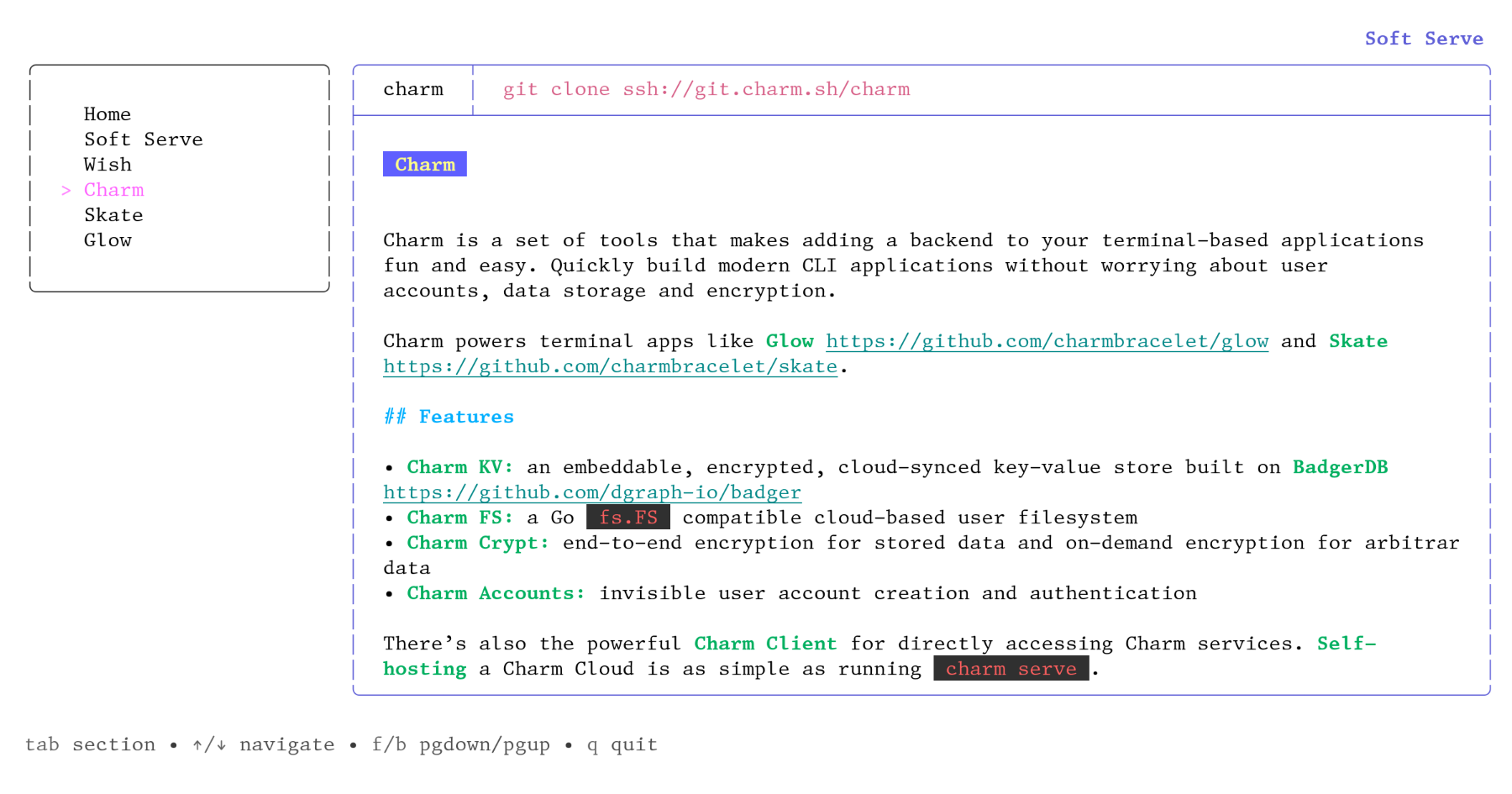
This particular app is mostly not too objectionable in my high-contrast light colour scheme, but there are a few places where it’s clearly not what was intended and doesn’t work as well, though still tolerable. Pane focus outline is a fair way off so that it’s much less obvious, and some of the colour choices grate. Markdown `code` highlighting, which is supposed to be salmon-coloured with a subtle lightening background, is way off and quite painful. Screenshot: <https://temp.chrismorgan.info/2022-01-24-git.charm.sh-in-lig...>. It’s all particularly bad for me with a light terminal, but I imagine it’ll look at least mildly dodgy even on many dark colour schemes.
There are no satisfactory choices in designing TUIs with colour. You can: stick to 5–6 colours plus bold and have it work pretty well for everyone but miss out on some desirable possibilities; go up towards 16 and have it start to not work properly for more people (e.g. blue could be clearly visible, or nigh-invisible against black and just about painful to read); use 256 or 24-bit and design for a particular background and character of colour scheme, and feel badly out of place on other sorts of colour schemes and work really badly in other sorts of backgrounds, especially as you can’t predict whether a lighter colour means higher or lower contrast; or specify the background colour (only even vaguely reasonable for full-screen TUIs) and badly annoy a lot of people.
It’s unfortunately a dead end for design as it stands: ANSI colour codes are just very insufficient. Things could be improved if apps at least tried detecting the terminal’s default foreground and background colours (printf "\033]10;?\033\\" and "\033]11;?\033\\") and adjusted things if that works, but you’re still just fundamentally quite limited in what’s possible.
Actually, on reflection I’m inclined to reckon lipgloss.AdaptiveColor an actively harmful API design direction, because it makes doing the right thing harder (scattered, inconsistent definitions) and encourages doing the wrong thing.
A vastly more robust approach is to shape your app around themes/palettes, and then allow the terminal’s colours to influence the default palette. Much like the traditional HTML/CSS approach: don’t use style="color:red;font-weight:bold", but rather class="error" and load in a stylesheet that says .error{color:red;font-weight:bold}.
Such an approach is also, incidentally, more flexible and user-pleasing because it necessarily allows more than two themes, allowing users to choose their own palette if they’re not happy with your default—though how that’s exposed is a distinct matter, especially as to whether ad-hoc themes can be created.
lipgloss looks to support some useful fundamentals for such a theme-based approach (styles, even with inheritance), but not to have built a palette abstraction on it, or adaptive palette selection, which is what you really need.
Any way to use it in other languages?
Or do I just keep poking at Rich[1] in Python?
When I started in computing the command line was the only way to make the computer do stuff, I don't miss those days.
According to Crunchbase, the company has two employees and receives millions in funding.
Something doesn’t add up here.
Also it lists two employee profiles, but a size of 1-10. This is common too, again at my current employer we've got a headcount in the 20s but only 1 or 2 employee profiles on crunchbase. $3M is also not a massive seed round by any means, I've seen plenty of early startups with 2-4 employees raise $9M+.