If you want to go fast & save NAND lifetime, use append-only log structures.
If you want to go even faster & save even more NAND lifetime, batch your writes in software (i.e. some ring buffer with natural back-pressure mechanism) and then serialize them with a single writer into an append-only log structure. Many newer devices have something like this at the hardware level, but your block size is still a constraint when working in hardware. If you batch in software, you can hypothetically write multiple logical business transactions per block I/O. When you physical block size is 4k and your logical transactions are averaging 512b of data, you would be leaving a lot of throughput on the table.
Going down 1 level of abstraction seems important if you want to extract the most performance from an SSD. Unsurprisingly, the above ideas also make ordinary magnetic disk drives more performant & potentially last longer.
In particular, the filesystem tends to undo a lot of the benefits you get from log-structuring unless you are using a filesystem designed to keep your files log-structured. Using huge writes definitely still helps, though.
A paper that I really like goes deeper into this: http://pages.cs.wisc.edu/~jhe/eurosys17-he.pdf
Edit: I had originally said "designed for flash" instead of "designed to keep your files log-structured." F2FS is designed for flash, but in my testing does relatively poorly with log-structured files because of how it works internally.
Edit 2: de-googled the link. Thank you for pointing that out.
In either case, the advice given in the article and by the OP is filesystem agnostic.
In my testing of these ideas, I've been able to push over 2 million transactions per second (~1Kb per transaction) to a Samsung 960 Pro. For reference, its rated for 2.1GB/s sequential writes, so I've got it pretty much 100% saturated.
The implementation for something like this is actually really underwhelming when you figure out how to put all the pieces together. I assembled this prototype (also a key-value store) using .NET5, LMAX Disruptor, and a splay tree implementation i copied from google somewhere. The hardest part was figuring out how to wait for write completion on the caller side (multiple calling threads are ultimately serialized into a single worker thread via the Disruptor). Turns out, busy wait for a few thousand cycles followed by a yield to the OS is a pretty good trick. You just do a while(true) over a completion flag on the transaction object which is set en masse by the handling thread after the write goes to disk. Batch sizes are determined dynamically based on how long the previous batch took to write. In practice, I never observed a batch that took longer than 2-3 milliseconds on my 960 pro. Max batch size is 4096, and it is permanently full when 100% loaded. A full batch = a nice big IO to disk.
I've always been told, "just treat SSDs like slow, permanent memory".
it's really about linking to the tutorial and papers it links at the end, which is some thing from 2014
And that was discussed here 6 years ago: https://news.ycombinator.com/item?id=9049630
I'd be more interested in the trends in SSD behaviour are. It seems SSDs have bigger and bigger DRAM caches and wear ceased to be an issue many years ago, so there's not much payoff in the write side advice of the article.
On a Windows server we were having SSD performance issues where sequential reads were often down to 100MB/s, it was kind of confusing but we tried all sorts of ways to copy it with the same result. I eventually tested the drive with a fragmentation tool and it was really high at 80% but most importantly the problem files had so many fragments that they were tending towards 4k IO reads.
What I did was remove all the files to another drive, force trimmed the drive and gave it several hours to sort itself out and then copied them back and performance was restored to 550MB/s as would be expected.
I wrote a quick go program to test sequential read speed of all files across all the drives and I found plenty of files where performance was degraded. This was across a range of SSDs I had, SATA and NVMe from differing vendors. I suspect this is a bigger problem than most people realise, normal use absolutely can get the drive into a bad performing state and trim wont fix it. Very few people expect that the drive will degrade down to its 4K IO speed on a sequential copy but it apparently can.
I've turned on plenty of cell phones that hadn't been charged or powered on for a couple of years and everything worked normally. Same with thumb drives I've picked up after years.
I mean, anything can fail after three months. Your statement doesn't really add anything without stating the failure rates. For all I know the failure rate could be less than that of physical hard drives.
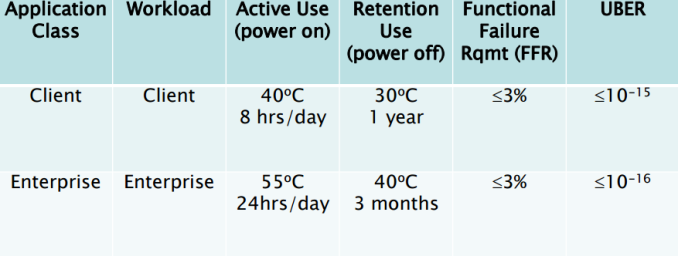
Outside of that narrow scenario, the three months figure is wildly wrong and should not be repeated. Lower temperatures, a consumer drive, and not having used up 100% of the write endurance will all drastically lengthen data retention.
(However, under no circumstances should you trust a cheap USB thumb drive to retain your data. Those tend to use lower-grade flash memory and lower-quality controllers. If you need an external device to reliably cart around data, shop for a "portable SSD", not a "USB flash drive".)
This is out of pure speculation, but there had to be a period of time during the mass transition to SSDs that engineers said, OK, how do we get the hardware to be compatible with software that is, for the most part, expecting that hard disk drives are being used, and just behave like really fast HDDs.
So, there's almost certainly some non-zero amount of code out there in the wild that is or was doing some very specific write optimized routine that one day was just performing 10 to 100 times faster, and maybe just because of the nature of software is still out there today doing that same routine.
I don't know what that would look like, but my guess would be that it would have something to do with average sized write caches, and those caches look entirely different today or something.
And today, there's probably some SSD specific code doing something out there now, too.
The canonical case is minimize time to load a level. Keep that level’s assets contiguous. And maybe duplicate data that is shared across levels. It’s a trade off between disc space and load time.
I’m not familiar with major tricks for improving after a disc is installed to drive. (PS4 games always streamed data from HDD, not disc.)
Even consoles use different HDD manufacturers. So it’d be pretty difficult to safely optimize for that. I’m sure a few games do. But it’s rare enough I’ve never heard of it.
Note though that memory use metrics on MacOS can been a misleading. Make sure that you're seeing what's actually there.
The heavy write bug Apple said was due to misreporting and was fixed ( so they say ).
I do think you should pay attention to it from time to time. iCloud Sync, Spotlight, Safari heavy tabs are all known to cause heavy paging in some corner case. You might end up having a TB of data written for no apparent reason. Apple used to ship their Macbook with MLC, on a 512GB MLC you could do 500TBW without problem, that is ~13 years of usage if you do 100GB write per day. Not sure about the M1 machines.
If you are doing Dev staging, Video and photos editing a lot these drive will fail quite quickly. In the space of 2 - 3 years. Although some would argue MacBook Air are not made for those task. And especially true if you have 8GB and 256GB NAND.
Then there's the matter of how much data is in the queue, rather than how many commands are queued. Imagine a 4 TB SSD using 512Gbit TLC dies, and an 8-channel controller. That's 64 dies with 2 or 4 planes per die. A single page is 16kB for current NAND, so we need 2 or 4 MB of data to write if we want to light up the whole drive at once, and that much again waiting in the queue to ensure the drive can begin the next write as soon as the first batch completes. But you can often hit a bottleneck elsewhere (either the PCIe link, or the channels between the controller and NAND) before you have every plane of every die 100% busy.
If you're working with small files, then your filesystem will be producing several small IOs for each chunk of file contents you read or write from the application layer, and many of those small metadata/fs IOs will be in the critical path, blocking your data IOs. So even though you can absolutely hit speeds in excess of 3 GB/s by issuing 2MB write commands one at a time to a suitably high-end SSD, you may have more difficulty hitting 3 GB/s by writing 2MB files one at a time.
Typically the SSDs with DRAM have a ratio of 1GB DRAM per TB of flash.
SLC caching is using a portion of the flash in SLC mode, where it stores 1 bit per cell rather than the typical 2-4 (2 for MLC, 3 for TLC, 4 for QLC) in exchange for higher performance. SLC cache size varies wildly. Some SSDs allocate a fixed size cache, some allocate it dynamically based on how much free space is available. It can potentially be 10s of GBs on larger SSDs.
Although they started removing it entirely for NVMe SSDs, I guess the direct transfer speed is enough to not need a cache at all.
Drives that include less than this amount of DRAM show reduced performance, usually in the form of lower random read performance because the physical address of the requested data cannot be quickly found by consulting a table in DRAM and must be located by first performing at least one slow NAND read.
> A drive can be over-provisioned simply by formatting it to a logical partition capacity smaller than the maximum physical capacity. The remaining space, invisible to the user, will still be visible and used by the SSD controller.
Does the controller read the partition table to decide that the space beyond logic partition is safe to use as scrap?
So if you partition the entire thing, but just never write to the full disk (you never use all the space), that also works as overprovisioning.
Partitioning just forces that to happen.
These are all reasons SSDs are much more pleasant to work with than old platter disks.
The actual physical address on the storage chip and the physical address from the operating system's perspective don't have much to do with another. For harddrives, "un-partitioned space" means that there is a physical "chunk of metal" that is unused.
However, that's not the case for SSDs. SSDs dynamically remap "OS-physical" block numbers to whatever they want. (Preferably addresses that have never been used before or that have been discarded/trimmed. If there aren't any available, perhaps to the address that was previously used for the same block number.)
I'm replying to the whole of comments on this article. The write amplification problem goes up as the number of "free" sectors/blocks goes down. Many solutions have been presented that don't allocate X% of the hard drive... but I'm not sure than any of them let the hard drive's SSD controller know they aren't allocated.
For that to happen, the OS has to have TRIM support, AND the block in question has to be on a volume that the OS is managing.
My worry is that if you have a blank partition, it's not being actively managed by anything, and thus isn't going to be TRIMed, and thus the SSD doesn't know the blocks are free for use.
Thus, leaving an unpartitioned area isn't going to help.
However, random read performance is only somewhere between a 3rd to half as fast as sequential compared to a magnetic disk where it's often 1/10th as fast.
I suspect it has something to do with prediction on the controller but I'm also not confidently spewing a bunch of bullshit about drive architecture unlike this article.
The numbers involved was insane and I played with various scenarios, with/without compression (MessagePack feature), with/without typeless serializer (MessagePack feature), with/without async and then the difference between using sync vs async and forcing disk flushes. I also weighed the difference between writing 1 fat file (append only) or millions of small files. I also checked the difference between using .net streams versus using File.WriteAllBytes (C# feature, an all-in-memory operation, good for small writes, bad for bigger files or async serialization + writing). I also played with the amount of objects involved (100K, 1M, 10M, 50M).
I cannot remember all the numbers involved, but I still have the code for all of it somewhere, so maybe I can write a blogpost about it. But I do remember being utttterly stunned about how fast it actually was to freeze my application state to disk and to thaw it again (the class name was Freezer :p).
The whole reason was, I started using Zfs and read up a bit about how it works. I also have some idea about how ssd's work. I also have some idea how serialization works and writing to disk works (streams etc).. I also have a rough idea how mysql, postgres, sql server save their datafiles to disk and what kind of compromises they make. So one day I was just sitting being frustrated with my data access layers and it dawned on me to try and build my own storage engine for fun, so I started by generating millions of objects that sits in memory, which I then serialized with MessagePack using a Parallel.Foreach (C# feature) to a samsung 970 evo plus to see how fast it would be. It blew my mind and I still don't trust that code enough to use it in production but it does work. Another reason why I tried it out, was because at work we have some postgres tables with 60m+ rows that are getting slow and I'm convinced we have a bad data model + too many indexes and that 60m rows are not too much (since then we've partitioned the hell out of it in multiple ways but that is a nightmare on its own since I still think we sliced the data the wrong way, according to my intuition and where the data has natural boundaries, time will tell who was right).
So I do believe there is a space in the industry where SSD's, paired with certain file systems, using certain file sizes and chunking, will completely leave sql databases in the dust, purely by the mechanism on how each of those things work together. I haven't put my code out in public yet and only told one other dev about it, mostly because it is basically sacrilege to go against the grain in our community and to say "I'm going to write my own database engine" sounds nuts even to me.
I encourage anyone to go write their own little storage engine for fun. It will force you think about IO, Parallelization, Serialization, Streams, and backwards compatibility.
It is really fun (and not even that hard) and even if it works I still recommend against using it in production, but it will help take some of the magic away on how databases work and reveal the real challenge. The real difficult part for me comes from building a query language, parser and optimizer (like sql) and to handle concurrent writes properly. It is still difficult for me to comprehend how something like a sql query string gets converted into instructions that pull data out of a single file (say sqlite file), where that file's structure on disk can be messy and unknowable upfront when sqlite gets compiled. You essentially have a dynamic data structure and you are able to slice & order the data however you want, it is not known at compile time with hard-coded rules. So I think in that regard sql adds a ton of value. So sqlite is still my go to for most flat-file scenarios.
But, fun to read and think about.
Unless you're writing desktop software or your application behaves in a way where you have actually selected the particular hardware components (most of us in cloud hosting don't do this), you probably don't [need to] care.
What every programmer should know about solid-state drives - https://news.ycombinator.com/item?id=9049630 - Feb 2015 (31 comments)
https://www.usenix.org/system/files/conference/inflow14/infl...
> Log-structured applications and file systems have been used to achieve high write throughput by sequentializing writes. Flash-based storage systems, due to flash memory’s out-of-place update characteristic, have also relied on log-structured approaches. Our work investigates the impacts to performance and endurance in flash when multiple layers of log-structured applications and file systems are layered on top of a log-structured flash device. We show that multiple log layers affects sequentiality and increases write pressure to flash devices through randomization of workloads, unaligned segment sizes, and uncoordinated multi-log garbage collection. All of these effects can combine to negate the intended positive affects of using a log. In this paper we characterize the interactions between multiple levels of independent logs, identify issues that must be considered, and describe design choices to mitigate negative behaviors in multi-log configurations.
So I think that unless this "every programmer" is a database storage engine developer (not too many of them I guess) their only concern would be mostly - how close my SSD to that magical point where it has to be cloned and replaced before shit hits the fan.
Near the beginning they talk about how targeting the PlayStation 5, which has an SSD, drastically changed how they went about making the game.
In short, the quick data transfer meant they were CPU bound rather than disk bound and could afford to have a lot of uncompressed data streamed directly into memory with no extra processing before use.
And where did the word "drive" come from? I thought it referred to motors that spin the media, which SSDs also do not have.