body {
      max-width:900px;
      margin-left:auto;
      margin-right:auto;
    }
javascript:!function(){var e,t;e='body {margin: auto;margin-left: 100px;max-width: 540px;font-family: "Helvetica Neue", Helvetica, sans-serif;}',t=document.createElement("style"),t.type="text/css",t.appendChild(document.createTextNode(e)),document.getElementsByTagName("head")[0].appendChild(t)}();
Edit I don't think it is infaillible, it didn't work on this page, but it works well on pages with no markup. For more complicated site you may try this: https://oxal.org/projects/sakura/bookmark/
What I do myself on sites like this is to use CTRL+ until the text is so large that I can read multiple lines in parallell (that is the secret behind speed reading, but the lines can not be too long of course).
To you. What I or someone not you does is up to them. For example, keeping a window full screen might have a lot of empty/negative space, but sometimes that's the desired effect to cover up all of the other things attempting to grab one's attention without having to hide/minimize other windows.
<meta name="viewport" content="width=device-width, initial-scale=1">
Sites with grey text on grey background I usually skip.
Once Firefox was my web browser because it has a very easy setting for forcing exactly this (black on white).
To be honest I never notice this particular problem because it’s easy to mitigate. The one I do notice is when someone creates an unnecessary minimum width so all the text doesn’t fit. I’m not a huge fan of max width either but it usually is a pretty minor annoyance.
My grandmother is suffering from dementia, and within the last few months has forgotten how to tune a radio. She's an avid radio listener, so I worked around this by buying her a few radios, tuning them, and labelling them - so she only has to hit the power button on the one she wants.
Unfortunately, she's not thrilled by how much space the set of radios takes up, and she's also at the edge of the coverage area for her favorite FM station.
Within the next few weeks, I'll definitely give this a shot with a Pi Zero W, and hopefully write something up on how workable of a solution this is for her.
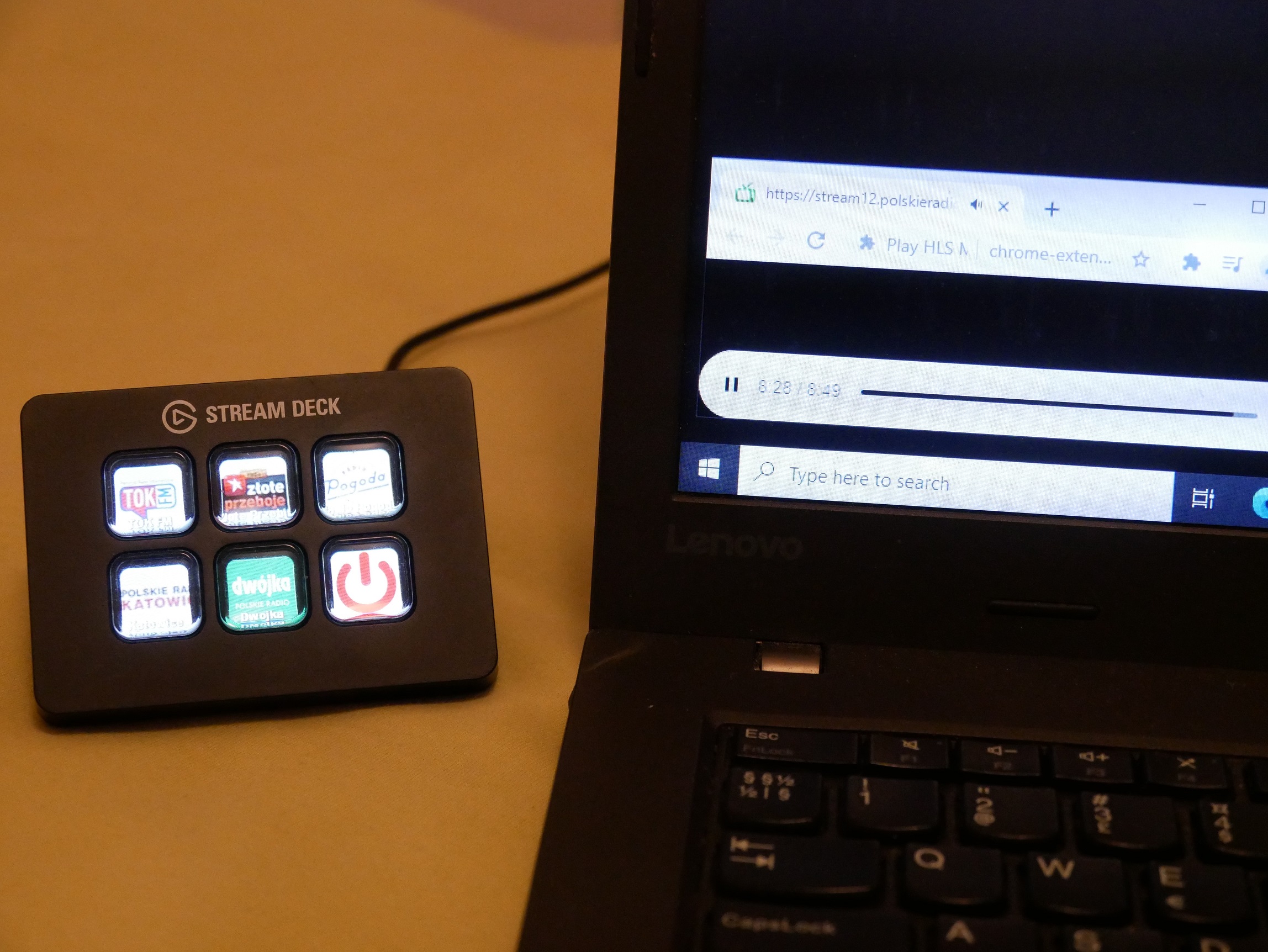
I have also rigged up a bluetooth "keyset" [3][4] after reading a how-to article about those.[5] I am currently using it to control zoom meetings, but it would be trivial to set it up so that the big clicky buttons switch the radio stations. If anyone indicates interest, I'll elaborate on the hardware and software details.
[1] https://c_return.u.blinkenshell.org/hn/1.jpg [2] https://c_return.u.blinkenshell.org/hn/2.jpg [3] https://c_return.u.blinkenshell.org/hn/3.jpg [4] https://c_return.u.blinkenshell.org/hn/4.jpg [5] https://learn.adafruit.com/ble-hid-keyboard-buttons-with-cir...
https://www.greatcall.com/phones/jitterbug-smart-smartphone-...
https://www.jitterbugdirect.com/
If you see the paper magazine published by the AARP, there are ads for phones and various technology things marketed for the age 65+ group in there.
Just the device shown in that article is worth €100. I don't know any older relative that would pay nearly that much to listen to the radio. Same reason why most people who don't care about tech struggle with a €200 Chinese Android rather than an easier-to-use iPhone.
RTL-SDR: https://www.amazon.com/dp/B0129EBDS2
Luckily this is less of a problem where I am as all of the stations I'm interested in are also broadcast via DVB-T.
1. Make a photo of her own radio.
2. Put that photo on a tablet device.
3. Allow her to click on the photo where the buttons are.
4. Adjust stations/volume accordingly.
Next step: physically operate her own radio remotely :)
Or: let her bring her own radio, and use internet and an FM transmitter to relay the signals.
The tablet never unlocks, so you don’t have to worry about UI quirks.
But your last idea was actually an excellent suggestion :) An ideal hacker project!
I can't tell if this is suggesting OP gaslight his mother-in-law
https://mechwild.com/product/murphpad/
https://github.com/dekuNukem/duckyPad
https://www.gboards.ca/product/faunchpad
It's also worth looking into small ortholinear boards where you can do the same things, but the form factor is more horizontal or has more keys.
https://mechwild.com/product/big-dill-extended-bde/
Another project i've done was with a Rasberry pi. A benefit of that would be that the system is self contained. Their Python GPIO library is one of the easiest i've ever worked with and you could have it easily launch Chrome or Firefox programmatically and play audio without a monitor.
I gave up and went with an Mbed board instead. It has the advantage that you can program key sequences without writing any host software. I use it with Audacity.
If you want a separate keypad a cheap solution would be to use any old keyboard and then remap that one specifically with a tool like http://www.hidmacros.eu/whatisit.php (optionally you can paint or add labels to the keys to make it easier to use).
For reasons I won't trouble anyone with, I've been educating myself with accessibility features on computers/phones/tablets, smart speakers, appliances, etc. It's funny how much shittier it all is than it could be.
It certainly hasn't helped that the button-per-function thinking in consumer product design has been largely replaced with low cost small displays. Maybe I'll design a piano that uses sub-menus to play each note.
. Break apart the programming/setup from the physical interface.
. Use a phone or pc for all setup, perhaps like a Google wifi router, a lot of the time this is done by a different person than the end user.
. make it look like a Tivoli Model One, except with an 8 (or so) pole switch or button set. off/am/fm/aux/internet preset 1-5
These came quite close to this (but have since been discontinued by Urbanears). Physical knob presets to internet radio stations (or turn it to “airplay/Bluetooth mode”)
Write some software, set up the machine differently, reboot it, turn off the monitor, try again.
Wash, rinse, repeat.
It's an existing product.
It would not have been so fun. And all Internet radios I have seen so far have some features that irritate me. For instance volume is push-buttons instead of turning knobs.
Actually, the only interface I would have on a radio is two turning knobs, one for volume and one for channel.
Thats all. The rest could be some phone or PC setup like 'kingsuper20' suggested.
Too sad Apple never gave us a radio. I might have been an Apple customer if they had.
Did you consider making a DIY internet radio from a raspberry pi? That's actually what I was expecting to see based on the title.
I used a rpi to make an internet radio for our living room our of a 1950s wooden console radio I picked up at a thrift store for 20 euros. Works great and keeps the illusion that the room is free of computers.
But again, if you didn't like them and had this gadget (or wanted an excuse to buy one ;) ), then it's the better solution. I was mainly reacting because it seemed like a lot of people thought that this is a generally practical solution.
it's a neat project, but if the goal is simply to listen to nearby radio stations (rather than streams), the simple radio is peerless.
Thanks for the tip, a dedicated application in combination with Stream Deck sounds even better.
Worth mentioning the 2016 OECD tech skills survey, which found 2/3 of people are not skilled technology users. In the U.S., <6% are level 3 (highest) while 20% can't use computers. https://www.oecd-ilibrary.org/education/skills-matter_978926...
This! I can't believe how shitty every single other video call apps are! Who invented swipe-to-answe? How did they test that? It's the most anti-intuitive move I've ever experienced and it took me months of frustrations to teach my 80+ old parent when he has an Android tablet... I ended up giving him an iPad just to use FaceTime
Through our work at GoGoGrandparent.com (a service that helps older adults and people living with disabilities use Uber/Lyft, grocery services, meal services and pharmacy services reliably without smartphones) we’ve interviewed dozens of folks living with visual impairments.
The feedback that stands out the most was from a gentlemen in his 30s or 40s living with blindness since birth. Paraphrasing: “owning a smartphone was like living in a house where every time I entered a room, it was as if someone had just rearranged the furniture. Tactile buttons give me a literal feeling of control. If I get lost I can find my way.”
I thought it was really powerful.
Disclaimer: Our current landing page gets accessibility wrong in a lot of places and we’re in the middle of a site redesign to make it more accessible.
Utterly maddening, barely useful, overly tied to Apple products, and it's a design problem I had never considered before. Kind of disappointing after watching some video of Tesla auto pilot do it's thing, perhaps natural language processing is harder.
Other people have gone down this road, but it would be interesting to think about how a purely audio and button based internet and phone system would act. It's a wonderful thought problem. It could well be that the solution is not in website redesign, but in the parsing and analysis of the website. How would you describe a banking site to a sightless person?
> Emacspeak introduces several improvements and innovations when compared with screenreaders designed to allow blind users to interact with personal computers. Unlike screenreaders that speak the contents of a visual display, Emacspeak speaks the underlying information. As an example, using a calendar application with a screenreader results in the blind user hearing a sequence of meaningless numbers; In contrast, Emacspeak speaks the relevant date in an easy to comprehend manner.
> The system deploys the innovative technique of audio formatting to increase the band-width of aural communication; changes in voice characteristic and inflection combined with appropriate use of non-speech auditory icons are used throughout the user interface to create the equivalent of spatial layout, fonts, and graphical icons so important in the visual interface. This provides rich contextual feedback and shifts some of the burden of listening from the cognitive to the perceptual domain.
[1] https://www.freedomscientific.com/products/software/jaws/
[2] https://www.nvaccess.org/download/
Apple has been frequently recognized for their efforts to make their products accessible - including by the National Federation of the Blind (NFB) [1]. Not to come off as a shill, but their contributions in the area of accessibility are worth praising.
iOS was the first mobile OS to include accessibility features. Apparently they're now using the LiDAR scanner on the iPhone 12 Pro to power a "people detection" feature for people with sight impairments.[2]
Here's a few of Apple's marketing videos on their accessibility features that are kind of neat:
A blind drummer who uses an iPhone with a black screen: https://www.youtube.com/watch?v=EHAO_kj0qcA
Accessibility: https://www.youtube.com/watch?v=XB4cjbYywqg
Voice Control: https://www.youtube.com/watch?v=aqoXFCCTfm4
---
[0] https://support.apple.com/accessibility/mac
[1] https://www.afb.org/aw/16/6/15452
[2] https://support.apple.com/guide/iphone/people-detection-iph4...
So far I've hooked it up to auto-post things to a Slack (using IFTTT) and done bindings for a MMORPG (DDO) as well as it's intended use (scene switching in OBS)
All works fine and it's pretty easy to setup.
So for example I can easily select scenes from OBS within the stream deck application to add them.
In addition there's various add-ons that can be enabled, so for there are buttons that'll show your CPU usage or Internet speeds.
I threw on a $10 USB DAC and some cheap Logitech Z120 speakers, and I hardwired some big arcade buttons from Adafruit to it. I wrote a little Python script so each button plays an MP3 playlist (Eg one for sleep, one for daytime, and one to stop everything).
The same buttons could quite easily play an internet radio station.
I think the entire thing cost me ~AUD80 total.
Next I want to integrate it all into a 3D printed housing and add some LEDs as night lights.
http://www.johnwolff.id.au/calculators/BellPunch/PLUSBakelit...
For extra authenticity, there should be hiss (or a station) when the knob is sitting still and crackling when it is turning.
http://bef.no/radio/Photo3.jpg
Those buttons look great, and this is a very thoughtful idea.
(But the user interface in VLC sucks though...)
To find streams I usually use Radio Garden: http://radio.garden
Use the network inspector while browsing stations and you'll find a working URL to the stream you can use anywhere.
Good way of staying in your MIL good graces too lol