Thanks, but it's not really the same thing (unless there's another feature somewhere).
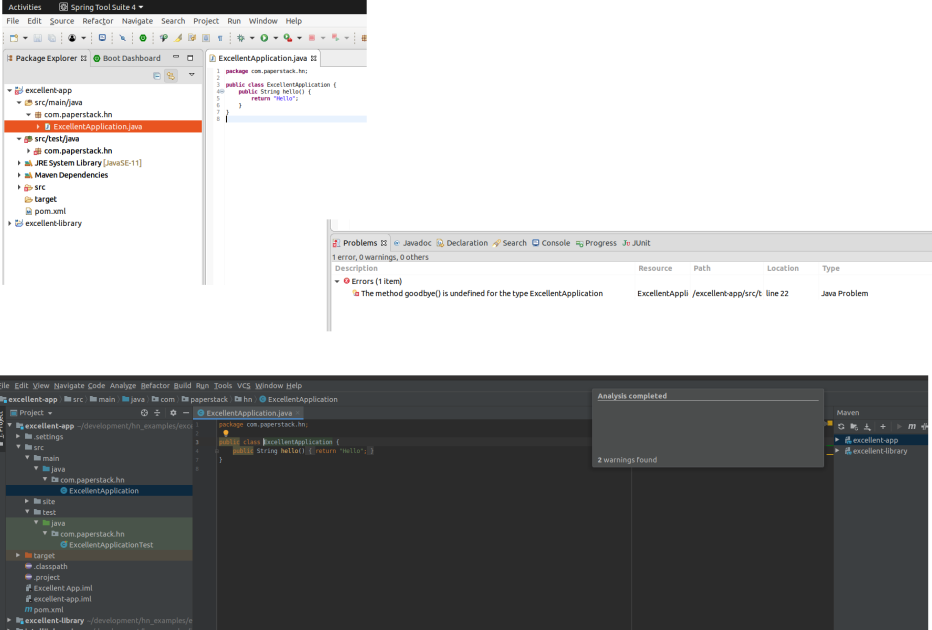
Take a look at this comparison:
https://paperstack.com/img/ides/eclipse_vs_idea_problems.png
In IntelliJ I can invoke this gizmo for the file I'm in, but it reports the problems for that file. It doesn't tell me where else the problems are. If I do a build I typically get a handful of compilation errors until the build gives up.
In Eclipse, by default, I get the Problems view. It lists all the compilation issues it knows about in the entire project(s).
Because Eclipse does incremental compilation I get to know about issues in a totally different file immediately. I also see stuff like config file errors in the same panel. It's really neat.
IntelliJ may have this feature somewhere, but this doesn't seem to be it.