Pros
- dead simple to upgrade the hardware. I was able to get 32GB of RAM and 3 1TB hard drives installed with no hassle or voiding of warranty.
- its a beast of a machine when you spec it out capable of any workload you throw at it.
- linux support is 1st class (obvs)
- all aluminum chassis
- the display is nice even tho its only 1080p
- the keyboard key action is nice. I have a thinkpad for work and they are similar feel.
- PopOS is amazing.
- the backlit keyboard is cool
Cons
- you cant use external monitors without the NVIDIA card enabled which requires a reboot. This is the single largest failing IMO and is more annoying than you'd think it is.
- you only get about an hour of battery life with the NVIDIA card enabled making it totally useless to keep on unless you plan on using this thing like a desktop all the time.
- its a rebranded Clevo laptop and kinda ugly. It feels cheap to me despite the aluminum chassis.
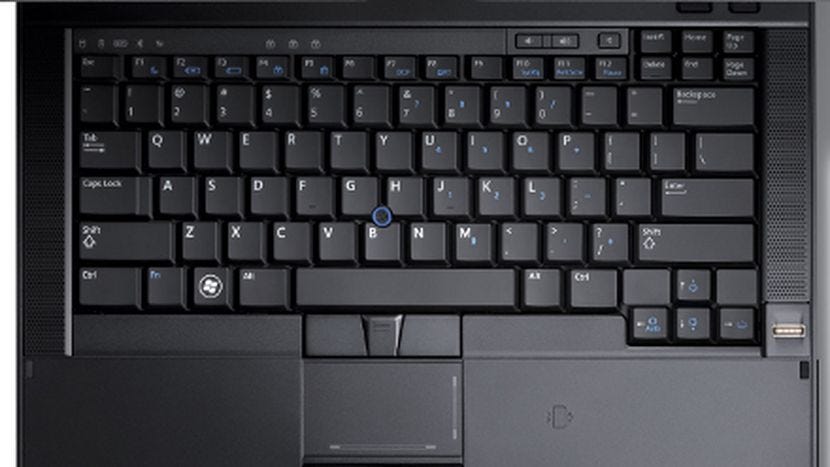
- the keyboard layout is weird. The number pad is unnecessary.
- the speakers suck. Seriously. Like my headphones lying on my desk sound better
- web cam is crappy
- the screen itself feels flimsy
- I dual boot into windows and its a second rate experience there.
> - you only get about an hour of battery life with the NVIDIA card enabled making it totally useless to keep on unless you plan on using this thing like a desktop all the time.
With these 2 caveats I'm surprised you still think it's fine! I guess it depends on your work situation and pain tolerance. If I had to toggle graphics cards and reboot every time I detached or re-attached my laptop from/to my desk-with-external-monitor setup... Well, I wouldn't be happy about that.
I have a Macbook Pro for work. It is functionally a desktop that I can take home with me every day. If Apple shipped a Mac Mini with a built in 10 minute battery that auto hibernated the machine when i unplugged it, it would make sense for work to provision me one of those and save $800~
If this was my personal laptop, it'd be untenable though.
A lot of laptop wired the external output to NVIDIA card, so if you are only using Intel it won't work, as is the case here. Wiring to NVIDIA can more performant, as wiring to Intel requires copy-back from NVIDIA to Intel when NVIDIA is active (which is what is being done for the internal monitor).
As for reboot, well, I still don't know why NVIDIA doesn't have auto-switch in their Linux driver yet.
I'd pay a 100 Euro extra to remove the number pad and center the keyboard and the touchpad. Having to slide any laptop to the right is so annoying (the space bar must align with the center of the body, no matter what.)
Personally, I find the numpad to be incredibly useful (and it's nice having it be there without having to lug around some extra gadget just for that purpose), and the fact that the touchpad is off-center is pretty irrelevant (as in: I don't think about it, and it doesn't really affect anything at all).
It does help, though, that even on a desktop I have a tendency to shift the keyboard somewhat to the left relative to my body (in fact, that's how I'm typing right now), so I guess I'm used to it. Still, switching between the Precision and my work ThinkPad (which lacks a numpad, and therefore doesn't need to offset anything) gives me no trouble at all.
On that note, I have exactly three requirements when shopping for a "mobile workstation" like that:
1. A numpad (even if it's one I access by holding down some Fn key to change the behavior of other keys)
2. A Trackpoint or equivalent
3. No NVIDIA GPU (ain't nobody got time for proprietary drivers)
My Precision passes all three of those with flying colors. This Oryx fails all three of those AFAICT.
That said, they don't have as much control over the hardware as I would hope. As I initially said, this is a rebranded clevo so they are kind of stuck with whatever they source from them.
So 1920:1080 + 3440:1440 + 3440:1440 => 8800:1440 (12,67Mp)
But 1920:1080 + 3440:1440 + 1440:3440 => 6800:3440 (23.4Mp)
EDIT: with the laptop screen off, it would just be:
3440:1440 + 1440:3440 => 4880:3440 (16.8Mp)
In any case, this seems to be an actual GPU issue instead of an issue caused by the laptop's design. Something that would happen with any laptop using that nvidia card.
This is crazy. The hybrid graphics approach has been around for a decade, and I had one of the very early ones in 2010, running Windows 7, and even that one didn't require a reboot to switch. It switched automatically based on load, just like Macbook Pros do (it had a bit of a display blink when doing so, but still).
Is this some kind of limitation with Linux itself?
Definitely not. I don't know the details of the grandparent's hardware, it's possible that there are some limitations with specific NVIDIA hardware, given the fact that NVIDIA does not have open source drivers.
I have had working hybrid NVIDIA graphics on my work laptop for eight years now I think. Basic functionality such as using one of the display outputs requires the dedicated GPU. The open source tool for controlling NVIDIA hybrid graphics is Bumblebee. NVIDIA's proprietary technology is called Optimus.
No it's Nvidia refusing to work with upstream to implement optimus properly( and wayland and drivers in general). They are very hostile to open source.
What's worse, they have zero information about the quality of this screen. It's almost certainly not HDR. Does it even cover the sRGB gamut? Plus there's no option for a glossy coating, no information about viewable angles, no option for 4K, etc etc.
One of the primary ways I judge the quality of a laptop offering is by the quality of the screen the manufacturer is willing to put in it. If they're not skimping on the screen, it's a good sign for the quality of the rest of the product. And every single Linux-first manufacturer has fallen down here. The general expectation from them seems to be that you'll pay mid-level Mac prices for mid level Dell-quality products, in exchange for first class Linux support.
It's really too bad, because I'd pay the premium for a high quality build with great components that would last me a decade. Not so much for this, though.
I've been interested in buying a System76 unit for awhile (specifically a Darter Pro), but I've always been concerned about their sourcing from Clevo. I previously owned a Sager which was also sourcing from Clevo at the time and the build quality was absolutely horrible.
Can anyone who has used a System76 for awhile chime in regarding the longevity of the hardware?
It shipped with an infamously bad keyboard that was basically unusable due to unregistered key strokes. They eventually replaced them, but they still weren't perfect.
The screen was very flimsy and pressed into the keys when it was closed and any sort of pressure was applied (for instance being in a bag), leaving an unsightly mark across the middle. I ended up sticking felt pads around the bezel to create some room to accommodate the flexing.
Once a screw came loose in the screen hinge, preventing it from opening. I had to send it back for repair.
On the base where my wrists laid while typing, the finish wore down through the paint leaving two big brown oval marks.
The battery life eventually went to nearly zero after a few years.
The battery eventually started swelling and, before I realized what was happening, pushed up the trackpad actually fully breaking it away from the surface.
All in all, it was super flimsy. It got me through grad school, but almost no longer and with zero resale value afterwards, and even then I never felt completely confident in it during that time.
I have a System76 that is still going in year 6. No issues, but I don't use the battery in that one much -- it sits on top of a stereo serving as a music source, mostly.
Apart from the keyboard more or less falling apart at this point and that the touchpad is megashit by today's standards I have been a happy user. It has survived a lot more beating than my wife's MacBook which seems to break when you look at it wrong.
This year I demoted it to be a home server with built in power redundancy (and screen and keyboard). I am very satisfied with that purchase.
This is absolutely crazy why are we still putting screens into laptops that would be disappointing on a CRT from the year 2000? How can you work with just a thousand lines?
I'd rather spend less money getting the 1080p option and have longer battery life.
https://www.lifewire.com/crt-computer-monitor-buyers-guide-8...
The answer is super simple. Because I'm not you. Which means I'm not sensitized to the same things that you are sensitized to.
For example, I can't stand working in a room that is not brightly lit, which isn't a problem at all for most other people.
I found it convenient to have the numpad available at all times and the muscle memory I developed while typing on it makes the process less frustrating than looking all the time at the number row on the main keyboard body. As I understand it, the laptops with no numpad have a toggle that turns keys on the right side into a numpad, don't remember how exactly, might be vendor specific, some even have numeric markings on those keys, but the keys are laid out slanted, not in a square grid like the real numpad, so it's less precise that knowing you can feel the bump on the no. 5 key and to get to the others you just have to move straight up/down/left/right.
The fact that the touchpad is not centered never bothered me at all; I use a macbook for work, which is centered, and I felt no difference in hand position or comfort. In fact, the inverted position of CTRL and FN were (and still are) way more frustrating to deal with, even the switch to ISO keyboard from ANSI was less frustrating that that, but the off center touchpad/keys, never.
    7 8 9 0
    U I O P
    J K L :
    M     +
Head naturally centers on the screen, it helps if palms lay on center too.
[1] https://kbimg.dell.com/library/KB/DELL_ORGANIZATIONAL_GROUPS...
[0] Especially not given the current trend for laptops to become thinner and thinner.
What I'm really disappointed by is laptop manufactures pretty much only go two routes now on laptop keyboard layouts: 1. The one with numpad on wider laptops like this one, 2. The compact one with smaller arrow keys and no nav keys (Home/End/Pgup/Pgdown) in a reasonable place. (typically hidden behind Fn+arrows)
I used to have this old laptop, Dell Latitude E6410, that had pretty much the perfect laptop keyboard for me to write code with. It looks like this [1]. I use Home/End keys extensively while coding and it's part of muscle memory to reach for them directly vertically above arrow keys. This is the only laptop with a keyboard layout like this that I know of. (the full size arrow keys also help)
1: https://miro.medium.com/max/1400/1*pDN_eHnop3QdkRbjkxRSFQ.jp...
It would be great to have a standard chassis that could hold an upgradeable pi-like board and a custom keyboard.
They might have chosen that due to their intended audience. The numpad is pretty handy for many professional applications. Let's say you are using Blender - there are many keys bound to the numpad. You can work without those, but it's awkward. Not to mention applications requiring lots of numeric input.
You could plug in an external numpad(or better yet, a bluetooth one). But this is a laptop, it's one more thing to carry.
I personally don't require a numpad these days - I'm typing this on a mechanic keyboard without one. Have I missed it occasionally? Yes. Would I prefer a laptop without one? Yes. Give me more keyboard real state and a better layout.
Now, the off-center small touchpad is the biggest offender here, IMHO. This is a design reminiscent of early 2010 cheap 15.6" laptops. Maybe it's a good touchpad. But I am already prejudiced against it, because it looks like the old synaptics (or the even worse competitor I forgot the name). They don't provide any details in the specs, they just say "multitouch".
For the price, I think one could live with it. High end workstations from HP/Dell (their own design, their own suppliers) went for $5,000+ a decade ago. They stopped doing that recently.
Nowadays only Apple seems to have enough pull to get uncommon features on their machines.
(I follow this philosophy in my martial arts as well. Which turned out well enough when on my black belt test I accidentally did all my techniques lefty and still passed!)
* centered touchpad (edit: well, kinda)
* touchpad with physical buttons below _and above_, including a _middle button_
* trackpad, though I don't use it much
* no numpad so there's more room for the rest of the keyboard (it's a 14" laptop) and it feels great
* arrows slightly out of the keyboard layout, with adjacent page up/down
* keys feel great, but I guess that's common now
Some more notes:
* old-school docking system, which I prefer over usb C and such
* (this one's a con) weird home/end button position, but nothing serious
I want to replace my aging MacBook Pro and move to Linux, but finding a non-gaming laptop with a good screen seems to be an impossibility.
Edit - To the people recommending laptops in this thread:
Thanks for the suggestions, but none of them so far have had a 144hz screen. It's very hard to go back to 60hz after using a higher refresh rate monitor, even for simple things like literally moving a mouse around the screen and looking at the cursor.
The only 144hz laptops I've found are 1080p, and that extra 120px of vertical room is a luxury I'm not yet willing to part with.
Yeah. 16:9 screens are frankly unprofessional. They're for gaming and movies, not work. Give us a 16:10 (like Apple and a handful of other vendors still use).
https://www.lg.com/us/laptops/lg-17Z990-RAAS8U1-ultra-slim-l...
If only I could do something about the software...
I like the freedom of Linux, but I find the best support to be for the least common denominator of feature sets.
https://www.notebookcheck.net/Dell-Precision-5550-5750-First...
* 1920x1200 or 3840x2400 * 64MB RAM, ECC w/ Xeon CPU
You'll get an infinitely better piece of hardware.
I've heard complaints on HN about S76's keyboard and display choices before but this categorical dismissal of them feels remarkably unfair and frankly, false.
The Blade 15 comes with 32gb standard and I thought that was a fairer comparison but should have been more specific. It also comes with much much better display options, is lighter, larger battery, user upgradable Wifi, hard drive and ram (up to 64) and is frankly just a much higher quality build.
My bad on the XPS 13 suggestion, I meant to say the XPS 15 which also does come with a Nvidia graphics card.
With this machine, I think you're paying a premium for a rebadged Clevo laptop here that runs Linux out of the box. If you are willing to spend a day you can get a Blade running Linux on much better hardware.
Now I'm on a System76 Galago Pro. It isn't perfect but gosh it has served me well these years.
So not sure what the techs would be referring to.
It's refreshing to see the tables turned for once. GNU/Linux first, Windows secondary :)
* Chiclet keyboard feels nice to type on
* Plastic fake brushed-metal case is
* Battery life is about an hour, almost unusable away from a charger. If I were spending my own money on this laptop, this would be a dealbreaker.
* Built-in display sucks. It's allegedly matte, but still has incredibly high reflectiveness. 1080p resolution and just okay LCD color reproduction
* Fan noise is a serious issue. I made the mistake of un-muting myself on a video call while the fans were going and other people on the call immediately muted me. They thought I was in a wind tunnel.
* Webcam quality is low. Video calls with an open window behind you mean you will be washed out by backlighting
* Performance is great. Runs a bunch of simultaneous headless Chrome browsers in Docker and completes our unit test suite pretty quickly.
* The trackpad is truly horrendous. I use tap to click on my MBP, and I had to turn that off on the Gazelle real fast. Palm rejection is nonexistent - had false clicks every 15 minutes. That is not an exaggeration.
* Keyboard is backlit
* USB-A, HDMI, ethernet means it's easy to use it as a desktop
* Built-in speakers sound tinny and low-quality
* Large and clunky, but weight isn't bad
I'm torn: Ubuntu and GNU/Linux generally are excellent developer environments, but the laptop hardware is horrible. It feels like the $600 Windows machines my friends used in college.
> NVIDIA graphics currently unavailable when dual-booting Windows
How the hell did they manage to do that?
Sadly, though, this is a bittersweet deal imo, since you will get NVIDIA's trademark Linux experience, including binary blobs that occasionally prevent you from updating to the latest stable kernel and practically being stuck with Xorg for the rest of your life. I understand that NVIDIA simply has the best options (or at least, that would be my guess) but it's hard to still not be a little disappointed since I've been having a great time with AMDGPU on my desktop, running Wayland, up-to-date kernels and having great system stability.
They've started asking people to share what they want here: https://github.com/system76/laptop-suggestions/issues
If you really want a great Linux-first laptop, copy/paste all of your complaints/desires for hardware from here into that repository.
Top of the list for me:
- High powered laptop (e.g. 47W TDP CPU) without a graphics card.
- Centered keyboard without a numpad.
- 14" 1080p option for high-end laptops.
Edit - Formatting + I used to work there, but this is NOT based on anything from when I did - just speculation. It was an AWESOME place to work as a Linux nerd though. :)
I've been hearing this for years, and System76 keeps on charging a premium for rebranded cheap Clevo laptops.
So I bought a zareason laptop. It was basically the same hardware, it was janky and lasted two years.
So then I splurged on a Thinkpad via LAC Portland, and it's been pretty wonderful. I just wish I could buy them from Lenovo directly.
It's ridiculous that the most "Linux focused" laptop maker doesn't offer AMD GPUs.
On eBay, you can get a 32GB RAM, mid-range i5/i7, with RTX-2060 6GB for ~$1,300 used.
It looks like ~$1,800 for the same specs (though brand new, and with a better CPU since it's 10th gen i7).
I'm not a hardware guy, can anyone here weigh in? Would really appreciate it.
Don't have a ton of money, I've been using a $650 Acer Nitro 5 with 8GB RAM + GTX 1060Ti (absolute steal) for few years but it's been freezing multiple times a day recently (lots of containers, my IDE, etc) so trying to future-proof best I can for max value.
Maybe I'll go that route for now, appreciate the reply.
I might be in the small group who wants this, but i wish it was easy to find a 15" laptop with a CPU like the one in oryx but without an NVIDIA gpu. I'd like to have a better cpu and i don't mind a laptop that's larger than the xps 13 or carbon, but i don't need/want a dedicated nvidia gpu. While we are wishing for things, please make more laptops with higher dpi screens. There are a lot of options for 1080p or lower, but very few good options (outside of macbooks or dell xps) that have high quality UHD displays.
I'm on the market for a new laptop and the screen quality is the only reason i'm even contemplating a macbook.
If you're willing to forgo the 4K display (a 15.6" 1080P screen at 24" is >60ppd, so it should be close to a "retina" display [3]) then you might have another option (the one I've been looking at). The latest AMD 4800H processors perform neck and neck with the i7-10875H (with much better power/perf) [4] and there's one ODM, Tongfang, that has a Renoir refresh (model PF5NU1G) that looks like it might be the best option available this generation (I'm looking for much the same thing as you - the highest CPU power possible, no dGPU for better battery life and less Linux hassle). It's using the same (1.5kg 15") chassis as their older Picasso model (see the Schenker VIA 15 NBC review for a good overview [5]) but with some notable improvements:
* Improved dual fan, dual heat pipe cooling means it can boost to 65W and sustain 54W CPU performance
* Dual channel, dual DDR4-3200 SODIMM slots (but the tradeoff is now only 1 M.2 slot)
* slight display upgrade from N156HCE-EN1 [6] to a NV156FHM-N67 [7] - matte, 300nit, 100% sRGB, dE<2, 1000:1 contrast ratio FHD screen w/ DC (not PWM) dimming
* USB-C PD (Power Delivery) support added, but no DP (DisplayPort alt mode); but has HDMI 2.0 support for a single 4K@60 external output
It's currently on-sale already in China as the Mechrevo Code 01 for ~$750 [8] and is supposed to be coming to Schenker/Tuxedo soon (lots of technical details and an interesting discussion in DE here [9]). Eluktronics should be bringing it to the US soon as well [10]. I'd expect a price point of around 1000 USD/EUR.
[1] https://laptopmedia.com/specs/?q=&hPP=20&idx=laptops&p=0&dFR...
[2] https://psref.lenovo.com/Product/Legion/Lenovo_Legion_Y740S1...
[3] http://phrogz.net/tmp/ScreenDensityCalculator.html#find:dens...
[4] https://www.notebookcheck.net/i7-10875H-vs-R7-4800H_11949_11...
[5] https://www.notebookcheck.net/Schenker-VIA-15-Laptop-Review-...
[6] http://www.panelook.com/N156HCE-EN1_Innolux_15.6_LCM_overvie...
[7] http://www.panelook.com/NV156FHM-N67_BOE_15.6_LCM_overview_4...
[8] https://item.jd.com/100013420504.html
[9] https://www.computerbase.de/forum/threads/mechrevo-code-01-n...
[10] https://www.reddit.com/r/eluktronics/comments/gs9e89/will_el...
As a Linux user, I'm generally just looking for a nice piece of hardware with good Linux support, and I have never felt Clevo /Sager were particularly good quality.
I wish they were higher quality tbh, HP and Dell hardware is still well ahead :/
WHY?!? Why do they keep using outdated, low res panels? I want to like system76 but can't with their bad displays.
Edit: I looked at their website and I still don't understand what the marketing term "linux laptop" actually means. Does it power management that follows specs? Do they offer open source firmware upgrade tools that work on linux?