Yeah, Windows has a bad rap, but in the last 2-4 years has come leaps and bounds from where it was—implementing great, thoughtfully designed features on a regular basis, for free. With WSL2 and the other developer-focused improvements in tow, most of these are a shitlist of nitpicks, than things you'll run into every day. I switched from macOS about two years back, and couldn't see myself going the other way anymore ever again. But, that said, I can see why people want to stay there! That's the beauty of choice.
These types of posts are based on historical grudges, rather than modern experiences with Windows. Sure, there's going to be annoying things to change out of the box, but every machine, with any OS, has that.
A lot of it for good reasons, but the churn is very much there, unlike for windows.
In principle, the feature set that Windows 10 ships could be useful. I don't find it appealing personally, but if it works well for you then that's great.
The issue that I have had is that every version of Windows I have used (from XP up to 10) has had serious reliability and performance problems.
As a specific example, it seems that the one Windows machine that I keep around to play games on needs a complete re-install every 6-12 months, usually because Windows tries to update and bricks itself so badly that even "Windows Recovery" cannot salvage the install. This is a relatively nice machine (Haswell i5, 24GB DDR3), and I tend to stay on the happy path of just running the vanilla install plus Steam and a small number of games (never any programming, web browsing, etc.).
In cases where I've had to use Windows for work, I've found that most of the built in programs lag and take a long amount of time to respond to keyboard or mouse inputs (in the specific cases I'm thinking of, this was on top-of-the line Dell Precision notebooks at the time). Most of my code seemed to run subjectively much slower natively on Windows than it did in a Linux VM running on the same machine.
I'm not trying to be a power user of Windows, as I generally try to avoid using it as much as I can due to the bad experiences I've had in the past. I'm not doing any crazy registry editing or anything like that. Just pretty basic development work and gaming over the years. In that time, I've never had a Windows install where the features reliably worked, and the install remained stable for any period of time.
This is all anecdotal of course. It's possible I've just be incredibly unlucky, or that I've had a string of a half dozen machines that have hardware that's somehow broken in a way that only affects Windows.
So what I'm wondering is: all you people who keep chiming in on these types of posts claiming that Windows works well for your use case -- what are you doing? What's the secret to having it actually function reliably? I've not been able to replicate any such success.
My main desktop has been upgraded from Windows 7, WIndows 8, 8.1, and now Windows 10. I've never have to re-install in all that time. It's stable and fast. No update issues.
This is really the norm. And I'm not particularly easy on Windows -- I have tons of development tools, games, customizations. I've changed hardware.
I also have a macbook pro now and it's confusing to me still, but I'm willing to give it a shot. Either way windows 10 is more than adequate, as far as stability goes it's great, I can't say for sure about performance but looks fine to me. Or maybe I just won the win10 lottery or something, "it just works" for me. Either way it doesn't feel like there should be a better or worse OS, they just have somewhat different flows and each has their upsides and downsides.
I have a Linux desktop and a laptop (Linux preinstalled) and resume from sleep works about 50% of the time (usually GPU driver crashed during resume).
I've run normal updates that have broken the boot, or cause X to stop starting up. I get more nervous running updates on Linux than Windows.
At work a guy changed the password on his LUKS volume and it hosed his entire encrypted partition and he lost all his days.
Linux is very easy to break and very hard to fix.
Windows is definitely more reliable as a daily driver than Linux, in my experience.
I replied elsewhere in this comment thread that Win10 is the first Windows version that I found usable.
I don't game. So, I probably don't stress the os the same way you do.
I run Eclipse, an Eclipse-based tool called Anypoint Studio, Netbeans, PyCharm, various developer tools like Git, Toad, etc. Also, I run various MS-based tools due to employer mandate. Overall, it's a pretty vanilla setup but it's all that I need to write software for my employer.
We don't run VM's or containers of any kind.
My main problem with Windows in the past has been BSoD happening in the middle of testing software, wiping out my entire setup. Win10 hasn't done it even once to me. So, I'm happy with it.
A blog post from late 2018, which references things like an October 2018 Windows update, counts very much as a modern experience with Windows. I don't think it's fair to try to smear the author in that way.
Hyper-V is over ten years old. If it hasn't killed VirtualBox in that time, Microsoft offering a convenient Ubuntu VM is not going to be the death knell, trapping people who don't want to use Hyper-V in a nightmare situation of "having a removable Linux VM".
> The freedoms of Linux (such as not having a boot loader assume it's the only OS on the disk) will be forgotten
I've never noticed this as a complaint about developers using macOS for its Unix underpinnings, that they and Apple are not giving sufficient weight to the importance of a Linux bootloader.
There is advertising in the launcher (can't remember what windows calls it but the start menu). There are popups on the desktop from Microsoft that I haven't been able to stop. (Something about "Teams" and it's tied to having installed MS Office).
I had to be sure I bought the Pro version, there are a lot of skus that don't include full disk encryption built in. Setting up bitlocker is not nearly as easy as setting up full disk encryption on Apple or Linux. I don't really consider that an optional feature so I don't understand why it's considered some kind of premium thing.
Did you see in the linked article what it takes to turn off telemetry? Are you saying that this is not longer necessary and now it can be done in an easy, convenient way?
It took me a while to clean up all the garbage apps MS bundle into it.
The things that I see listed in the link are current and real.
I had to have IT reimage a Win 10 Enterprise machine because Cortana had somehow gotten so screwed up (how? I turn it off) that my Start Menu stopped returning results and I couldn't launch anything by typing.
On another Enterprise machine, my Start Menu periodically starts coming up black and then disappears. I have to force kill the Cortana process to get it working again.
When I switch from corp to outside networking, DNS and routes often stop working correctly and I have to run a magic dance of network reset commands to get things going again, unless I want to reboot. Which I don't.
A few months ago I started up a batch job to run overnight on a Win 10 Pro box. A Windows Update dialog popped up saying it was going to reboot my machine. I clicked the button to reschedule it for the next day. An hour later I passed by the machine and saw it rebooting and applying updates. (After that user hostile experience I switched the machine to Mint and haven't looked back. It ain't perfect, but it's much better, and I actually feel like I own the OS now.)
To stop the telemetry I have to use a Pihole-like setup, which is great ... until I take my laptop somewhere else.
Let's talk maintenance. When something goes wrong, Windows can be brutally complex to troubleshoot. That's why when you start having non-obvious problems with a Windows machine, most IT's knee-jerk answer is to reimage. And that's not even irrational. It's a rational response to the difficulty of diagnosing problems occurring in a complex black box. It ain't worth the time, so just wipe the thing. In contrast, I've never had to reinstall a production Linux machine due to misbehavior -- troubleshooting has always solved the problem.
And force installing Candy Crush?! https://www.howtogeek.com/342871/hey-microsoft-stop-installi... No no no no. Microsoft's treatment of their OS users can feel so exploitive.
For me I place high value on feeling like I own my OS, and that includes requiring a modicum of stability and troubleshooting ease. For my sample size of however many Win10 machines I've dealt with over the years, that bar has not been cleared.
For iOS, I would grant that.
One last point is that OS X is partially Open Source (at least Darwin is) even if in actuality, nobody really cares about it (like building something on top of Darwin).
In the end, neither of MS or Apple is my preferred choice anyway. I much prefer an OS I roughly understand (at least to some degree) each pieces and on wihch I could generally troubleshoot things (Linux, *BSD), even if I do acknowledge I'm far from your typical user being a "dev/sysadmin/devops/whatever it's called these days".
> What are the cultural differences between Unix and Windows programmers? There are many details and subtleties, but for the most part it comes down to one thing: Unix culture values code which is useful to other programmers, while Windows culture values code which is useful to non-programmers.
See https://www.joelonsoftware.com/2003/12/14/biculturalism.
Why do I pay around €80 of the sales price for a license and still have to deal with all this intrusive upselling and ads?
It isn't really Windows' fault that my work computer has an i5-8500 six core processor coupled with a single DIMM of 8 GB and a $20 hard disk. I won't blame Windows for that. I won't blame Windows for Symantec Endpoint Protection that just has to check every single file just as I need to do npm install. My manager is sympathetic but we are powerless.
I want to say something good about Windows as well: as far as I can see, there is no memory leak in Windows. Windows 10 is pretty solid.
I still think there are two very low hanging fruits:
1. Prohibit OEM partners from shipping Windows 10-based PCs booting from a mechanical hard disk (yes even "SSHD"). Vendors can add a mechanical hard disk but may not boot from it.
2. By default, no automatic reboot without manual consent especially for consumers.
Long term, look very hard into what kind of update requires a reboot and why. Be willing to break compatibility where required.
Going from Win XP at home to OS X, I found it astounding that my PowerBook could go months without a reboot. Likewise, my MBP astounds me daily that I can't remember when I last rebooted.
My employer's Win10 laptop is like that as well: I don't think about rebooting it anymore.
MS is on a good trajectory, finally, with its os.
Haven't we already learned the underlying issue with the moniker of "free" from the likes of Facebook and Google?
The complaints seem to come from heavily technical folks that think LTSB branches are reasonable things for normal people to run. I wouldn't want to run one on my own machine.
Remember when Windows Server 2012 didn't have a start menu button, but instead a pixel? I hope someone was fired for that blunder.
However in January 2020 Microsoft will not support Office 365 (ProPlus?) on LTSC. This is because the 'official' LTSC use case is for things like medical devices, and not "regular" desktops. It's just that many IT sites got tired of the Windows 10 what-a-mole with non-helpful features, phone home stuff, etc, that they went with the cleaner version.
Doing a quick search, it seems people are saying "just buy Office 2019" to square this circle.
Can anyone comment the pro/cons of using Enterprise LTSC or not?
It’s an ongoing problem to keep these bog-simple machines running smoothly. Constantly slowing down, and under performing. What’s more—IT is the person who knows the most.
I imagine it’s the same for many small businesses. I hoped LTS was a solution. Evidently, to the detriment of users, MS wants one option (and all the telemetry. Haha.)
I have to build a virtual desktop environment for an isolated network that is almost-but-not-quite a SCADA system. It's the monitoring and management bits, without the direct control.
It's not ultra critical, but there's a strict uptime requirement, and a general preference for long-term service releases of everything where possible. Security and prevention of "data leakage" are also very important.
Windows 10 just. does. not. work. out of the box as a VDI operating system. It will absolutely massacre your shared storage subsystem (even if it is all flash!) because every now and then it just "decides" on its own that applying a 4GB update to Minecraft is the most important thing in the world right now.
For Enterprise editions there's on the order of 200 GPO settings and about 20 PowerShell scripts required to make it "behave", but these settings will break as soon as the next semi-annual release is applied because Microsoft is actively trying to circumvent customer controls over their own environments.
For example, did you know that they use deliberately misspelled domain names such as "microsft.com" for telemetry URLs to try and trick hapless firewall admins? This is to work around their desperate customers who resorted to blocking "microsoft.com" in order to prevent the endless torrent of information leakage out of their secure networks. But Microsoft just can't have that. No sir! Got to get that juicy telemetry out, no matter what.
I'm waiting for Microsoft to piggy back telemetry on DNS requests or use some other method that is indistinguishable from an Advanced Persistent Threat. It's just a matter of time, mark my words.
Check this horror show out:
    https://docs.microsoft.com/en-us/windows/privacy/manage-windows-1803-endpoints
    https://docs.microsoft.com/en-gb/windows/privacy/manage-windows-1809-endpoints
    https://docs.microsoft.com/en-us/windows/privacy/manage-windows-1903-endpoints
You also can't block everything in those lists, because then legitimate functions such as Root CA updates will break. Sure, you can override that with a local Root CA update, but the complete workaround procedure for all such services is not documented in any one place, so you're looking at something like 3 months of effort. Enjoy!
Or you can just use LTSC and need only about 10 settings and a couple of days... guess which one I went with?
Microsoft "suggesting" to their customers that they should use the semi-annual channel is self-serving crap, and I'm not falling for it.
Wait until DNS-over-HTTPS (DoH) takes off so it will be impossible to have any visibility into the track.
Paul Vixie, no DNS dummy he, thinks DoH is really, really dumb and is totally against it AFAICT. He's okay with DNS-over-TLS because it's a more service specific protocol and not piggybacking over something else.
Microsoft definitely has a systemic "Software Quality Problem".
It does get really embarassing at times. Or, at least I would hope someone there is embarassed. I'm not sure. Maybe Raymond Chen is the single one embarassed person and everyone else are new recruits happy to be there?
Really, the only reason I run Windows 10 is that it's the fastest way to use the web, which is what I do all day long. The browsers are optimized for Windows in three critical ways:
a) general rendering speed
b) font rendering quality
c) site quality/functionality - a particular browser not working with a particular site is a much more urgent issue on Windows, where 90% of the users are than anywhere else.
As for the 30 dollar keys you can find online they will activate Windows but it won't actually be "legit", the requirements listed in the site are correct and you need a VL agreement and a CAL.
Linux: Free, Doesn't spy on you
MacOS: Costs money, Doesn't spy on you
ChromeOS: Free, Spies on you
Windows: Costs money, Spies on you
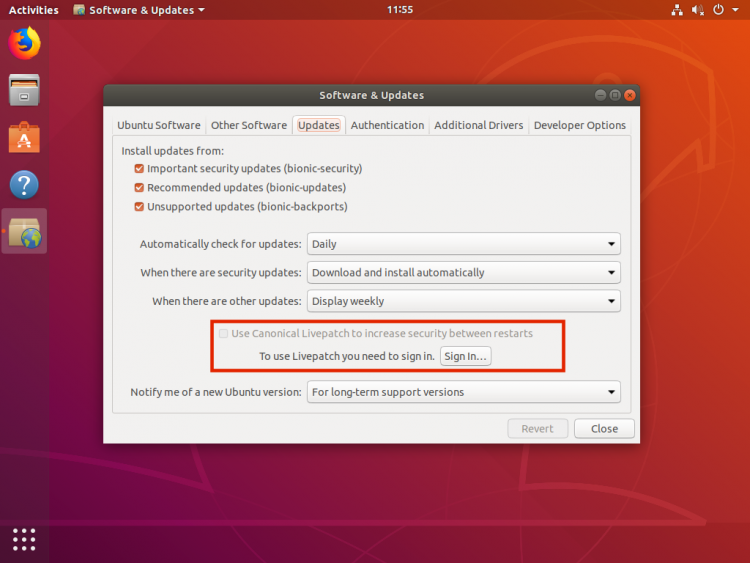
https://www.omgubuntu.co.uk/wp-content/uploads/2018/04/canon...
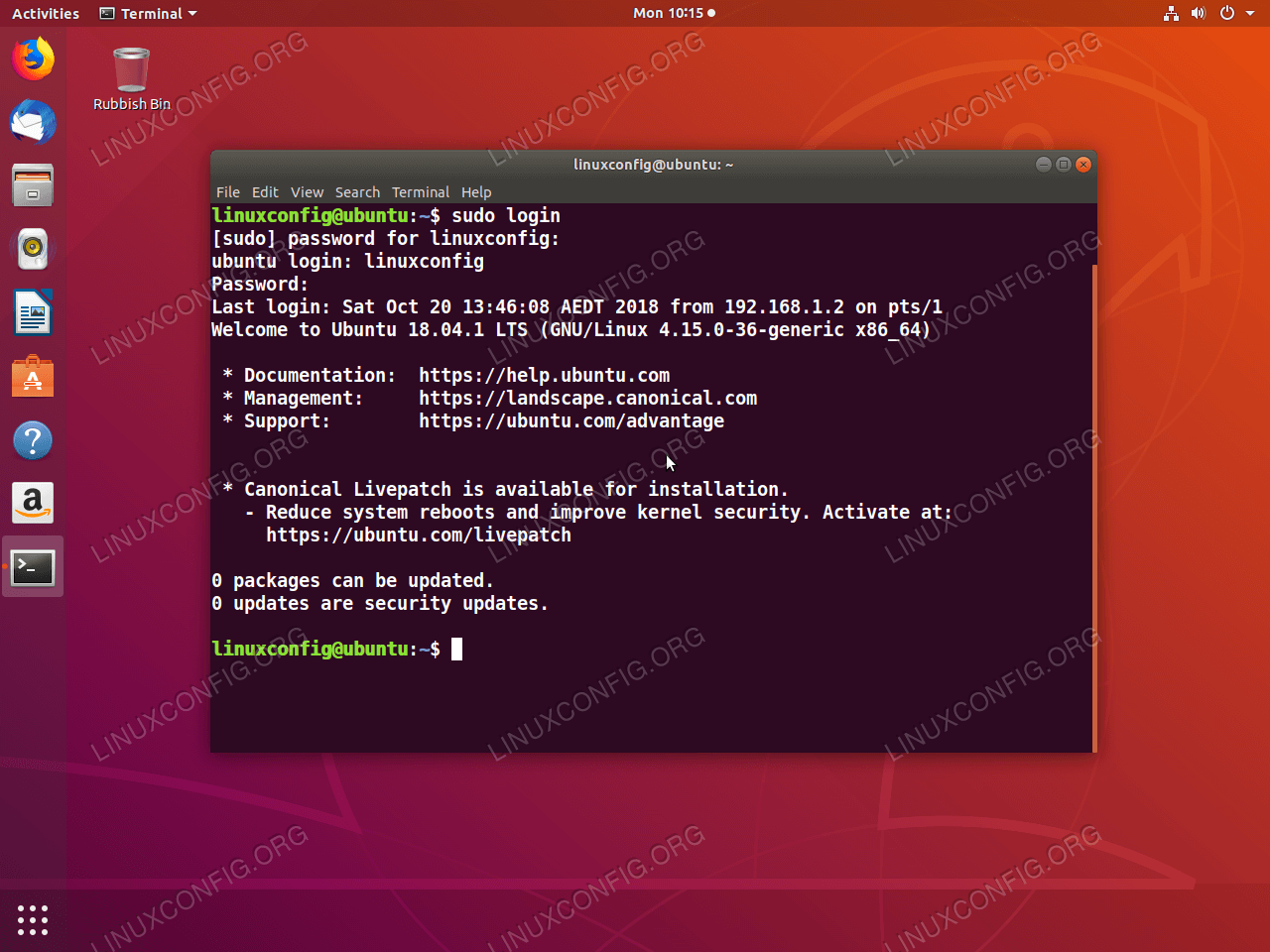
They advertise this paid service in the MOTD:
https://linuxconfig.org/images/02-change-welcome-message-ubu...
That's not fundamentally any different to Microsoft advertising Office 365 in Windows, is it?
- macos phones home a lot (and this has increased release by release)
- so does ubuntu (snap)
Other new features that I enjoy: Windows Sandbox, new Snip and Sketch, the current iteration of OneDrive (though I think I still prefer SkyDrive from many years ago..), Your Phone app for sending messages, emoji keyboard, clipboard history, local PIN instead of password.. I could go on but those are all things I use on a frequent basis and they make for a great experience.
I'd suggest that Windows fans should raise their standards a bit, otherwise for Windows 11 they will get a nice progress bar at each boot "uploading data to MS for mindcrime verification" and you have to pay for Windows in IAP gems you collect by playing games and watching ads.
If Windows 11 boots up with a progress bar that says "uploading data to MS for mindcrime verification", and requires me to play games and watch ads to pay for it, I will reconsider my OS choice. For now, I'm enjoying the OS and have dialed down the telemetry to a level that I am comfortable with.
I have a notebook with Ubuntu installed and if you would ask me I would rather work on the linux machine, but I'm trying to push the envelope with WSL2 to develop with RoR... Weird bugs and slow sometimes (better than WSL1 tho). Oh well...
I sold my Dell XPS 13 and now I use my work provided MacBook Pro for nearly all other purposes besides Gaming. It's my first Mac and I've found developing on it to be a dream after 10~ years of Windows use.
I'd love to run MacOS on my gaming PC for when I'm not gaming. Unfortunately, Hackintosh' is possible but seems like a time sink and I'd rather spend that time you know, playing games, or working on my homelab (e.g. breaking it).
It's highly likely especially after Windows 7 goes EOL, you'll start seeing a lot more consumer applications that depend on Windows 10 functionality that's not going to work in LTSC.
Does it take more effort to de-crappify non-LTSC Enterprise? Things like games, Store, Cortana, etc.
Perhaps people are going with Enterprise LTSC because 'regular' Enterprise is still filled with too much garbage. Perhaps that should be telling Microsoft something.
Cortana is being phased out of Windows 10 into a separate app, and eventually a replaceable component. Enterprise should install without any games/ads AFAIK.
https://www.rijksoverheid.nl/documenten/rapporten/2019/06/11...
I’ve always run desktop server when I could - back to NT4 - initially to avoid any differences between local behaviour and deployed, though this is not really ever the case now. So now it’s for this reason - to avoid the cacophony of recent Windows versions, weird behaviour from updates and the like. I don’t know offhand how much a license is, mine is MSDN.
Recently I tried setting up a Windows Server 2019 install... to use as a home server... on my Intel NUC, only to discover that the Ethernet driver on the NUC has been intentionally omitted from Windows Server compatibility, because Intel wants you to use enterprise class hardware with Windows Servers. (If you plug in a USB to Ethernet dongle that uses a Realtek chip, Windows Server works fine on the NUC, but this is hilarious. There are also bad-hack ways to modify the Intel network driver so it installs on the Server OS.)
* no Cortana (MacOS has Siri on all systems)
* no semiannual feature upgrades (Mac OS upgrades annually)
* not a single tile on the default Start menu (UI difference, mostly personal taste)
* telemetry can be set to 0 (the lowest level) (MacOS has some telemetry, although the specific amount is less, and Apple has been a lot less transparent about what they track)
* no "Show suggestions occassionally in Start" (This is stupid, but easy to turn off)
* despite some misbelief, WSL and Hyper-V work just fine (Apple doesn't offer virtualization at all, you have to buy a commercial product)
* receives security and stability updates for ten years (unlike Windows 10 Home & Pro versions, which reach "end of service" after just 18 months from their initial release) (MacOS only receives security updates for 2 years, approx.)
* no Metro/Windows 8-style/Modern/Windows Store/Universal/Windows apps like Store, Edge, Calendar, Camera, News, Weather, etc. (Apple has all of these apps in the App store too)
* no zombie games like Candy Crush Soda Saga, Bubble Witch 3 Saga, March of Empires, etc. that refuse to die (part of Microsoft's plan for "post-license monetization opportunities beyond initial license revenues" much like the recent Mail app debacle) (Plenty of these in Macos)
All in all, the differences here are pretty minor. Unless you're willing to run Linux on your desktop, your only options are pretty balanced in the unpleasantness they offer. MS supports Windows 10 for many years, Apple requires a full OS upgrade every two years. Both have App stores full of both good and bad apps. MS does a little more pushing of apps and suggestions, but it all can be disabled, and with Group Policies, it can be disabled centrally.
The main difference is in the telemetry, and MS gives you plenty of options (at install, even) to turn those down/disable those.
- macOS isn't bundled with unkillable freemium games
PoSh can remove built in apps and apply a clean template start menu and pinned apps. With MDT this can be automated and a deployment completed in under half an hour. A power user may need to log in as a default admin, set things up, then create and use a secondary basic user account for their regular use (the Start menu/pinned app changes only apply to new users when pushed via PoSh).
I have a short list/folder of tools and scripts to start a new build with at home mostly built and tested for the MDT system I used to manage. It's pretty slick.
If this article is mislead to select LTSC instead of Enterprise as that option (as is suggested in this thread), the confusion of Microsoft's messaging is largely to blame. Microsoft should have marketing material aimed at individual technologists who want a premium Windows experience with ~0 surveillance.
Why can't they do this for everyone?
I must, because it's the only viable choice for a blind, screen reader user (me) who wants to get real work done.
Unless you’re referring to the screen reader, but my impression is Apple is generally regarded as the best in what comes to accessibility features, and they keep improving. They’re so proud of it they frequently brag about it in promotional videos they present at high-visibility events such as WWDC.
Which makes me even more interested in your experience, since you live it.
I am. I would never claim MacOS couldn't be used by professionals in a more general sense.
> but my impression is Apple is generally regarded as the best in what comes to accessibility features, and they keep improving. They’re so proud of it they frequently brag about it in promotional videos
For screen reader users, they're the best in terms of what they ship with the OS. You get a fully accessible experience out of the box, which includes a tutorial for first-timers. You can even run with text to speech in the Recovery mode e.g. to format your disks.
Contrast that with Microsoft, with Windows 10 being the very first version to offer an accessible setup/installation process, no obvious way to use a screen reader in Safe Mode, and next to nobody using Narrator in their day-to-day computer use because it took so long to be developed to any usable degree. One of the most popular Windows screen readers (JAWS) also costs hundreds of dollars - thousands over a user's lifetime if they purchase upgrades along the way. Apple are definitely winning there. Everything is free and just works, and I'm quite happy for them to brag about it.
Where it starts to fall apart is when you want to actually get things done outside of a core set of Apple apps. For example, Office support is pretty lacking, with poor or no accessibility for advanced word processing and spreadsheet features. The terminal support is so bad that an enterprising blind user made his own terminal screen reader to combat it[1].
There are other problems, such as the screen reader's slow performance making the entire OS feel sluggish. Plus, if there are any bugs in it, you have to wait for an entire MacOS update before it gets fixed. That's annoying when it's a Window Manager bug, but can be completely disruptive when your only gateway to your computer won't read your email for a while without crashing.
There are also tons of more opinionated stuff that users can (and do) argue about, like the efficiency of the way you browse the web with VoiceOver on MacOS vs the way Windows screen readers do it. But once you've assessed that the core accessibility experience isn't going to work for you, debating the rest is pretty pointless. Plus (and this is entirely anecdotal) it can become exhausting trying to have a discussion about these problems, only to have hordes of users tell you that you're wrong even though they're unemployed (or employed in a different field) and don't have people relying on them to get anything advanced done in the first place. Sometimes I think there's a tendency to want to justify how much money they've spent on expensive Apple hardware which, realistically, they didn't really need, especially if the cost of a cheaper Windows laptop plus JAWS would've been less or the same anyway. And these days, there's a fantastic free, open source screen reader for Windows[2].
[1] https://github.com/tspivey/tdsr [2] https://www.nvaccess.org
I posted this to reddit:
I installed my first Linux in 1994, before there was a Linux 1.0. I use Linux to this day on my router and my server.
I have been using Linux as my daily driver 2004-2017.
You can't say I haven't tried.
I maintain anyone advocating to use Linux on a notebook has Stockholm syndrome or more amicably, uses a very narrow set of hardware and services ("plain" wifi, no bluetooth, no printers, no scanners, no Thunderbolt). Windows has a Linux subsystem, use it, it's great.
Your choices include using Ubuntu or a similar system where the six month OS upgrade will break your system so badly you won't be able to work for days. Or you can use Arch where at least the main body of your system will stay alive (most of the time but not always) during rolling upgrades but "insignificant" pieces like MFC devices or bluetooth will break all the time. Mind https://xkcd.com/619/
And if you ever need to work with enterprises, their wifi, their VPN... the company will have an IT helpdesk ready to help with any glitches if you are running Windows or Mac but if you are running Linux? Sucks to be you. And it does suck.
I now have an external GPU via Thunderbolt. I plug in, my monitor plugged into lights up, all my running programs move there. It's a nonevent. So is undocking. How would that work on Linux?? The hot-plugging-an-nVidia-GPU might be supported on paper but I am very happy not to need to configure that and even more not to need to keep that configuration working. And I don't think moving apps from one GPU to the next GPU would just work without an X restart.
Nope. The driver support is so far superior in Windows it's not even funny. Sure the command line sucks but oh well, just use WSL. Use O&O Shutup to kill the controversial reporting back features. Enjoy.
And then I got some answers and I looked up other Thunderbolt uses under Linux and the results... oh my. A quick check shows the Aquantia 10 GbE chipset driver [broke](https://bugs.archlinux.org/task/58174) from 4.15 to 4.16 fixed in 4.17 and then from 4.20 to 5.0 again and there is a patch but the [bug report](https://bugzilla.kernel.org/show_bug.cgi?id=202651) is still open (every affordable, single port 10 GbE TB3 adapter utilize this chipset).
Or Ubuntu LTS, where you only have to worry about things every five years (or two if you want to update).
This is what is used by my local helpdesk, and things generally haven't been a problem from what I can tell.
The school I work for has been pushing out an LTSB image to most of our PC's and I can attest that it is a huge improvement over Pro.
The article also recommends Optimize-Offline and O&O ShutUp10 for users who can't get a license for the LTSC image. I hadn't heard of Optimize-Offline, but ShutUp10 is great for making Windows 10 way less annoying and invasive. I'll be checking out Optimize-Offline tonight!
github: https://github.com/bmrf/tron
Another interesting repository was http://www.aplusfreeware.com/last_freeware_versions.html It contained the last free version of lots of well known software before their makers decided to turn them commercial, add adware or discontinue them.
It checks for all apps (that it knows about) and if they are out of date can silently install the latest version of all apps at once in 2-3 clicks.
[0] https://www.cdw.com/product/microsoft-windows-server-2019-es...
I'd be a little more generous if this most recent round of Win10 update hadn't messed a bunch of stuff up which was working, and rather than spend 4 hours googling esoteric windows registry settings I think I'll just switch to Server 2019.
At this point I find Windows so hideously unpleasant I believe if I were forced to use it as a daily driver I'd go into another line of work. Life is too short to be annoyed all day and not have control over your surroundings.