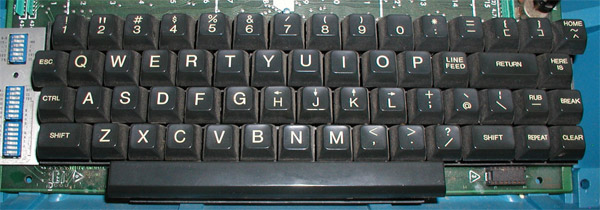
My hate for the key came years before I thought about the possibility of remapping it. Similarly, I hate the F1, a key that when accidentally pressed on some windows machines inside programs like excel can steal the focus and leave the computer unusable until it loads the useless help sidebar (when all I wanted was hitting the F2 for editing a cell content).
You can:) https://vim.fandom.com/wiki/Map_caps_lock_to_escape_in_Windo...
This is a bit older than my current bindings, but this does 3 useful bindings
https://github.com/keithn/vsvimguide/blob/master/vsvim.ah
CapsLock = Esc
Alt-J = Down Arrow
Alt-K = Up Arrow
this is super useful in non vim editors that support vim bindings, and the browser with vimium. The arrow keys are for where you get a dropdown list and don't want to touch your arrow keys. In Visual Studio where I use vim keybindings ( using VsVim ) a lot of refactorings / auto complete gives dropdown options and this gives an easy way to select them without leaving your homerow.
If you don't have admin then you'll need to launch it every boot since you can't put it into the startup folder.
To get to the startup folder, open the start menu, right click on an application (might have to be a windows-included app, like Edge, instead of a 3rd party one), and do 'open in folder', then go up to the Start Menu folder if necessary and then into the startup folder. Google says the path of that is this, but I haven't verified:
C:\ProgramData\Microsoft\Windows\Start Menu\Programs\Startup
Programs / links in there get autorun at boot :)
I haven't tried it but it appears there's a user-specific startup folder which might work without admin: C:\Users\Username\AppData\Roaming\Microsoft\Windows\Start Menu\Programs\Startup
https://catonmat.net/images/why-vim-uses-hjkl/lsi-adm3a-full...