You get every professional features out of the box (full/inc backups, deduplication, compression...) & everything is automated.
If you want something along these lines that scales better, rsnapshot works wonders. Rsnapshot is much more simple, as it doesn't create a large pool of files to compare and de-dupe against, it uses rsync's built in deduplication features (so, it doesn't create a "pool" like backuppc.) Techincally, backuppc uses less storage space, so if that's the concern, use it. but rsnapshot is my tool of choice.
EDIT: I will mention that my experience is based on having to deal with very large sets of data across numerous backup targets and at least 4 years ago, I have not tried any of the latest updates that may make this solution better or make performance better. Most people that were in my position probably would have had the funds to leverage an enterprise vendor solution at that scale. For what backupPC does, it was pretty amazing to work with and rock solid in terms of functionality at smaller scales.
Does anyone have a different experience?
Then does the hard part with diffs and etc?
Isn’t this already built in to Windows and I assume Linux(es)?
(I apologize for my ignorance here, not a sysAdmin)
I couldn't use rsync.net though because all it's datacenters are outside of EEA, i'm currently looking into doing this myself on a simple VPS, ZFS for linux has matured quite well it seems. I'm a bit new to doing chroot jails on linux but the ZFS snapshot part is very easy if that's enough for you.
apt install zfsutils-linux
RE databases, with some extra work you could also use ZFS on the source server and take a snapshot of the database (once you invoke the correct commands to lock it), rather than do a dump, this would be very fast because it prevents the duplication of a dump, and therefor could be done much more frequently, you however have the additional complexity of then syncing the snapshot to another servers ZFS pool, although there are tools for this I haven't bothered going this far.
Honestly curious, what's wrong with Switzerland? It's not technically in the EEA but it's part of EFTA and the single-market so has to meet the same requirements as an EEA country.
The problem is our customers are not end-users, they have their own policies and a significant number of them have a much more rigid interpretation of GDPR data storage rules which we've been forced to integrate into our own. This is one of the many problems of overreach due to the fear that GDPR creates IMO.
LXC/D was on my radar but all of this is a little more complexity than I was anticipating dealing with myself (the security side of locking down the rsync account at least). I may even settle for "restricted rsync". This is why I value rsync.net, they do this for me - and for a much lower cost I might add (I am not a security expert).
It's simple, fine-grained (you can use .rsyncignore files like .gitignore files) and versioned.
http://marc.merlins.org/perso/btrfs/post_2014-03-22_Btrfs-Ti...
[0] https://linux.die.net/man/7/capabilities
rsync has the upside of being universal.
Also, I can't imagine how something could be for Unix-likes and not target Mac OS, since it is literally a certified Unix.
Beyond traditional POSIX file attributes like ownership and access mode, there are POSIX ACLs. Linux also has extended attributes and SELinux policies. Windows has a different ACL model, and NFSv4 ACLs on Linux are more like those. A Mac has "resource forks" which have no real analogue in Linux or POSIX systems, and a backup/restore that ignores these would be very useless to most Mac users.
We do not live in a perfect world. But backups can have exactly zero errors.
But thanks for pointing out, that a mac brew exists. I did not see this.
MacOS IS UNIX.
As a side note for fun, Linux is not UNIX and that’s intentional. Freedom is nice. ;)
Now I wonder if `b2 sync` is a good candidate for more traditional desktop backups (documents, lots of photos...). Does anyone have feedback on it?
[1]: https://github.com/Backblaze/B2_Command_Line_Tool/issues/525
It’s better to use an external tool such as Restic or Duplicacy. So moving 5GB file is just a matter of changing a few KB index file.
There are plenty of software projects to choose from for the latter. Borgbackup, Restic, Plain old NFSv3 and rsync, Tarsnap, Backblaze B2 etc.
I simply use a combination of Cron, rsync and Ansible to make backups to our central NAS, and that central NAS is mirrored to our off site NAS (with extensive snapshots and tape backups).
I had to use Netbackup for the Tape system which does everything you listed - managing and scheduling backup procedure in "clients" and does fine-grained schedule, show backup status etc. But, I HATE that thing with all my gut. It is one complicated pile of crap that I have to fight all the time to make it write to the damn tapes. Nothing like plain old simple Unix tools.
Many startups use it, and i think backup is also easy.
Managing database backup manually when there is something like RDS and now RDS serverless seems like a lost cause.
Though for DB's i like to have near realtime backups. Like barman ( https://www.pgbarman.org ) does for PostgreSQL or Ottomatic ( https://ottomatik.io/ ) for MySQL. Both work with the similar principal of taking a full backup (pgdump, mysqldump, etc.) and then to stream logs (WAL in case of pgsql and binlogs in case of MySQL). These logs allow you to roll forward your full back to a certain point in time. Since the logs are streamed realtime you have a near realtime backup with point in time recovery.
I don't know of an open source alternative for ottomatik BTW. So if anyone knows one...
Backup & Recovery - Inexpensive Backup Solutions for Open Systems
https://www.oreilly.com/library/view/backup-recovery/0596102...
It's from 2009, but going through the comments here it seems not much has changed. It will help you choose the right tools, and with many of the open source ones, configure them.
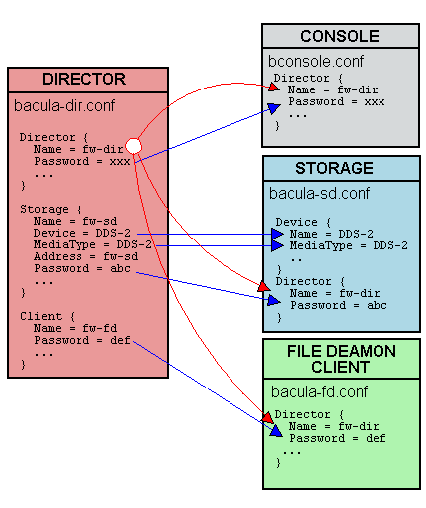
But in truth, it's a bit complex to setup. You have 3 daemons (agent, director and storage) each with its configuration.
This configuration files must match exactly (a bit like a nagios configuration) (http://www.bacula.org/2.4.x-manuals/en/main/Conf-Diagram.png).
Adding SSL is also a bit annoying, as there are many moving parts.
But once setup, it works quite well and bconsole is nice.
It's also quite easy to install since it's already available in most distributions.
You can set backup policies on a per job basis, do full, incremental and differential backups, you can also set a pre and post backup scripts as well as do the same for restorations. It is quite comprehensive albeit a bit complex.
At home, I use it with an old LTO-1 tape recorder/bank (IBM 3581-H17) repaired with pieces of bicycle tube (I find this kind of robots fascinating, a bit anachronistic in our age, but still relevant).
In the end, I'm not sure if I will recommend it, but it's definitely a viable option.
It's a command line tool that does all stuff related to backup perfectly. It's in the Debian repos.
It synces a given directory to a backup directory with an additional dir for metadata and history. It's super fast, even over the wire. It seems to achieve this by only sending the changed parts of files. I wonder if it also uses compression?
You can always change your directory back to any state you backed it up.
It has tons of nice features for checking the integrity of the backup, recovering single files from a given point of time etc.
Did I mention how much I love it?
For backing up databases, you'd need to install small packages, like `automysqlbackup`. We already provide an Ansible role for setting up automatic backups, which could be extended to apply your schedule or add "plugins".