I check this every time a new version is released as I'd love to make the switch from Chrome, but Firefox with one blank tab and no extensions uses more CPU than Chrome with 15 actual tabs. When I actually throw activity at Firefox it hogs the CPU even more.
Here's hoping v61 addresses it.
It kind of surprises me that this is an issue at all. I was under the impression a large number of FF devs use Macbooks.
Don’t you think it’s more likely there is a bug in macOS-specific Firefox code?
I run Arch Linux on this exact hardware and Firefox runs amazingly well there. It only runs like crap under macOS, which makes me think there's something with macOS specifically that's going on there.
Such a two week period has just ended, and while FF does feel snappier than before, I'm running into exactly the issues you describe. When using Firefox, my four-year old MacBook Air pretty regularly slows down to the point where my music starts stuttering and even force-closing FF takes a while. I've had bluetooth devices disconnect too.
Now if it was just that, I could perhaps accept that maybe my laptop just can't handle my browsing behavior anymore. Unfortunately the same thing happens on my 16GB RAM Mac Mini. Not as often, but still.
I don't have these problems with Chrome, even when I clearly have too many tabs open for my memory to handle. Occasionally my music will stutter when I open multiple gmail tabs in Safari (I use Safari for stuff like email and banking), but it's rare, and nothing like what happens with Firefox.
At work, I have several GUIs in browsers that I access through Chrome, and they cause instant 3+ GB of usage. I can't test FF due to group policy, but anyway, Chrome can be a hog, too.
Are you saying that those same half dozen apps, when pinned in Chrome, do not cause any RAM issues for you?
Has been working just fine here for 7-9mo since I got it (not on the latest latest, but this sounds like an ongoing issue)
Agree it's weird.
Really hoping this gets sorted out soon, because on most other counts I prefer the current Firefox to Chrome. (The other thing keeping me on Chrome is pinch-to-zoom support.)
What specific problems are you seeing?
Pocket Sponsored Stories will appear for a percentage of users in the US. Read about our privacy-conscious approach to sponsored content
> If the “Recommended by Pocket” feature is enabled, Pocket will send a list of the best stories on the web to Firefox every day. With each story, Pocket also sends a list of related websites that, when visited, signal likely interest in the story. Your Firefox browser compares your browsing history with the list of related websites to sort and filter through each day’s stories and recommend the ones that are most likely to interest you.
> Important Note: Neither Mozilla nor Pocket receives a copy of your browser history. The entire process of sorting and filtering which stories you should see happens locally in your copy of Firefox.
The feature isn't "EU-excepted", it's "US-only", probably because they only have recommendations for US audiences.
Firefox is basically adware now.
Wiki >Adware, or advertising-supported software, is software that generates revenue for its developer by automatically generating online advertisements in the user interface of the software or on a screen presented to the user during the installation process
Correction, 'you're not employing a "privacy-conscious approach" by EU standards'. The EU does not define for the world what privacy-conscious means.
Garbage collection was pretty terrible too. I managed to use up 4 GB of ram with ~10 tabs. In my normal (firefox fork) browser I run 300 active/loaded tabs and 700 'suspended' tabs for ~1k total and never get that high.
There's seemingly still a lot of work to be done before it's usable as a main browser.
After about 8 or 9, I find myself tabbing through half of a dozen tabs to get where I'm going, and at that point I realize I've added like 5 new tasks to my original stack of todos or research or whatever I was originally doing. At that point it's time to shut some tabs and concentrate on the original item.
Also, once I've logged into, for example, GMail or Facebook, I do not want to be browsing other sites while under their eye. I instead usually open multiple Chromiums / Chrome, each app for a specific task.
You don't.
You just push new tabs onto the stack. When you're done with a topic, you start popping those tabs until you're back at the previous topic.
Then that previous topic is either something unrelated which you wanted to read later, so you just leave it there. Or it's whatever you were researching before you had to look up something that's mentioned in the text, meaning that you now know this thing and can continue working on the previous topic.
You never have to know what your tabs to the left contain. You only care for the last handful of tabs to the right, which you can use as if those tabs to the left wouldn't exist (well, on Firefox at least, on Chrome they become unreadable).
As for GMail and Facebook, check out these:
https://addons.mozilla.org/en-US/firefox/addon/facebook-cont...
https://addons.mozilla.org/en-US/firefox/addon/google-contai...
Or the more generic variant:
https://addons.mozilla.org/en-US/firefox/addon/multi-account...
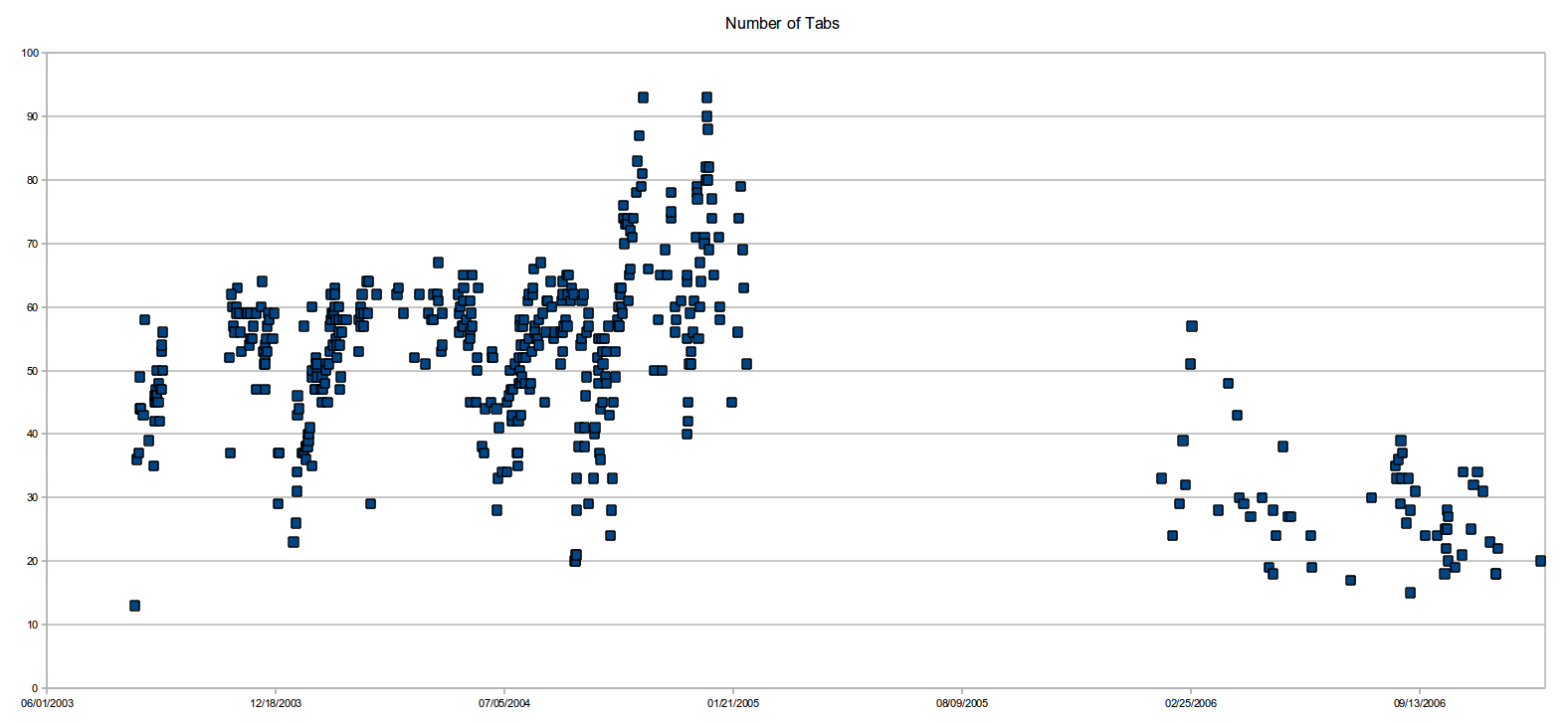
Tabs are great because they provide context both as a span of tabs showing how I got from point A to point B and as individual tab due to tab history backwards. I've been regularly saving my session files since ~2001 although I only have data from 2003 onward. It's great to load up an old one and see what I was doing on some old date.
http://superkuh.com/number-of-tabs-vs-date-2003.png (2003-2006) http://superkuh.com/number-of-tabs-vs-date-2017.png (2013-2017)
Nowdays the first couple hundred are almost static over a year or two. They are things I always want to have open. The most recent ~300 or so are in flux from week to week. There is a gradient. The older tabs and their favicons/etc form a landscape I know and can navigate just by a glance. The newer ones I can see the general topic of a group/span of tabs by clicking in and using tab search. I also use minimal browser skins/layouts to pack the max amount of tabs in.
Every couple months I'll go through and "clean" up a session by closing some and bookmarking others. The tabs that make it through this are added to the static landscape of useful things for current projects. Kind of like how sedimentary rock is layed down in layers.
Every year or two I'll start a new session. It always feels so directionless.
I do not use 'web app' sites like gmail or Facebook.
For logging into sites like gmail and Facebook, consider using Containers https://support.mozilla.org/en-US/kb/how-facebook-container-...
Why are you tabbing at all? If you type "* foo" in the url bar (without hitting enter), you will get a list of tabs whose url or title includes "foo". You can select one to jump to it. Much faster than linearly going through tabs.
I don't understand how hundreds of open tabs can be necessary, even if there are tools that make it manageable.
But, to each his own.
I can't tell whether it's mostly web 2.1's fault or Firefox's gross mismanagement and stubbornness
Anyway, maintaining the old extension API wasn't sustainable. Many older extensions broke repeatedly due to refactoring efforts like Electrolysis. These refactors ultimately resulted in some of Firefox's current speed gains.
It's not too bad, and honestly the mobile version is a god send (it fills passwords in apps !), but it's irritating.
One issue I've been seeing more of (both on Android and on desktop) is the cache not re-populating automatically. You have to go Advanced -> Clear Local Cache, and only then will it download a fresh copy.
Or worse, sometimes after adding new credentials it never sync's it to the cloud. It remains on that device, but that's it.
It's maddening.
On Firefox 60, I'm still not on board with the newest versions after the support for legacy extensions was removed. SessionManager, an awesome (legacy, XUL) extension, still doesn't have a perfect equivalent in the Web Extension world. Tab Session Manager, which has similar functionality, seems to be lagging behind and struggling with issues in Firefox that prevent it from becoming a good session manager.
If there's one thing I could ask the Firefox team, it would be to focus on enabling web extensions to do almost everything that legacy extensions were able to. Without the power of feature rich and stable extensions, Firefox is currently inadequate for me (though I still use it as my primary browser).
[0] https://extensionschallenge.com/ [1] https://addons.mozilla.org/en-US/firefox/addon/session-sync/
Tab Session Manager is comparatively a lot richer in features, and also allows importing from the (legacy) SessionManager sessions.
[0] https://blog.mozilla.org/addons/2018/04/02/extensions-firefo...
Of course, everything that was possible before wouldn't make sense in the web extensions platform (for security and other reasons), which is why I said "almost everything". But things like tab management (even Tab Mix Plus on web extensions is only in beta now), session management, etc., are highly important to the browser UX for a lot of Firefox users. They're highly sticky factors as well that prevent users from switching to another browser.
I've also seen some people who deploy and use Firefox in enterprise state that they're going to be on ESR 52 for quite sometime, with one of the reasons being some extensions not being available (or ported) on web extensions.
I'm not going to blame Mozilla or the Firefox team for the current state of affairs. But knowing what we know (with the advance notice on web extensions), the main advantage of Firefox on the extensions front shouldn't be lost. If anything, this piece needs to be accelerated further and also have the Mozilla Firefox team drive new features and abilities in web extensions that make other browsers look outdated.
I'm a die hard Firefox fan, and would always be cheering it on to thrive and grow.
Seriously, it's the main reason I don't use Firefox.
Despite this, I stick with Firefox because I want to use it - I can imagine that the vast, vast majority of users who have no opinion on which browser they use simply don't/won't put up with this and just go back to the easier to use Chrome. It's little things like this that make all the difference.
As an aside, I think iOS might have the same behavior, which could be the reason they're doing it, but it goes against the system standard and is completely unbearable for me.
Hopefully this means the two gigantic companies I work for will phase out Firefox ESR for Quantum. I also hope they move from 32-bit Firefox to 64-bit, but I've learned to keep my expectations low when it comes to these places progressing with tech.
>Added support for Web Authentication API, which allows USB tokens for website authentication.
That's awesome. Ok. Maybe I'll let myself get a little more hopeful. :')
[0] https://www.mozilla.org/media/img/firefox/organizations/rele...
Although, with a quick look it seems like I still can't use U2F with Google on Firefox.
But just yesterday people tried to "educate" me that it works with 60 and for 59 I had to toggle an about:config switch.
It's great that they support the proper web standard. It would be useful if all those web sites supported it. This is a long-known issue, and nobody cares about non-Chrome browsers.
For now, it’s not as high a priority as it could be, because the functionality it provides is already available in Chrome (for that matter, I don’t believe Chrome’s webauthn implementation hits stable until the next release), Firefox can get it by enabling security.webauth.u2f which is good enough as a short-term measure when it’s always been required in the past anyway, and Edge doesn’t have many users (and few of them currently do 2FA). It’s pragmatism, sadly.
It's a usability trade off; I have a physical key, but I'm asked to authenticate 20+ times a day which make it a pain on my port-limited MacBook Pro.
Yes, but I'm not sure it's just Firefox. I suspect a significant number of sites are now being developed and tested only with Chrome, using Google's developer tools and recommended practices and browser feature set. Unfortunately, those things may not be supported or work well on other browsers, and if you don't choose carefully and test properly...
I've just assumed these issue are caused by add-ons behaving badly, but I haven't bothered to get scientific about it yet.
Actually, I suppose there are a couple of sites which Tracking Protection completely broke, but that’s not Nightly-specific.
But no, they continue to be useless.
"We put this 800px wide image in here and dag gone it, we want you to SEE THE WHOLE THING."
RequestPolicy can selectively block third-party content that NoScript will let through.
It's not for non-technical users, but if you are looking for RequestPolicy or NoScript I'm sure you'll manage.
https://github.com/gorhill/uBlock/wiki/Blocking-mode:-medium...
https://addons.mozilla.org/en-US/firefox/addon/tip-tab/
It was runner up in a Mozilla add-ons contest:
https://blog.mozilla.org/addons/2018/05/08/firefox-quantum-e...
It's in the Preferences under General -> Tabs -> "Ctrl+Tab cycles through tabs in recently used order". Right in the middle of the screen, when you open the Preferences-page...
That said I use Firefox on Android every day and it's fantastic, so what are you talking about specifically?
My side-projects and experiments (like the WebGL2 "minecraft-y" demo - https://mrspeaker.github.io/webgl2-voxels/) now work out of the box: no build system, no transpilers, no dot-files. Happy day!
But performance seems a little inconsistent in production. For iOS Safari in particular, I've had apps take over a minute to load via modules, versus seconds when bundled. So I stick to rollup for deploy (maybe http2 is supposed to fix this?)
(great demo btw!)
For something shorter, the import[1] and export[2] pages on MDN are great. These pages also have some useful related articles linked at the bottom.
Unrelated side note: MDN and Mozilla Hacks are doing an incredible job documenting web development and web standards.
[0] https://hacks.mozilla.org/2015/08/es6-in-depth-modules/
[1] https://developer.mozilla.org/en-US/docs/Web/JavaScript/Refe...
[2] https://developer.mozilla.org/en-US/docs/Web/JavaScript/Refe...
> Firefox's new parallel CSS engine — also known as Quantum CSS or Stylo — which was first enabled by default in Firefox 57 for desktop, has now been enabled in Firefox for Android.
That's exciting, but on my phone the Play Store still doesn't provide the new version.
Can someone explain this one to me? Does this mean I can't use "gi", "i", "image", and "is" as my Google Image Search keywords and need to pick one? Reading the issue [0] isn't helping me. I only recently updated to FF59 from FF39, having to abandon most of my workflow. I really hope this update isn't another nail on the stairs for me, seems every single update since FF40 has broken a significant piece of my workflow. I'd appreciate knowing before updating and then having to roll-back.
> But people expect that it's the specific bookmarks that have keywords, not the urls+postdata, because it always worked like this.
> The UI also shows this. There's a keyword field for a bookmark. And it's not labeled keyword for url/post data. This is a discrepancy, and results in unexpectedly overwritten keywords.
I'm guessing the title is supposed to be read "(multiple bookmark) keywords", not "multiple (bookmark keywords)", and the release note restated it wrongly.
Like, if you have two separate bookmarks with different names, but they go to the same URL, they share whatever's in the keywords field.
>It is no longer possible to have multiple bookmark keywords for the same url, unless the request has different POST data.
I guess I'm confused what "POST data" is - as it apparently isn't %s and I don't know what else you can change for a keyword bookmark so I'm not sure how you'd even change what the POST data is.
"y" and "yt" both work to navigate to "youtube.com" and "y search" and "yt search" both did a youtube search for "search".
I'm so excited about the future of Firefox. In addition to the above, OpenBSD is currently working on pledge support in FF. In a couple years FF could be simultaneously faster, more private and more secure than Chrome.
It does occasionally seem to get stuck in a state where it just starts chewing CPU cycles and RAM. I've seen this mostly with Google sites like gmail or docs, so I assume it's JS-related. But it's fairly rare, and seems to be improving with each release.
The gmail/gdocs slowdowns are being tracked and worked on. It's a problem when websites actively optimize for competitive products though.
Mozilla categorically doesn't want that anymore, as it will inevitably cause some Mozilla devs to try to not break those extensions and therefore not do things such as code refactoring. The sort of stuff that you can ignore in the short-term in order to not break extensions, but which causes huge problems in the long run.
The CTR dev has however created a userChrome.css file, which you can use to get at least the visual changes: http://techdows.com/2017/09/classic-theme-restorer-userchrom...
You can test this in Firefox 61 Beta by setting the "apz.android.chrome_fling_physics.enabled" pref to true in about:config. The new behavior will hopefully be enabled by default in Firefox 62.
I use ctrl+shift+t in private browsing all the time.
But I guess there's a long tail of issues that keep some people from (still) switching to Firefox.
Mine is lack of smooth pinch-zoom on macOS. Once that is fixed, I think I'll be using Firefox most of the time.
On 2018 Android flagship phone, scrolling speed seems to be maybe 58/59 fps. Occasional jerky motion sticks out like a sore thumb. I think it might feel smoother steady 30 fps, because at least then all frames take equally long to render.
Tab pause button.
Or better, opt in to not pause; I hacked up a -STOP for webkit (surf/glide) when the tab/window was not in the foreground. The X plumbing was tricky and never quite right. Still on my TODO to finish.
Firefox Quantum is quite nice but in the past, I've had a constant resizing bug that makes it unusable on my home laptop plus the numerous issues listed below.
Alternatively, Chrome is neat but I find it runs sluggish after a while on my older Macbook. I wish it had container tabs a la Firefox and the upcoming "disabled autoplay by default" change is really annoying.
I feel the same about OSs anyway but it's easy to complain rather than contribute bug fixes. Mind you, I don't know eg; C++ so