I wonder how my applications will fare. I would like to have the latest version of Firefox, emacs, git, and so on. It's the desktop environment and OS itself I want to be as stable as possible. I'd also like to get the most recent kernel, I think, since the kernel is pretty darn stable and rarely has regressions, at least in my experience.
I also learned that there's an official plan for 18.04.1, to be released July 26th. This is the release that will prompt 16.04 LTS for an upgrade. In other words, the official upgrade path for an LTS is to wait for the first patch release, and not upgrade immediately. So I'm considering waiting to update from 17.10 until 18.04.1 is out.
Don't forget to remove the preinstalled – and soon outdated – .deb-package version of LibreOffice :)
This seems to be much easier these days. Around 10.x / 12.x releases being on recent versions of everything made a lot of sense. Especially with browsers not updating separately from the main repo. There were actual, big improvements with drivers, power management, hi-res support, and other things. These days, I don't see that many reasons to keep current. All the tools I use are stable and almost old - vscode may be the only new one in 5 years. That's my anecdata anyway.
I've been eyeing this setup with Guix but I have some concerns. If I install a newer version of GCC through Nix/Guix, can I run update-alternatives on it?
As a seasoned LTS user, would you recommend waiting for 18.04.1?
The real advantage of staying on a LTS has been no big updates and no changes in the GUI. I'm on Gnome Flashback which I tweaked to be as closed as possible to Gnome 2. It seems that Gnome Shell eventually got enough extensions to also make it look like Gnome 2. I'll give it a try again after those memory leaks will go away. I can probably stick to 16.04 for another year before developers start skipping it in their builds.
Edit: I checked and I have git 2.17.0, which is the latest version. I keep it up to date with ppa.launchpad.net/git-core/ppa/ubuntu
The main thing is latest browser versions and they still ship with the LTS release.
The stability of LTS far, far outweighs every new feature I've found so far. It's a no-brainer when you are trying to get stuff actually done and don't appreciate having to regularly waste cycles on your toolbox.
EDIT: Found the answer in another comment:
> I also learned that there's an official plan for 18.04.1, to be released July 26th. This is the release that will prompt 16.04 LTS for an upgrade. In other words, the official upgrade path for an LTS is to wait for the first patch release, and not upgrade immediately. So I'm considering waiting to update from 17.10 until 18.04.1 is out.
(I don't really know what I'm talking about here.)
For now its still in development according to them.
Ref: https://linuxconfig.org/how-to-upgrade-to-ubuntu-18-04-lts-b...
https://www.omgubuntu.co.uk/2017/09/enable-fractional-scalin...
I hoped hard the communitheme would be the official theme of this release, but no.
Examples:
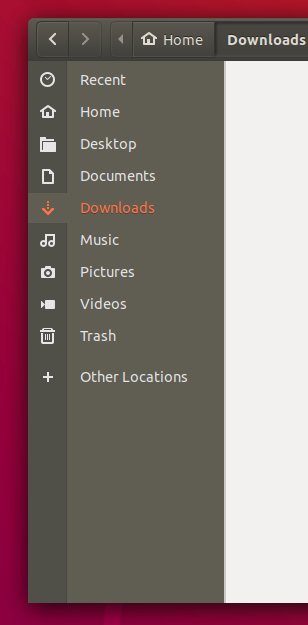
- The active directory effect in Nautilus's sidebar makes me thing there were two sidebars with different purpose [1]
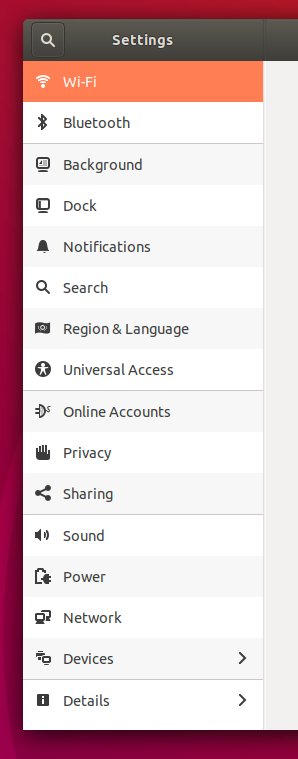
- Changing the background of every other rows in the settings look weird. The fact they are splitting settings by group do not help. I thought it was a theme glitch, and found out it was an actual feature [2]
I understand why people are interested in more serious theme (arc-theme) or even other Ubuntu-based distros (elementary...).
Does anyone have a list of how this has evolved? Are we getting more or less stable on this, the ultimate bikeshedding issue?
THE FAMOUS BIONIC BEAVER Our Signature Drink for Sharing! Seagrams Vodka / Gin / Rum / Triple Sec / Peach Schnapps / Light Beer / Grenadine / Splash Cranberry
I am praying to the open source gods for it to happen.