Slap Ubuntu on it and pay it forward. If you gift it to somebody looking to use it for more than Facebook then stick some free ebooks for Python or such on it.
It is easy to think "but everyone has access to a computer" and while that is mostly true having your own computer is very different from access to one.
My father is a teacher and has recycled three laptops (and a desktop a long time ago) to kids living on the poverty line. I know at least one was very grateful as I got a lovely thank you letter from them.
I took a year off with my wife in kids in the cheapest US locale I could find (agricultural area of Puerto Rico) so I could survive on my passive income projects while I learn some new skills (C++, Go, deep learning, and a few others)
I didn't expect to lose both laptops I brought - One to power surges caused by bad infrastructure and one to tiny sugar ants that decided to build a colony inside the laptop.
I've ended my sabbatical and am heading back to the mainland, but it's hard to do dev work on the laptop I managed to breath life back into when I know that if it dies, I have no way to replace it.
I'm sure I'm not the only poor geek out there. Where should we look for cast-off equipment that doesn't get mined by opportunists who just want free stuff to sell on ebay?
- poklanjanje.com ( https://www.facebook.com/Poklanjanje-142113603722 )
- cipele46 ( https://www.facebook.com/Cipele46 , http://cipele46.org/ )
We probably wouldn't move to Puerto Rico, but likely somewhere cheap on the mainland - maybe Texas, or somewhere in the midwest.
If you're looking for an inexpensive place on the mainland, I would suggest looking at small towns (under 10k people) adjacent to agricultural areas. Areas near or in the Appalachian Mountains would likely be beautiful and inexpensive, albeit a bit neglected culturally.
PR was hard to get set up because we couldn't move our possessions and had to start from scratch here. It also was difficult because there isn't a culture of "charity shops" that I was used to. Without a salvation army or goodwill or even garage sales, we had to buy everything new or travel for hours to find a store that sold used appliances.
Besides, manufacturing a new device has certain environmental costs, and there's the money I'd have to pay for it, as well. What's the point where the manufacture+lifetime energy of a new device crosses the energy-use line of my current machine?
[1] https://kodi.tv/
Also, I use Rowmote[0] to control the computer -- an old Macbook -- from my phone and run OpenEmu[1] next to Plex for a home arcade solution. I use a Bluetooth PS3 controller for the arcade. SNES works great with Sixaxis controllers, N64 is possible. Havent tried Dolphin[2] yet... But looking forward to it.
Late 2011 MBP for the curious, runs great for the above uses.
0. http://regularrateandrhythm.com/apps/rowmote-pro/ 1. http://openemu.org/ 2. https://dolphin-emu.org/
Using a PS3 controller will work in Dolphin, but you'll need multiple controller profiles (think Wiimote + nun chuck, Wiimote sideways, Classic Controller, etc).
Retroarch takes a bit of the pain of setting up different controllers for emulators.
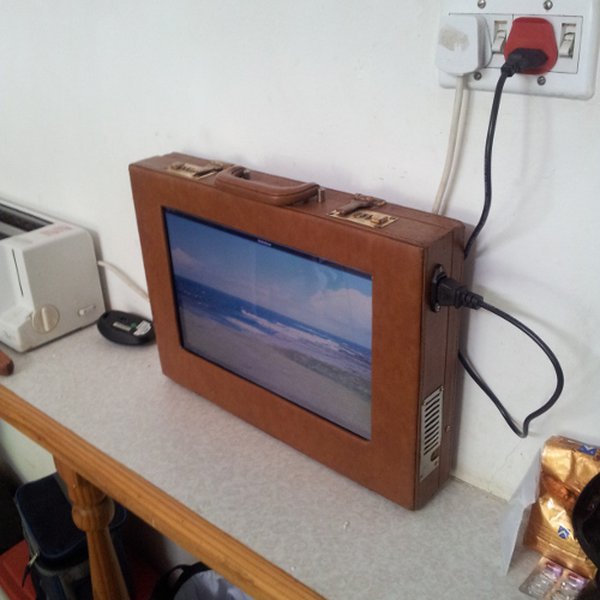
Second Option: Put it on the wall near your door, and have it as a generic assistant. Put the days weather, your family calendar, time until next bus/train, news headlines, etc. on it. They should change at different periods of the day to give you time relevant information (e.g. I want to know the time until the next bus in the morning, but I don't care about this when I'm home in the evening).
Advanced: Have the webcam in the laptop detect when someone comes home using OpenCV or similar. Then, have that information accessible via an app (read: HTML5 webpage). That way, you should know when your kids come home in the afternoon and they forget to text you "I'm home safe". Or you can have it run a script when you come home like reading the latest news stories, reading emails, etc.
The combination of microphone, web camera, battery and screen in this make it perfect for this. Your other options are to use a tablet. You could also link to the Google/Microsoft voice recognition software to listen to your commands (e.g. add Milk to the shopping list).
It's not just the CPU, either. M.2 SSD's are quite a bit more power efficient than SATA, and when you're going to low single digit power usage, even those things start to stack up.
You could potentially use one of those wireless display technologies (Miracast, I think it's called) and setup the computer as a sink, but the software seemed far from usable when I tried that a year ago.
Other ideas might be to purpose it for your car, or somewhere else, but that depends on how old / large / power hungry it is.
Honestly, if you're a hacker, you're probably not going to want to part with working hardware you might use later. I own a ton of parts and old computers for this purpose.
So, if you're looking to use your old laptop for something novel, I suggest:
1. Turn it into a TERM server.
2. Turn it into a media center with KODI(XMBC).
3. Turn it into a game server.
4. Put Windows Server onto it and build a home domain.
5. Install a different OS than your main laptop and use it interchangeably.
6. Use it for projects that may put your main laptop into danger (water, high voltage, etc.).
7. Plug a Kinect into it and turn it into a machine vision robot.
8. Add it to a BlenderGrid with all of your other computers and teach yourself 3D animation.
9. Install it into your car as a carputer / wardriving rig.
10. If it has a GPU, use it as a Steambox for low-end gaming. (See also: Media Center)
which allows use as Web terminal and music player with local storage.
Also BOINC from UC Berkeley -- http://boinc.berkeley.edu/ -- to volunteer your processor cycles to scientific research. E.g. the current OpenZika project:
https://www.worldcommunitygrid.org/research/zika/overview.do
I've done this myself, and it was a great learning tool.
You get the benefit of having a built-in UPS too. Note that you'll need a switch capable of supporting VLANs too, but you can pick these up very cheaply nowadays.
When I'm finished, I should be able to text my PA number: "gift John" and a script runs on my old laptop that buys and sends a gift to John.
Admittedly, this is a somewhat contrived use case, but I like automation and repurposing old hardware :D
And as @haser_au suggests, great information panels.
I had an old laptop I used to run Linux + Spotify on, so that I could take it to people's house parties and run music off it. No concerns about drink spillages or it being stolen, and you can let anyone add songs to the playlist. Warning: be selective over who you let near it! :-).
If it's considerably older than that it might still be sufficient for software development, so you could either sell it, or have a refurbisher sell it, or donate it to projects like a local CoderDojo group.
Does it have a good GPU? Have it run password hashes for Aircrack-ng instead. Are you versed in Linux distros? If not, use it to play with unfamiliar OS (driver issues notwithstanding) without too much worry about breaking anything important.
#tldnr use it to learn something new
Usually the hardware I'm replacing it is so much faster that using the old machine as a compile farm or something like that doesn't make sense.
Using it in a robot or something sounds fun, but I'm more likely to use a Rasberry Pi or Arduino for that.
Could use it to play with distributed computing, but even that might be easier using a couple VMs on your new machine.
Set up ~/.fvwm2rc. Copy it and hack it a lot. Enjoy an ultrafast machine.
Run SMPlayer, search for the option "Skip loop filter", enable it for HD videos.
Get Audacious, you'd need some background music to relax yourself.
Learn to code in Scheme, and get some books on AI .
You could then practice your hardware modification skills and fit it into a different box.
They'd love taking one apart.