* (the window manager sucks, but that's not the topic. I had to get it out)
* it needs a good package manager
For us ol' bearded folk (at least spiritually), OS X comes with a slew of unix tools we love. It already includes both vim AND emacs! However, these tools are hopelessly outdated: Despite OS X 10.11 "El Capitan" coming out last fall, Vim is still 7.3 (that's from August 2010. 2010!), and Emacs 22 (2007. That's right.)
So some enterprising folk come to the rescue: Fink, Homebrew, Macports...
Homebrew installs over /usr, so come the next OS update, all that gets squashed. Macports installs into /opt/local, but somehow doesn't survive an OS update. Also, when I tried installing SciPy it went and recompiled GCC4 from source. Guys, the 90s called, and it's been shown that recompiling from source for each user isn't worth the effort.
Apple gave MacPorts some support in the form of equipment, so there's some hints of their preferred method. But the core WTF is this: why doesn't OSX integrate a package manager for its unixy side?
That's not entirely true. A relatively widespread issue during 10.10 (Yosemite) updates was the installer seemingly locking up and actually moving all the files in /usr/local one by one to then from a backup location veeeery slowly, potentially taking >12h to complete the update rather than a pair of.
Do I wish the 3rd party ones could be better integrated with the OS? Sure. But I'm definitely thankful it isn't Apple calling the shots (or more likely, releasing it and then refusing to call any shots at all for 8 years).
And that's way more up to date than it used to be.
> Apple gave MacPorts some support in the form of equipment, so there's some hints of their preferred method. But the core WTF is this: why doesn't OSX integrate a package manager for its unixy side?
Yeah who hasn't dreamt of a package manager handled like MAS.
I'd be happy if Apple helped package managers more, contributed (financially) to them and better took them in account or discussed stuff with them wrt major releases (see: Yosemite homebew woes), but I'm really quite glad the community is completely in charge of macports or homebrew or nix.
    > the core WTF is this: why doesn't OSX integrate a
    > package manager for its unixy side?
    > Ah, you just need to update your packages; install foo:
    >     macman -Syu && macman -S foo
It's more likely that they just consider package management out of scope for their part of development-- something that benefits too few people to be worth the cost. Seems to have paid off, too-- package management has been well-handled on OSX for a long time, both through semi-sanctioned projects like MacPorts (which is community-developed but is hosted by Apple) and through community projects like Fink and Homebrew.
MacPorts is very, umm, opinionated. And doesn't seem to trust anything outside of itself. And has some weird opinions, too.
Example: For some reason, svn is a dependency for nmap. Forgot those gravity waves, the next nobel prize belongs to whoever can figure out why a network scanner depends on an obsolete version control system. So macports installs a shiny new version of svn. Which doesn't play nice with the svn that Xcode uses. Overtime I run (macport) svn from the command line it tells me to upgrade my repository, which breaks the Xcode svn.
The worst offender for MacPorts was TeX. I had an official install the latest version from TeX Live and MacPorts wanted to install a second version of TeX. I think they fixed it so you can use a TeX Live version, but it was definitely an issue.
I use ctrl-left and ctrl-right to switch virtual desktops. Can't remember if that's the default or if I used custom keybinding. There are a bunch of other window management keybindings that can be found in the OSX System Preferences.
Agree. I really like Spectacle (https://www.spectacleapp.com/) for window management on OS X. As a bonus, it's open source. (https://github.com/eczarny/spectacle)
If you like tiling window managers Amethyst is worth checking out. It's a little unpredictable sometimes but otherwise it works well.
Absolutely. I adore Homebrew and it's ecosystem. Cask, in particular, is quite satisfying; gotta love installing a swath of neccessary fonts from the terminal. And, fwiw, the project is about to be on Homebrew, with no tap required: https://github.com/Homebrew/homebrew/pull/49040 Though getting it up was not quite as pain-free than our initial publishes to NPM.
The thing is: Homebrew solves the problem for just a portion of your audience. In diff-so-fancy's case, we've supported Linux and Windows from the get-go, the only hard part is getting it installed. NPM solves that problem really well, and I can't imagine any other installation technique being our recommendation for Windows/Linux going forward.
In my experience, cask is too fragile for its original use of installing binaries. Issues include
* applications expecting to be installed to /Applications
* applications with weird installation requirements/dependencies
* self-updater conflicting with cask's installation settings
* problems with detecting an installation (and uninstalling it) because the updated version's recipe installs differently or something.
For these reasons I now prefer to install applications by their official/expected/supported installation method.
On the other hand, I find brew very useful.
The brew command for users would be:
brew tap octavore/delta https://github.com/octavore/delta.git
brew install delta
---
Example above of course doesn't currently work because the formula is not there
(I successfully use it in my repo: https://github.com/stepanhruda/ios-simulator-app-installer)
(1) You're pushing down bits onto users' machines that may not be necessary (like developer documentation, or development versions of your source code if you're developing on master), and
(2) 'brew update' will need to download (via 'git pull') all changes to your repository any time you update, even when the Homebrew formula doesn't change.
Keeping formulas in a separate repository allows Homebrew to work like it's supposed to (and like it does for built-in formulas): an update to your tap repository means there's updates for the formulas that it contains, and you're not downloading any source code except what's actually going to be used, at the time it's going to be used (during 'brew install').
brew tap octavore/delta https://github.com/octavore/delta.git brew install delta
This is probably asking for a PR to hombrew, the ideal command would be
brew install delta https://github.com/octavore/delta.git
well.. yeah.. Every OS has an easy way to distribute binaries, the hard part is having something that work on each of them.
Macports handles this usecase far, far better. Give your users sudo rights and be done. Only thing it desperately lacks is allowing third-party additional repositories like Debian's apt does.
Linux got it right: https://en.wikipedia.org/wiki/Package_manager
It drives me crazy that Apple removed one the most amazing features of *nix systems: a unified software repository. Brew/brew cask doesn't come close to AUR.
It's not a feature of unices, it's a feature of _Linux_ (Ian Murdoch called it "the single biggest advancement Linux has brought to the industry"[0]).
The vast majority of unices never had a "unified software repository", and BSDs (probably the least indirect ancestor of OSX) have port trees, which at the time OSX was born (ignoring the NeXTSTEP ancestry which predates "modern" BSDs and builds directly from 4.3BSD) were a very different beast and not something suitable proprietary unices (because Apple wasn't going to give the OSX commit bit to randos).
And hell, both apt and rpm were busy _being born_, the premier package managers at the time were raw dpkg and pms(1). And pkgtool[1] I guess?
[0] http://ianmurdock.com/solaris/how-package-management-changed...
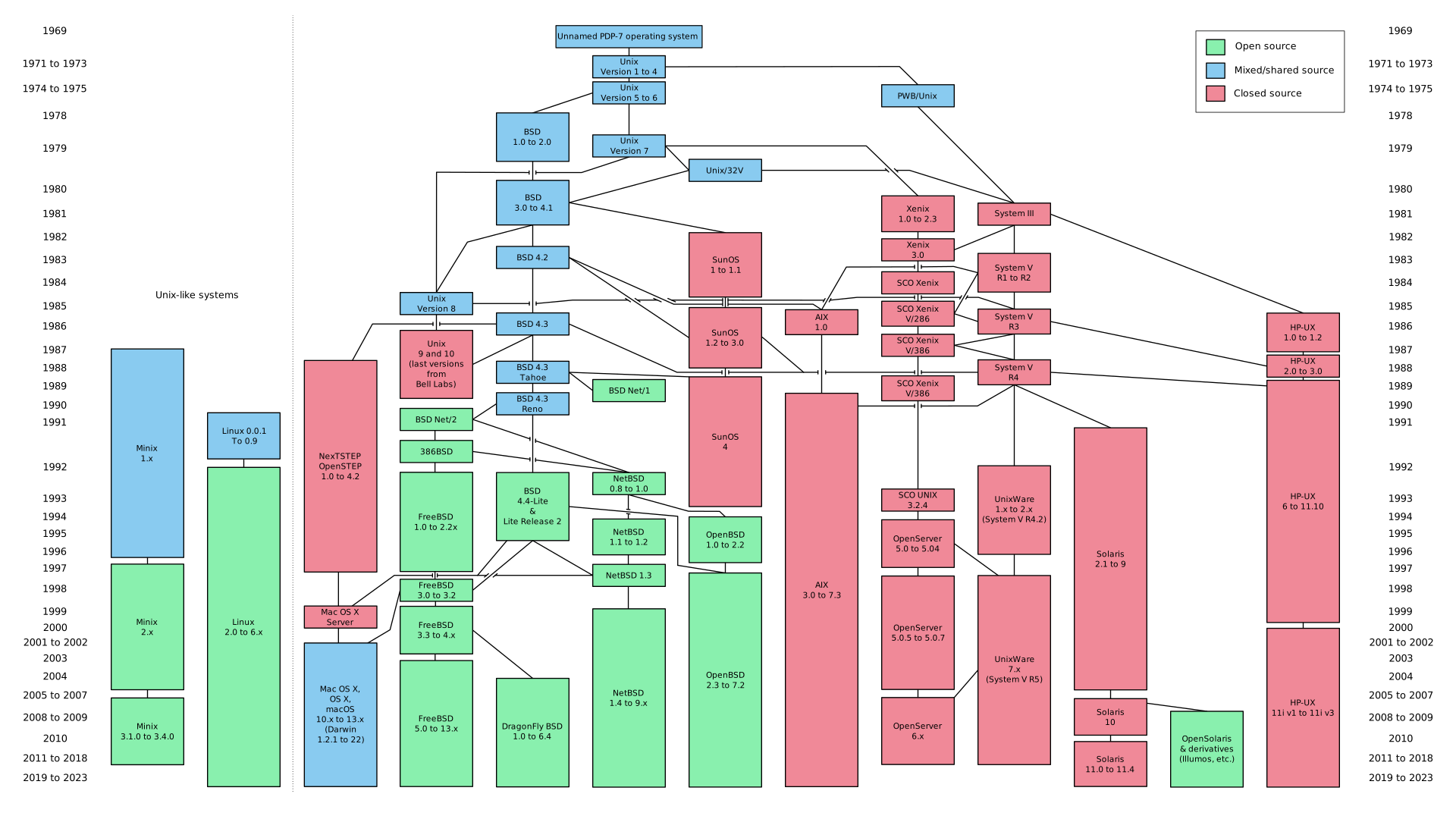
In this popular diagram, https://upload.wikimedia.org/wikipedia/commons/7/77/Unix_his..., NeXTSTEP was originally forked in 1988, before Linux really had package management put together. Darwin is from 2001.
Is 14 years not enough time to establish a proprietor supported unified package management system?
My expectations may just be set too high.
1. Jump to separate repository
2. Create a .tar.gz with sensitive filename
3. "upload somewhere"
4. Manually update formula, sha, version
4. Push
Versus:
1. npm bump && npm publish
I ended up automating the formula updating after getting tired of doing that every other day, for a private tap.
    > when a post on better diffs showed up on Hacker News
    > last week ... people below are asking why a bash script
    > (that depends on a perl script) is being recommended to
    > install via NPM? [cont. about using Homebrew]
In the mean time, you can tap it:
    % brew tap OJFord/formulae
    % brew install diff-so-fancy
indeed, but couple of things
specific to Mac OS X: there are homebrew, macports, fink and probably more
distributing with homebrew to someone who already going with macports is problematic for example as it is advised to not have both installed.
One alternative is to distribute a pkg and so use PackageMaker to build one.
A pkg has the pros to be native to Apple, but the cons to not work for other systems like Windows and Linux.
So here another alternative: Debian packages (deb).
Wether with macports, homebrew or fink you can install the command line utility dpkg, and using dpkg-deb you can build deb supporting the darwin-amd64 arch.
For Windows, you can use the utility wpkg, http://windowspackager.org/ and with it you can build deb packages for win32 and win64 architectures.
Ultimately if you distribute command-line tools (not GUI app), you can use deb packages for Windows, Mac OS X and Linux Debian (Ubuntu etc.)
Here an example (one of my tools that I need to distrib/install on servers): https://github.com/Corsaair/as3shebang/releases/tag/1.0.0
Debian packages for everyone :)
Linux and Mac OS X install: dpkg -i as3shebang_1.0.0_amd64.deb
Windows install: wpkg -i as3shebang_1.0.0_win64.deb
You can see the build scripts at the root of the repo, they are pretty similar.
Also, once you have deb packages you can also convert them to rpm and other nix-like packages usinga tool like alien, see https://en.wikipedia.org/wiki/Alien_(software).
Anyhow, it's nice and simple approach that works.