Browsers routinely spend as much time in image decoding as they do in layout, so this matters.
If you want a purely entropy coded format with a trivial, easily memorizable file format, just use PNG with all scanlines set to the None filter, one IDAT chunk, and one IEND chunk. Totally trivial, and probably simpler because DEFLATE is a relatively simple format.
Or compared to xz. bzip2 seems completely obsolete: gzip provides much faster compression and decompression, and xz provides better compression ratios with faster decompression. Not to mention new algorithms like brotli.
At that point you might as well just be a subset of PNG, which is nice for interoperability anyway.
That seems less like "criticism" and more like "a summary of the blog post". (Sorry, I have to admit I'm developing a pet peeve around people echoing back things the original author already said but acting like it's a new criticism.)
That's the opposite of the suckless philosophy.
(2^64)^((2^32-1)
(2^32-1)) ~ 10^(10^21)bzip2 < giantimage.ff.bz2 | header-checker
Inside the header checker, you just read in the first 16 Bytes ("farbfeld" + width + height), do whatever you like with the data and exit. bzip2 would then receive an SIGPIPE. Up until this point, it would have probably filled the pipe buffer (~16K) with data and then blocked.
Receiving SIGPIPE, I'm certain bzip2(1) will cancel any further decompression attempts.
You see, you could even carry on with your image-processing in case you like the header data and want to proceed. The nice pipe-system already handles that for you. :)
how come people assume there are only Little Endian machines. This mmap-technique wouldn't work on Big Endian like this, this is inaccetable!
However, you can still mmap and properly call ntohs() on each color channel value (if you access it). These functions won't hurt performance too much anyway, if at all. If you show me a measurable difference between using LE and BE, I owe you a beer, okay? :)
The author clearly has very limited experience of professional printing.
Images aren't just used by photographers. They're used by graphic designers, digital artists, and other people who need a consistent wide-gamut colour space.
sRGB is not that colour space.
Referring to a couple of ancient Ken Rockwell blog pages as "proof" is simply uninformed and amateurish.
On the other hand, most photographers shoot their stuff in sRGB (for a fact, because sRGB is by far the most widespread). I don't want to insult the professionals or something, I'm just acknowledging the fact that for the 1% using AdobeRGB there's no reason to complicate the format.
A lot of computer vision research datasets uses a similar file format - so I can see its use there. But things like movie creation, publishing, etc will probably never adopt this.
But I was really distracted by how the author kept going on borderline nonsensical tangents about compression. There's a reason we usually build compression into the file format, instead of just zipping a lossless bitmap. It turns out that there's a ton of stuff you can do to exploit redundancy in two dimensions - if you can apply a transformation before the compression stage.
And yeah, you can make up some of your losses by using bzip2. But again, there's a reason formats like PNG don't do that: it's slow.
Additionally, in pipelines, you would only decompress your image once and compress it once. Usually, when people build pipelines based on individual tools passing png's to each other, these steps are repeated n times for n elements of the pipeline.
ff2jpeg --metadata image_metadata.json < image.ff > image.jpeg(Give it a try! The tools are right there in the git repo, and quite easy to use.)
bzip2 is an especially poor choice in 2016 given that it's inferior to LZMA in both speed and quality.
on a technical side, lzma is a better choice. I might add a lzma recommendation, however, in soma cases lzma performs worse than bzip2.
also, decompression speeds matter, not compression speeds.
in the end, use what you prefer. the compression is not mandated by the spec. the main use for farbfeld is also rather thought to be as a piping format. it could also be used for storage, but that's not the main point.
That's a,b,c when your pixels are labeled
    c b
    a d
Which one it actually is doesn't matter, there's not too much magic happening in the background anyway. Those people claiming "Little Endian Master Race" might probably jump on the Big Endian bandwaggon as soon as it became the majority for some reason.
In fact though, writing endian independent code is the way to go.
http://geekandpoke.typepad.com/geekandpoke/2011/09/simply-ex... :)
All the things you presented are useful to have, but the question is: For which percentage of people is it useful to have? Is it solved by something else in a better way? You can never please the 1% without making everything harder for the 99%.
> tagging file systems
Like HFS+? I'm somewhat ignorant, not sure what other filesystems support this. What tools do? I have no idea if I rsync a file from my mac to a server, and back to a Windows box, if you'll still be able to see the metadata. This strikes me as a huge weakness compared to just supporting internal headers like every other image format.
zlib apparently supports the `Z_FULL_FLUSH` sync option which you can use at compression time to provide sync points. (I haven't used it, and it doesn't seem to be exposed by GNU gzip.) Other compression formats might have something similar.
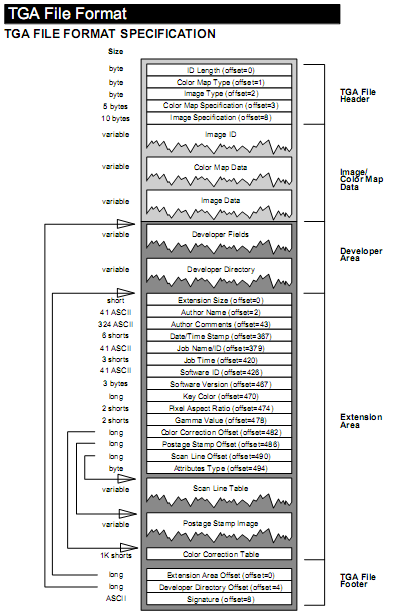
TGA currently has the advantage over Farbfeld that many image editors and viewers can already read it, which means you can look at the intermediate results in your pipeline without having to convert them to PNG or whatever first. But Farbfeld has the advantage of utter simplicity.
Not every image format needs to be suitable for use as general-purpose distribution format.
Most people in the comments clearly do not understand the words "easy" and "straightforward". I can only recommend them to go to the nearest dictionary and look at those words carefully.
Personally, a tool like this is what I always wanted to have during my Engineering Master and Machine Learning PhD. A clear, simple, straightforward & easy format so that I could process my images easily, simply, clearly and straightforwardly.
The only small complaint I can make is the use of BE that requires a manual transform to an "actual" integer.
But what does this give you that the NetPBM tools and formats don't?
Care to hit me with a mail (you can find it at the bottom of the page) so I can write you in a more sensible way what I've been thinking. Maybe you can help me decide on which color space to use (Adobe RGB, ProPhoto RGB, ...).
...
Dependencies
libpng
libjpeg-turbo
That's a bit of a non sequitur.
Aside from that, the arguments put forth aren't very convincing; the "integrated compression" is what makes compressed formats more efficient, since these are specialised compression algorithms adapted for image data. PNG, for example, uses a differencing filter. I think me and many others have tried ZIP'ing or RAR'ing uncompressed BMPs before, and found the compression is not as good as PNG. This is not even mentioning the possibility of lossy compression.
The converter programs jpg2ff and ff2jpg depend on libjpeg-turbo to read and write JPEG files.
The converter programs png2ff and ff2png depend on libpng to read and write PNG files.
280K trump.ff.bz2
516K trump.ff.gz
304K trump.ff.xz
360K trump.png
32K trump.jpg
Using a more complex langscape image:
175M coast-hdr.ff
42M coast-hdr.ff.bz2
83M coast-hdr.ff.gz
39M coast-hdr.ff.xz
6.5M coast-hdr.jpg
52M coast-hdr.png
Does not look that bad to me compared to PNG.
PPM explicitly supports 16 bit colour depth.
http://netpbm.sourceforge.net/doc/ppm.html says "Each sample is represented in pure binary by either 1 or 2 bytes."
And PAM explicitly supports transparency (which I guess you could consider an "extension" but since it's handled by libnetpbm, I'd quibble.)
http://netpbm.sourceforge.net/doc/pam.html says "Each of the visual image formats mentioned above has a variation that contains transparency information."
Also,
> Due to it being a textual format it also lacks the desired compression characteristics.
...isn't true since P6 is binary (excepting the header which is likely trivial on a normal sized image).
this is why i use stb_image.c - even though it doesn't cover everything - it has a sane interface instead of a nightmare like libpng or libjpeg.
most image formats and the 'standard' libraries for using them look like a great reason to never employ anyone who had anything to do with them. this one looks like an engineer, competent at the most basic levels, did the most obvious thing.
good work.
given that most modern app formats do compression anyway i'm not sure there is any need to care about that. pngs don't shrink much inside an ipa or apk but raw data shrinks to about the same size as png in my experience.
May be as format for piping images makes some sense, but seems quite limiting.