I used it for a while as "shift", then ESC and control, then I stopped. Not so much because it wasn't efficient (I still think it's better than using caps-lock, not so much for other keys), but because it enforced a more rigid posture when sitting. I like to move the feet a lot, and change the sitting position. Instinctively I tended to stay more rigid instead of moving the pedal.
But YMMV. If you tend to abuse shift to capitalize words, a pedal is worth considering.
I also just used a mouse attached to a piece of cardboard, controlled with the foot just by sliding it on the ground. Just too hard to control fine movement. I briefly tested just a mouse with the bare foot, but the foot joint just doesn't has the versatility of the wrist. It was also annoying that I had to use a keyboard combo to perform the clicking (since I used the toes to hold it).
Trying costs nothing though, so have fun and try for yourself. Pick a crappy keyboard, and construct a lever with a V shaped piece of cardboard. Position the pin on the back on the key that you want to "try". It won't be as rigid or comfortable as a pedal (you cannot "rest" on it), but you can get a feel of how it works. I let several of my colleagues try the pedal since I don't use it anymore, but it's not something that is easily appreciated.
It certainly requires some training to get used to, especially to generate control sequences. I would advice to try one before buying for this reason.
At some point I noticed that my left pinky was experiencing more pain than my other 9 fingers, due to its heavy use for holding shift and ctrl while pressing other keys. The Kinesis has two lovely ctrl keys in the thumb position, so I trained myself to start using those instead by remapping the pinky-placed ctrl key to F12. (Initially I just unmapped it, letting it devolve back into the awful capslock key, but F12 actually proved to be a better deterrent for retraining, as its negative effect was immediate.)
That helped with the pain, but only a little. So I bit the bullet and mapped the shift key to F11, forcing me to use my foot pedal for shfit.
Even after years of practice, it's still hard to use. The timing of a foot press is very different from a finger press -- the leg muscles require more time to build up the extra force necessary for the pedal. (The pedal is much stiffer than a keyboard key, because it has to accept the weight of the front of my foot without triggering, as opposed to the weight of a single finger.) I still find myself capitalizing the second letter of a word because of this issue. wHich looks ridiculous. And it forces me to sit squarely in my chair, with legs uncrossed, which I find very unnatural.
But my left pinky doesn't hurt anymore.
i've been using foot pedals with a kinesis advantage for a couple of months. note: i don't always use the pedals.
> Do you really think this could be a significant help when typing code?
no. i'm slower with the pedals, but my immediate goal was to reduce RSI-related pain, not to increase typing speed. to that effect they've been effective.
I imagine that resulted in far less pinky-strain.
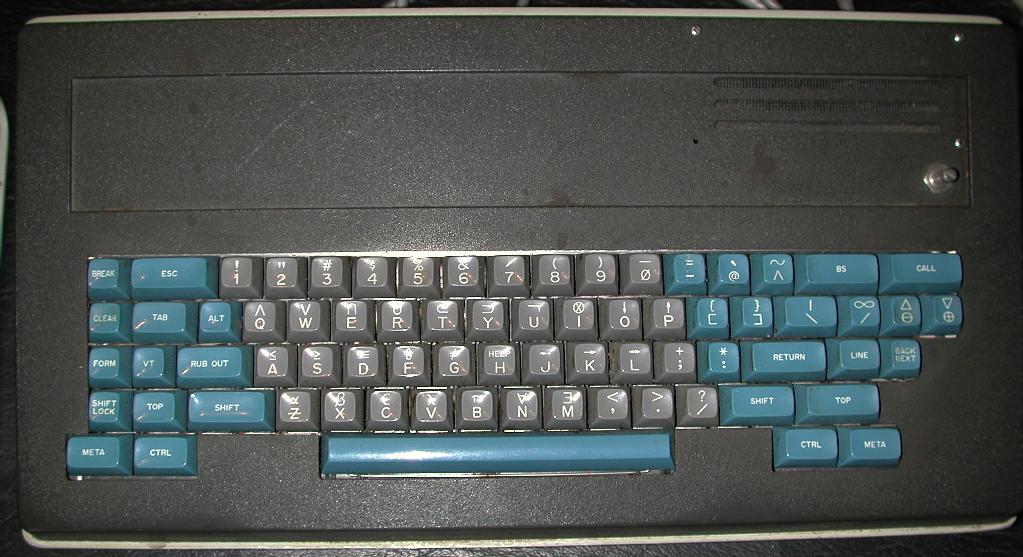
Knight keyboard: http://world.std.com/~jdostale/kbd/Knight1.jpeg
Later followed up with the space cadet keyboard: https://en.wikipedia.org/wiki/Space-cadet_keyboard which added super and hyper.
> How about using ViM?
Thanks for sharing, this post made my day.
[1] http://www.linuxquestions.org/questions/programming-9/esound...
After all, we simply want to read voltage level from simple input - why should we need to invent new library for it every 3 years?
Who thought this was a good idea?
In most keyboards, a keypress is registered during the connection of two conductive pads on two separate membranes, each of which contain a trace back to a controller chip. You can take a keyboard apart, look at where the Ctrl key is, then visually follow the traces back to their respective pins on the chip. Soldering a switch to those two pins will register with the keyboard exactly as if that key were pressed.